bdsams bdsams

Start11 v2 Is Ready, Now with Rounded Taskbars and a Lot More

Start11 v2 Is Ready, Now with Rounded Taskbars and a Lot More

Turn your taskbar into a modern experience with new style options

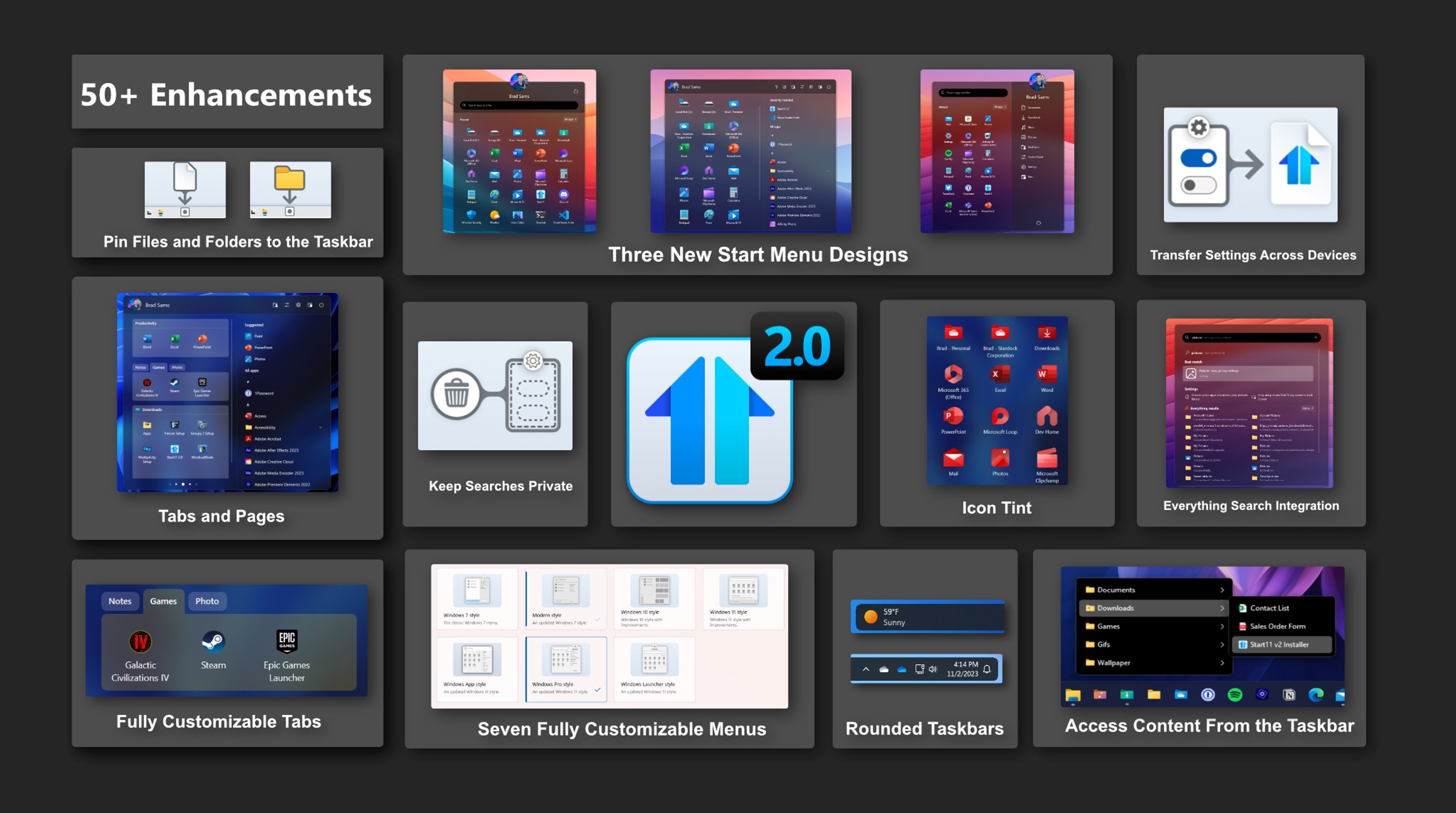
Today is the day, Start11 v2 is ready for prime time – we are taking the Release Preview tag off and adding new features. Rolling out now is the latest version of Start11 v2 with new features for the taskbar as well as a significant number of bugs being squashed.

If you want a deeper dive into many of the new features in Start11 v2, check out this earlier post from the release preview, but there have been a couple of additions since our initial release. Especially the updates for the taskbar - let's dive in.

Easily the biggest request we got after announcing Start11 v2 was the option to round the corners of the taskbar and we are happy to share that this feature is now included in the release today. And, not only can you round the corners, but in true Stardock fashion, you can fully customize the layout with various options to dial in the perfect taskbar for your desktop.

To begin building your modern taskbar, click on the Taskbar option in Start11 v2, then click the Taskbar blur, transparency, color, and rounded corners dropdown menu. From there you can select the intensity of the rounded corners, your preferred offsets on both the X and Y axis, and more.

One of the neat features that is included is how the taskbar can adapt if you are using a full-screen app. When a taskbar is floating with rounded corners, it can create an odd visual experience on the sides and below the taskbar when using an app that spans the entire display. To help reduce this visual irregularity, you can have the taskbar dynamically adapt to a traditional style layout when a full-screen app is detected.

These are the little things that add up that make Start11 v2 a truly great experience on Windows 10 and Windows 11. While the work is never done and we will continue to monitor feedback and patch bugs, this is a major milestone that we are crossing as we have taken Start11 from a product that brought back old features of Windows to a new era where we are adding new functionality that makes Windows a little more personal and a lot more productive.

116,540 views 68 replies
Reply #26 Top

Quoting Neil, reply 25


Quoting Galthariel,


Quoting Neil Banfield,


For those of you with the menu issue, you can avoid this by setting the following registry key : 

Computer\HKEY_CURRENT_USER\Software\Stardock\Start8\Start8.ini\Start8

Create a value called "S11_MenusAreSolid" with type String, data should be "1"


That fixed the issue for now but I do hope that Stardock fixes this without making people playing with registry since not all will be comfortable doing it.


We will be.  Thats a short term fix only.


Also, as feedback, the Windows 7 Style from the previous 1.4.7.2 version was WAY BETTER honestly. Icons spaces look awkward, Control Panel showing in 2 pages doesn't look good either...I mean...if you call it Windows 7 Style it needs to be Windows 7 Style and not a mix of Windows 7, 10, and 11. Just my two cents.

Reply #27 Top

Hello everyone, the taskbars can now be rounded and floating does not work with the Windows 11 PRO 23h2 build 22631,2506 version.

Reply #28 Top

Quoting Galthariel, reply 26
 
Also, as feedback, the Windows 7 Style from the previous 1.4.7.2 version was WAY BETTER honestly. Icons spaces look awkward, Control Panel showing in 2 pages doesn't look good either...I mean...if you call it Windows 7 Style it needs to be Windows 7 Style and not a mix of Windows 7, 10, and 11. Just my two cents.

Do you mean the popup menus on the right hand side rather that the menu itself as nothing on the menu itself should have changed visually?

Things should only show two columns if they will not all fit as one column and so would need to be scrolled to see / access everything.  Scrolling is a terrible UI choice when there is ample screen so you can see everything.

You can add the S11_UseOldStyleBrowseMenus registry key (with "1" as a string data) to the same location as mentioned earlier to use the old menus if you wish.

Reply #29 Top

I just updated Start11 v2 to 11/8/23 version and it started fine, but when I started changing things, it went bat shit crazy. How do I get the previous version installed again, because none of the issues that are presenting now (and there are many) were happening prior to today update?

Reply #30 Top

Quoting Sunwheel9, reply 29

I just updated Start11 v2 to 11/8/23 version and it started fine, but when I started changing things, it went bat shit crazy. How do I get the previous version installed again, because none of the issues that are presenting now (and there are many) were happening prior to today update?

Could you be a little more specific about the issues you were having?

Also were you using a 2.x or 1.x version before?

Reply #31 Top

Quoting Neil, reply 28


Quoting Galthariel,
 
Also, as feedback, the Windows 7 Style from the previous 1.4.7.2 version was WAY BETTER honestly. Icons spaces look awkward, Control Panel showing in 2 pages doesn't look good either...I mean...if you call it Windows 7 Style it needs to be Windows 7 Style and not a mix of Windows 7, 10, and 11. Just my two cents.


Do you mean the popup menus on the right hand side rather that the menu itself as nothing on the menu itself should have changed visually?

Things should only show two columns if they will not all fit as one column and so would need to be scrolled to see / access everything.  Scrolling is a terrible UI choice when there is ample screen so you can see everything.

You can add the S11_UseOldStyleBrowseMenus registry key (with "1" as a string data) to the same location as mentioned earlier to use the old menus if you wish.


That did the trick. Thanks much. While I agree with you it might be a terrible UI choice to scroll (not in my case) the color by using your trick is now the one I had before in 1.4.7.2 (grayish) and not SUPER WHITE like the new one. It also fixed the alignment of the icons (Hard Drives, Custom Locations, etc.) so again, thank you so much. I'm happy now :-)

Reply #32 Top

Hello everyone, the taskbars can now be rounded and floating does not work with the Windows 11 PRO 23h2 build 22631,2506 version.

Reply #33 Top

Quoting RSRAZOR, reply 32

Hello everyone, the taskbars can now be rounded and floating does not work with the Windows 11 PRO 23h2 build 22631,2506 version.

It should do.  Are you perhaps using an autohide taskbar?

Reply #34 Top

The whole start menu became a jumbled mess; right clicking on areas was originally pulling up a menu with function, and after the mess started, the menus were large and blank; clicking on areas in attempts to fix or restore anything just made things worse. Had to reboot the WIndows 11 machine to get it back to normal - at least until I tried changing things again (which seemed to work at first and then became unruly).

I was previously using the previous v2 version.

At present, it seems find, but I have not tried to change anything since it just wastes my time and I have to reboot to get it to function at all.

Reply #35 Top

Quoting Sunwheel9, reply 34

The whole start menu became a jumbled mess; right clicking on areas was originally pulling up a menu with function, and after the mess started, the menus were large and blank; clicking on areas in attempts to fix or restore anything just made things worse. Had to reboot the WIndows 11 machine to get it back to normal - at least until I tried changing things again (which seemed to work at first and then became unruly).

I was previously using the previous v2 version.

At present, it seems find, but I have not tried to change anything since it just wastes my time and I have to reboot to get it to function at all.

What menu style were you using and what settings were you changing?

Reply #36 Top

I discovered something very interesting. Upon installing V2 Release I noticed that various context menus (taskbar, menu etc..) were purple with white text. Of course I assume Start11 is just using the themes accent color. I'm currently using the Glow theme. The curious part is up until not all context menus in Every build of Start11 were always black with white text. I mean every single version. I assume this wasn't the case for everyone since I never seen it mentioned I just assumed it was a UI design choice. Go figure. Well it certainly is working for me now and I like it very much. 

Maybe I will try changing themes but I'm afraid of breaking something lol.

Great work folks.

Reply #37 Top

Quoting Neil, reply 9


Quoting c242,

Still unsolved.


Which style is that with what settings exactly?


Windows Launcher, Username and -icon set to hide (I think, that is the problem). I would prefer the shutdown icon on the bottom, also.

Really minor issues though, V2 is fantastic!

Note the Rustdesk icon being huge although it is set to 'middle' as the other icons. That is, because the groups have titles and increase the height of the row, I guess.

It 'behaves' when dropped to another tab.

Reply #38 Top

Quoting Neil, reply 20

For those of you with the menu issue, you can avoid this by setting the following registry key : 

Computer\HKEY_CURRENT_USER\Software\Stardock\Start8\Start8.ini\Start8

Create a value called "S11_MenusAreSolid" with type String, data should be "1"

Just to confirm that this works fine for me.

Reply #39 Top

Hello, when you set Advanced rounded taskbar settings, nothing happens if you set something there. I've already tried everything, reinstalled Start11, nothing works. It's probably due to the German Windows 11 23h2.

Reply #40 Top

Quoting RSRAZOR, reply 39

Hello, when you set Advanced rounded taskbar settings, nothing happens if you set something there. I've already tried everything, reinstalled Start11, nothing works. It's probably due to the German Windows 11 23h2.

And you did enable the option to turn on rounding in the section above it? (Taskbar blur, transparency, colour, and rounded corners)?

The other settings just change the rounding, they do not turn it on and off.

Reply #41 Top

Quoting c242, reply 37


Quoting Neil Banfield,


Quoting c242,


Still unsolved.


Which style is that with what settings exactly?


Windows Launcher, Username and -icon set to hide (I think, that is the problem). I would prefer the shutdown icon on the bottom, also.

Really minor issues though, V2 is fantastic!


Note the Rustdesk icon being huge although it is set to 'middle' as the other icons. That is, because the groups have titles and increase the height of the row, I guess.

It 'behaves' when dropped to another tab.


That would seem to be working correctly.  Icons have to be a multiple of the smallest line.  So adding text means the lines are taller so one thats 2x the height will now be taller.

+1 Loading…
Reply #42 Top

Quoting Neil, reply 41

That would seem to be working correctly. Icons have to be a multiple of the smallest line. So adding text means the lines are taller so one thats 2x the height will now be taller.

The resizing looks pretty good with the Windows 10 theme. But I feel the sizing scheme on the Windows 11 themes increases a bit too much regardless of if text is used or not for the icons. Going from small to medium is a pretty big jump in size for the menu style.

Reply #43 Top

Quoting PhoenixRising1, reply 42


Quoting Neil Banfield,

That would seem to be working correctly. Icons have to be a multiple of the smallest line. So adding text means the lines are taller so one thats 2x the height will now be taller.


The resizing looks pretty good with the Windows 10 theme. But I feel the sizing scheme on the Windows 11 themes increases a bit too much regardless of if text is used or not for the icons. Going from small to medium is a pretty big jump in size for the menu style.

Thats because there needs to be two lines of text.  Unfortunately things have to be a multiple of the lines so it is what it is.

Reply #44 Top

🚨We have a new build that we believe will address some of the issues brought up in this feedback thread including:🚨

1) Reduced a flicker when minimizing/restoring a window from the taskbar using the mouse

2) Resolved sub menus showing on popup folder menus being shifted too far right on Win11 setups

3) Tweak to extra control panel item showing

4) Resolved issue with rounded taskbar causing clipped taskbars on the primary monitor when using a touch-capable device with Win11 22H2 or later

5) Resolved issue with taskbar offsets on the secondary monitor without enhanced taskbar enabled not working correctly

6) Tweaked shutdown menu to stop list under it taking focus sometimes

7) Resolved issue with Win7/Modern style jumplists sometimes showing each item too small after switching menu modes

8) Resolved all apps / steam apps list not working from a pinned taskbar folder if you are using the Win7/Modern menu styles

9) Resolved issue with sub menus showing far left of the screen when they would not fit next to the open menu on multi column menus

10) Resolved issue with new Start11 autohide taskbar mode triggering too far from the bottom of the screen vs the primary

11) Resolved issue with Win 7/modern menu with Win10 style all apps tree not having Show Recently installed and suggested apps not refreshing the list instantly

12) Resolved issue with right-hand list on start menu flickering over search results during animation to switch to search mode sometimes with Win 7/modern menu styles

13) Resolved issue with leftover tooltip after launching an app from the menu if the tooltip was visible at the time

14) Resolved Win Launcher menu style when hiding search and username causing shutdown to overlap contents of the list

This build is out of our normal testing workflow and may have more bugs or unforeseen issues because of limited testing. This is our standard boilerplate warning for all out-of-band releases.

Download: Start11 v2 2.01

+3 Loading…
Reply #45 Top

Wish the text color issue on the right click menus on the taskbar and a few other areas issue would be resolved. :-(

Reply #46 Top

Quoting LightStar, reply 45

Wish the text color issue on the right click menus on the taskbar and a few other areas issue would be resolved. :(

The text colour is.  Brad Sams didn't include everything in the change list it seems.

I would recommend trying it out.

Reply #47 Top

Guess I downloaded the same version on the Stardock site Neil. I did not really see the download link on BradSams post. I will install the new version and see what happens now.

All is well now, thanks! :-)

Reply #48 Top

Ist the download-link gone already? :-(

Nevermind, it's only very tiny. ;-)

Reply #49 Top

Quoting c242, reply 48

Ist the download-link gone already? :(

It is at the bottom of reply 44.  

Reply #50 Top


Yeah! :-)