Stardock has a new killer app: Groupy - organize your windows together

From the people who brought you Fences, Start8, ObjectDock, DeskScapes, and countless other amazing programs comes a new one that will transform the way you use your PC: Groupy.

At any given moment, people have a lot of windows open. 

Maybe it's a few Explorer windows, a couple of Excel spreadsheets, maybe a a Word document or a PowerPoint presentation.  Maybe they're working with Adobe Premiere and After Effects and a few other windows.  In any event, dealing with all these windows can get to be quite a mess. So what's the solution?

The answer is: Stardock Groupy, the program that lets you treat all your windows the same way you are now used to treating browser windows -- put them them together with each window given its own tab.

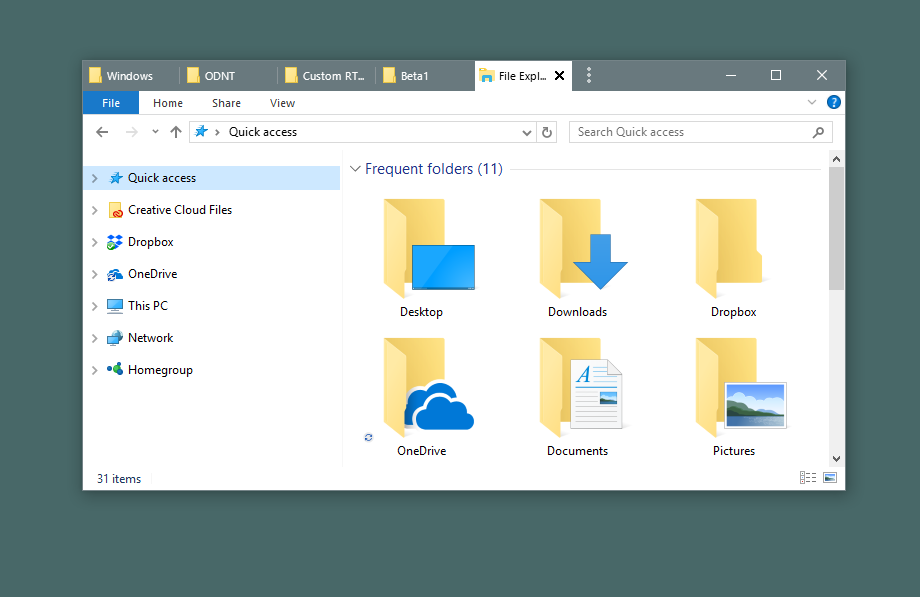
Example 1: Got lots of Explorer windows?

image

No problem:

image

Example 2: So many spreadsheets

Lots of people end up with several Microsoft Office apps running that can easily get misplaced, especially if you have multiple monitors.  Groupy fixes that.

image

Just put them together.

image

Example 3: For the Adobe power user

Many artists are familiar with working between the various amazing Adobe applications.  Navigating between them adds up over time.

image

Instead, just put them together.  Now you can switch between tabs with the Win-~ key instantly.

image

Now it acts as a single app.  If you need to pull them apart, no problem - just drag the tab off like you would with a browser window.

Example 4: Chrome and Edge living together in harmony

Do you find yourself using multiple web browsers occasionally?  Groupy can help with that, too.

image

Groupy supports tabs within tabs.

image

Edge and Chrome are now acting as a single web browser.

Example 5: Mix and Match

Maybe you are a power user or developer who has a diversified mix of applications in use to get a job done.  No problem, Groupy will let you group any window with another window.

image

And to ungroup, just drag the tab off from the group.

It's both the simplest app and most useful app you may ever buy.  Get it now as part of Stardock's award-winning Object Desktop suite of utilities at www.objectdesktop.com today.

149,560 views 52 replies
Reply #1 Top

I just extended my Object Desktop subscription, but do not see any way to download Groupy.  Can you point me in the right direction?


thanks

Reply #2 Top

You can download from your account: http://download.stardock.com


Reply #3 Top

Sounds like this might be the application I need ...

Downloaded, installed ... but starting it only opens a "Settings"-type dialog box. There's no actual program.

... Or am I missing something?

Reply #4 Top

Just drag a window on top of another. Check out the video in the post for examples.


Reply #5 Top

This is pretty neat. Now I can group apps like Dreamweaver and MS Outlook together (on one screen) and MS Edge, Firefox, Opera etc on the second screen and just tab between them. And I just need to minimise one app to minimise all the grouped apps in one go.

Very handy!

:D


Reply #6 Top

Quoting Island, reply 2

You can download from your account: http://download.stardock.com

 
I still don't see it...and my Object Desktop says expires in 95 days but I have 2


Object Desktop Upgrade (from Standalone) - Expires in 95 days

View Product Keys

Object Desktop - Expired

View Product Keys

Reply #7 Top

Sounds great! Just missing a crucial trick to make it a truly productive project management tool...

I would love to be able to save a Groupy under a name, then later, to continue working on that project - open the saved groupy and have all the apps AND the files I was working on open in them!

Just imagine the productivity gain!! Open ONE groupy and have 3 - 4 - 5 - 6 different applications open with my work for that project open and ready! Word docs, spreadsheets, graphics, websites.... ahhh, if only...

Any chance of making that happen?

Cheers,

Flip

+3 Loading…
Reply #8 Top

Quoting hashonboat, reply 6


Quoting Island Dog,

You can download from your account: http://download.stardock.com


I still don't see it...and my Object Desktop says expires in 95 days but I have 2


Object Desktop Upgrade (from Standalone) - Expires in 95 days


View Product Keys

Object Desktop - Expired


View Product Keys


Try:
http://sd.stardock.com/sean/JingImages/2017-11-14_17-27-11.png

Reply #9 Top

 Hashonboat, the subscription you are showing is your most current one that was purchased on 2/17/2017.  Your other one expired on 1/14/2017.  When you go to the "my downloads", the first item for OD is the OD manager.  Under it, is a link to see individual downloads.  When you click that, the list with Groupy in it will appear.


Reply #10 Top

Can you set up rules for applications that will always be grouped when multiple are open?

e.g. Windows Explorer - Always group together when multiple are open?

Chrome, Firefox , IE Always group when open together?

If this is not already a feature can I request it to be added - I will buy if this is available :)

Reply #11 Top

Quoting dueWest, reply 7

I would love to be able to save a Groupy under a name, then later, to continue working on that project - open the saved groupy and have all the apps AND the files I was working on open in them!

Its on the drawing board.  We just need to make sure we collect all the good ideas you guys will surely have before we put pen to paper again.

Reply #12 Top

OK, I've played with it a bit now...

I can't see the righthand 3 squares for min, max, close on the titlebar which is shared with the groupy tabs whose colour bar extends over the top of them.

I can click them - very carefully - by positioning my mouse just below or above the coloured bar, so they are there and working, just not obvious.

Is this a beta glitch that will be fixed?

Cheers,

Flip

Reply #14 Top

I downloaded it, installed it, got the verification email and verified my account:

Groupy Trial Validation Successful

But it still asks me to enter or purchase a license key when I run it...

Is there some trick to getting past this?


Reply #15 Top

You need to activate with your Object Desktop account.


Reply #16 Top

Quoting dueWest, reply 12

OK, I've played with it a bit now...

I can't see the righthand 3 squares for min, max, close on the titlebar which is shared with the groupy tabs whose colour bar extends over the top of them.

I can click them - very carefully - by positioning my mouse just below or above the coloured bar, so they are there and working, just not obvious.

Is this a beta glitch that will be fixed?

Cheers,

Flip

Which operating system are you using?

The tabs should be located on the far left of the window, so in order to even get close to the min, max, close buttons you would have to have a lot of tabs?

Are you able to post a screenshot of what you are seeing? 

Reply #17 Top

Hi Neil,

Windows 10 Pro... Only 2 apps grouped on a screen-wide (maxed) groupy. The Groupy bar (apps on the left) extends over the to the righthand edge covering the buttons. Same when it is not fullscreen...

I've created a JPG screengrab... how do I upload it?

Thanks,

Flip


Reply #18 Top

I generally have multiple command, explorer, and X-Windows all over the place, and this is great for collecting those together into respective groups.  This works surprisingly well and has a very small profile; well done!

+1 on saving groups. 

More control of the display of the tabs would be nice.

1. Ability to change size of tabs and/or ability to display trailing characters, rather than just the leading ones.
    After changing Explorer to display full path, rather than just current path, I can't see the path above the current path.  For instance, when working in c:\long\path\fu\bar\ and c:\long\path\foo\bar, I need to see the directory above "bar" in both cases.  When turning full path on, one ends up only being able to see c:\long\path in each of the tabs and I have no way of making each directory more obvious without pulling them back out of the groupy group.

2. Ability to give my own name to the tab could be workable for gaining clarity in the above situations.


Reply #19 Top

One feature this really needs is when you close a window with multiple tabs, it should ask if you want to close all the windows or just the current one. Also the pin tab feature from google chrome would fit nicely with groupy :D

Reply #20 Top

MailWasher Pro refuses to join Groupy, even when window is manually reduced in size.  Any thoughts??

Reply #21 Top

Open tab bar shows up by itself on new desktop in Task View (I still use it). Is this meant to happen?

Reply #22 Top

Nice piece of SW! Besides definitely supporting @dueWest suggestion of being able to SAVE GROUPS I'd like (actually "need") to have the possibility of CHOOSING the HOTKEY (default WIN + "tilde" is NOT CONVENIENT at all for people that have a different keyboard layout than USA). 

So PLEASE MAKE the HOTKEY to switch from tab to tab CUSTOMIZABLE,

thanks a lot!

     Andrea

Reply #23 Top

Quoting Island, reply 15
You need to activate with your Object Desktop account.

How?

I downloaded from the Object Desktop Manager list of individual downloads on my account on the web site, and I clicked the Activate 30 Day Trial button on the email and got an acknowledgement.

What else should I do?

I've opened Object Desktop Manager on my PC, but Groupy doesn't appear there.

When I run Groupy it tells me my license has expired and I should enter a product key or purchase one.


Reply #24 Top

Hello !

I download and installed it, it works perfect!!!

I like this app very much !! I use it all the time now :)  

Thanks a lot. Daniel

Reply #25 Top

Quoting davelorde, reply 23

When I run Groupy it tells me my license has expired and I should enter a product key or purchase one.

You need to activate with your account. Select enter product key and login with your Object Desktop account.