

Stardock has a new killer app: Groupy - organize your windows together
 Stardock Forums
From the people who brought you Fences, Start8, ObjectDock, DeskScapes, and countless other amazing programs comes a new one that will transform the way you use your PC: Groupy.
At any given moment, people have a lot of windows open.
Maybe it's a few Explorer windows, a couple of Excel spreadsheets, maybe a a Word document or a PowerPoint presentation. Maybe they're working with Adobe Premiere and After Effects and a few other windows. In any event, dealing with all these windows can get to be quite a mess. So what's the solution?
The answer is: Stardock Groupy, the program that lets you treat all your windows the same way you are now used to treating browser windows -- put them them together with each window given its own tab.
Example 1: Got lots of Explorer windows?

No problem:
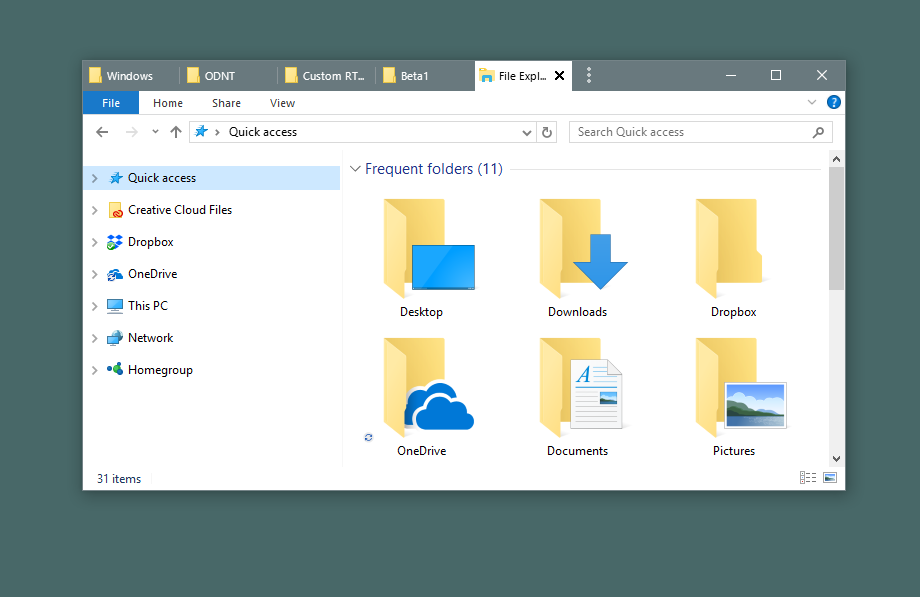
Example 2: So many spreadsheets
Lots of people end up with several Microsoft Office apps running that can easily get misplaced, especially if you have multiple monitors. Groupy fixes that.

Just put them together.

Example 3: For the Adobe power user
Many artists are familiar with working between the various amazing Adobe applications. Navigating between them adds up over time.

Instead, just put them together. Now you can switch between tabs with the Win-~ key instantly.

Now it acts as a single app. If you need to pull them apart, no problem - just drag the tab off like you would with a browser window.
Example 4: Chrome and Edge living together in harmony
Do you find yourself using multiple web browsers occasionally? Groupy can help with that, too.

Groupy supports tabs within tabs.

Edge and Chrome are now acting as a single web browser.
Example 5: Mix and Match
Maybe you are a power user or developer who has a diversified mix of applications in use to get a job done. No problem, Groupy will let you group any window with another window.

And to ungroup, just drag the tab off from the group.
It's both the simplest app and most useful app you may ever buy. Get it now as part of Stardock's award-winning Object Desktop suite of utilities at www.objectdesktop.com today.
