Island Dog Island Dog

Stardock has a new killer app: Groupy - organize your windows together

Stardock has a new killer app: Groupy - organize your windows together

From the people who brought you Fences, Start8, ObjectDock, DeskScapes, and countless other amazing programs comes a new one that will transform the way you use your PC: Groupy.

At any given moment, people have a lot of windows open. 

Maybe it's a few Explorer windows, a couple of Excel spreadsheets, maybe a a Word document or a PowerPoint presentation.  Maybe they're working with Adobe Premiere and After Effects and a few other windows.  In any event, dealing with all these windows can get to be quite a mess. So what's the solution?

The answer is: Stardock Groupy, the program that lets you treat all your windows the same way you are now used to treating browser windows -- put them them together with each window given its own tab.

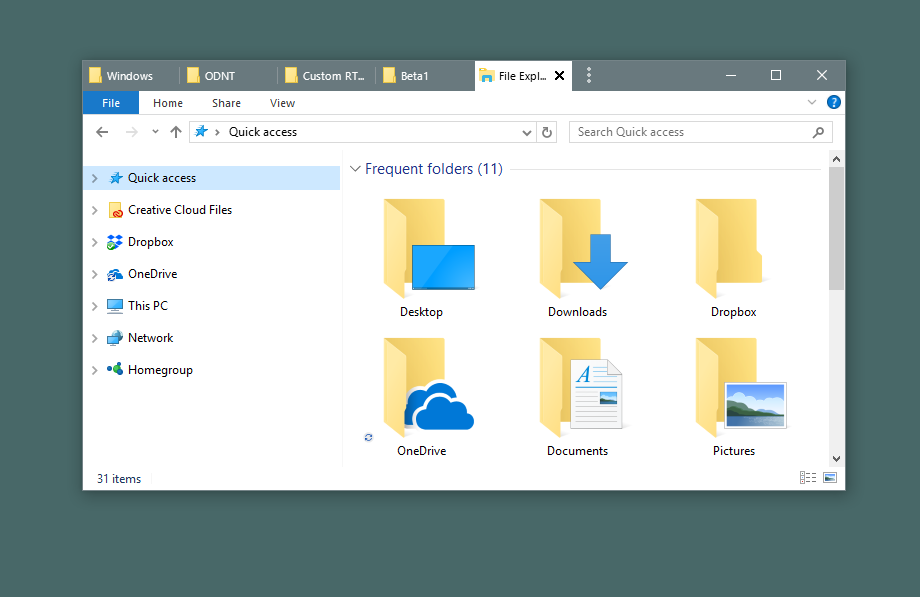
Example 1: Got lots of Explorer windows?

image

No problem:

image

Example 2: So many spreadsheets

Lots of people end up with several Microsoft Office apps running that can easily get misplaced, especially if you have multiple monitors.  Groupy fixes that.

image

Just put them together.

image

Example 3: For the Adobe power user

Many artists are familiar with working between the various amazing Adobe applications.  Navigating between them adds up over time.

image

Instead, just put them together.  Now you can switch between tabs with the Win-~ key instantly.

image

Now it acts as a single app.  If you need to pull them apart, no problem - just drag the tab off like you would with a browser window.

Example 4: Chrome and Edge living together in harmony

Do you find yourself using multiple web browsers occasionally?  Groupy can help with that, too.

image

Groupy supports tabs within tabs.

image

Edge and Chrome are now acting as a single web browser.

Example 5: Mix and Match

Maybe you are a power user or developer who has a diversified mix of applications in use to get a job done.  No problem, Groupy will let you group any window with another window.

image

And to ungroup, just drag the tab off from the group.

It's both the simplest app and most useful app you may ever buy.  Get it now as part of Stardock's award-winning Object Desktop suite of utilities at www.objectdesktop.com today.

149,561 views 52 replies
Reply #26 Top

A few little things I noticed (Windows 7 Professional 64-bit):

When two VS2015 windows are grouped and maximised, the Groupy tab bar has a sizeable gap on the right, through which I can see and click a close button belonging to another (non-Groupied) maximised window. [EDIT: only happens in 'Combine' mode. 'Place above' mode doesn't exhibit this bug.]

When any Groupied thing is maximised (custom titlebar or not), there is a two-pixel gap at the bottom between it and the taskbar, through which I can click on other maximised windows if I'm precise enough. Tested with VS2015 and Sublime Text 3.

When switching between VS2015 tabs, Visual Assist X sometimes leaves a swarm of its tooltips all over the place, where the mouse hasn't been, and they mostly don't go away until I click them.

All in all a great tool though :)

By the way, I have a UK keyboard and have found that Windows Key + ` (which is to the left of 1) does the job. Those of you with other non-US keyboards might like to try that top-left key if ~, wherever it is for you (next to Enter and requiring Shift for me), doesn't work.

Reply #27 Top

Quoting entheh, reply 26

A few little things I noticed (Windows 7 Professional 64-bit):

When two VS2015 windows are grouped and maximised, the Groupy tab bar has a sizeable gap on the right, through which I can see and click a close button belonging to another (non-Groupied) maximised window.

When any Groupied thing is maximised (custom titlebar or not), there is a two-pixel gap at the bottom between it and the taskbar, through which I can click on other maximised windows if I'm precise enough. Tested with VS2015 and Sublime Text 3.

When switching between VS2015 tabs, Visual Assist X sometimes leaves a swarm of its tooltips all over the place, where the mouse hasn't been, and they mostly don't go away until I click them.

All in all a great tool though :)

By the way, I have a UK keyboard and have found that Windows Key + ` (which is to the left of 1) does the job. Those of you with other non-US keyboards might like to try that top-left key if ~, wherever it is for you (next to Enter and requiring Shift for me), doesn't work.

When you say switching between VS2015 tabs, do you mean tabs in Visual studio, or groupy tabs with Visual Studio in it?

Reply #28 Top

Sorry, that wasn't clear. Groupy tabs. I also couldn't say exactly what triggers it - I might have seen it immediately after putting the windows together too.

Reply #29 Top

Quoting Island, reply 25


Quoting davelorde,

When I run Groupy it tells me my license has expired and I should enter a product key or purchase one.


You need to activate with your account. Select enter product key and login with your Object Desktop account.

...

Aha; OK, I get it now... [if only they'd put that in the email!]

Thanks for your help!


Reply #31 Top

Hi Neil,

OK, here's the screengrab of the Min/Max/Close buttons being obscured.

Sorry, I've been busy running my business and have only just had time now to inspect the other posts with embedded graphics and deduce the method to display one.

Groupy Bar overlays buttons

Cheers,

Flip


Amendment: When the Groupy is Full Screen, I can see the 3 buttons in each app, which affect the entire group. They are only obscured when they are not maximised.

Reply #32 Top

I love the Idea of Groupy.

Installed used for 1 min then uninstalled.

Why?

When applications are grouped the "groupy" window does not allow snapping in windows 10.  (e.g. when I drag a window to the left, right, upper-left, lower-left, etc. it will not automatically snap and resize the window.

This feature is far to important to my productivity to adopt Groupy until is is supported.


In addition, Having the ability to arrange windows in a "groupy" would be great for things like side-by-side compare of a spreadsheet and an email.  Finally, as another use suggested, having the ability to have pre-defined groups that can easily be reopened is nearly essential.

+1 Loading…
Reply #33 Top

Quoting coreyrh, reply 32

I love the Idea of Groupy.

Installed used for 1 min then uninstalled.

Why?

When applications are grouped the "groupy" window does not allow snapping in windows 10.  (e.g. when I drag a window to the left, right, upper-left, lower-left, etc. it will not automatically snap and resize the window.

This feature is far to important to my productivity to adopt Groupy until is is supported.


In addition, Having the ability to arrange windows in a "groupy" would be great for things like side-by-side compare of a spreadsheet and an email.  Finally, as another use suggested, having the ability to have pre-defined groups that can easily be reopened is nearly essential.

Are you dragging the window by the groupy bar or by the apps titlebar?

Also do you mean they do not snap or there is some overlap issue?

Reply #34 Top

I dont know if its groupy or recent windows 10 update. but steam starts really slow now. when I start steam nothing happens. even task manager shows nothing and then almost a minute later steam process starts in task manager.

Reply #35 Top

Hi,

OK, found another issue for you O:)  .

I run dual monitors (Windows 10 Pro 64) - I should also let you know I'm running Windowblinds 10, Fences, Window FX6 just in case they are impacting the functionality...

When I have Groupy open with Word 2016 and OneNote 2016 full screen on one monitor and I'm working in another program on the other monitor and click back into OneNote the keyboard focus remains in the "other program" but the mouse focus is in OneNote. I can click around to my heart's content but anything I type goes into the "other program".

Now, if I click the Groupy tab for Word then click the Groupy tab for OneNote the keyboard focus is now in OneNote.

I hope this is an easily resolved glitch, because when you're typing away furiously from other information and not staring at the screen at what you're typing, it can get frustrating having to cut out the text from the wrong program, double click around the Groupy tabs and then paste it into where you expected to be typing.

Cheers,

Flip

Reply #36 Top

Ladies & Gentlemen:

Groupy apperas to be an exciting utility.  However, after receiving Groupy BETA trial email and many frustrating attempts, I still been unable to activate it even when following your instructions. Your Beta simply tells me the "trial has expired". Can you please make this simple for us so we can try your software?

Thanks,

Allan White

Reply #37 Top

Quoting allanwhite, reply 36

Ladies & Gentlemen:

Groupy apperas to be an exciting utility.  However, after receiving Groupy BETA trial email and many frustrating attempts, I still been unable to activate it even when following your instructions. Your Beta simply tells me the "trial has expired". Can you please make this simple for us so we can try your software?

Thanks,

Allan White

I think the confusion has come about because you are trying to activate it as a trial.

It is not a trial.  In fact the trial functionality is intentionally blocked.

All you need to do is activate it like every other ObjectDesktop app you have installed.  Simply enter your ObjectDesktop serial number via the Enter product key link.

Reply #38 Top

Quoting dueWest, reply 7

Sounds great! Just missing a crucial trick to make it a truly productive project management tool...

I would love to be able to save a Groupy under a name, then later, to continue working on that project - open the saved groupy and have all the apps AND the files I was working on open in them!

Just imagine the productivity gain!! Open ONE groupy and have 3 - 4 - 5 - 6 different applications open with my work for that project open and ready! Word docs, spreadsheets, graphics, websites.... ahhh, if only...

Any chance of making that happen?

Cheers,

Flip


First post on these boards (registered for years but Groupy got me really excited), if Stardock can actually save open apps+ documents in a group.... That's pretty much what I've dreamt about for years working on tons of different creative projects.

Please consider this.

Reply #40 Top

question: is this thing running only on win10 or also on win7 or 8.1? took a quick look but didnt find anything?

Reply #41 Top

Quoting My1xT, reply 40

question: is this thing running only on win10 or also on win7 or 8.1? took a quick look but didnt find anything?

It runs on Windows 10, Windows 8/8.1 and Windows 7.

Reply #42 Top

Am I going to be able to get Groupy on its own ? 

I have object desktop but only use fences and windowblinds so don't want to subcribe again.

Reply #43 Top

Quoting mike634, reply 42

Am I going to be able to get Groupy on its own ? 

I have object desktop but only use fences and windowblinds so don't want to subcribe again.

Yes.  It will be available as a standalone product too for I think $9.99

Reply #44 Top

Quoting Neil, reply 33


Quoting coreyrh,

I love the Idea of Groupy.

Installed used for 1 min then uninstalled.

Why?

When applications are grouped the "groupy" window does not allow snapping in windows 10.  (e.g. when I drag a window to the left, right, upper-left, lower-left, etc. it will not automatically snap and resize the window.

This feature is far to important to my productivity to adopt Groupy until is is supported.


In addition, Having the ability to arrange windows in a "groupy" would be great for things like side-by-side compare of a spreadsheet and an email.  Finally, as another use suggested, having the ability to have pre-defined groups that can easily be reopened is nearly essential.


Are you dragging the window by the groupy bar or by the apps titlebar?

Also do you mean they do not snap or there is some overlap issue?

Sorry for the delayed response, I subscribed but have not been receiving updates to this thread.   I am dragging the window by the groupy bar. 

Reply #45 Top

Hello,

Groupy is really helpful and exactly what i searched for.

I only miss 2 things which would make it perfect.

It would be great if all instances of a program are added together, it only shows once in the taskbar.

And the second thing is, that it would be great if there is option to add a new instance if there is already one open automatically as a tab.

Reply #46 Top

I much rather prefer to purchase Groupy as a standalone application. I already have license for Windows Blinds etc but the whole Object Dock bundle is too much for me.

Of all previous purchased licenses I am just stuck using

1. Fences

2. Start 10

and I had hoped to get Groupy as my third.

I really do not want or need the other apps in that Object Dock bundle.

Reply #47 Top

Quoting anthony14, reply 46

I much rather prefer to purchase Groupy as a standalone application. I already have license for Windows Blinds etc but the whole Object Dock bundle is too much for me.

Of all previous purchased licenses I am just stuck using

1. Fences

2. Start 10

and I had hoped to get Groupy as my third.

I really do not want or need the other apps in that Object Dock bundle.

Groupy will be available as a standalone product once it hits 1.0 and leaves beta. 

Reply #49 Top

I use this app every day at work.  It works pretty well.  Know, though, that MS is going to release something similar soon.  Soon is questionable though.  This tool works reasonably well if you have to have multiple dos, vim, emacs, or other windows up that want to be all by themselves.