Neil Banfield

Compatibility issue with an app?

Compatibility issue with an app?

Please let us know

If you have compatibility issues with WindowBlinds and an application or game, please do let us know in this thread so we can investigate it and hopefully resolve the problem.

Please make sure you are running the latest version of WindowBlinds first and that the problem exists with a theme included with WindowBlinds vs a downloaded one. 

Please provide as much detail as you can, screenshots of the problem, information on the application itself, how to reproduce the problem and if possible dmp files from any crashes. 

The information on the about WindowBlinds page and information on your setup would be helpful too.


1,451,849 views 481 replies | Pinned
Reply #451 Top

for some reason windowblinds is preventing my ubisoft connect from starting, ill get a pop up for connect that says initializing  and then it closes and never restarts. all my other game launchers work fine unless i try to launch an ubisoft game through them and then ill get nothing.

Reply #452 Top

Quoting chibs316, reply 451

for some reason windowblinds is preventing my ubisoft connect from starting, ill get a pop up for connect that says initializing  and then it closes and never restarts. all my other game launchers work fine unless i try to launch an ubisoft game through them and then ill get nothing.

Which game are you trying?

Reply #453 Top

Quoting chibs316, reply 451

for some reason windowblinds is preventing my ubisoft connect from starting, ill get a pop up for connect that says initializing  and then it closes and never restarts. all my other game launchers work fine unless i try to launch an ubisoft game through them and then ill get nothing.

This is resolved in an internal build.  Thank you for the report.

Sean Drohan
Stardock Product Lifecycle Manager

Reply #454 Top

any ubisoft game that requires the ubi connect,  i have to switch windowblinds to the default theme and then everything works as normal.

Reply #455 Top

Hi,

I'm evaluating the transition from Windows 10 to Windows 11 on various VMware virtual machines..

With W11 23H2, no problems mixing WB with various utilities like explorer-patcher and Start Menu X. But 23H2 will reach EOL this year.

With W11 24H2 LTSC IoT (to get long time support without disrupting new features), I cannot make my favorite menu replacement
(sorry :blush: ) Start Menu X work with WB.

I don't use with 24H2 explorer-patcher, Microsoft having removed the dormant old taskbar code EP does not work at all with WB, their own taskbar replacement is a mess when WB is skinning the taskbar.

Start Menu X without WB works perfectly. 

But as soon as the taskbar is skinned, instead of seeing the Start Menu X start button (I chose one very garish to show the difference):

I see the normal icon over it:

and clicking on it start the Windows usual menu instead of Star Menu X one.

You can try with the free version here:

https://www.startmenux.com/index.html

I know that you provide a nice Start Menu, and having an object desktop license I could use it, but I like better the no scroll at all flat view that Start Menu X provides.

Making WB work with explorer-patcher on W11 24H2 might be a good thing too. I'm sure that many EP users would love to be able to use WB with it, both products strive to get rid of all the nastiness that Microsoft keeps forcing on us.


Reply #456 Top

Quoting Bob4K, reply 455

Hi,

I'm evaluating the transition from Windows 10 to Windows 11 on various VMware virtual machines..

With W11 23H2, no problems mixing WB with various utilities like explorer-patcher and Start Menu X. But 23H2 will reach EOL this year.

With W11 24H2 LTSC IoT (to get long time support without disrupting new features), I cannot make my favorite menu replacement
(sorry :blush: ) Start Menu X work with WB.

I don't use with 24H2 explorer-patcher, Microsoft having removed the dormant old taskbar code EP does not work at all with WB, their own taskbar replacement is a mess when WB is skinning the taskbar.

Start Menu X without WB works perfectly. 

But as soon as the taskbar is skinned, instead of seeing the Start Menu X start button (I chose one very garish to show the difference):


I see the normal icon over it:


and clicking on it start the Windows usual menu instead of Star Menu X one.

You can try with the free version here:

https://www.startmenux.com/index.html

I know that you provide a nice Start Menu, and having an object desktop license I could use it, but I like better the no scroll at all flat view that Start Menu X provides.

Making WB work with explorer-patcher on W11 24H2 might be a good thing too. I'm sure that many EP users would love to be able to use WB with it, both products strive to get rid of all the nastiness that Microsoft keeps forcing on us.

Hello,
Sorry to hear you are having issues. Have you tried disable this option in Windowblinds?

Thank you,
Basj,
Stardock Community Assistant.

Reply #457 Top

Thanks for the fast reply.

The option was not on.

I tried ON and OFF again to be sure, that makes no difference.

Reply #458 Top

Quoting Bob4K, reply 457

Thanks for the fast reply.

The option was not on.

I tried ON and OFF again to be sure, that makes no difference.

That probably show that WB and Start Menu X is not compatible.

Thank you,

Basj,
Stardock Community Assistant

Reply #459 Top

Quoting Bob4K, reply 455

Hi,

I'm evaluating the transition from Windows 10 to Windows 11 on various VMware virtual machines..

With W11 23H2, no problems mixing WB with various utilities like explorer-patcher and Start Menu X. But 23H2 will reach EOL this year.

With W11 24H2 LTSC IoT (to get long time support without disrupting new features), I cannot make my favorite menu replacement
(sorry :blush: ) Start Menu X work with WB.

I don't use with 24H2 explorer-patcher, Microsoft having removed the dormant old taskbar code EP does not work at all with WB, their own taskbar replacement is a mess when WB is skinning the taskbar.

Start Menu X without WB works perfectly. 

But as soon as the taskbar is skinned, instead of seeing the Start Menu X start button (I chose one very garish to show the difference):


I see the normal icon over it:


and clicking on it start the Windows usual menu instead of Star Menu X one.

You can try with the free version here:

https://www.startmenux.com/index.html

I know that you provide a nice Start Menu, and having an object desktop license I could use it, but I like better the no scroll at all flat view that Start Menu X provides.

Making WB work with explorer-patcher on W11 24H2 might be a good thing too. I'm sure that many EP users would love to be able to use WB with it, both products strive to get rid of all the nastiness that Microsoft keeps forcing on us.

Unfortunately having installed StartMenuX I cannot even make it uninstall as the uninstaller is buggy and just crashing out every other 32 bit process.  

It is merely the nature of the beast when you have two things trying to impact the same area.  My recommendation would be to use Start11 with WB as the two are compatible with each other.

With regards to explorerpatcher, I suspect it didn't implement the taskbar in a theme aware manner.

Reply #460 Top

Quoting Neil, reply 459

Unfortunately having installed StartMenuX I cannot even make it uninstall as the uninstaller is buggy and just crashing out every other 32 bit process.

Wow, sorry to hear that.  I have been using it for years, and never had this problem.

May I suggest to use Revo Uninstaller? It's a great tool to remove all the remnant of a software hard to remove.

It is merely the nature of the beast when you have two things trying to impact the same area.  My recommendation would be to use Start11 with WB as the two are compatible with each other.

Of course, but I really like Start Menu X.

I will stay with Windows 10 IoT LTSC, its EOL is 2032.

I really don't like W11 after trying it, so now that I know that you can't help, it's the only choice.

Reply #461 Top

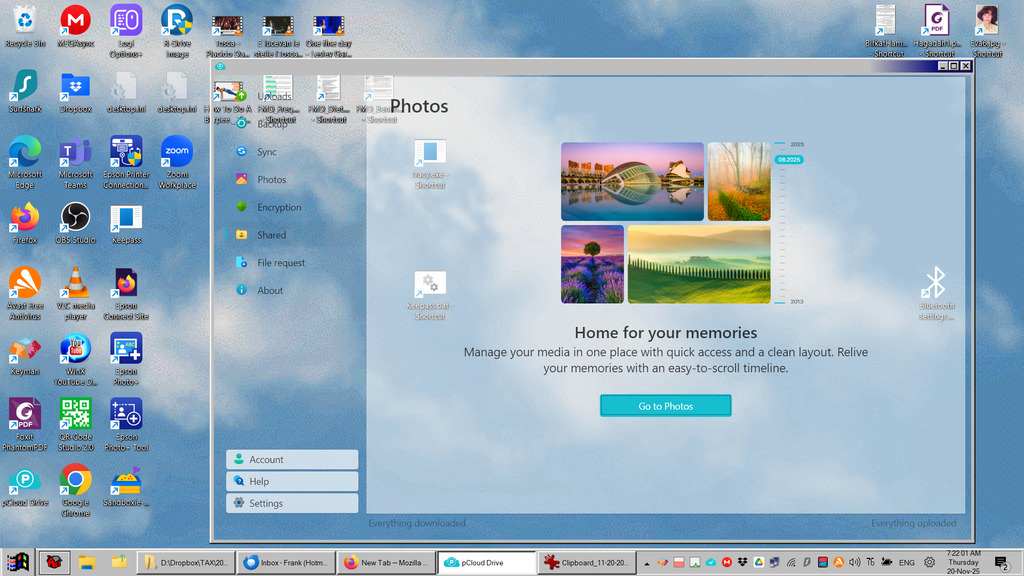
I have Win 11 with Windowblinds 11.07 with windows classic theme. This is why I installed Windowblinds.

The latest version of pCloud has the preferences window transparent (see below).

I have contacted pCloud and they show a white background to their window and suggested that the problem might be the theme.

Any idea how I can repair this maybe in a setting?

Reply #462 Top

Quoting fhutt, reply 461

I have Win 11 with Windowblinds 11.07 with windows classic theme. This is why I installed Windowblinds.

The latest version of pCloud has the preferences window transparent (see below).

I have contacted pCloud and they show a white background to their window and suggested that the problem might be the theme.

Any idea how I can repair this maybe in a setting?

Hello,
Sorry to hear you are having issues. I tested PCloud and I can't find the "preference windows transparent" option, please point me to this setting.

Thank you,
Basj,
Stardock Community Assistant.

Reply #463 Top

Sorry for a misunderstanding.

There is no "preferences windows transparent" option. The preferences window of pCloud shows a transparent background as shown.

I need to also note that this behaviour is in pCoud V5.01. Version 4.? was ok. After updating pCoud to the new version did this show up.

Reply #464 Top

I tested, and, unfortunately, look like pCloud no longer compatible with Windowblinds. The only way is to set, pCloud to be ignore by Windowblinds and don't skin it.

Thank you,

Basj,
Stardock Community Assistant

Reply #465 Top

Well done Basj.

I didn't realise this could be done in Windowblinds.

Obviously it would be better if it worked properly, but at least there is a work around.

Thank you very much.

Reply #466 Top

Quoting fhutt, reply 465

Well done Basj.

I didn't realise this could be done in Windowblinds.

Obviously it would be better if it worked properly, but at least there is a work around.

Thank you very much.

You welcome, perhaps, pCloud Dev can revert back to the older way which work with WB.

Thank you,

Basj,
Stardock Community Assistant

Reply #467 Top

Hi, when opening league of legends, my pc immediately crashes with the error "SYSTEM_SERVICE_EXCEPTION: 0x3b" related to vgk.sys (Riot vanguard driver file). I have found that if I revert to the default skin, then it works fine. The specific error code is "0xC0000005: STATUS_ACCESS_VIOLATION" from BlueScreenViewer according to https://learn.microsoft.com/en-us/windows-hardware/drivers/debugger/bug-check-0x3b--system-service-exception .

In the process of debugging this before I knew it was WindowBlinds I updated all drivers, uninstalled drivers, reinstalled windows, etc. so I've isolated the issue. It applies to all skins and I've tried changing all the settings too but to no avail. I had the same setup in Windows 10 and it worked just fine.

DMP file: https://drive.google.com/file/d/12xBD4zhXmiAk1UzekyWcNmjUQ8C2PEyT/view?usp=sharing 

I also cut a ticket to Riot about it but I doubt they'll investigate, so if anyone can help me that would be much appreciated :)

Reply #468 Top

Quoting pewster, reply 467

Hi, when opening league of legends, my pc immediately crashes with the error "SYSTEM_SERVICE_EXCEPTION: 0x3b" related to vgk.sys (Riot vanguard driver file). I have found that if I revert to the default skin, then it works fine. The specific error code is "0xC0000005: STATUS_ACCESS_VIOLATION" from BlueScreenViewer according to https://learn.microsoft.com/en-us/windows-hardware/drivers/debugger/bug-check-0x3b--system-service-exception .

In the process of debugging this before I knew it was WindowBlinds I updated all drivers, uninstalled drivers, reinstalled windows, etc. so I've isolated the issue. It applies to all skins and I've tried changing all the settings too but to no avail. I had the same setup in Windows 10 and it worked just fine.

DMP file: https://drive.google.com/file/d/12xBD4zhXmiAk1UzekyWcNmjUQ8C2PEyT/view?usp=sharing 

I also cut a ticket to Riot about it but I doubt they'll investigate, so if anyone can help me that would be much appreciated :)

Hello,
Sorry to hear you are having issues. Have you tried setting this game to be ignore by Windowblinds? If that still fails, perhaps the game anti-cheat is working and its detecting Windowblinds is working in the background and causing conflict with it. If that the case, from what I know the only to work around it is to disable Windowblinds before starting the game.

Thank you,
Basj,
Stardock Community Assistant.

Reply #469 Top

Yeah I disabled all the .exe's I could. It seems to be something to do with the kernel level driver though.

Reply #470 Top
Quoting pewster, reply 469

Yeah I disabled all the .exe's I could. It seems to be something to do with the kernel level driver though.
 
I found this: 
 

League of Legends: uses Riot Vanguard as its anti-cheat system. This is a proprietary, kernel-level anti-cheat software developed in-house by Riot Games and rolled out globally for League of Legends (LoL) and Teamfight Tactics (TFT) on PC with patch 14.9 in May 2024

Perhaps, this is the reason.

Thank you,

Basj,
Stardock Community Assistant

Reply #471 Top

I have no idea if this has been mentioned yet (nor have I tested it in the last month or so), but all versions of Opera, as well as Chrome, completely break when Windowblinds is installed. Not Edge, for some reason, but I really just want to use Opera GX. I've never tried to skin any of the browsers either, it's just broken. Whenever I try to play a video, there's three white flashes in succession, followed by the video and hardware accel breaking. I used to be able to fix it by using the Direct3D 9 backend, though that disables the adjustable backgrounds in normal Opera, but that hasn't worked since they introduced more AI garbage in the form of Opera AI, leaving me no choice but to completely uninstall Windowblinds.

Reply #472 Top

Quoting Cinder, reply 471

I have no idea if this has been mentioned yet (nor have I tested it in the last month or so), but all versions of Opera, as well as Chrome, completely break when Windowblinds is installed. Not Edge, for some reason, but I really just want to use Opera GX. I've never tried to skin any of the browsers either, it's just broken. Whenever I try to play a video, there's three white flashes in succession, followed by the video and hardware accel breaking. I used to be able to fix it by using the Direct3D 9 backend, though that disables the adjustable backgrounds in normal Opera, but that hasn't worked since they introduced more AI garbage in the form of Opera AI, leaving me no choice but to completely uninstall Windowblinds.

Hello,
Sorry to hear you are having issues. Unfortunately, I can not reproduce your issue on my system. Opera is running without issue with Windowblinds skin applied.

To make sure Windowblinds is install properly, please try, uninstall Windowblinds, reboot immediately (important), download latest version available in your account product download page: https://store.stardock.com/myaccount/products. Install it, reboot immediately again. Retest it and report back. Try that and report back.

Thank you,
Basj,
Stardock Community Assistant.

Reply #473 Top

Yep, still happening once I restart the browser after enabling a skin for the first time. I think it's trying to skin something related to the browser and that's what's breaking it.

Edit: FIXED IT! I've had multiple versions of Opera installed at once for the past while, but they all have the same name for its EXE file. After changing the ones for GX and Air and adding them to the exclusions individually, it stopped bugging out!

Reply #474 Top

Quoting Cinder, reply 473

Yep, still happening once I restart the browser after enabling a skin for the first time. I think it's trying to skin something related to the browser and that's what's breaking it.

Perhaps, its something to do with some extension installed in those browsers.Try disable those extension and see if that help.

You can also do a Sandbox test: Refer here: https://support.stardock.com/space/SHC/1416396827/Testing+WindowBlinds+in+Sandbox 

Thank you,

Basj,
Stardock Community Assistant

Reply #475 Top

Unfortunately, I don't have access to that, judging by the description. I only have Windows 11 Home. However, I did fix it. Almost. Changing the file name of Opera GX's EXE seems to have stopped it from bugging out, but normal Opera still breaks under the exact same conditions. Opera Air also works after changing the filename.