Neil Banfield

Compatibility issue with an app?

Compatibility issue with an app?

Please let us know

If you have compatibility issues with WindowBlinds and an application or game, please do let us know in this thread so we can investigate it and hopefully resolve the problem.

Please make sure you are running the latest version of WindowBlinds first and that the problem exists with a theme included with WindowBlinds vs a downloaded one. 

Please provide as much detail as you can, screenshots of the problem, information on the application itself, how to reproduce the problem and if possible dmp files from any crashes. 

The information on the about WindowBlinds page and information on your setup would be helpful too.


1,452,406 views 481 replies | Pinned
Reply #326 Top

Using Window Blinds (10.89-064) with Windows 10 and the Aero 8 Theme.

Had to exclude: Chrome, MyPhoneExplorer, Opera, Pdigin, RadonInstaller, Supertuxkart, Teracopy, Thunderbird and VLC.

So quite a lot of software I had issues with.

Reply #327 Top

Quoting web75, reply 328

MyPhoneExplorer 

Pidgin

(continued soon)

I personally don't skin Opera and Chrome but check out the Advanced Options for more advice on them. I would suggest you have WindowBlinds set up incorrectly. What I usually do is set my skin to the Windows default and apply, Unload WB from the notification icon area on the taskbar, reboot and then apply my WB skin again. Failing that you may need to do a complete reinstall. You can find how to do that in earlier messages.

Reply #328 Top

Another problem I haven't been able to fix, and it's quite a biggie, is the new Microsoft Store. WB cuts the top off the store so you can't see the search bar and other interface elements up there. You can search if you manage to click in the box just in the right place but it's quite awkward. I have this problem with all skins (including Aero 8!) Microsoft Store can't be added to the exclusion list because it's installed in a protected folder. Even if you gain access to this folder which I haven't dared to (I've already had to repair Windows recently, not Stardock related thankfully, so I'm not fiddling unnecessarily), the folder name will change with each new version of the store installed.

Reply #329 Top

The problem with MyPhoneExplorer is not the main window. It starts when you try tu use the chat function, because buttons are out of focus.

Reply #330 Top

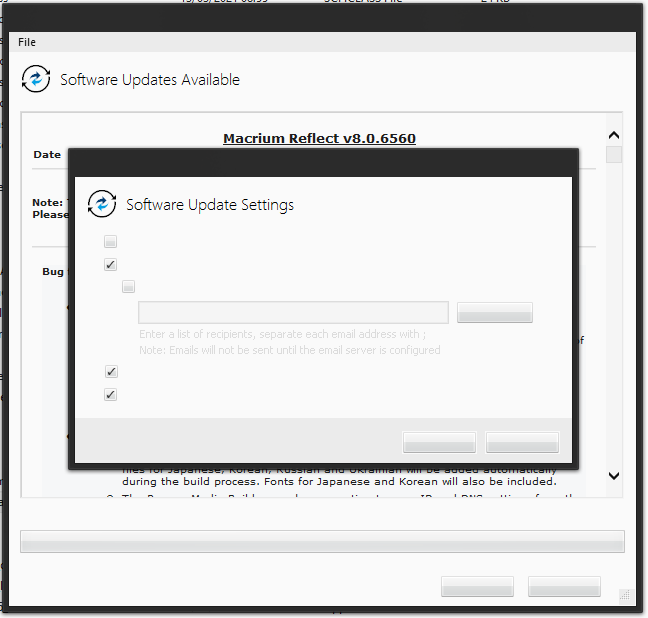
Problem with Macrium Reflect's updater app. Buttons have no text, invisible text etc. Still using Aero 8. I like it that much!

Reply #331 Top

Having trouble skinning VLC version 3.0.16

This is opening up a new VLC instance clicking on open folder or any other media the resolution of the new window is like this crazy small

New instance of VLC

If I however have VLC open and i reapply the skin it is normal

VLC open and re-skinned

Reply #332 Top

Yeah, I excluded VLC a long time ago. Not necessarily for this particular reason but I forget why.

Cool folder icons BTW. Are those made with an app or did you download and apply them all manually?

Reply #333 Top

Another one for Macrium Reflect ... affects the latest version

Latest version of WB, skin is Dark mode by Vad_M

No text visible on any of the buttons in various dialogs - see row of buttons along bottom of shot below

Current workaround is to unload WB when working inside Reflect ...


Reply #335 Top

Quoting MagikGimp, reply 334

Yeah, I excluded VLC a long time ago. Not necessarily for this particular reason but I forget why.

Cool folder icons BTW. Are those made with an app or did you download and apply them all manually?

I created alot of the movie and tv show folders myself but most are downloaded I manually changed them

All my icons are all windows 7 icons which I used 7tsp to change them

Anyway to get VLC to skin properly without having to reload

Reply #336 Top

If you like and have any ideas for folders you'd like me to create or want some of the folders I've created I probably can in my spare time I have a program I use to layer out different parts of each folder and then I convert it to an .ico

Reply #337 Top

What I don't like is that you always have a part of the background on your screenshots (if you do a window with alt+print). I first thought it was Windows 10 until I figured out it was Window Blinds.

Reply #338 Top

Quoting MagikGimp, reply 334

Yeah, I excluded VLC a long time ago. Not necessarily for this particular reason but I forget why.

Cool folder icons BTW. Are those made with an app or did you download and apply them all manually?

Is there any word on how to fix this?

I have a 4k monitor and at 3840x2160 or 4096x2160 resolution VlC and anything for that matter everything is horribly small. At 1920x1080 things are a bit better but still small


Reply #340 Top

Someone on Reddit mentioned that "150% dpi" isn't supported  yet: https://www.reddit.com/r/windows7/comments/ock908/comment/h3wvtji/?utm_source=share&utm_medium=web2x&context=3

Can you edit the skin to increase the text size? I think making the GUI elements bigger too is too difficult and sadly I doubt the creator will either.

EDIT: Sorry, I read your earlier post and I can see that this is a bug. If I feel like it, I might test this skin myself as I'm getting a little bored of my current setup. I'm not a dev BTW so I can't comment on any fixes to WB.

Reply #342 Top

Quoting Cattlelyst, reply 333
This is opening up a new VLC instance clicking on open folder or any other media the resolution of the new window is like this crazy small

New instance of VLC

So I'm checking out this skin too now (very recent update posted BTW) and I'm not getting this but I am having (and always have had) your problem with VLC's main window not skinning correctly on the bottom and sides. In fact mine is worse and I guess I've always had this problem hence why I've always had it ignored by WB.

I AM getting tiny icons elsewhere though with that skin, on Start10 for example. Some of the selections' icons on the right of the Start Menu are the correct size but folder icons are tiny, like the lowest possible size i.e. even smaller than in Explorer on Small Icons mode.

I'm going to leave a comment on the DA page about this but I feel it's not a skin problem but Stardock one so don't hold your breath!

Reply #343 Top

Oh lovely, well for now I at least have it set to 1080p and I have VLC skinned with eXperience and it's skinned better

Not perfect the icons are better but the font is small

It's tolerable thanks for looking into it for me. 

Reply #344 Top

I use the web browser Vivaldi.  Basically, this browser doesn't skin at all.   Thank you for looking into it.

Reply #345 Top

I cannot make an application specific skin change to Sierra Charts 64-bit exe.  I can change the skin when I apply the skin globally, but nothing happens when I specify the skin (e.g. ICE) using a Per Application link to the executable and restarting WindowBlinds according to the documentation.  The application does not use Direct3D but clicking that option doesn't change the skin of the application anyway.  Other users for Sierra Chart have experienced this issue as well (https://www.sierrachart.com/SupportBoard.php?ThreadID=41173&Page=Last#P314155).  I purchased WindowBlinds specifically for Sierra Chart.  Please help.

Reply #346 Top

Now that I'm a subscriber again I wanted to see if there was any changes to WB. Unfortunately the top of the Microsoft Store being cut off is still a problem. With all skins as far as I'm aware. Same for maximised window; I made the window small for the sake of the screenshot.

Search bar etc. cut off at the top.

Reply #347 Top

I am currently getting this (See Picture Below) in Fences (4.0.7.2). I have to go to the "Per Application" option and enable "Total Exclusion" for it to go back to normal. I am currently using a pre-install theme that came with WindowBlinds 11.


WindowBlinds info:

Windows 11 Core 22H2 (22621.ni_release.220506-1250)

WindowBlinds 11.00 BETA (009 x64 - Windows 11 Edition) - 64 bit OS

Window titlebar blur features are enabled on this operating system

        Wblind.dll                2022/11/07 08:44:23

        Wblind64.dll              2022/11/07 08:44:46

        Wbsrv.dll                2022/11/07 08:44:52

        WB11Config.exe            2022/11/07 08:44:25

        Wbload.dll                2022/11/07 08:45:38

        Screen10.exe              2022/11/07 08:44:45


Reply #348 Top

Quoting MagikGimp, reply 348

Now that I'm a subscriber again I wanted to see if there was any changes to WB. Unfortunately the top of the Microsoft Store being cut off is still a problem. With all skins as far as I'm aware. Same for maximised window; I made the window small for the sake of the screenshot.

Reduced 81%
Search bar etc. cut off at the top.
Original 1022 x 799


You will have to exclude the Microsoft Store from the theming when using WindowBlinds 10/11. I haven't been able to figure a way to get it to work. It seems to have a custom theme separate from windows. Its been this way since Microsoft updated Microsoft Store.

Reply #349 Top

Incompatible with StartAllBack (probably all start-menu enhancements besides start11) would love an option to be able to not theme taskbar+start menu, I think it would probably solve those issues.

Reply #350 Top

Adlice UCheck is wonky in wb 11..  was wonky in wb10 too...

using windows 10 2h22 19045.2251 and windowblinds 11 '011 - windows 10 edition' (i just installed wb 11 yesterday)

messed up;

broken

and the way it should look;

not skinned


since installing wb11 i have removed many apps from exclude... was worth the upgrade.. esp if i can report broken apps for future fixes