Island Dog Island Dog

WindowBlinds 10 Beta Thread

WindowBlinds 10 Beta Thread

WindowBlinds 10 beta is available for Object Desktop members.

More info about that here: https://forums.stardock.com/474045

Please use this thread for discussion about the beta and reporting of any issues you might come across. 

WB v10.0.1 update:


  • Added skin rebuild list button
  • Fixed config screen resolution


1,438,536 views 407 replies
Reply #276 Top

Quoting TheDude23112, reply 272

Is the Windowblinds 10 skins folder a registry entry like in previous versions, or is it hardcoded somewhere?


Still a registry thing. I have moved my folder.

Reply #277 Top

I keep getting this error when trying to install the beta:


"Encountered a sharing violation while accessing C:\ProgramFiles(x86)\Stardock\Windowblinds\Screen.exe"


Any help is appreciated.


Thanks

Reply #278 Top

Quoting 2of3, reply 271

Anyone having SKS crashing all the time?

Still happening. Every time I open the Edit menus and Menubars section....anyone able to reproduce this? Kinda makes it hard to skin when the skinning app crashes!


Reply #279 Top

By all means someone help this man! We need 2 or 3 2of3 skins!!!!!

Reply #280 Top

Quoting rcharris09, reply 277

I keep getting this error when trying to install the beta:


"Encountered a sharing violation while accessing C:\ProgramFiles(x86)\Stardock\Windowblinds\Screen.exe"


Any help is appreciated.


Thanks

A sharing violation typically occurs when the file being installed is locked or being accessed by another application.

This typically indicates your antivirus/antimalware software is causing some issues during the installation.

Please try temporarily disabling your antivirus protection while the application installs and it should succeed without any issues.

Reply #282 Top

Quoting neone6, reply 105

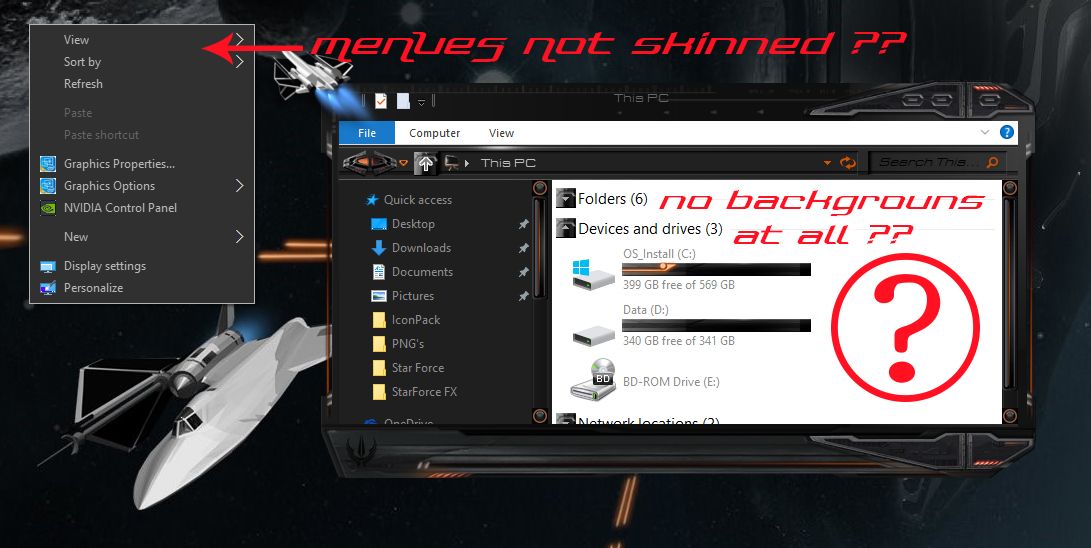
Aren't we going to have any background skinning at all & won't the PopUps be skinned ? :(O :(O

Reduced 54%
Original 1091 x 548


-If not, the overall continuity & quality of skins will seriously drop...as well as sales.


Just a little shocked and taken aback, overall, what is there works super good  5*

I am in agreement with you if you are going to call it window blinds 10 then skin every part of it i normally buy a few skins every other month but not buying anymore till they start skinning the windows 10 menu..just my 2 cents it is a good start though

Reply #283 Top

Quoting greg2, reply 282

Quoting neone6,

Aren't we going to have any background skinning at all & won't the PopUps be skinned ? :(O :(O


Reduced 54%


Original 1091 x 548


-If not, the overall continuity & quality of skins will seriously drop...as well as sales.


Just a little shocked and taken aback, overall, what is there works super good  5*


I am in agreement with you if you are going to call it window blinds 10 then skin every part of it i normally buy a few skins every other month but not buying anymore till they start skinning the windows 10 menu..just my 2 cents it is a good start though

I am afraid you may be waiting some time.

The product has to work with the OS and unfortunately Microsoft have made some decisions which are less than ideal.

It is worth noting that the right click menu DO skin, it is just they skin differently to other menus.  They use colours for the background.  As long as a skin author has designed their skin correctly this should work pretty well.

Reply #284 Top

This post: (Win10 64bit) - None of the "User Icon Frames" or "User Icon Backgrounds" defined in the WB's are displaying around/behind the Start Menu User Icons, regardless of which Start10 style is selected (Win7/Modern/Win10).  Consistently get a (rather nice) semi-transparent light frame on the Win7 and Modern styles.

looks like it says transparency in window title bars works. I have tried both, and the Acrylic style, which all preview with transparent title bars. However when I click on Apply style or the ... button next to it ht greys out for over a minute, looks like something is happening, but when it stops nothing happens, not even the title bar style changes. FWIW this only works once, there is no response until I restart and start the program again. Then I can reapply the skin, but it still does nothing. Am I doing something wrong? Current Win 10 release with all updates, also running Start 10. I've tried Winaero tewaker (latest build) enable Aero Lite, and the registry hacks for getting Winaero lite back. None of them work.


 

Reply #285 Top

Quoting orerockon, reply 284

I've tried Winaero tewaker (latest build) enable Aero Lite, and the registry hacks for getting Winaero lite back. None of them work.

There ya go.......

Reply #286 Top

Not sure what you mean, is there something they did that I would need to change back for Window Blinds to work?

Reply #287 Top

Quoting orerockon, reply 286

Not sure what you mean, is there something they did that I would need to change back for Window Blinds to work?

Anything you do to the registry might interfere with WB. WB works best with a "clean" OS.

Reply #288 Top

Something I noticed a couple of days ago. Icons on my task bar don't 'bounce' or act like they should. Nothing happens when I click on them. The apps will open but that's it. I'm not sure if its WB10 or Start10 or if its W10 doing its thing.

Reply #289 Top

The registry hack changes 2 keys. EnableBlurBehind changed from 0 to 1, EnableTransparency changed from 0 to 1. http://www.askvg.com/how-to-enable-aero-glass-transparency-with-blur-in-windows-10/

As far as I can tell Winaero modifies these key values and potentially other in the same Themes branch. All keys there point to Win Aero themes. It makes no difference whether Aero lite is enabled or disabled, transparency is enabled or disabled, which style I pick, Window Blinds does nothing to change anything. For all I know it has absolutely nothing to do with transparency or blur. The fact that it appears to change nothing when I apply a style might not have anything to do with transparency. And not all of us had the luxury of starting with a brand new install. Window Blinds 10 didn't exist when I migrated to Win 10.

Reply #290 Top

There are proggies to restore your registry to default windows....just sayin'. anything that "tweaks" aero or "themes" the OS most likely will effect windowblinds.

I'm not support staff or anything, just a long time user/skinner of WB. I'll let an official SD rep answer you instead.

Reply #291 Top

Registry hacks do not play nice with WindowBlinds. FWIW

Reply #292 Top

Quoting Uvah, reply 291

Registry hacks do not play nice with WindowBlinds. FWIW

some do very successfully...especially default folder for skins...

Reply #293 Top

Ross, my taskbar icons have never "bounced" with or without WindowBlinds 7, 8, or 10. With or without Start8, or Start10.


What planet are you on?    o_O


Reply #294 Top

Quoting TheDude23112, reply 292

Quoting Uvah,

Registry hacks do not play nice with WindowBlinds. FWIW


some do very successfully...especially default folder for skins...

Correctamundo. Moving the directory for the skins works fine. But registry hacks involving the GUI directly usually don't.

Reply #295 Top

Quoting RedneckDude, reply 293

my taskbar icons have never "bounced"

Let me rephrase that. There is a 'pressed' state, I guess you call it, (mouse over and normal work) but 'pressed' does not.

Reply #296 Top

Quoting Uvah, reply 295

Let me rephrase that. There is a 'pressed' state, I guess you call it, (mouse over and normal work) but 'pressed' does not.

Nothing new there. It's hasn't worked since win7

Reply #297 Top

I noticed a few things need to fixed in this... theres a bug that doesn't keep the icon in the system tray even after you checked if off in settings and applied the new theme with it checked off and close out of windowblinds reopening windowblinds shows the show icon in system tray unchecked again.. even trying this with admin priveledges doesn't change it... also cannot open some administrative applications with MSI extenstions and theres no way to add them to windowblinds to be ignored since the only extension allowed in the ignore list is .EXE... both off these combined cause an issue when you need to open computer management and theres no icon in the system tray to unload windowblinds to run computer management ....

Reply #298 Top

Quoting leprechaun_1967, reply 297

I noticed a few things need to fixed in this... theres a bug that doesn't keep the icon in the system tray even after you checked if off in settings and applied the new theme with it checked off and close out of windowblinds reopening windowblinds shows the show icon in system tray unchecked again.. even trying this with admin priveledges doesn't change it... also cannot open some administrative applications with MSI extenstions and theres no way to add them to windowblinds to be ignored since the only extension allowed in the ignore list is .EXE... both off these combined cause an issue when you need to open computer management and theres no icon in the system tray to unload windowblinds to run computer management ....

Are you running BitDefender?

Reply #300 Top

Quoting Neil, reply 298


Quoting leprechaun_1967,

I noticed a few things need to fixed in this... theres a bug that doesn't keep the icon in the system tray even after you checked if off in settings and applied the new theme with it checked off and close out of windowblinds reopening windowblinds shows the show icon in system tray unchecked again.. even trying this with admin priveledges doesn't change it... also cannot open some administrative applications with MSI extenstions and theres no way to add them to windowblinds to be ignored since the only extension allowed in the ignore list is .EXE... both off these combined cause an issue when you need to open computer management and theres no icon in the system tray to unload windowblinds to run computer management ....


Are you running BitDefender?

Neil. I will be getting another computer with win 10 Pro, 64 bit on it in a couple days. I will be putting BitDefender on it. so is there something I need to know in case any of the above problems come up?