CursorFX 2.11 Update Available

We have released an update to CursorFX 2 with fixes for some issues that some users were experiencing.  CursorFX lets users change their bland default Windows cursor with one of thousands available for download.

CursorFX 2.11 update:

  • Fix for Flip3D mode
  • Windows 8 installation is not recommended

Current customers can update via Stardock Central or download via their account downloads page.

Get CursorFX here - https://www.stardock.com/products/cursorfx/

6-18-2012 11-38-13 AM

161,189 views 141 replies
Reply #1 Top

Don't see it in SDC.

Reply #2 Top

me neither!!


Reply #3 Top

Windows 8 installation is not recommended

You certainly got that right. :-"

Thanks for the heads up. :thumbsup:

BTW, when SDC updates itself, the "Updating Stardock Central" text runs off the window slightly.

Reply #4 Top

Not showing up yet in SDC or my accounts download page yet for me. :S

Reply #5 Top

@ Carl and Bryan -

Did you guys install it (CFX) with Impulse and not uninstall it the same way? It shows up in mine...

Reply #6 Top

This is on my XP laptop: Installed and running, still shows as version 2.10 in SDC. Relaunching SDC shows the update as still available.

From the CFX UI, check for updates opens the SDC folder, but doesn't launch SDC. Is this normal?


Update: Just ran SDC from Win7/64 with the same results with the exception that it prompted for a reboot with Win7.

Reply #7 Top

Not showing up on my SDC either, and I installed it stand alone.  Also, v2.10.023 is showing up in the store. not 2.1.1. :(

Reply #8 Top

I ran the update from SDC, it went through the install,  but upon opening SDC again the update still shows available and the version installed shows 2.10 >_>

If I open CFX it shows version 2.11 in the "about" screen. :meow:

Reply #9 Top

SDC installation, no update showing.


Reply #10 Top

Carl, did you install with Impulse [originally]? If so, you can uninstall with Impulse or with CCleaner. It should then show up in sdc.

Mine shows CFX 2.11 in the 'About' screen as well as in sdc.


Reply #11 Top

Okay, I cleaned out my browser history and cookes thinking maybe that might be the problem, it wasn't.

SDC and My Accounts, Download page is still not showing the update.

I'm using IE9 if that will makes a difference.

Guess I will just keep checking back.  :S

Reply #12 Top

Quoting LightStar, reply 7
Not showing up on my SDC either, and I installed it stand alone.  Also, v2.10.023 is showing up in the store. not 2.1.1.

Tom... I think sdc works to track stuff installed through it (and not yet installed). I wonder what would happen if you uninstalled with CCleaner (backup your CFX skins) and then opened sdc?

Reply #13 Top

Got it, Win 7, no reboot required.

Reply #14 Top

But then, it still shows as available in SDC. Maybe I do need to reboot. I wasn't prompted to.

Reply #15 Top

No reboot necessary, Jim... not on my system, anyway.

Reply #16 Top

Rebooted, still shows as not installed. The cursor I was running is still running, but I can't open config to change cursors. I can't get the shortcut in start panel all progs to run. I can only launch by going to program files and launching CursorFX Control Panel.


Still shows as not installed.


Reply #17 Top

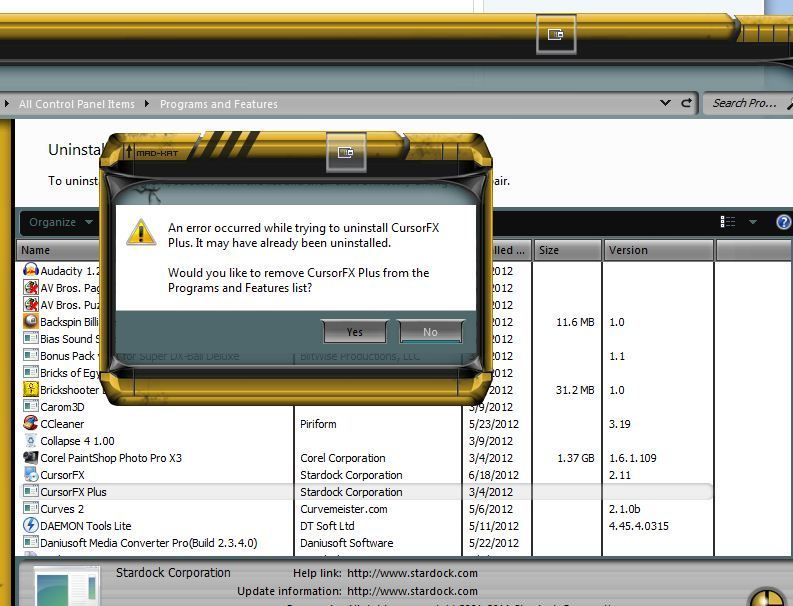
OK, thought I'd uninstall, roll back to the last version.....got this.


Reply #18 Top

Looks like a bug thread is in order?  I'm gonna roll back.

Reply #19 Top

Quoting RedneckDude, reply 16
Rebooted, still shows as not installed. The cursor I was running is still running, but I can't open config to change cursors. I can't get the shortcut in start panel all progs to run. I can only launch by going to program files and launching CursorFX Control Panel.


Still shows as not installed.

 
Same deal here! X(

Reply #21 Top

Rolled back to 2.10.


Good thing SDC auto archives.

Reply #22 Top

Everything's seems to work great over here :rofl:


Reply #23 Top

OK, I uninstalled CursorFX and ran 2 registry cleaners and rebooted.  After opening SDC, it says version 2.10 is available, so does the store.  So I installed it via SDC and it also says it is version 2.10.  There is no version 2.11 showing any where at all. :(

Reply #24 Top

Quoting LightStar, reply 23
OK, I uninstalled CursorFX and ran 2 registry cleaners and rebooted.  After opening SDC, it says version 2.10 is available, so does the store.  So I installed it via SDC and it also says it is version 2.10.  There is no version 2.11 showing any where at all.

Well that's what I did also with the same results.  :S

Reply #25 Top

Well, since SDC said it was still an available update, I told it to install it again, only this time it told me to reboot after installing. I did, but on restart WB wasn't loaded and Explorer locked up hard. Once Explorer unlocked,I tried to open the Cursor FX but could only open from the control panel applet,  I opened SDC and it still shows the update to Cursor FX Plus. Since I have the 2.11 downloaded from the store, I think I will uninstall and redo it. X( x_x Gawd, I am beginning to hate applying updates!