mr_vico

Feature request: Command-line / CLI support for saving & restoring Fences layouts

Feature request: Command-line / CLI support for saving & restoring Fences layouts

Hello Stardock team,

I’m a long-time Windows power user and Fences user, and I’d like to ask whether it would be possible to add command-line (CLI) support for Fences, specifically for saving and restoring desktop layouts.

I’m using a multi-monitor setup, and occasionally Windows temporarily disconnects a secondary display (for example due to DisplayPort handshake or power-state changes). When this happens, Windows moves all desktop icons to the primary monitor. Fences already solves this perfectly by restoring the layout — but currently this can only be triggered manually via the UI.

What would be extremely useful is a simple, documented CLI interface, for example:

  • fences.exe /saveLayout

  • fences.exe /restoreLayout

  • or any equivalent supported mechanism (CLI, COM, or PowerShell-friendly API)

This would allow advanced users to:

  • Automatically restore layouts after display reconnect events

  • Integrate Fences into scripts or scheduled tasks

  • Eliminate the need for UI automation or workarounds

I understand that Fences is primarily a GUI-driven product, but even a very minimal CLI surface for layout management would add a lot of value for power users, especially in multi-monitor environments.

Thanks for a great product, and for considering this request.


Best regards,
mr_vico

 
43,200 views 52 replies
Reply #27 Top

Hm this is very odd. Seeing the change come in, but again
(1) It's all packed within 1 second
(2) It's not detecting any actual monitor change.

2026-01-07 12:28:01,090 - WM_DISPLAYCHANGE Received
2026-01-07 12:28:02,401 - WM_DISPLAYCHANGE Received

We're going to need some time to figure out how to approach and have a busy next 5-6 days. Let us get this in our list for this coming week and we'll come up with ways to diagnose?

It's clear what's going on here based on your description – the icons are getting shoved off as one of the monitors disappears – but it's not showing with the current data. We'll get some more thorough info in there, it'll show up, and then we'll be able to take action to effectively "block" those adjustments and resolve the issue. Thanks for your patience; more soon

Reply #28 Top

Thank you for your dedication to this issue.  I did wait about 60 seconds in the monitor power saving state before moving the mouse in case it does not show.

Your efforts show great dedication to your software and go above what most software devs have shown me in my experience so far!

Thank you!

Reply #29 Top

I would also like to reiterate this monitor with the issue is running on a 4 port HDMI 4 port KVM.  It may have something to do with it, it may not.. I can say the issue does not occur if i change to a different system and come back.

Reply #31 Top

Hey Jeffis, newsch, sorry about having dropped this, the team was taking care of other tasks.

Good news, we've been able to add a considerable amount of debug logging around this topic of icon position changes, to hopefully help us get to the bottom of what's going on. Please give the new build an install at https://www.dropbox.com/scl/fi/3yesbjb58xmwy8yyn4i4f/Fences6_6.4.0.1-j108-Setup.exe?rlkey=ufu1yu5i85elo27ucioia3od8&st=j1d2qmlp&dl=1 (and/or from Object Desktop Manager or your My Product download page; beta build v6.40).

Once installed, please reproduce and send us a report, and we'll dive in to figure it out. Be sure to take a "before the problem", "after the problem" layout snapshot so that we're able to narrow things down.

Thanks again for your help, and we hope to get this taken care of for you.

Reply #32 Top

Hi Jeffis, newsch1,

We put in enhanced debug logging for this in the new version above, so just checking in on if anyone has been able to give this a shot, assuming the issue is this occurring. Thanks for any insight

Reply #34 Top

Thanks for asking.

As I already wrote, I changed the monitor connections and no longer have any problems. So I can't tell whether your changes solved the problem.

Reply #36 Top

uploaded before and after.  I have created a bandaid for now, doesnt fix the issue but does stop it from messing up my icons.  I just created new fences called left center and right monitors. and just drag my random icons there.  For testing I moved a few icons out of the right monitor fence.  As you can tell they moved into the center after power saving.


+1 Loading…
Reply #37 Top

I should add I have upgraded my GPU since first troubleshoot report.  Went from a AMD 6750 iir to a Nvidia 5070.  Issue stays the same.

+1 Loading…
Reply #38 Top

[ResetFrom] Icon monitor origin changed (.lnk) [\\.\DISPLAY3, 3840x0->1920x0]

Very interesting! So yes, one minute after workstation lock, the screen goes to sleep (at least for a second), then 15 seconds later a WM_DISPLAYCHANGE notifies of a display settings change. But, according to the display enumeration, everything is still the same – \\.\DISPLAY1, \\.\DISPLAY2, \\.\DISPLAY3, and the overall virtual screen size etc. Yet – those icons somehow then report that the monitor origin has changed, thus shifting them in.

This aligns with the initial guess that somehow \\.\DISPLAY3 is blinking out of existence for a moment in some Windows subsystem layer but not another.

"I would guess" that the monitor handle has just gone invalid somehow, and so the system is defaulting to the primary, except that that's not how the GetMonitorInfo API works. So. Going to need to think of ways to debug this further to see what's going on, and see which kind of redundancy helps turn up the truth. Very strange!

Thanks again for rolling along with this and will be back with more.

Reply #39 Top

Hi Jeffis, new build here that contains some zoomed-in debug logging around that "Icon monitor origin changed" event, around the idea that the monitor handle might be invalidated and thus causing problems.

There's a chance that it fixes the problem, but please send log either way, so we can see definitively if our mitigation technique resolves the issue? Thank you!


https://www.dropbox.com/scl/fi/z601k08hmmzrjifde2su6/Fences6_6.4.1.2-j110-Setup.exe?rlkey=vslexmaoq2fzoyud17h4n7wo6&dl=1


Reply #42 Top

Thanks Jeff!

Aye! Looks like this attempt was with v6.40 from February. Had added v6.41 (6.4.1.2) in the post above March 2 – though, looks like the link was broken, so you might not have been able to try. Here it is fixed:

https://www.dropbox.com/scl/fi/z601k08hmmzrjifde2su6/Fences6_6.4.1.2-j110-Setup.exe?rlkey=vslexmaoq2fzoyud17h4n7wo6&dl=1


This one might even fix the issue, so, 🤞. It adds (1) A whole bunch of debug code looking for invalid monitor handles, which is the current hypothesis, and (2) Ability to fix invalid monitor handle, if detected


Reply #44 Top

2026-03-04 22:45:02,561 - [ResetFrom] Icon monitor Pre-Change-Verify [rcMonitorValid 0] (.url) [\\.\DISPLAY3, 1920x0->1920x0] [VerifyMonitor1: 10062 0 0,0 0x0] [VerifyMonitor2: 0 0 0,0 0x0] - 0


We are getting close!

This verified that the monitor handle at \\.\DISPLAY3 was indeed invalidated, and as well, we're unable to look up a new handle for it, even though it's still being reported as present by Windows via EnumMonitors.

This is touching on very sensitive logic, wherein a "fix" could create problems for other people, so, treading carefully and making sure to understand the scenario.

Going to think up a final round of debug output to explore the scenario more exhaustively, and then can hopefully come to a decision around how to go about fixing. 
(1) If monitor is invalid, and cannot refresh handle, ignore monitor change without attempting to reassign to a new monitor [would fix, but dangerous, if we don't know why it's still present but giving back nil monitor info]
(2) cache the monitor information. if monitor info missing but monitor itself is still present, pull from cache [likely even more dangerous]
(3) [something else, depending on what the debug output shows]


New build coming in the morning. 👍 I don't know what it is about this specific system that is causing this, but, it's immaterial. The app needs to be able to know that this scenario exists and handle it.

+1 Loading…
Reply #45 Top

could it be a delay from the KVM ?  If so how about a check box option that adds a delay to checking in your logic for that monitor.  And if checked icon placement will be adjusted after the monitor is verified there or missing.


Reply #46 Top

Unclear. It does look like it's just an issue with the handle being invalidated. More or less, the monitor never leaves, but its handle is invalidated during the display changeover. We haven't seen this before, but, we should be able to handle it, and this isn't actually that crazy of a scenario. I'm surprised we haven't seen it before.

Found a gap in the just-added handle refresh logic in 6.4.1.2 (saw it just now walking through in debug after reviewing log), so, there's a good chance the next build resolves this in full. I'm going to guess that it just refreshes the handle, and everything just works.

Reply #47 Top

Alright! New version is here, 6.4.1.4

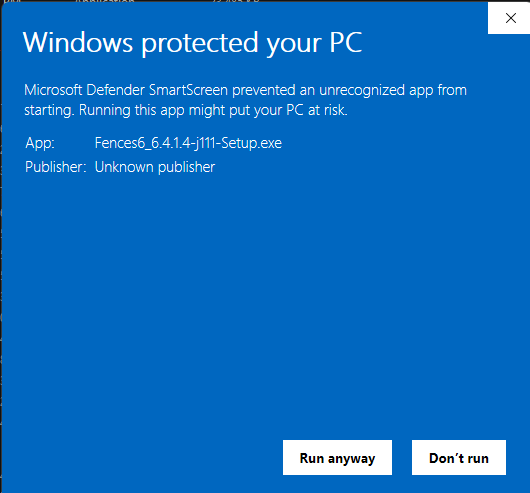
https://www.dropbox.com/scl/fi/un6k5ah5l286gzvumclnb/Fences6_6.4.1.4-j111-Setup.exe?rlkey=c8o8bi2o8gyyk7q4lt39eb7nv&dl=1

I have good hopes that it resolves the issue. In either event fixes/does-not, would appreciate a copy of the report for the debug data to confirm the fix and verify the hypothesis.

If somehow this doesn't fix it, this version contains even-even-further zoomed in debug info regarding the monitor disappearance (including extra data about the monitor state at that time), and we are very close to complete. Thanks for your help

Reply #49 Top

Aye! The team has been futzing with signing in the build pipeline recently, and yes looks like this one came up broken. Thanks for the heads up. We’ll get a new one printed up shortly