Feature request: Command-line / CLI support for saving & restoring Fences layouts

Hello Stardock team,

I’m a long-time Windows power user and Fences user, and I’d like to ask whether it would be possible to add command-line (CLI) support for Fences, specifically for saving and restoring desktop layouts.

I’m using a multi-monitor setup, and occasionally Windows temporarily disconnects a secondary display (for example due to DisplayPort handshake or power-state changes). When this happens, Windows moves all desktop icons to the primary monitor. Fences already solves this perfectly by restoring the layout — but currently this can only be triggered manually via the UI.

What would be extremely useful is a simple, documented CLI interface, for example:

  • fences.exe /saveLayout

  • fences.exe /restoreLayout

  • or any equivalent supported mechanism (CLI, COM, or PowerShell-friendly API)

This would allow advanced users to:

  • Automatically restore layouts after display reconnect events

  • Integrate Fences into scripts or scheduled tasks

  • Eliminate the need for UI automation or workarounds

I understand that Fences is primarily a GUI-driven product, but even a very minimal CLI surface for layout management would add a lot of value for power users, especially in multi-monitor environments.

Thanks for a great product, and for considering this request.


Best regards,
mr_vico

 
43,204 views 52 replies
Reply #1 Top

Hello,
I have forwarded your request to the Stardock Support Team for their review and recommendations. Please keep an eye on this thread for any updates. We really do appreciate your feedback, Thanks

Basj,
Stardock Community Assistant.

Reply #3 Top

Hi!

I just updated it to the latest version: 6.20

BR

mr_vico

Reply #4 Top

Hi Mr Vico,

Ok great. Well in good news, while CLI for this is not supported, the program does have ability in v6 that is built specifically to handle this situation gracefully.

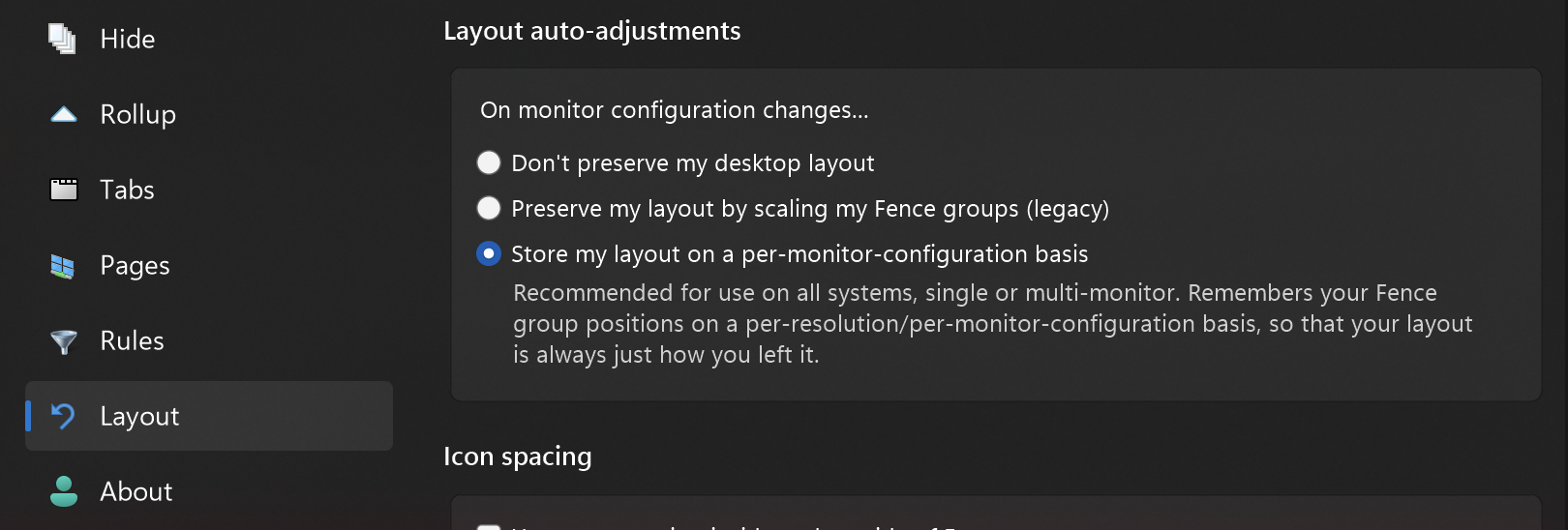
You may need to check your settings to ensure it's enabled. Head to the layout tab, and ensure "Store my layout on a per-monitor-config basis" is checked. If it already is, switch it to "Don't preserve my desktop layout" and then back to "Store on a per-monitor-config basis", and try again. You'll have to customize the configuration on each of the different configurations the first time, but after that, it will remember the layouts separately for your single and multi-mon scenarios, so, this will resolve your issue. Over the last year we've had a number of people coming to the forums seeking similar and this reliably takes care of it so hopefully it does for you as well.

Thanks and let us know

Reply #5 Top

Hi,

Thanks for the detailed reply.

I already have “Store my layout on a per-monitor-config basis” enabled. I’ve also tried toggling it off and on again as suggested, and I understand how the per-configuration layouts work.

Unfortunately, this doesn’t fully solve my use case.

The issue occurs when my secondary monitor briefly turns off or loses signal for a few seconds (for example due to power saving, signal hiccups, or switching inputs). When this happens, Fences does not automatically restore the desktop layout when the monitor comes back. The layout can be restored manually via the UI, but it does not happen automatically.

This is why I was asking about a CLI or command-based trigger. My idea is to schedule or programmatically trigger a layout restore as soon as Windows detects that the monitor configuration has changed (or after a short delay), without requiring manual interaction with the UI.

So while the per-monitor layout feature helps with persistent configurations, it doesn’t cover transient monitor dropouts where an automatic restore would be needed.

Thanks again for the explanation, and I appreciate you taking the time to respond. I just wanted to clarify why a CLI-style trigger would still be very useful in this scenario.


Best regards,
mr_vico

 
Reply #6 Top

I too would love to make a simple bat file for restoring.  I run a triple monitor setup.  2 DP and 1 HDMI off a Nvidia 5070.  The HDMI monitor is also on a KVM that supports 3 other servers.  

I am having the same issue as the display is resetting on the HDMI during power saving.  Every time I turn the screen back on, I have to launch the fences configuration and restore a layout from days ago.  Its tedious.  

The ability to just click a bat file to do it would be so nice.!


something like fences -restore 12-15-2025


Look forward to what ever you all come up with for this wonderful software!


I should mention im on Fences 4.23 and HOPE you all this feature to all versions :)

Reply #7 Top

Hi mr_vico, a couple steps to try and diagnose this. The first series includes creating a log file and submitting.

Please do the following
(1) Go to About, Troubleshooting, and click "Enable advanced logging". Reboot so that the setting can take effect.

(2) After rebooting, modify your layout as desired.

(3) Take a backup snapshot from the Layouts tab. (Ideally, click on the snapshot and rename it "Before disconnect")

(4) Reproduce the issue, disconnecting monitor etc.

(5) Take another backup snapshot from the Layouts tab. (Ideally, click on the snapshot and rename it to "After disconnect")

(6) Go to About, Troubleshooting, and click "Create error report package". Be sure to include your username and upload per directions.


The team can take a look at hopefully figure out what's going on. Thanks for your help.


@JeffIs, I'm sorry to report that v4 does not contain the ability your need :( Please give the trial of v6 a try. While occasional users have problems (per this forum post), v6 has new system built specifically to handle this specific scenario properly and it works great for the vast majority of users, so, I recommend giving it a shot. (The new system is able to track multiple layout configurations simultaneously, based on different monitor configs.) If you install v6 and decide it's not for you, you can still uninstall and go back to v4. Just be sure to not erase your backups at %appdata%\Stardock\Fences\Backups & settings at HKEY_CURRENT_USER\Software\Stardock\Fences during the uninstall & reinstall process. 


Reply #8 Top

I have the same problem with three screens.

I would also appreciate it if there was an easy way to restore the last saved layout.

For example: right-click Fences restore (possibly instead of Configure Fences).

Greetings from Switzerland from a long-time Fences user.

Reply #9 Top

Hi newsch1, welcome and thank you!

The team is happy to take a look, if you're having issues with layouts getting messed up. Would it be possible to follow the instructions in the post above?

Be sure to take a snapshot, rename it to "This is the way I want it" etc etc, then do whatever causes it to break, take another snapshot / name it "broken" and then upload it to us. We'd love to figure out what's going on.

Thanks for the help and again glad you've gotten good use out of the app.

Reply #10 Top

I did some testing and found the following solution:

It is important that the main screen (Windows settings) is the same as the screen on which the BIOS is displayed, then this problem does not occur.

If Fences starts and does not immediately find the previously used screen, then Fences starts on the BIOS screen. :annoyed:  

Reply #11 Top

Thanks for the update.


It SHOULD work in all conditions — so if you’d like this fixed for you without having to jump through this hoop, feel free follow the steps, and our team will be able to help you out. Just would need you to take snapshots before and after (and rename them appropriately) then upload the report. In the meantime, glad you’ve found a workaround.

Reply #12 Top

I have purchased and installed Fences 6.  It still removes all icons off my right monitor 50% of the time.  There is no rhyme or reason.  Sometimes the screen goes off and when I move mouse to restore, they are there.  Sometimes they are all on the primary monitor.  It was mentioned that a command line for restoring was available for V6.  Could that info be made available to me so I can just make a simple bat file to execute it.

Reply #13 Top

I'm sorry but explicitly no, a CLI for restoring saved backups is not available – what it does have is a system built specifically for handling these multi-monitor change scenarios. There's always a chance you don't have it enabled or there's some other issue.

Please see the instructions from the previous post – the team is happy to look into this further to see why this isn't working for you. Multi-mon flakiness is a thing of a past for most everyone as the new one stores configs on a per-screen-configuration basis – so if it's not working for you with v6 we're very interested to learn why.


Quoting Dr, reply 7

Hi mr_vico, a couple steps to try and diagnose this. The first series includes creating a log file and submitting.

Please do the following
(1) Go to About, Troubleshooting, and click "Enable advanced logging". Reboot so that the setting can take effect.

(2) After rebooting, modify your layout as desired.

(3) Take a backup snapshot from the Layouts tab. (Ideally, click on the snapshot and rename it "Before disconnect")

(4) Reproduce the issue, disconnecting monitor etc.

(5) Take another backup snapshot from the Layouts tab. (Ideally, click on the snapshot and rename it to "After disconnect")

(6) Go to About, Troubleshooting, and click "Create error report package". Be sure to include your username and upload per directions.


The team can take a look at hopefully figure out what's going on. Thanks for your help.


@JeffIs, I'm sorry to report that v4 does not contain the ability your need :( Please give the trial of v6 a try. While occasional users have problems (per this forum post), v6 has new system built specifically to handle this specific scenario properly and it works great for the vast majority of users, so, I recommend giving it a shot. (The new system is able to track multiple layout configurations simultaneously, based on different monitor configs.) If you install v6 and decide it's not for you, you can still uninstall and go back to v4. Just be sure to not erase your backups at %appdata%\Stardock\Fences\Backups & settings at HKEY_CURRENT_USER\Software\Stardock\Fences during the uninstall & reinstall process. 


Reply #14 Top

@jeffis108

How did you connect your monitors? HDMI/DisplayPort/USB-C (3/4) with or without an adapter?

My main screen is connected to a USB4/HDTV adapter and also goes black from time to time.

Reply #15 Top

The Monitor that is having the issue is on a 4 port HDMI KVM.  The KVM connection to the PC with windows and fences is on a DP to HDMI Adapter.  The other 2 monitors are on DP.

Reply #16 Top

Hi all. Thank you for continuing the conversation. I'd like to repeat that we would like to look into the issue further for you, as this shouldn't be happening – so if it is, we like to figure it out so that it's resolved for you and anyone else who might be having this issue. Instructions are in the posts above. Please note that creating a "before" and "after breaking" backup is an important part of the process so that we can attempt to replay and diagnose, and so that we can see exactly what you want to be happening and what is the non-desired result.

Thanks and I hope we can get this resolved. This system should be working regardless the number of monitors or DP/HDMI/KVM configurations.

Reply #17 Top

@jeffis108

Which monitor displays the BIOS when starting up?

@Dr W - Fences In my opinion, there are various causes at play here, for example the computer, the cables, the DP/HDMI connection modes, the adapters, the Windows operating system (which has had problems with multi-monitor configurations for years) and, of course, Fences.

I have already written that since I placed Fences on the monitor on which the BIOS is displayed, the problem no longer occurs.

In my opinion, your developers should consider/analyze the following point:

If Fences starts and does not immediately find the previously used screen, then Fences starts on the BIOS screen. 

Reply #18 Top

It is true that one can work around it perhaps. But the only (only!) cause is Fences mismatching the data. It is specifically programmed to handle this. Please submit a report and we can get this resolved - thank you!

(If it’s already resolved for you personally and you’re satisfied with the workaround, that’s of course fine, but no workaround should be required. It should Just Work ✅)

Reply #19 Top

Sorry, it's too much effort for me to create a detailed log according to your instructions. I would have to reset my monitor cabling and settings to the faulty state they were in at the time, carry out the logging procedure, and then redo the cabling and settings.

Please forward my information to the developers. I assume that they will be able to find a solution.

By the way: I have been using Fences since 2010, am very satisfied, and have installed the program for many other seniors so that they can have some order on their screens.

Reply #20 Top

Sounds good and of course.

Well that is a delight for us to hear – thank you for sharing!

Reply #21 Top

My middle monitor displays BIOS.  The Right Monitor is the KVM.  KVM Monitor is the issue.  Doing logging and before and after restores now.


Reply #22 Top

Ok files created and uploaded.


On a side note, Im not receiving email updates on this forum.  Reason it took me a few days to reply..


found it in my spam folder :)  all good on forum subs now.

Reply #23 Top

Hey jeffis, we appreciate the report.

Looked into this and very interesting indeed – it looks like a monitor change came in (WM_DISPLAYCHANGE) but there was no actual change. But in the meantime, the icons got moved. Critically – we see that there were two WM_DISPLAYCHANGE's generated within one second of each other, indicating two system monitor changes within a second.

> 2026-01-06 01:04:01,356 - WM_DISPLAYCHANGE Received
> 2026-01-06 01:04:02,238 - WM_DISPLAYCHANGE Received

Might you be able to share a little more of what went on between those "before" and "after" snapshots? Sounds like it goes to sleep, and then you immediately wake it up by moving mouse.

Also given the monitor only seems to sleep for a second - I'm wondering if this happens too if you let it sleep longer – say 30 or 60 seconds, instead of waking it up immediately? Wondering if the behavior is the same, and wondering what the logs might look like there. (Try this, and then upload logs again?)


===

Regarding the logs we have, here's the full technical detail in case you're curious.

A guess is perhaps that, for a split second moment, one of the monitors blinked out of existence as far as the system was concerned, but too quickly to react at a Fences-layout-recalibration level. Because the monitor disappeared however, the icons got moved (by Windows), and the move registered as valid (by Fences) as the monitor wasn't there. Groups themselves have the luxury of knowing that "move" operations are only valid if you move them, but for icons themselves, their positions are owned by Explorer, so if the icon moves, it technically is valid until proven otherwise.

Normally in this scenario, the new bad icon positions wouldn't save because the monitor remains gone long enough and by the time position changes save on batch delay, a monitor check is done, and the save is blocked. (It can be computationally expensive to scan full monitor configuration every single time an icon is moved – so this check happens on batch during save.) In this scenario, the save of the icon data would be blocked and because the layout of the system has changed, the configuration would be reloaded from the registry, thus negating any transient icon moves that happened. But since it went out and back without time to react, the icons got moved, but no reload-from-registry happened as no layout change was detected. And actually further, since no layout change was detected, the new incorrect icon positions get written to the registry as if all was good.

> 2026-01-06 00:52:50,647 - Saved icon [...] -> 3:[1920x1080@100]+[1920x1080@100][1920x1080@100] -> -1|3944|367|3944|367|0|3840|0|\\.\DISPLAY3|0|0|0|Fences.exe|0|0|0

> 2026-01-06 01:04:03,855 - Saved icon [...] -> 3:[1920x1080@100]+[1920x1080@100][1920x1080@100] -> -1|2176|294|2176|294|0|1920|0|\\.\DISPLAY3|0|0|0|Fences.exe|0|0|0

3944 vs 2176 above is what is wrong regarding the shift, as well as 0|3840 vs 0|1920, indicating a shifted owning-display coordinates despite still listing \\.\DISPLAY3. These are numbers from the top left of the desktop not the 0,0 of the primary monitor.

Further: Something notable as well is that the OS's own APIs may not have fully updated. Full dump at time of event still reporting 3 monitors. So we might need to get you another build for some more fine tune debugging. Might take several attempts to figure out where this tripwire is occurring.

2026-01-06 01:04:01,356 - WM_DISPLAYCHANGE Received
2026-01-06 01:04:01,361 - DetectResolutionChange attempt
2026-01-06 01:04:01,374 - DetectResolutionChange all clear, fingerprints match 0
2026-01-06 01:04:01,386 - Skipping SyncMultiMonAsync, fingerprints haven't changed. [0|0|1920|1080|1|\\.\DISPLAY1];[-1920|0|1920|1080|0|\\.\DISPLAY2];[1920|0|1920|1080|0|\\.\DISPLAY3]; / [0|0|1920|1080|100|\\.\DISPLAY1|\\.\DISPLAY1\Monitor0|\\?\DISPLAY#AUS25AB#5&2a9d5ec8&0&UID176389#{e6f07b5f-ee97-4a90-b076-33f57bf4eaa7}|\Registry\Machine\System\CurrentControlSet\Control\Class\{4d36e96e-e325-11ce-bfc1-08002be10318}\0009];[-1920|0|1920|1080|100|\\.\DISPLAY2|\\.\DISPLAY2\Monitor0|\\?\DISPLAY#ACI22AE#5&2a9d5ec8&0&UID176385#{e6f07b5f-ee97-4a90-b076-33f57bf4eaa7}|\Registry\Machine\System\CurrentControlSet\Control\Class\{4d36e96e-e325-11ce-bfc1-08002be10318}\0004];[1920|0|1920|1080|100|\\.\DISPLAY3|\\.\DISPLAY3\Monitor0|\\?\DISPLAY#AUS25A8#5&2a9d5ec8&0&UID176388#{e6f07b5f-ee97-4a90-b076-33f57bf4eaa7}|\Registry\Machine\System\CurrentControlSet\Control\Class\{4d36e96e-e325-11ce-bfc1-08002be10318}\0008];

====


Anywho.

Yes, information on what exactly happened in that blip between "before" and "after" would be useful, as well as "what does the log look like if you wait 60 second wait before waking the monitor up". And otherwise, stay tuned and appreciate your help.

Reply #24 Top

I locked the computer to log in screen, let it go to sleep.  Waited till all monitors went in power saving mode then about 10 - 20 seconds later I moved mouse and logged back in.


Also given the monitor only seems to sleep for a second - I'm wondering if this happens too if you let it sleep longer – say 30 or 60 seconds, instead of waking it up immediately? Wondering if the behavior is the same, and wondering what the logs might look like there. (Try this, and then upload logs again?)

It does not make a difference if its 20 seconds or 3 hours, the results are the same.