Windowblinds

WindowBlinds 11.06 (021 - Windows 10 Edition) - 64 bit OS

Hello Folks, I am trying to understand why my favorite Windows Blind theme, Aero 11 by Simplex Designs is screwing up my "explorer" title bars on some applications. Open Shell's T-Clock gets hit the worse. I have about 7 themes I tired and none cause the shading or rounding of the buttons as Aero 11. I am not naive enough to know many of the "graphically" based programs aren't all trying to hit the same memory locations. Since Aero 11 is one of the few themes that really pushes transparency (why I love it), I have not been able to find a setting to clear up the title panel. Anyone have a similar experience? I did read somewhere (can't remember), Stardock and OpenShell could not co-exist in the same environment peacefully. Thanks for any thoughts. TJ. 

Moved to Windowblinds area

39,000 views 42 replies
Reply #1 Top

Hello,
Sorry to hear you are having issues. I don't use Openshell, but there were few reports on issue with Openshell. Perhaps someone with more knowledge on Openshell will come in and share some though on it.

Thank you,
Basj,
Stardock Community Assistant.

Reply #2 Top

Generally, having two different apps trying to make changes to the UI is not going to work well - if you turn off OpenShell, does everything go back to functioning normally?

Reply #3 Top

Thanks "basj" & brad_sams", I realize from my early days of programming (never had time to get to c++), that memory locations can get stomped on by graphic intensive utilities, that's why I was looking for an intensity setting in the Aero 11 theme that would even out the tones in the title bar. Like I mentioned I have only downloaded 7 themes as most are way more than I want, and Aero 11 is the only theme that causes this issue. It is also the only one I found that can "glass" the title bar area. If I change the theme the problem goes away. In the top two images you can see the desktop and the area with the multi-tone buttons. Thankfully this doesn't effect the wider "explorer" titles. I going to mess around with the OS color settings to see if I can find a cause and effect. Have I told you how much I hate Windows 10? Miss XP and really miss Windows 7. If I had wanted a MAC, I would have gone that route when I moved on from my beloved TRS-80. I read more and more about non-tech folks playing around with their Windows 10 registry just to make a color change. That's not right or safe Mr. Microsoft. Maybe the guys at "Simplex Designs" have a solution? Thanks again.

Reply #4 Top

SimplexDesigns is one skinner. ;)  

Not sure why you're averse to trying Brad Sams' request to just trying turning off OpenShell. That could solve the problem very easily.

Reply #5 Top

Quoting StarGazer1777, reply 3

Miss XP and really miss Windows 7.

There is a solution to that.  You stay with Windows 7 and use other methods to keep it safe and current. [eg 0patch].

The issue is typically not with memory-intense GUI changes... that's a thing of the past with both Modern OS memory management and modern systems having oodles of ram.

The issue arises when 2 competing programs are trying to modify [skin] the same GUI component/s.

As brad_sams suggests try all the Windowblinds skins and its options without running Openshell.  You will find everything will function as it should [other than newer OS changes/updates thanks to MS that may have not yet been accommodated].

Lately Windows 7 has been left behind by Microsoft to the point I really needed to be using Windows 10 [at least] but simply loaded that into a Virtual Machine instead.

I let Win 10 play with 4 cores and 8 gig of ram, Win 7 gets the full 16 cores and 64 gig ...;)

Reply #6 Top

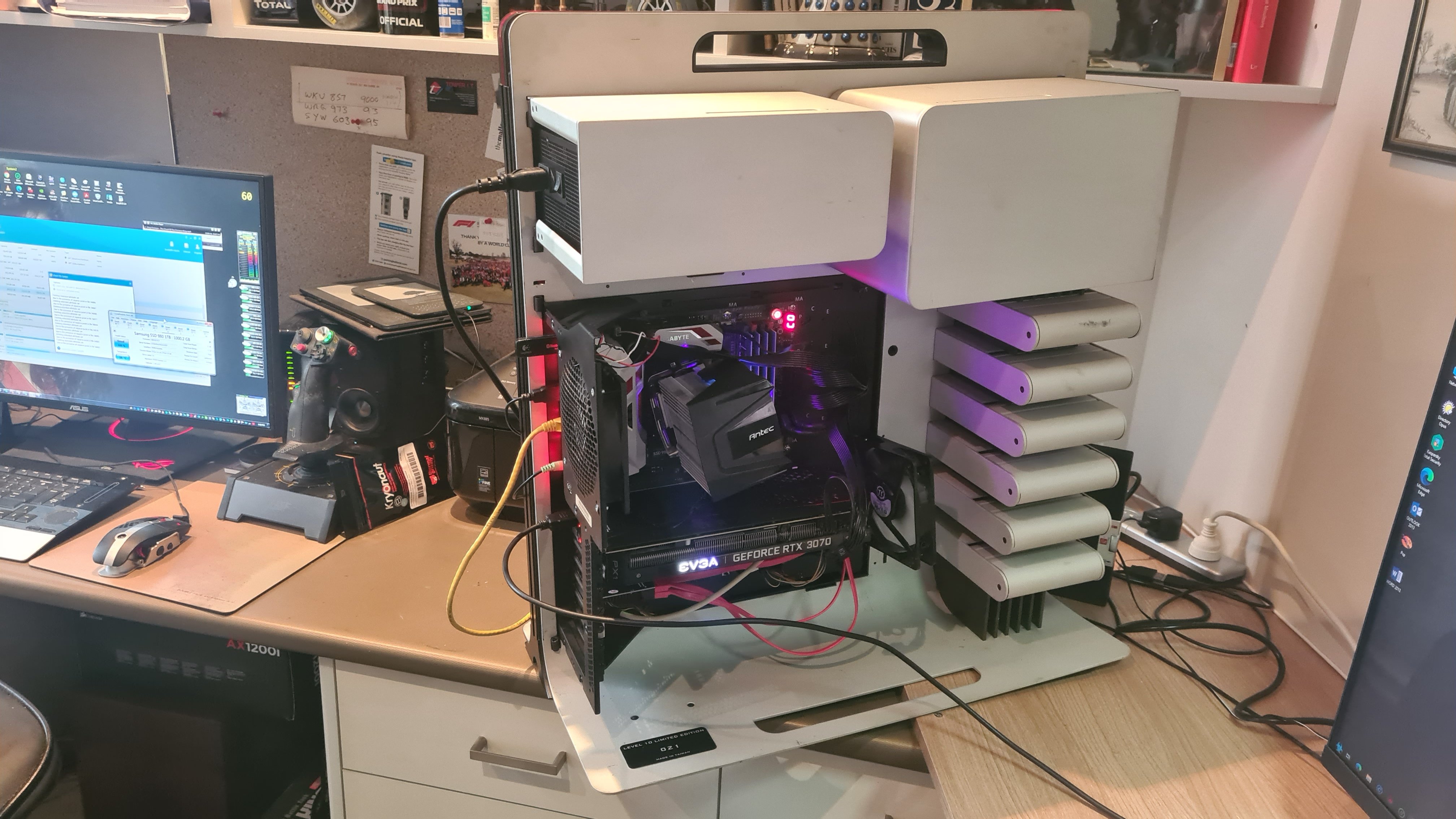
Well, I do want to thank all the early responders for their suggestions. But after spending almost 30 years in the IT profession at companies like IBM, NEC, Digital, Apple, GE Capital IT, Compaq, Hewlett-Packard and forming my own, "Pulse Software" company back in the day, I've come to realize if you look under the covers you find the basic problem. I want what I want! LOL! I have never bought a big desktop system, if I need one I built it. The company's I worked for supplied the laptops, which I would never try to build. Since I have already invested in WindowsBlinds, I may just give "Start11" a try since StarDock only wants $10.00 for it. I am not willing to live with Windows 10 as it exist. The old guard at MS is gone and the new crew seem to be programming for their convenience and not the end user, and that's not just my opinion. I m really "old school!" LOL! Just in case you're curious when I said I build my own. Picture of interior of current build almost finished. Peace and thanks again.

Reply #7 Top

There's a lot who 'build their own' in our bunch.  Customizing the GUI is one thing... customizing the hardware is simply another part of it.

Current machine.... went live in January, 2015 ... has an uptime of around 10 years.... I mean the big lump of Thermaltake Level 10, not the laptop...;)  It's No 221 of a world wide limited 500.


Reply #8 Top

Quoting StarGazer1777, reply 3

Thanks "basj" & brad_sams", I realize from my early days of programming (never had time to get to c++), that memory locations can get stomped on by graphic intensive utilities, that's why I was looking for an intensity setting in the Aero 11 theme that would even out the tones in the title bar. Like I mentioned I have only downloaded 7 themes as most are way more than I want, and Aero 11 is the only theme that causes this issue. It is also the only one I found that can "glass" the title bar area. If I change the theme the problem goes away. In the top two images you can see the desktop and the area with the multi-tone buttons. Thankfully this doesn't effect the wider "explorer" titles. I going to mess around with the OS color settings to see if I can find a cause and effect. Have I told you how much I hate Windows 10? Miss XP and really miss Windows 7. If I had wanted a MAC, I would have gone that route when I moved on from my beloved TRS-80. I read more and more about non-tech folks playing around with their Windows 10 registry just to make a color change. That's not right or safe Mr. Microsoft. Maybe the guys at "Simplex Designs" have a solution? Thanks again.


Lower your screen DPI to 100%, for some reason higher dpi in the current skin version does not obey the image margins correctly on 120% and higher scale. I am working on an updated version of the theme, but its taking quite some time as I have to import hundreds of images for higher screen scales (Some dont have them so I have to manually make them).

Reply #9 Top

Then, earlier this year... No. 021... second hand took a lot of rebuilding, particularly when I discovered not all Modular PSUs are wired the same....and fried a 1000w Antec.

Reply #10 Top

I see I am among the "elite", how refreshing! Sorry about the image, forgot to down scale it! Looking at "Jafo's" images, I may never put the covers back on the case. LOL! It's a Fractal Design. I see someone likes either flight or space sims. I go all the way back to the first Wing Commander's. Been waiting for Squadron 42 for "ever!" Just bought a Trustmaster T.16000, changed my mind about spending $500 on a Warthog. Special thanks to the folks from SimplexDesigns for responding. Oh, did try 100%, but at 1920x1080 (recommended) made no difference. Not to worry, I am a patient "sob" and will wait for an update. I know it won't take as long as waiting for Squadron 42! ROFLMFAO!!!

Reply #11 Top

Quoting StarGazer1777, reply 10

Special thanks to the folks from SimplexDesigns for responding.

SimplexDesigns isn't a company. He's a solo skinner, and a rather good one. ;)

+1 Loading…
Reply #12 Top

Quoting StarGazer1777, reply 10

I see someone likes either flight or space sims.

I do graphics [I skin planes] for MS FSX .... they are a challenge as they never follow a standard method of doing them.

When done from scratch and generating your own 'paint kit'  it can take a huge amount of work..

Here's a whacky example.... 

Reply #13 Top

Quoting StarGazer1777, reply 10

Oh, did try 100%, but at 1920x1080 (recommended) made no difference. Not to worry, I am a patient "sob" and will wait for an update. I know it won't take as long as waiting for Squadron 42! ROFLMFAO!!!

Make sure when you set to 100% screen dpi that you restart your system to take affect. Make sure that it did not set back to higher than 100% after restart. You might need to re-apply the skin if possible. Idk why but windowblinds does not read margins properly on higher DPI settings if the main image is too small, it causes the margins to only select from the edges rather than 2-3pixels set by the skin settings. This causes everything to look stretch wonky like in your pictures. They said its working as intended but thats not how windows native visual style files work.

Reply #14 Top

THIS IS A RE-REPLY AS IT SEEMS THE 20 APRIL REPLY WAS LOST???


Thank you SimplexDesigns, (maybe one day I'll know your name, or at least an initial)


Setting the dpi to 100% was the magic that worked. Two months ago if someone had ask me about “skins” and “themes”, I wouldn’t know what the heck they were talking about! Sort of reminded me of my early days of programming and a program I was writing kept crashing during testing and a friend was kicking my ass for being stupid. Well, I found the problem in a single line of code with a missing semi-colon ( ; ), that pointed to a subroutine. He tried his hand at writing in BASIC and said, “This ain’t so easy, I thought BASIC was easy!” I said don’t let the name fool you. I still use a program I wrote in TRS-80 BASIC II, (45 pages of code), with a polish calculator, IO routines and security logins) running in an emulator for balancing my check book and maintaining budget information. I actually used that program to inform my Bank I was losing 25-50 cents every month, they laughed, then checked my numbers. Long story short, an Executive at the branch had set up a “stealth account”, and was draining folk’s accounts, he had about $290,000 in the account when the police arrested him. Never made the “papers”, to prevent a run on the bank. Anyway the key was restarting after the change, as Windows10 will even change registry settings back if it wants, and updates can undo a bunch of stuff. I’m finding that out with color settings. I’m going to use “WinAero Tweaker”, (a great little unity) to see if I can make some text big enough for my older eyes to see. My final test was seeing if my full motion StarTrek screen saver by ITI (not around anymore), would function. Yeah! I really hate having to move to Windows10 from Windows7 this past February, and all the "BS" about security. Nothing ever got through my security suites in 10 years! I had to move because of updates and any support, not security, and frankly I was happy with the older programs. Nobody needs most of the added “bloat” tacked into programs. Thank you again SimplexDesigns. Sorry for the “rant!” I knew it wouldn’t take as long as Squadron 42! LOL! Happy Easter My Friend…well done!

The Proof:

Reply #15 Top

Quoting StarGazer1777, reply 14

I actually used that program to inform my Bank I was losing 25-50 cents every month, they laughed, then checked my numbers. Long story short, an Executive at the branch had set up a “stealth account”, and was draining folk’s accounts, he had about $290,000 in the account

Maybe he thought he was Richard Pryor (Superman III).

Reply #16 Top

LOL! I don't know what the hell he was thinking! But, when you get the Banking Commission, Police Dept. and the FBI involved...whew! They reviewed my code to see how I had gotten so many banking variables accounted for like fees and account charges. Maybe they thought I was in on the take. LOL! (not funny). Except for the money it wasn't that big a deal for me as the "checking account" was a semi-small part of my program. But, you don't want to have the FBI on your ass! Two screen shots in case you're curious. Bank IT department offered me a job. No thanks! Remember this was, "A Long Time Ago, In A Galaxy, Far, Far Away!"


Reply #17 Top

"save to cassette"...yep a galaxy far far away...;)

Reply #18 Top

Quoting StarGazer1777, reply 16

Remember this was, "A Long Time Ago, In A Galaxy, Far, Far Away!"

Those screen shots bring back memories. After a day of looking at those green screens, everything would have a red hallo around it for a while. :grin:  

Reply #19 Top

pelaird,

LOL! I had to laugh, every time folks would come over and see me running that program on a MS OS’s they go, “How’d you do that?” Then they’d giggle when they saw save to “cassette”. Then say why not just save to your hard drive? And I’d tell ‘em, back in the day, a cassette was all there was, until floppy disk came around at $599 apiece for 100kb of storage. Windows 10 & 11 will recognize 3.5 to 5.25 floppy (USB)…with some headaches of course. Ah…those early days of computing. I remember falling out of love with MS support when I wanted to move Windows XP off my “C” partition to my “D” partition to make room for Windows 7. A MS tech person said that was easy, just do a format “C”. I told him I was running a “triple boot system”, and that would destroy everything. He then said I couldn’t do that. So, I just opened one of my registry editors, pulled in “XP”, changed all the pointers that pointed to “C:\” to “D:\”, re-booted with Windows98se, copied the “XP” directory to “D”, rebooted to “XP” after changing the various boot loaders and never looked back. “Open the pod bay doors Hal.” “I’m sorry Dave, I can’t do that!” LOL! Idiots! Couple things I’ve learned over the years, and one of the most important, is always have two admin accounts. My laptop has four users; Admin1, Admin2, Superuser, Visitor. I know too many people screwed up their system running under admin, lost it, and had no way back home. A second admin would have saved their asses! Unless you have "mirror backups". I use TeraByte Unlimited. PS: Didn't you get a pair of the anti-ray glasses! LOL! Peace.

Reply #20 Top

Quoting StarGazer1777, reply 19

I remember falling out of love with MS support when I wanted to move Windows XP off my “C” partition to my “D” partition to make room for Windows 7. A MS tech person said that was easy, just do a format “C”. I told him I was running a “triple boot system”, and that would destroy everything. He then said I couldn’t do that.

In Jan 2015 this system went live... Windows 7 Ultimate 64 and it was installed on an M.2 drive back when the MS Installer did not recognize such a drive.  It was invisible and thus not an install option.

I did it anyway. [there are tricks].

I drew the line at cassette drives... however I still have 3.5, 5.25, and Zip drives around here 'just in case'.  These days even a CD rom is an oddity, but yes most of my machines still have a Blue-ray/DVD ...;)

Reply #21 Top

Yes Jafo, it's funny how the industry convinces folks that...oh that's old technology and not good any more. When we all know that's not quite true and a bunch of bull. What folks need to do is be aware. As far as I'm concerned MS made four great OS's. Windows98se (after they took off their training wheels), Windows 2000Pro, Windows XP Pro, and Windows 7. All the rest were basically "money grabs!" Windows 10 is just barely tolerable, but has given a lot of guys a second very artistic career. I was an Art Director for many years, so I appreciate your art which Windows 10 drove me to. Even though my new build is a Dual INTEL Xeon® Silver 4214 12-Core 2.2-3.2GHz Turbo, with (3) Seagate 6TB EXOS 7e10 Sata's, plus the (3) older Seagate Cheetah 15k.5, 300 GB. I still have (2) Plextor Drives, DVD and Blue-Ray, plus a Dual 3.5-5.25 floppy in her. I have tons of floppies, so unless I spend a year copying them to a hard drive, they stay in the cabinet. You never know when you might need the way back machines. PS: Your "whacky" (your words, not mine), reminds so much of the Concord. That was a beautiful piece of Aeronautic!

Reply #22 Top

Quoting StarGazer1777, reply 21

PS: Your "whacky" (your words, not mine), reminds so much of the Concord. That was a beautiful piece of Aeronautic!

It's a North American XB70 Valkyrie ... almost twice as fast as a Concorde...

The 'whacky' bit is it's about the last plane imaginable likely to be used by the Thunderbirds Team [and not 'just' because there is only one surviving].  It was designed to supercruise riding its own shockwave.... about 15 miles up ... so not at all a spectacle at an Air Show...;)

+1 Loading…
Reply #23 Top

Quoting Jafo, reply 22


Quoting StarGazer1777,

PS: Your "whacky" (your words, not mine), reminds so much of the Concord. That was a beautiful piece of Aeronautic!


It's a North American XB70 Valkyrie ... almost twice as fast as a Concorde...

The 'whacky' bit is it's about the last plane imaginable likely to be used by the Thunderbirds Team [and not 'just' because there is only one surviving].  It was designed to supercruise riding its own shockwave.... about 15 miles up ... so not at all a spectacle at an Air Show...;)

As a USAF 22 Year Veteran, I must say a Paul... that is one cool plane! :-)

Reply #24 Top

LOL! I bet it wasn't. Don't know to many folks would enjoy eating a meal with a pressure suit on at 15,000. LOL! It's fast. But, even as fast as an F-35 is for example, it can't out run a Soviet s400 which can do 11,000 mph, mach 14. My hats off to the men and woman who strap on an F-35, or any other fighter. They are extraordinary souls. I loved the TopGun movies, but, some of the crap that Maverick pulled, would not be tolerated in real life, especially ignoring a senior officers command. I don't care who your daddy was! LOL!

Reply #25 Top

Quoting StarGazer1777, reply 24

My hats off to the men and woman who strap on an F-35, or any other fighter.

Not sure you comprehended the size of an XB70.  Fighter it isn't ...;)

+1 Loading…