Groupy 2.15 Release Feedback Thread

With the Groupy 2.15 release, we are creating this thread so that users can report any observed issues.  

Obtaining the product

Object Desktop members can get the release from within Object Desktop Manager 

Individual purchases (as well as Object Desktop Members) can also be obtained from your account page: https://store.stardock.com/myaccount/products

For guest check-out purchase (no account), from this link: http://www.stardock.com/support/productkeyretrieval

Reporting an issue

Please include the following for anything found:

  • Exact Windows version \ build (winver.exe)

  • Detailed steps to recreate the issue seen

  • Screenshots and videos are very helpful.  Videos can be uploaded to a cloud drive service (GoogleDrive, DropBox, OneDrive, YouTube), with a shared link included in your post.  Images can be copied and pasted directly into a post.

  • If there are specific apps that the app does not work (well) with, please note what apps and their exact versions.  If any app is not common, a link to a trial version would be appreciated.

Thank you for your interest and any time you put into making Groupy 2 a better product.

Sean Drohan
Stardock Support Manager

138,676 views 65 replies
Reply #1 Top

Groupy 2.15 Changelog (Released 03/21/2024)

03/21/2024

General release

Version

  • UI: 2.15

  • GroupyConfig.exe: 2.1.5.3

Platforms

  • Stardock

  • Steam

Changes

  • Resolves mouse wheel scrolling config app pages accidentally scrolling combo boxes when the mouse ends up over one of them.

03/15/2024

Version

  • UI: 2.15

  • GroupyConfig.exe: 2.1.5.2

Platforms

  • Stardock: Beta and Object Desktop Insider

  • Steam

Changes

  • Resolves the do not paint a tab for groups with a single tab also impacting integrated explorer and Notepad tabs

  • Resolved the issue of not being able to drag auto-grouped windows out of groups

  • Tweaked group joining to factor in the current virtual desktop more for auto-grouping

  • Tweak for detecting support for integrated tabs in Explorer on Win11

Languages

  • Japanese now included. Credit (and much thanks): DiGS-O5

02/23/2024

Version

  • UI: 2.15

  • GroupyConfig.exe: 2.1.5.1

Platforms

  • Stardock: Beta and Object Desktop Insider

  • Steam

Changes

  • Corrected missing line on the edge of Windows Explorer windows on Win11 when not replacing OS tabs possibly due to modification of the OS to remove the native OS tabs

  • Resolved positioning of non-rounded tabs in integrated mode when Groupy icon hidden on the bar
    Added registry key to make tabs less rounded G2_LessRounded = "1" (in HKEY_CURRENT_USER\Software\Stardock\Groupy\Groupy.ini\Groupy)

  • Added registry key to make tab bar less rounded G2_LessRoundedBar = "1" (in HKEY_CURRENT_USER\Software\Stardock\Groupy\Groupy.ini\Groupy)

  • Resolved issue with custom rules causing windows to not remain maximized when the first window as maximized

  • Resolved issue with custom groups combining the windows in the wrong order and so making a new window override the position of the original rather than merging with the original

  • Detects if the user has client area animations disabled and if so disables the Groupy tab animations.  G2_ForceNoAnimsOnTabs = "1" would also force this

  • Resolved issue with auto group option not working correctly

  • Stopped extra separator line showing on left of titlebar when do not show the groupy icon on the left mode is enabled

  • Added UI options to force groupy tab animation to off and to hide line under tabs when in integrated mode if wanted

  • Reduced strength of line under tabs in integrated mode when in dark mode

Language Updates

  • en.lng has been updated with 2 new strings. Supported languages have been updated in-app and on GitHub

02/19/2024

Changes

  • ARM64 support added. This is only currently available to Object Desktop members. It will make it to a general release in future updates.

  • Resolved issue with delayed detection of explorer tabs causing new explorer tabbed windows to jump up and down briefly

  • Resolved SwifDoo PDF reader having gap above and below window when maximized

  • Resolved PDF-XChange having overlap on titlebar incorrectly when maximized
    Resolved Steam having overlap on titlebar incorrectly when maximized

  • Modified saving colors per app so it factors in path as well for duplicate names

  • Added option to force alternative maximize mode when an application is being overlapped slightly

  • Added option on ungrouped Groupy bar to disable this for the given app

  • Added support for Facebook Messenger to be dragged into groups

  • Resolved New explorer tabs should open in the same folder UI option not appearing to save (it did, the UI just didn't reflect the value)

  • Added support for auto grouping New MS Teams for Work client chat windows

  • Resolved issue with opening maximized windows in New MS Teams / VSCode and then appearing non-maximized

  • Worked around an issue with new MS teams for Work client and crashing when closing a child window

  • Non-grouped window tabbed bar will auto close 2 seconds after the last mouse movement to ease use if it is on top of other things you want access to.  The previous behaviour can be obtained by setting G2_DoNotAutoCloseBar = "1" in the registry (HKEY_CURRENT_USER\SOFTWARE\Stardock\Groupy\Groupy.ini\Groupy)

  • Fixed resource leak on saving new group icon

Language Updates 

Reply #2 Top

Known issues

While we appreciate all feedback, please remember that we offer no official support for beta \ preview \ developer channel versions of Windows. If you report issues while in any of those early release channels, you should not expect them to be addressed unless it still exists in a retail version of Windows.

  • tbd
Reply #3 Top

***Reserved***

Reply #4 Top

After saving a group, closing the group, and opening it from the group shortcut the last 2 tabs colors are missing.

I've tried resaving the same group. I've made other groups with totally different programs. This happens in every instance.

The colors I am using are saved colors if it makes any difference.

Reply #5 Top

While this has existed for a while, this visual issue has been bugging me:

On applications that do not utilize replaced tabs (that being File Explorer and Notepad), the "Traditional" tabs appear detached. This is not how I would expect the tabs to look. This used to not be the case until 2.12 (when I first noticed) - 2.15

This is how I expect tabs to appear with the traditional style.


Steps to reproduce:

1. Select Traditional tabs instead of Rounded tabs

2. Group windows that will not show integrated tabs (if you have that option enabled), or replaced tabs (File Explorer and Notepad). You should see the visual issue

Note: This issue will not happen if the windows are maximized

Winver:

Reply #6 Top

Quoting BrookeRaraAvis, reply 4

After saving a group, closing the group, and opening it from the group shortcut the last 2 tabs colors are missing.

I've tried resaving the same group. I've made other groups with totally different programs. This happens in every instance.

The colors I am using are saved colors if it makes any difference.


Hello,
Sorry to hear you are having issues. I try to reproduce your issue, but I can not reproduce it.

Thanks
Basj,
Stardock Community Assistant.

Reply #7 Top

I just reproduced what you did in your video & the colors work perfectly. So, Notepad and Windows Explorer aren't causing any problems. Wish I had a list of our overlapping apps and I'd put in the work to test 'em and get something that will break for you.

Reply #8 Top

When using groupy 2 with file explorer, I have a small white line that sticks out on the left top area under the first tab. This has been a long standing issue that has prevented me from using groupy 2

Reply #9 Top

Quoting PhoenixRising1, reply 8


When using groupy 2 with file explorer, I have a small white line that sticks out on the left top area under the first tab. This has been a long standing issue that has prevented me from using groupy 2

Reply #10 Top

Thanks Pelaird, but that does not fix the issue on my pc. I went as far as to install a clean windows 11 and still no luck

Reply #11 Top

Quoting PhoenixRising1, reply 8


When using groupy 2 with file explorer, I have a small white line that sticks out on the left top area under the first tab. This has been a long standing issue that has prevented me from using groupy 2

Hello,
Sorry to hear you are having issues. But, strangely I don't see that line on my system.

Thanks
Basj,
Stardock Community Assistant.

Reply #12 Top

Quoting basj, reply 11

Hello,
Sorry to hear you are having issues. But, strangely I don't see that line on my system.

Unfortunately, I can not seem to find the variable as to why my system has the line while others do not. I was frustrated enough to try a fresh clean install of Windows 11 and still the issue persists. At this point I will probably just forgo using Groupy 2 for the time being. I guess we will see if anyone besides me has this issue.

Reply #13 Top

Quoting PhoenixRising1, reply 12

Unfortunately, I can not seem to find the variable as to why my system has the line while others do not. I was frustrated enough to try a fresh clean install of Windows 11 and still the issue persists. At this point I will probably just forgo using Groupy 2 for the time being. I guess we will see if anyone besides me has this issue

Are on Windowblinds theme? And your Groupy setting icon on that tab look different than mine. Are we on the same version? I am Groupy 2.15.

Thank you,

Basj,
Stardock Community Assistant

Reply #14 Top

Quoting basj, reply 13

Are on Windowblinds theme?

No I am not. I have no programs installed that alter the explorer either. Nor am I using an insider version of Windows 11.

Quoting basj, reply 13

And your Groupy setting icon on that tab look different than mine. Are we on the same version? I am Groupy 2.15.

I am using Groupy version 2.15. But you are correct the icons are different. Looking at everyone's posted screen shots on this thread it appears there are two different icons. Reply # 4 matches my icon. Where as Reply #5 matches your icon. I am not sure why exactly that is?

Reply #15 Top

Quoting PhoenixRising1, reply 14


Quoting basj,

Are on Windowblinds theme?


No I am not. I have no programs installed that alter the explorer either. Nor am I using an insider version of Windows 11.


Quoting basj,

And your Groupy setting icon on that tab look different than mine. Are we on the same version? I am Groupy 2.15.


I am using Groupy version 2.15. But you are correct the icons are different. Looking at everyone's posted screen shots on this thread it appears there are two different icons. Reply # 4 matches my icon. Where as Reply #5 matches your icon. I am not sure why exactly that is?

What scale factor is your display set to?

Reply #16 Top

Quoting PhoenixRising1, reply 12

Unfortunately, I can not seem to find the variable as to why my system has the line while others do not. I was frustrated enough to try a fresh clean install of Windows 11 and still the issue persists. At this point I will probably just forgo using Groupy 2 for the time being. I guess we will see if anyone besides me has this issue.

I have the same issue; I just didn't notice it until you pointed it out. It doesn't really bother me enough to try a reinstall of Groupy2. I really thought "Do not draw line under integrated tab bar" was supposed to fix this.

Windows 11 Pro - 22635.3350; Groupy2 - 2.1.5.3

Reply #17 Top

Quoting Neil, reply 15

What scale factor is your display set to?

1080p @ 125% scale

I am also running on Windows 11 pro (perhaps the pro model is the variable?)

Reply #18 Top

Quoting PhoenixRising1, reply 17


Quoting Neil Banfield,

What scale factor is your display set to?


1080p @ 125% scale

I am also running on Windows 11 pro (perhaps the pro model is the variable?)

I suspect it is the 125% scaling.  Non integer scaling is prone to small differences in rounding behaviour.

+1 Loading…
Reply #19 Top

Quoting Neil, reply 18

Quoting PhoenixRising1,

Quoting Neil Banfield,


What scale factor is your display set to?

1080p @ 125% scale

I am also running on Windows 11 pro (perhaps the pro model is the variable?)

I suspect it is the 125% scaling.  Non integer scaling is prone to small differences in rounding behaviour.

This is the 16x16-32 icon from GroupyConfig.exe. It looks nothing like the icon in basj's post at Reply #11.

Very Strange. Basj, is your screenshot from a Windows 10 machine?

Reply #20 Top

Quoting Neil, reply 18

I suspect it is the 125% scaling. Non integer scaling is prone to small differences in rounding behaviour.

Neil, you are correct 125% scale is in fact the issue. Issue persists @ 120 - 125% scale but the issue is actually fixed at the custom scale of 126% Not too bad of a change for me.

I am glad you figured out the issue. It was driving me crazy

Reply #21 Top

Quoting pelaird, reply 19

This is the 16x16-32 icon from GroupyConfig.exe. It looks nothing like the icon in basj's post at Reply #11.

Very Strange. Basj, is your screenshot from a Windows 10 machine?

I figured this one out as well.

Basj icon is seems to be at present at 100% scale. Any other scale seems to switch to the other icon. This is still kind of strange.

Reply #22 Top

Quoting PhoenixRising1, reply 21


Quoting pelaird,

This is the 16x16-32 icon from GroupyConfig.exe. It looks nothing like the icon in basj's post at Reply #11.

Very Strange. Basj, is your screenshot from a Windows 10 machine?

I figured this one out as well.

Basj icon is seems to be at present at 100% scale. Any other scale seems to switch to the other icon. This is still kind of strange.

Yes, it was on 100% scale on Win11 VM.

Thank you,

Basj,
Stardock Community Assistant

Reply #23 Top

Hi.

Right-clicking on Groupy 2 tab crashes Groupy after I bump it up to version 2.15.
My windows version: 23H2 (OS Build 22631.3374)


Is anyone facing the same issue?

Here is how to reproduce (movie link below)
In the video, I'm merging 2 notepad apps, but it also happens in any combinations of apps.
https://drive.google.com/file/d/1jiwER9wZnVe-oTB-1WhljsqZCJIP2Rcd/view?usp=sharing

As you can see, if I right-click on groupy tab, the groupy bar dissapears and non-active windows are hidden somewhere.


I would like to keep using Groupy 2, so I'm trying to downgrade it to 2.12 where this problem does not happen,
but even if I use an older installer it installs 2.15. Is there any way to downgrade the application?

Reply #24 Top

Quoting techneconn, reply 23

Hi.

Right-clicking on Groupy 2 tab crashes Groupy after I bump it up to version 2.15.
Is anyone facing the same issue?

Here is how to reproduce (movie link below)
In the video, I'm merging 2 notepad apps, but it also happens in any combinations of apps.
https://drive.google.com/file/d/1jiwER9wZnVe-oTB-1WhljsqZCJIP2Rcd/view?usp=sharing

I would like to keep using Groupy 2, so I'm trying to downgrade it to 2.12 where this problem does not happen,
but even if I use an older installer it installs 2.15. Is there any way to downgrade the application?

Hello,
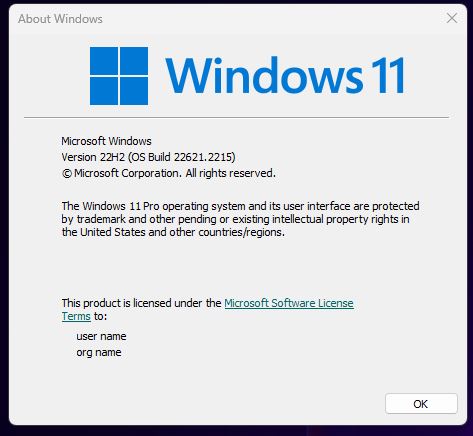
Sorry to hear you are having issues. Need to know your Windows 11 full version number. Please use Winver.exe. Something like screenshot below.

Thank you.
Basj,
Stardock Community Assistant.