sdRohan sdRohan

Start11 v2.05 Beta Feedback Thread

Start11 v2.05 Beta Feedback Thread

With the Start11 v2.05 (was 2.04) beta release today, we are creating this thread so that users can report any observed issues.  

Obtaining the beta:

Object Desktop members can get the beta from within Object Desktop Manager with 'show beta downloads' enabled:

Individual purchases (as well as Object Desktop Members) can also be obtained from your account page:

https://store.stardock.com/myaccount/products

Reporting an issue:

Please include the following for anything found:

  • Exact Windows version \ build (winver.exe)

  • Detailed steps to recreate the issue seen

  • Screenshots and videos are very helpful.  Videos can be uploaded to a cloud drive service (GoogleDrive, DropBox, OneDrive, YouTube), with a shared link included in your post.  Images can be copied and pasted directly into a post.

  • If there are specific apps that the app does not work (well) with, please note what apps and their exact versions.  If any app is not common, a link to a trial version would be appreciated.

Thank you for your interest and any time you put into making Start11 v2 a better product.

262,493 views 158 replies
Reply #26 Top

Quoting CIOXX, reply 25

Come to think of it, object desktop has never displayed that word beta on any of the apps


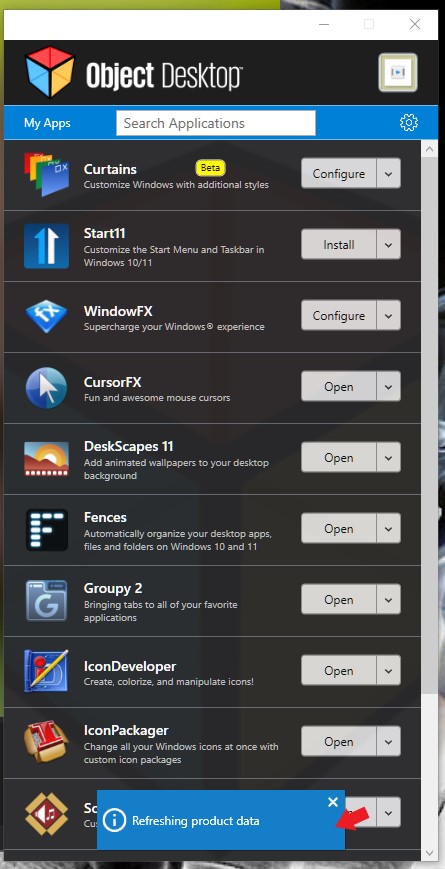
What is you Object Desktop version? Mine is V4.03. Also try disable "Show Beta downloads"-> Click "apply". "Refreshing product data" popup should appear refer screenshot below. Close it if does not close itself. Re-enable "Show beta downloads"->click "apply" button again. Recheck "My apps" does it shows the "Beta" sticker?

Thank you,

Basj,
Stardock Community Assistant

Reply #27 Top

Quoting basj, reply 22
Please try this, uninstall Start11, reboot immediately after uninstall finished. Re-download the latest version again, reinstall using it. Reboot again immediately after installation finish. Retest and report back.

Thank you,

Basj,
Stardock Community Assistant
So, clean uninstalling Start11v2 and reinstalling 2.03-stable or 2.04-beta no longer create PinMenu items for me.  I'm at a loss for what the real issue is, now.  I've tried disabling various security/customization software to no avail.  The only major updates to anything on my system has been Patch Tuesdays.

This isn't a big issue for me... but I figured I wasn't the only one.

Reply #28 Top

Quoting JLJTGR, reply 27

So, clean uninstalling Start11v2 and reinstalling 2.03-stable or 2.04-beta no longer create PinMenu items for me. I'm at a loss for what the real issue is, now. I've tried disabling various security/customization software to no avail. The only major updates to anything on my system has been Patch Tuesdays.

This isn't a big issue for me... but I figured I wasn't the only one.

Please try cleanboot and see if there are some conflicting application or corrupted admin account: https://forums.stardock.com/505872/start11-support-faq#cleanboot.

Thank you,

Basj,
Stardock Community Assistant

Reply #29 Top

Quoting basj, reply 26

What is you Object Desktop version? Mine is V4.03. Also try disable "Show Beta downloads"-> Click "apply". "Refreshing product data" popup should appear refer screenshot below. Close it if does not close itself. Re-enable "Show beta downloads"->click "apply" button again. Recheck "My apps" does it shows the "Beta" sticker?


Thank you,

Basj,
Stardock Community Assistant


My OD is also 4.03. Apparently the beta sticker is only implemented if you set OD to dark mode.

The new start update showed up now. I don't know why but I did reboot prior.

Thank you

Reply #30 Top

Quoting CIOXX, reply 29

My OD is also 4.03. Apparently the beta sticker is only implemented if you set OD to dark mode.

The new start update showed up now. I don't know why but I did reboot prior.

Thank you

Great, glad it resolved

Thank you,

Basj,
Stardock Community Assistant

Reply #31 Top

Quoting JLJTGR, reply 27


Quoting basj,
Please try this, uninstall Start11, reboot immediately after uninstall finished. Re-download the latest version again, reinstall using it. Reboot again immediately after installation finish. Retest and report back.

Thank you,

Basj,
Stardock Community Assistant

So, clean uninstalling Start11v2 and reinstalling 2.03-stable or 2.04-beta no longer create PinMenu items for me.  I'm at a loss for what the real issue is, now.  I've tried disabling various security/customization software to no avail.  The only major updates to anything on my system has been Patch Tuesdays.

This isn't a big issue for me... but I figured I wasn't the only one.

I'm curious to find out if you turn off "Auto Hide," do Taskbar Pins now work?

Reply #32 Top

Quoting pelaird, reply 31
I'm curious to find out if you turn off "Auto Hide," do Taskbar Pins now work?

Unfortunately, I already tried that at the beginning.

Quoting JLJTGR, reply 15
{...}
I have auto-hide enabled(bottom), and when trying to create the icon, the taskbar briefly appears... but there's no new icon.  I tried browsing a folder on my desktop, I tried using one of those pre-selected filtered folders.  I tried turning off auto-hide, restarting explorer and rebooting. 
{...}

Reply #33 Top

For me the taskbar pins work for some programs but not for others, not sure why, and these are normal desktop apps. However, i can tell you that for the ones that don't work, If I right click the white icon on the taskbar then right click the name of the application on the context menu that opens and select properties, if I click ok on the dialog that pops up, there is an error:


This does not happen on the ones that work. So the workaround is to correct the path in the (start in) box on that dialog, then reselect the icon, and click ok. After that you have to click (restart explorer) button in the (taskbar) vertical tab within configure (start 11) settings. Then the icon will show up!


Reply #34 Top

Quoting CIOXX, reply 33

For me the taskbar pins work for some programs but not for others, not sure why, and these are normal desktop apps. However, i can tell you that for the ones that don't work, If I right click the white icon on the taskbar then right click the name of the application on the context menu that opens and select properties, if I click ok on the dialog that pops up, there is an error:


This does not happen on the ones that work. So the workaround is to correct the path in the (start in) box on that dialog, then reselect the icon, and click ok. After that you have to click (restart explorer) button in the (taskbar) vertical tab within configure (start 11) settings. Then the icon will show up!


What do you have to alter about the path?

Reply #35 Top

Quoting alexvojacek, reply 14

I consider this issue with the taskbar buttons getting garbled every time I click on the start menu while the taskbar being centered troubling to say the least.

You SHOULD take your full time on fixing these things.  I paid for the original Start11 and then I paid again for the Start11v2 only to find a program that is half working.

We are using our PC's all day long.  Do you have any idea how tiresome is, having to restart the Explorer every time the Taskbar gets corrupted?.

You cannot provide software that people is paying for it to then ignore what people is complaining about.  Can someone please answer me on what should I do with my taskabar?.

You've marked the "center taskbar" with autohide as Experimental and yet, this is the DEFAULT behavior of Windows 11 if this program weren't installed and the whole issue I'm having is that the taskbar wants to align the buttons to the left and it is corrupting the Start Button and the first button after the Start.  It shouldn't be THAT hard to fix it somehow seeing as I can partially fix it by applying a custom Start Image.  Yet, I still get corruption in the form of a line.

Either fix it or tell me WHERE should I look to fix it. Or at least, give me a reply if you are taking a look at this case.  You should have a ticket system where we can report issues that you can actually follow up. It's very very annoying and it generates a lot of frustration to have to read about tons of forum posts only to see that no developer ever answers to you.

He's really right. It has become a real burden to constantly have to go through this forum only to ultimately find out that nothing (at least nothing that concretely helps us) is happening!

What are you doing to fix this points asap???

Reply #36 Top

Since no developer seems to really care about my issue.  Here is a fun piece for you...

Hey there, Stardock Start11 Wizards!

So, I've been playing this fun game called 'Spot the Glitch' with your software. It's where the taskbar buttons decide to throw a party and garble themselves every time I dare to click the start menu. It's like a surprise party I never wanted, especially with the taskbar playing hide-and-seek in the center.

I've invested not once, but twice in this rollercoaster ride - original Start11 and the sequel, Start11v2. It's like buying tickets to the same movie, hoping for a different ending. Spoiler alert: the taskbar is still the villain.

Living life on the edge, we're all glued to our PCs. Imagine the sheer delight of restarting Explorer every time the taskbar decides to throw a tantrum. It's my new workout routine.

Now, here's a wild thought: when folks pay for software, they might, just might, want it to work as advertised. Shocking, I know! Could someone kindly tell me what sorcery I need to perform with my taskbar?

And about the 'center taskbar' marked as 'Experimental' – isn’t that just Windows 11's everyday fashion? The taskbar seems to have a mind of its own, aligning buttons left, right, and center, corrupting my Start Button. I tried waving a magic wand (a.k.a. custom Start Image), but all I got was a mysterious line of corruption as a souvenir.

So, dear magicians, could we either fix this spell or maybe, just maybe, get a secret map to the solution? A simple 'We're on it!' would be music to my ears. And hey, how about a ticket system for us adventurers? It's like going on a quest through endless forum posts, with no wizards in sight to guide us.

Looking forward to your owl (or forum post, whichever is faster).

Hoping ChatGPT-4 can finally make you see reason.


Reply #37 Top

Feature request: could we please have an option to insert a small padding area so that when the enhanced taskbar is full, there is enough space between the rightmost taskbar button and the ^ symbol (show hidden icons) to access the right-click context menu? The standard Windows taskbar leaves a small gap, circled in the image below.

On the enhanced taskbar the buttons go all the way up to the ^ leaving no space to click. 

Reply #38 Top


Quoting AndyW70, reply 37

Feature request: could we please have an option to insert a small padding area so that when the enhanced taskbar is full, there is enough space between the rightmost taskbar button and the ^ symbol (show hidden icons) to access the right-click context menu? The standard Windows taskbar leaves a small gap, circled in the image below.


On the enhanced taskbar the buttons go all the way up to the ^ leaving no space to click. 


This could also fix my issue as well.

Reply #39 Top

I would have thought my (and others) issue of chrome app icons just not displaying. Would be a priority to get fixed. This has been a issue since v1. My original post was outright ignored. And then another gained some traction but no action has been made, It's becoming clear v2 is half baked and stardock is incapable to get ahead of the issues being brought forward. When you charge for software users are going to expect issues fixed timely as they should. 

Reply #40 Top

Quoting lazyboyy, reply 39

I would have thought my (and others) issue of chrome app icons just not displaying. Would be a priority to get fixed. This has been a issue since v1. My original post was outright ignored. And then another gained some traction but no action has been made, It's becoming clear v2 is half baked and stardock is incapable to get ahead of the issues being brought forward. When you charge for software users are going to expect issues fixed timely as they should. 

Yes, it's awful when your issues are blatantly ignored by the developers.

Reply #41 Top

I wouldn't say ignored. Yes there has been many times where i post an issue and no one responds directly however I would say most of the time another build drops and those issues are fixed. Not always of course and every issue is different. Some may get prioritized over others.

One of the things I do after an initial post is wait for a build or two. If enough time has passed and the issue still remains I might add a follow up asking if anyone has looked into it.

While I do understand the frustration you may have (everyone wants everything to work smoothly all the time) all I would say is try to be patient. Also there's nothing wrong with posting or asking for any additional info. 

On the issue itself I can't seem to reproduce it on my system. Unless I misread your previous post. If you wouldn't mind reposting the steps to reproduce it I would like to confirm it on my machines (I have many).

+2 Loading…
Reply #42 Top

Quoting Narusegawa, reply 41

I wouldn't say ignored. Yes there has been many times where i post an issue and no one responds directly however I would say most of the time another build drops and those issues are fixed. Not always of course and every issue is different. Some may get prioritized over others.

One of the things I do after an initial post is wait for a build or two. If enough time has passed and the issue still remains I might add a follow up asking if anyone has looked into it.

While I do understand the frustration you may have (everyone wants everything to work smoothly all the time) all I would say is try to be patient. Also there's nothing wrong with posting or asking for any additional info. 

On the issue itself I can't seem to reproduce it on my system. Unless I misread your previous post. If you wouldn't mind reposting the steps to reproduce it I would like to confirm it on my machines (I have many).

Are we talking about my issue?.

See?.  This is the problem of having to deal with a forum thread to solve issues.

Reply #43 Top

Quoting alexvojacek, reply 42


Quoting Narusegawa Naru,

I wouldn't say ignored. Yes there has been many times where i post an issue and no one responds directly however I would say most of the time another build drops and those issues are fixed. Not always of course and every issue is different. Some may get prioritized over others.

One of the things I do after an initial post is wait for a build or two. If enough time has passed and the issue still remains I might add a follow up asking if anyone has looked into it.

While I do understand the frustration you may have (everyone wants everything to work smoothly all the time) all I would say is try to be patient. Also there's nothing wrong with posting or asking for any additional info. 

On the issue itself I can't seem to reproduce it on my system. Unless I misread your previous post. If you wouldn't mind reposting the steps to reproduce it I would like to confirm it on my machines (I have many).


Are we talking about my issue?.

See?.  This is the problem of having to deal with a forum thread to solve issues.

Yes  I was referring to your issue. 

Reply #44 Top

Quoting alexvojacek, reply 42

This is the problem of having to deal with a forum thread to solve issues.

Stardock is a small company which works similarly to large companies. Even MS has forums with volunteers who try to solve frequent problems of other users. When a volunteer runs into a problem they can't solve, they send it to Support to help solve.

This is simply the model in use in many places. Of course, you want the most skilled worker to solve your problem as quickly as possible. So do many others. It quickly becomes obvious that approach is untenable as is hiring many highly skilled people, as people object to pricing increases...

So...you're back to information gathering and folks who know how the software works trying to help new users, or even experienced users who run into problems.

If you have a better way, suggest it.

+1 Loading…
Reply #45 Top

Quoting DrJBHL, reply 44


Quoting alexvojacek,

This is the problem of having to deal with a forum thread to solve issues.


Stardock is a small company which works similarly to large companies. Even MS has forums with volunteers who try to solve frequent problems of other users. When a volunteer runs into a problem they can't solve, they send it to Support to help solve.

This is simply the model in use in many places. Of course, you want the most skilled worker to solve your problem as quickly as possible. So do many others. It quickly becomes obvious that approach is untenable as is hiring many highly skilled people, as people object to pricing increases...

So...you're back to information gathering and folks who know how the software works trying to help new users, or even experienced users who run into problems.

If you have a better way, suggest it.

I agree. I think using a forum is better in many cases. Often times many problems have already been resolved or involve simple solutions such as a setting change. Not to mention I would wager there are way more users who can help. Of course it doesn't work in every case (sometimes a bug is a bug) but it's nice to have many people working on a problem. 

I'm not sure what other system would be better. Different maybe but better maybe not.

+1 Loading…
Reply #46 Top

Quoting alexvojacek, reply 40

Yes, it's awful when your issues are blatantly ignored by the developers.

Your issue has been diagnosed and then commented on by Neil (the lead developer of start 11v2) on the previous thread. There is no current fix for this and thus nothing to report

+3 Loading…
Reply #47 Top

Quoting DrJBHL, reply 44


Quoting alexvojacek,

This is the problem of having to deal with a forum thread to solve issues.


Stardock is a small company which works similarly to large companies. Even MS has forums with volunteers who try to solve frequent problems of other users. When a volunteer runs into a problem they can't solve, they send it to Support to help solve.

This is simply the model in use in many places. Of course, you want the most skilled worker to solve your problem as quickly as possible. So do many others. It quickly becomes obvious that approach is untenable as is hiring many highly skilled people, as people object to pricing increases...

So...you're back to information gathering and folks who know how the software works trying to help new users, or even experienced users who run into problems.

If you have a better way, suggest it.

I do not want the best developer to solve my issue.  I just want a better way to organize each bug that was reported.


At this point anything will be easier than this.  They could very much sign up for a free  Taiga account which allows for a ticket system without paying a penny.

https://taiga.io/

Reply #48 Top

Quoting alexvojacek, reply 47

At this point anything will be easier than this. They could very much sign up for a free Taiga account which allows for a ticket system without paying a penny.

https://taiga.io/

I'll forward your suggestion.

As for me, I've learned that common things are common and can be handled by folks I know and trust in the Community more quickly than Support can, simply due to numbers of problems vs Support personnel. Also, it's a waste of Support's time to deal with 90% of the simple problems brought up in forums, with all due respect to the folks I care a great deal about in Support.

We evolved as a Community, and I'd rather hope we stay that way. The fact that your problem was solved by the top guy (in another thread) speaks to my point of view.

Please note:

"Stardock will be closed for the holidays starting on December 25th and we will be returning on January 2nd. We will be monitoring support tickets and forums during this time but expect delays in responses during this time.

Happy Holidays!"

Reply #49 Top

Yes but I'm not saying you should replace this or assign this to support.

I'm just saying,  use a system such as Taiga to add all the issues that people report on these forums,  so it's gonna be a lot easier to just solve them.  Instead of having to go around these forums, you could just insert the report URL on the first forum post and when someone post a bug, you add it into as a bug in taiga.

This way, when someone needs to check if the bug reported was fixed, taken a look, recognized by the devs, etc,  they simply go into the first forum post, open the bug list and see the status.

Super easy and will save us (and you) a lot of trouble.  It will also not negate this forum post.  It will simply complement it.

Reply #50 Top

Please note I added the banner from this page to my prior reply. Not sure you saw it.

"Stardock will be closed for the holidays starting on December 25th and we will be returning on January 2nd. We will be monitoring support tickets and forums during this time but expect delays in responses during this time.

Happy Holidays!"