Frogboy Frogboy

WindowBlinds 11 planning

WindowBlinds 11 planning

We are putting together the schedule to make WindowBlinds 11.  

Customization is a lot harder now than it used to be.  Microsoft, for reasons unknown, has actively encouraged developers to take care of their own client and even non client (border, frame) painting rather than using standard Windows controls.  

Microsoft's baffling decision to throw away trying to provide a standard set of in-app controls for developers and instead provide vague, often conflicting standards (cough, Fluent) has resulted in having less and less of the OS we can even touch.

Which is unfortunate because WindowBlinds, in theory, could actually give Windows users a consistent, OS-wide Fluent if apps weren't handling the drawing of their own UIs these days.

Still, with that in mind, there are things we can do such as skin the standard OS controls and then handle apps on a case-by-case basis.  Keep in mind though, the more non-standard apps we have to handle, the harder it is for us to keep compatibility.

Earlier this year we released Curtains which doesn't even hook into the OS.  This means it is 100% compatible. Skins, even the weirdest ones, won't break a given app.  Of course, the price is that it doesn't skin nearly as much (no client area GUI controls like scrollbars, push buttons, radio buttons, etc.).  It's done quite well.  However, we know there are still plenty of people out there who would like to have more full control over how their Windows desktop looks.

That's where this thread comes in: What would you like to see in WindowBlinds 11?  

2,442,300 views 670 replies
Reply #351 Top

Quoting RedneckDude, reply 348
Windows 11 isn't so bad, from a standpoint of progress. Change is difficult for some.

The problem I have with Windows 11 is it doesn't look like progress.  There's nothing in it that could not have been implemented in Windows 10 via the usual feature updates.  It was not necessary to mess with the UI.  It doesn't only break Stardock apps.  It makes a lot of perfectly good hardware obsolete.  

 
Reply #352 Top

tell us more.. Win11 looks like shit especially when you go Dark Mode and find literally every application window  built using winforms from the top to bottom is literally White.. those fking retards at MS.


Especially when they go ahead and break the work of developers behind Curtains etc and any other ux theme patching efforts

Reply #353 Top

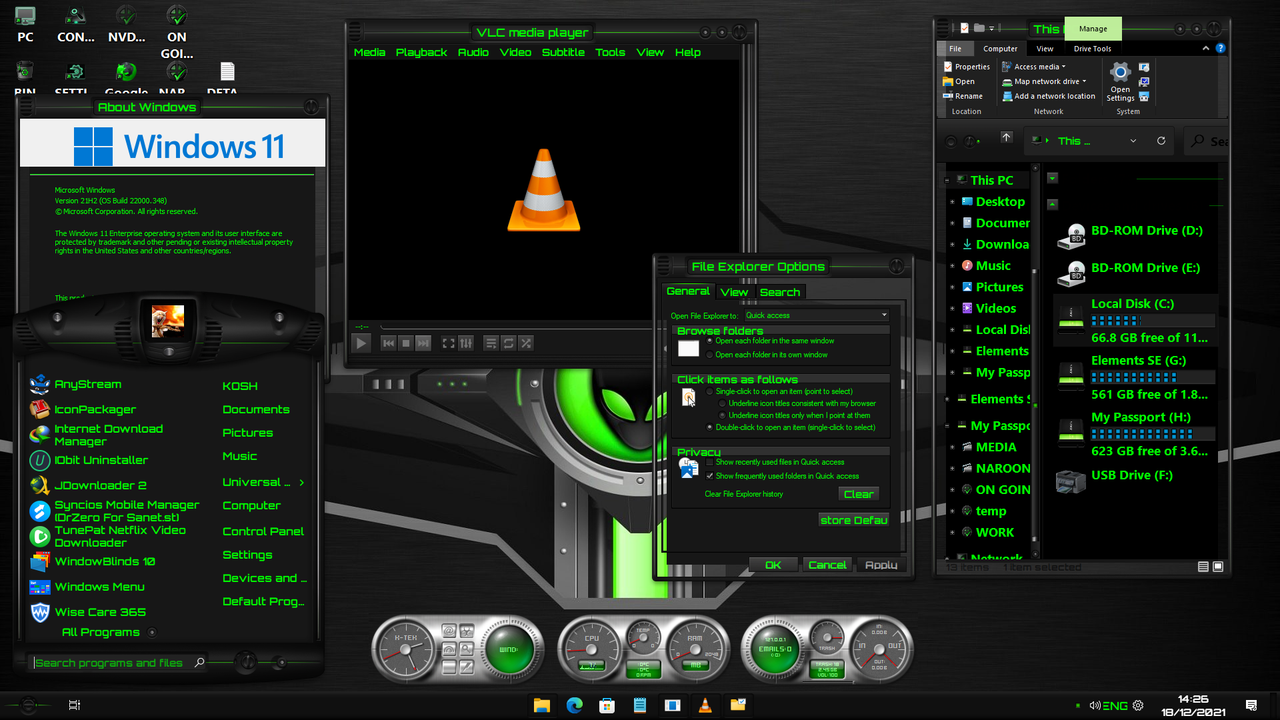
The creators of UX Theme Patcher have released a couple of updates enabling the use of many Windows 10 themes alongside another popular start replacement program, allowing them to work fine with Windows 11.  Just added another " Kinetik Tech Edition" and "Kinetik Aqua Edition" as my love of Dark skins and Electric Green Text is well known. Working Flawlessly on a windows 11 Enterprise Latest Build, fully updated.


It was Stardock that got me into Skinning my system, and as there is still no release for a WB 11 Beta, i had to go elsewhere, experimenting, changing, until i had something that is 95% as good as WB 10. 

+1 Loading…
Reply #354 Top

Quoting Koogle, reply 352

tell us more.. Win11 looks like shit especially when you go Dark Mode and find literally every application window  built using winforms from the top to bottom is literally White.. those fking retards at MS.


Especially when they go ahead and break the work of developers behind Curtains etc and any other ux theme patching efforts

My friend it the UI so it's personable I actually prefer Windows 11 stock UI to windows 8 or 10. Did not like tiles or the ribbon.  But to each his own. Hopefully Stardock will bring windowblinds 11 out soon that way we all can make windows more to our liking. 

Reply #355 Top

dont think it will come out anytime soon.. think i saw someone say on here that it wasnt gonna be until 2023 or something like that lol

+1 Loading…
Reply #356 Top

Quoting IAMTHEMACHINE, reply 355

dont think it will come out anytime soon.. think i saw someone say on here that it wasnt gonna be until 2023 or something like that lol

The "someone" was the CEO of Stardock and it was a typo.

Just refer back to comment #340, and anything subsequent from BradSams and you will be up to speed with reality...;)

+1 Loading…
Reply #357 Top

Quoting Jafo, reply 356


Quoting IAMTHEMACHINE,

dont think it will come out anytime soon.. think i saw someone say on here that it wasnt gonna be until 2023 or something like that lol


The "someone" was the CEO of Stardock and it was a typo.

Just refer back to comment #340, and anything subsequent from Bradsams and you will be up to speed with reality...

That may be true. But it would be nice for his paying customers to actually hear that from the CEO himself. Don't you think? 

Reply #358 Top

Quoting JCurie, reply 357

it would be nice for his paying customers to actually hear that from the CEO himself. Don't you think? 
-If you don't trust JAFO then...?? o_O  

Reply #359 Top

Quoting JCurie, reply 357

That may be true. But it would be nice for his paying customers to actually hear that from the CEO himself. Don't you think?
No.

+2 Loading…
Reply #360 Top

Quoting neone6, reply 358


Quoting JCurie,

it would be nice for his paying customers to actually hear that from the CEO himself. Don't you think? 

-If you don't trust JAFO then...?? o_O  

It's not about trust. It's about doing the right thing. There is a difference. 

Reply #361 Top

Quoting JanOscar, reply 359


Quoting JCurie,

That may be true. But it would be nice for his paying customers to actually hear that from the CEO himself. Don't you think?

No.

LOL

YES

Reply #362 Top

No.  It's called delegation of duty and/or confidence/trust in others to manage what's needed.

Please desist....;)

+2 Loading…
Reply #363 Top

Agree with JCurie , yes we have finally have a post from Bradsams, but even though his post says he will answer questions, the most important question "When will WB 11 be ready" was not, although he did confirm WB 11 would come at some point. To know something will be coming, really does not do it for a lot of us.

+1 Loading…
Reply #364 Top

Who is BradSams?


Reply #365 Top

Quoting RedneckDude, reply 364

Who is BradSams?

 
You can find out a little more here: Link

+3 Loading…
Reply #367 Top

Quoting subdinyu, reply 366

Question: Does the current WindowsBlinds work on Windows 11?

No, Windowblinds 10 don't work on Windows 11.

Thank you,

Basj,
Stardock Community Assistant

Reply #369 Top

OK, then I misspoke -- as I realize that OD includes lots of apps. 

What I should have said is that I cut back to only Startxx and WB. 

I did, but no longer do, use the other OD apps.

Reply #370 Top

Quoting Mark, reply 313

I have an Object Desktop subscription that is expiring and currently costs $20 to renew. The Retail price is $50.

When it first came out, with Win7, I subscribed to OD because I could download and run nearly a dozen different apps.

Over time, this has cut back to Startxx and Windowblinds -- which means they cost me $10 each, more than the $5 (?) for Startxx alone but not enough to matter for me.

But I don't really want to keep paying the OD renewal year after year, hoping that WB 11 will eventually be released.

And there is the dilemma -- if I let OD subscription die, then it will cost me (at least)  $50 to get it down the road when WB11 gets released. Or, I keep paying $20 a year for basically Start11 -- which while not a LOT, is bothersome because as some have pointed out here, there are NOW some really good Start Menu alternatives that are free.

And then, we get a post claiming the 2023 for Windowblinds was a "typo" and it is really 2022. So, as long as it really does come out next year, then my $20 renewal will get me WB 11.  But, as beaten to death here in this thread, there are no fine-grained accurate predictions of WB 11 availability.

An yeah, I know it's not a lot of money, I just don't like paying for something I'm not going to get.


Like you I only really use a few of the OD programs.  Now it's just these 4 since updating to Windows 11: Start 11, Deskscapes, Fences 4 and I started using Object Dock again. Object Dock says it's not compatible with Windows 11 but it is working fine for me.  I believe Tiles and Groupy work in Windows 11 as well but I am not a big fan of those apps. 

Heck I'm paid up on Object Desktop for a few years, lol! Stardock runs renewal specials for $14.99 a couple of times a year. I always forget when I see it that I really don't need to add another year, and yet I do. My current subscription runs until 7/20/25 so I would assume they will have a compatible version of WIndowblinds by then! If you find you do use more than 1 or 2 OD components it's worth keeping the subscription active. Just enable email updates from Stardock in your account and they will let you know when they run a renewal price special next

+1 Loading…
Reply #371 Top

"My current subscription runs until 7/20/25" Your subscription will probably last longer than Windows 11. 

+1 Loading…
Reply #372 Top

To all those interested in having a working WB10 and using it on the latest build of Win 11 Enterprise, check out the topic   "Windows 11 - Not For Me"   

Follow the lead from "PhoenixRising1"  and install  explorerpatcher   from the link provided and as long as you  follow one more step  

"In the explorerpatcher options under file explorer options

Disable the windows 11 command bar* absolutely needs to check marked to yes."


Once this is done you will have a working WB10 on Windows 11 (in my case Win 11 Enterprise Latest Build)

No Explorer crashing WOW, i have one simple issue which i will iron out later connected to transparency, but i am sure it is a simple setting in Start11.

PhoenixRising1  great work man.


A Working WB10 on Win11 Enterprise

+1 Loading…
Reply #373 Top

That screenshot shows windows with no frames, or should I say transparent frames.  That skin shouldn't be that way.


I don't call that working.

Reply #374 Top

This is the biggest move forward in the ability of using WB10 on a fully updated Windows 11, not even the company have gotten this far yet (no beta or any kind of early stage development, i guess there is no pleasing some peeps)

I am sure the transparent issue in borders will be solved as it will be a setting in either Start 11 or the explorer Patcher .


You say " I Don't call that working"  


Before this development, it was just Explorer crash after explorer crash , and based on that NOTHING WORKED BEFORE.


Instead of a complaint, why not a pat on the back for getting this far when we do not even have a Beta of a working Windows 11 WBs.

Really 1 little fault which i am sure can be solved, before this we had nothing as a community, i have used Stealth Drone for several years, and beside that little error it looks like it should.


The Stealth Drone skin i am using has been modded by me to be dark with Electric Green Text and trimmings, so i am sure it should not look like that.


But beside what i have done changing system colours, and the one fault you have pointed out, there are NO explorer crashes.


Would it really be too much for you to say "good Effort" making something that did not work before, work now.

+1 Loading…
Reply #375 Top

Quoting RedneckDude, reply 373

That screenshot shows windows with no frames, or should I say transparent frames.  That skin shouldn't be that way.


I don't call that working.

I have noticed that issue as well. It is actually a funny bug, because if you actually go to modify transparency in any way it starts to work. It just doesn't in the default middle for whatever reason