

Tatiora Tatiora

Curtains v1.1 is Now Available

Curtains v1.1 is Now Available

Customize Windows with new style modes, now with new blur and transparency effects

Stardock releases v1.1 for Curtains, the popular Windows customization app
v1.1 is now available for all Curtains and Object Desktop users

Stardock released a v1.1 update for Curtains today. One of Stardock’s newest customization tools, Curtains allows users to apply new styles along the lines of Dark Mode and Light to Windows® 10.
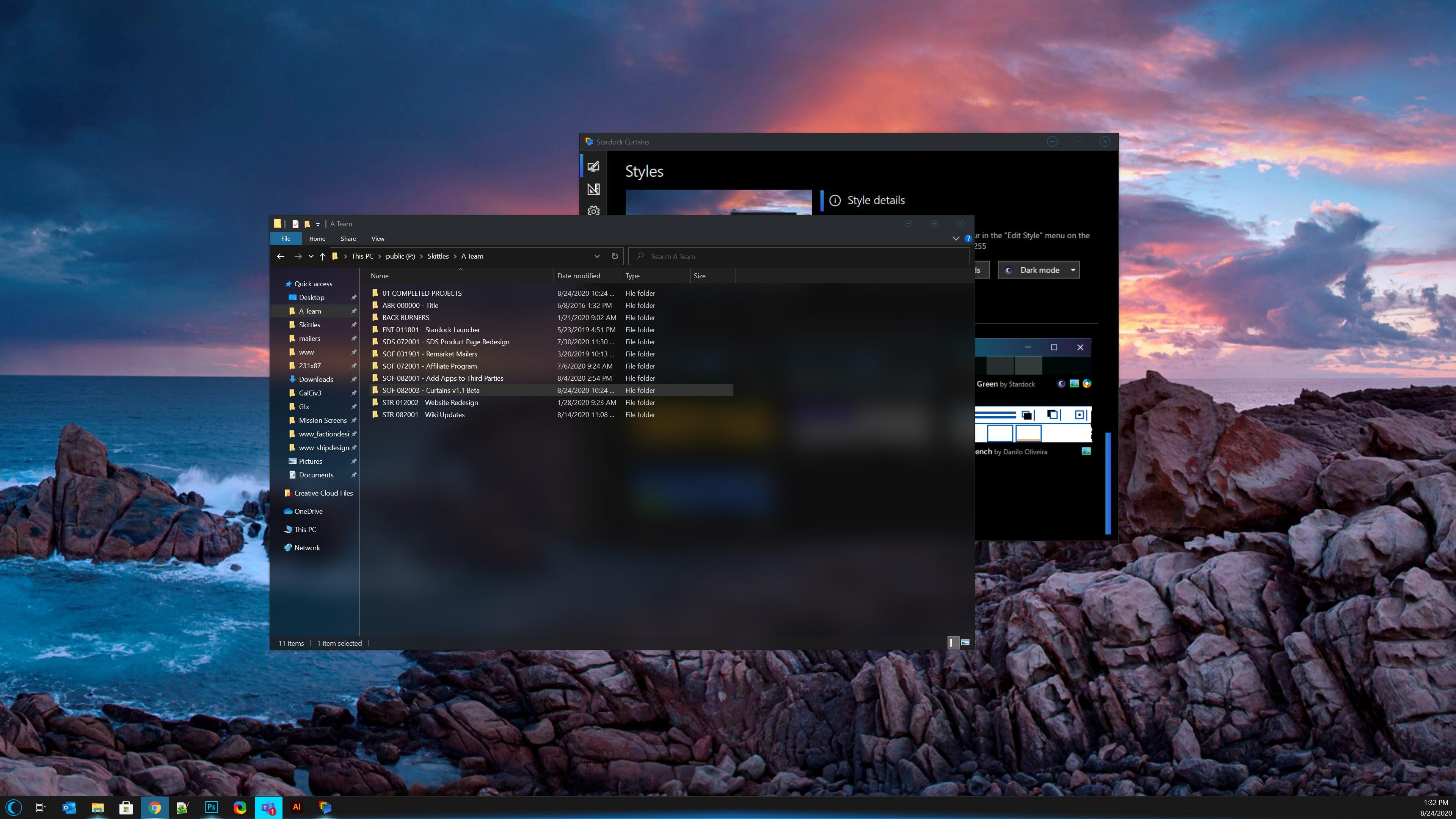
Curtains

Taking advantage of the groundwork built to support light and dark mode, Curtains includes several unique styles that enhance the look and feel of the Windows UI along with apps that already support light and dark mode.  

"The advantage of using a program like Curtains is that it's essentially just adding new 'modes' to Windows," said Brad Wardell, CEO of Stardock.  "It works with high DPI displays and your existing programs. This gives users a little extra touch of customizing the Windows experience."

Users can easily create and share their own styles using the built in style editor.  A Curtains style can change everything that Light and Dark mode can change, including the Start button, title bar buttons, and title bar coloring. It also supports tweaking gradients, shadows opacity, and hundreds of other small elements of the Windows GUI.

The newest version of Curtains adds a major new feature for Explorer background transparency and blur effects. While the new option only comes standard with certain styles in the app, users can edit other styles and apply the blur and transparency effects themselves for further customization. 

A new option to extend the title bar ribbon in Explorer windows also adds an extra layer of customization for those who enjoy editing every detail of their Windows experience. v1.1 also introduces several quality of life improvements and increased style application speed.

Don't have Curtains yet? Get it now through Stardock or Steam.


Curtains is also available in Object Desktop™, our complete suite of desktop enhancements.
Object Desktop includes programs like
 Fences®, Start10, Groupy, SoundPackager, DeskScapes™, Multiplicity®, and more.

Curtains
Curtains
Curtains
Curtains


97,676 views 40 replies
Reply #26 Top

Quoting David2P, reply 24

Guys,

I have been trying to figure out which software to use for skinning Windows 10 with a Windows XP or Windows 7 theme, including round corners and including scrollbars, for a long time without real success. 

Can somebody point me in the right direction, particularly whether I should use WindowBlinds or Curtains, or something else?

You would want to use WindowBlinds (plus Start10) which skins more thoroughly than Curtains.  For example, Curtains does not skin scrollbars.  Even at that though, an XP style skin on Win10 is not going to look exactly like XP, some things simply won't skin the same.

Here are a couple of XP style skins for Win10 I found just now;

https://www.wincustomize.com/explore/windowblinds/9262/

https://www.wincustomize.com/explore/windowblinds/9119/


Reply #27 Top

Thank you Dave, that looks great!

I have installed WindowBlinds now and tried one of the themes that come with it. 

Works good, however, it seems that the skinning is not HiDPI aware?

Everything looks blurry on my 4K monitors with Windows scaling set to 200%:

Is that normal, I mean, are the skin elements of WindowBlinds (like buttons, round corners etc.) not available with HiDPI resolution?


Reply #28 Top

Quoting David2P, reply 27

Everything looks blurry on my 4K monitors with Windows scaling set to 200%:

I don't know the answer to that, and you will probably have better luck if you start a new thread perhaps here:

https://forums.wincustomize.com/forum/167


Reply #29 Top

Quoting David2P, reply 24

Can somebody point me in the right direction, particularly whether I should use WindowBlinds or Curtains, or something else?
As close to XP as you can get, is eXperience by SimplexDesigns with all the Luna styles in one. You will need Start 10 for the the start menu to be skinned like in the screenshot.


Reply #30 Top

Thanks -- I believe that is one of the two that also Dave has linked.

I shall try one of these, or even the beautiful Vista Plus, as soon as I find out whether my HiDPI/Retina monitor setup is supported.

Edit:
Unfortunately, WindowBlinds damaged interfered with my patched theme (i.e. did not restore it completely on reset). Not even restoring the system to a point in time before installing WindowBlinds helped with this.

Luckily, I was able to restore the theme by re-patching it with the excellent UltraUXThemePatcher, like so:

Reply #31 Top

You can NOT have UltraUXThemePatcher insatalled and expect Windowblinds to behave without errors. I have tried that several times without good results. UXT alter your system files, which is the best reason for not using it - Windowblinds don't. So your conclusion that Windowblinds damaged your theme, is wrong, imo.

Reply #32 Top

Yes, technically speaking that is probably correct. 

Still, I find it somewhat strange (by Windows, that is) that not even System Restore fixed this.

Anyway, I got my theme back

Reply #33 Top

Quoting David2P, reply 30
I shall try one of these, or even the beautiful Vista Plus, as soon as I find out whether my HiDPI/Retina monitor setup is supported.

Unfortunately, that probably will not be the case for most currently available themes, since these are entirely bitmap-based as I have seen now, and normally only contain one size of all elements, which is calculated for 100% scaling in Windows.

Buttons, window borders and other things therefore will always look pixelated and/or blurry on Retina screens, like the below extracts from eXperience_Release.wba (enlarged):


Reply #34 Top

Quoting David2P, reply 30

Thanks -- I believe that is one of the two that also Dave has linked.

I shall try one of these, or even the beautiful Vista Plus, as soon as I find out whether my HiDPI/Retina monitor setup is supported.

Edit:
Unfortunately, WindowBlinds damaged interfered with my patched theme (i.e. did not restore it completely on reset). Not even restoring the system to a point in time before installing WindowBlinds helped with this.

Luckily, I was able to restore the theme by re-patching it

Just to correct something here.

WindowBlinds does not touch any patched files or themes or replace any system files.  Given rolling back to a date before installing WB also didn't work rather suggests an OS patch replaced one of the files you had patched with an unpatched one.

With regards to high dpi, WB will automatically scale graphics based on dpi to ensure they remain the right size regardless of the users actual dpi settings and generally they should look pretty good as every pixel will be smaller.  Blown up they look blurry but assuming the dpi is set to physical dpi rather than being used to simply make things bigger you would have to look closely to even notice especially as text is sharp.  WB 10.5 and higher allow a skin to include multiple versions of images to cater for other dpis, but this is rarely done by skin authors currently.

Stardock Curtains also supports high dpi and usually scales down from a super high res version of a image making life easier for the author who only has to include the one image.

 
Reply #35 Top

Quoting Neil, reply 34

Stardock Curtains also supports high dpi and usually scales down from a super high res version of a image making life easier for the author who only has to include the one image.

In this case, Curtains seems to be the way to go for me, as soon as some great XP or 7 or Vista themes become available for it.

Or I just leave it with my above, patched theme which also is not too bad. 

Reply #36 Top

When you install Curtains, this theme comes with it.

Reply #37 Top

I am trying to make a Curtains theme to satisfy my Windows 7 Aero Glass style needs, and I'm using modified Windows 8 RP assets to try do it. I feel like it's a good update to the classic Aero design (and using Windows 7 Aero assets don't work well in Curtains). This is never going to be perfect but here's how I currently have it looking. I'm not happy with it yet, blur in the title bars would help it feel right.

Reply #38 Top

Quoting JanOscar, reply 36

When you install Curtains, this theme comes with it.

I hope to not offend anyone here, but this looks a little sterile and a little like a chinese (or Linux-based) knockoff of the good old Windows XP
Reply #39 Top

Good morning. My drop shadow feature isn't working in curtains. Need help. I have tried all kinds of transparency and blur shadow combination with a 2-4 mm of thickness. Nothing seems to have any effect. 

Reply #40 Top

Quoting sheranbhattacharyya, reply 39

Good morning. My drop shadow feature isn't working in curtains. Need help. I have tried all kinds of transparency and blur shadow combination with a 2-4 mm of thickness. Nothing seems to have any effect. 

Hello,
Sorry to hear you are having issues. But, not really sure on this one. Do you mean, you can't get drop shadows to work within Curtains or ShadowFX? Please elaborate.

Thanks
Basj,
Stardock Community Assistant.