Curtains v1.1 is Now Available

Customize Windows with new style modes, now with new blur and transparency effects

Stardock releases v1.1 for Curtains, the popular Windows customization app
v1.1 is now available for all Curtains and Object Desktop users

Stardock released a v1.1 update for Curtains today. One of Stardock’s newest customization tools, Curtains allows users to apply new styles along the lines of Dark Mode and Light to Windows® 10.
Curtains

Taking advantage of the groundwork built to support light and dark mode, Curtains includes several unique styles that enhance the look and feel of the Windows UI along with apps that already support light and dark mode.  

"The advantage of using a program like Curtains is that it's essentially just adding new 'modes' to Windows," said Brad Wardell, CEO of Stardock.  "It works with high DPI displays and your existing programs. This gives users a little extra touch of customizing the Windows experience."

Users can easily create and share their own styles using the built in style editor.  A Curtains style can change everything that Light and Dark mode can change, including the Start button, title bar buttons, and title bar coloring. It also supports tweaking gradients, shadows opacity, and hundreds of other small elements of the Windows GUI.

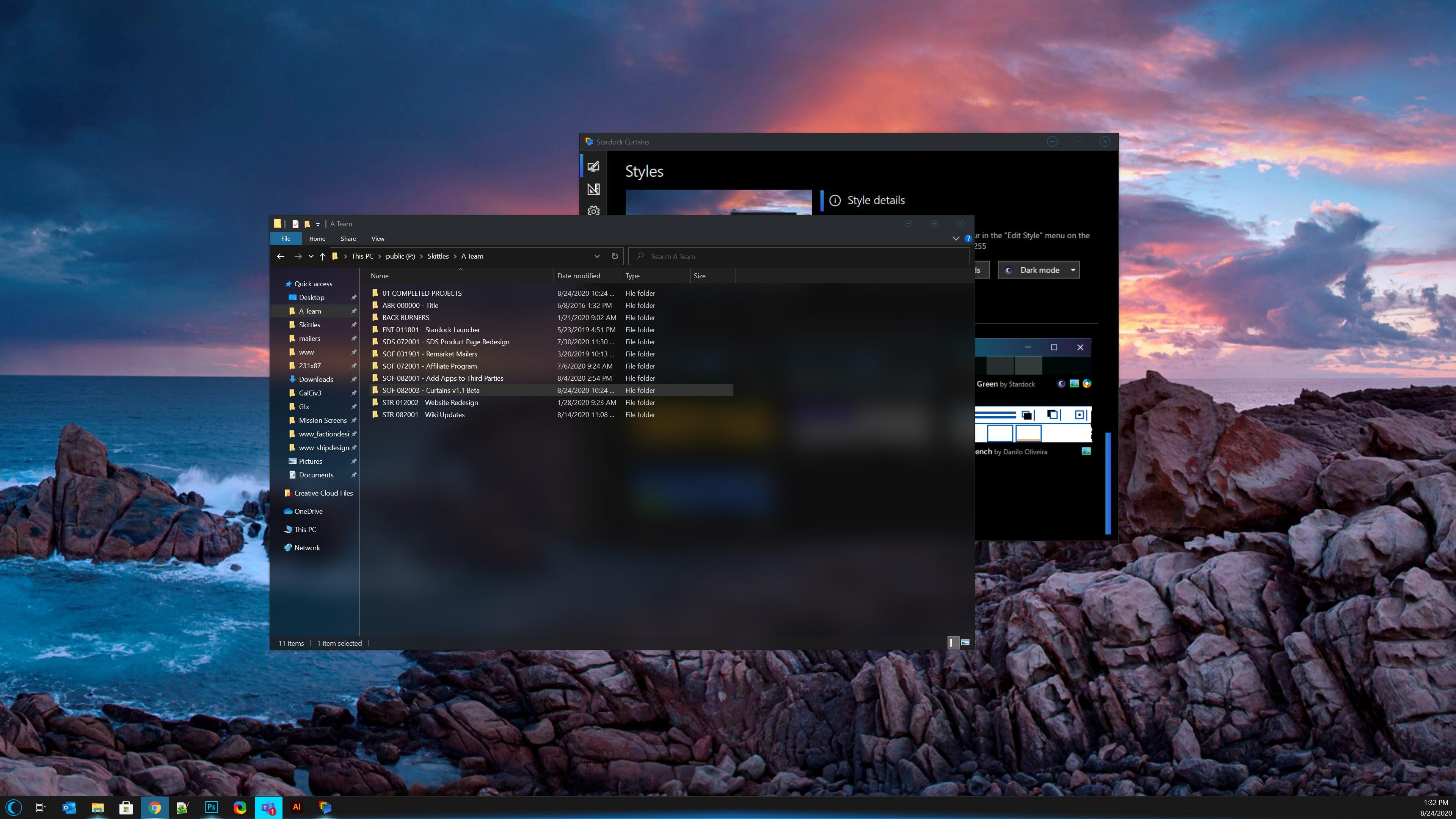
The newest version of Curtains adds a major new feature for Explorer background transparency and blur effects. While the new option only comes standard with certain styles in the app, users can edit other styles and apply the blur and transparency effects themselves for further customization. 

A new option to extend the title bar ribbon in Explorer windows also adds an extra layer of customization for those who enjoy editing every detail of their Windows experience. v1.1 also introduces several quality of life improvements and increased style application speed.

Don't have Curtains yet? Get it now through Stardock or Steam.


Curtains is also available in Object Desktop™, our complete suite of desktop enhancements.
Object Desktop includes programs like
 Fences®, Start10, Groupy, SoundPackager, DeskScapes™, Multiplicity®, and more.

Curtains
Curtains
Curtains
Curtains


97,680 views 40 replies
Reply #1 Top

Can now you remove the user picture in Start 10 when curtains is running ?

Reply #2 Top

Quoting neone6, reply 1

Can now you remove the user picture in Start 10 when curtains is running ?

That would be a Start10 feature.

Reply #3 Top

Quoting Neil, reply 2

That would be a Start10 feature.
-Oh yeah.. you told me, forgot, sorry :blush:  

-Will there be a Start 10 update? :dur:  

Reply #4 Top

Great update!

Now, if only the default Dark Mode of Windows 10 wasn't so ugly. Black backgrounds everywhere is just not easy on the eyes. If the Curtains team could do something about that in a future update, that would be so great. I don't even know if that kind of modding would be possible with Curtains, but who knows...

Reply #6 Top

What about window border size? Is the main feature i miss in order to customize my desktop.

And what about big space between maximize, restore and close buttons in windows?

Reply #7 Top

I'd like a rollup feature, like in WB where you can set it to rollup on double clicking titlebar.

Reply #8 Top

Broken record here but transparency/blur effects don't appear at all on my Dell Inspiron 13-7378 Win10 Pro 1909 laptop with the 1.1 release.  Currently using Dark Waters style, dark mode, but doesn't work with any other style I've tried either.

Transparency & blur work now on my Optiplex 3060 desktop rig with Win10 Pro 2004, however, with the 1.1 release.

Reply #9 Top

Quoting Daiwa, reply 8

Broken record here but transparency/blur effects don't appear at all on my Dell Inspiron 13-7378 Win10 Pro 1909 laptop with the 1.1 release. Currently using Dark Waters style, dark mode, but doesn't work with any other style I've tried either.

Please try install Curtains in Windows 10 Sandbox. And see if the transparent blur effect work in there. https://www.windowscentral.com/how-use-windows-sandbox-windows-10-may-2019-update. Try that and report back.

Thank you,

Basj,
Stardock Community Assistant

Reply #10 Top

please, puh-lease add an "APPLY" button. just because i click on a theme to see the preview does not mean i want it applied. if i'm running WB and open Curtains just to see something doesn't mean i want a theme applied when i click on it. WWB has an "APPLY" button so I'm sure Curtains can have one. 

+2 Loading…
Reply #11 Top

Quoting SamEVO, reply 10

please, puh-lease add an "APPLY" button.

I really like it the way it is, so if you go that route maybe you could add a global setting "Clicking on skin tile applies skin" or something?

Reply #12 Top

Can I just ask what's the difference between Curtains and WindowBlinds? On Windows 10 I'm already running an older version of Object Desktop (so I've already got WindowBlinds + Start10 etc - and I mostly use them to give Win10 a "Windows 7" look & feel). So would it be worthwhile upgrading to the newer version with Curtains? What extra stuff would it get me?

Reply #13 Top

Quoting johne53, reply 12

Can I just ask what's the difference between Curtains and WindowBlinds? On Windows 10 I'm already running an older version of Object Desktop (so I've already got WindowBlinds + Start10 etc - and I mostly use them to give Win10 a "Windows 7" look & feel). So would it be worthwhile upgrading to the newer version with Curtains? What extra stuff would it get me?

Hello,
You can install both in your system. But, you can run only one of it at a time. If you have Windowblinds loaded and if load Curtains, WB will get unload and visa versa. Curtains has it own advantages, so does Windowblinds. Curtains can change almost all Windows frame, but some part of Windows can't be change such as buttons, menus and scroll bars. While Windowblinds can do those, but there are applications not compatible with Windowblinds, hence some strange behavior effecting the applications.

You could do the trial https://www.stardock.com/products/curtains/download


Basj,
Stardock Community Assistant.

Reply #14 Top

Thanks for the prompt reply Basj - I followed your link but it looks like the latest edition of Object Desktop doesn't include WindowBlinds any more. Am I misunderstanding that?

Reply #15 Top

Quoting johne53, reply 14

Thanks for the prompt reply Basj - I followed your link but it looks like the latest edition of Object Desktop doesn't include WindowBlinds any more. Am I misunderstanding that?

Looking in here it still included : https://www.stardock.com/products/odnt/

Thank you,

Basj,
Stardock Community Assistant

Reply #16 Top

Thanks again Basj. I just renewed Object Desktop for another year but strangely enough I got sent 2 x receipts. Is there a way I can check I haven't been charged twice?

Also...  do I need to remove my existing version before installing the new one - or will the Object Desktop Manager take care of all that for me?

Reply #17 Top

Quoting johne53, reply 16

Thanks again Basj. I just renewed Object Desktop for another year but strangely enough I got sent 2 x receipts. Is there a way I can check I haven't been charged twice?

Also...  do I need to remove my existing version before installing the new one - or will the Object Desktop Manager take care of all that for me?

Hello,
I have forward your problem/question to Stardock Support Team for their assistance. Please keep an eye on this thread for any updates. We appreciate your feedback and patience.

Basj,
Stardock Community Assistant

Reply #19 Top

Quoting sufyannisar, reply 18

The Transparency effect is not working. 

Hello,
Sorry to hear you are having issues. Need more information on what is not working. Please show us which part and which style transparency effect is not working for you.

Thanks
Basj,
Stardock Community Assistant.

Reply #20 Top

Quoting basj, reply 19


Quoting sufyannisar,

The Transparency effect is not working. 


Hello,
Sorry to hear you are having issues. Need more information on what is not working. Please show us which part and which style transparency effect is not working for you.

Thanks
Basj,
Stardock Community Assistant.

The Windows Explorer background transparency effact is not working. 
I am using Splash Green on v1.1 Curtans.Transprancy Effect Not Working

Reply #21 Top

Hello,

You need to turn on the transparency for each style. Here what it look like if your turn it on.

Here is how you turn and adjust it. Curtains config -> Edit style -> Windows tab-> Advance Property -> scroll down to Explorer background blur mode -> Drop down menu ->Choose blur type and change those within that section colors and transparency level active and inactive mode and also there are different sections between Dark and light mode. Click "apply changes" button to see the changes.

Thank you,

Basj,
Stardock Community Assistant

+6 Loading…
Reply #22 Top

Quoting basj, reply 21

Hello,

You need to turn on the transparency for each style. Here what it look like if your turn it on.

Reduced 90%
Original 929 x 657


Here is how you turn and adjust it. Curtains config -> Edit style -> Windows tab-> Advance Property -> scroll down to Explorer background blur mode -> Drop down menu ->Choose blur type and change those within that section colors and transparency level active and inactive mode and also there are different sections between Dark and light mode. Click "apply changes" button to see the changes.

Reduced 57%
Original 1454 x 963


Thank you,

Basj,
Stardock Community Assistant


Than Worked !

Thanks .. 😊

Reply #23 Top

Great, glad it work.

Thank you,

Basj,
Stardock Community Assistant

Reply #24 Top

Guys,

I have been trying to figure out which software to use for skinning Windows 10 with a Windows XP or Windows 7 theme, including round corners and including scrollbars, for a long time without real success. 

Can somebody point me in the right direction, particularly whether I should use WindowBlinds or Curtains, or something else?

Reply #25 Top

Quoting David2P, reply 24

I have been trying to figure out which software to use for skinning Windows 10 with a Windows XP or Windows 7 theme, including round corners and including scrollbars, for a long time without real success. 

Can somebody point me in the right direction, particularly whether I should use WindowBlinds or Curtains, or something else?

Me too.