ktkwon00

Multiplicity Audio occasionally stops

Multiplicity Audio occasionally stops

Multiplicity audio occasionally stops working, where the sender's audio is not outputted from the receiver any more.

Unticking and ticking "Send audio when receiver is online" or "Use lossless compression when sending audio" immediately fixes this.

I'm not sure what the cause is, this issue happens rarely, and I haven't found a pattern that it breaks on.

If this is not a known issue or if there needs to be extensive troubleshooting for this issue, could I have a batch file that disables and enables Multiplicity audio as a temporary fix? 

Thank you!

98,302 views 59 replies
Reply #26 Top

Quoting Neil, reply 25
Are you at any time using any specialist audio software which might use a low latency mode on either end?

I do use Reaper as a DAW for recording guitar which may fall into that category on the receiving machine, but I never have it running when I am streaming audio from a sender machine. Beyond that I can't think of anything else which would be defined that way. 

Reply #27 Top

I also have a DAW 'Cubase 10.5' on my receiving machine. Like the previous poster I also never have it running when trying to receive the audio stream from the sending machine, so I don't think it's related to that.

Reply #28 Top

I'm having the same issue as the others in this thread and have also been pressing Ctrl+F12 on the sender to fix it. I'm not using any specialized audio software on either machine. Like the others, the issue first appeared for me after upgrading to version 3.5.

Both machines are running Windows 10 Pro and multiplicity kvm v3.5, build 00096.

The primary/receiver is connected to the network via ethernet. The secondary/sender is connected wirelessly.

Let me know if there's any other information you need that might be helpful in resolving the issue.

Reply #29 Top

Quoting todd113, reply 28

I'm having the same issue as the others in this thread and have also been pressing Ctrl+F12 on the sender to fix it. I'm not using any specialized audio software on either machine. Like the others, the issue first appeared for me after upgrading to version 3.5.

Both machines are running Windows 10 Pro and multiplicity kvm v3.5, build 00096.

The primary/receiver is connected to the network via ethernet. The secondary/sender is connected wirelessly.

Let me know if there's any other information you need that might be helpful in resolving the issue.

Another test...

When this happens, pause any audio being sent on the sender...

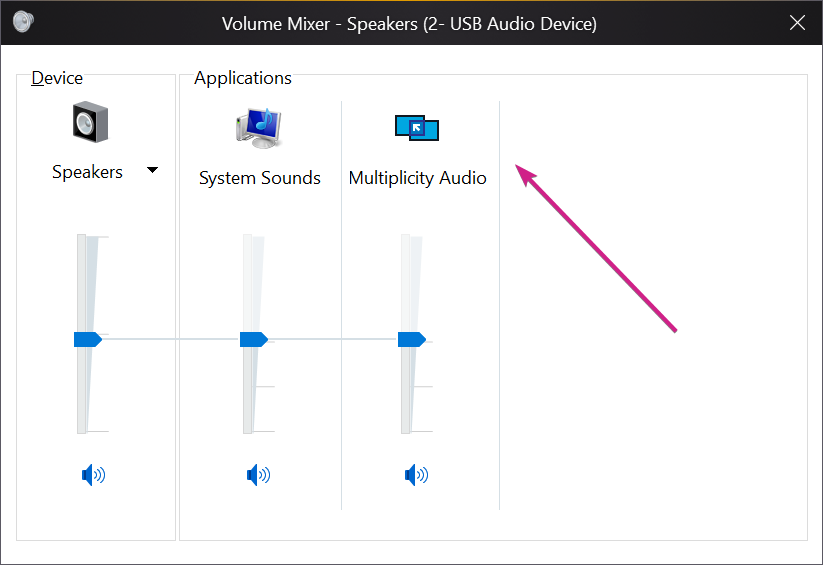
On the receiver, is MP showing up in the Sound mixer:

If not, and while keeping it open, unpause the audio on the sender.  Does it appear then and actually start playing?

Sean Drohan
Stardock Support Manager

Reply #30 Top

Quoting sdRohan, reply 29
Another test...

When this happens, pause any audio being sent on the sender...

On the receiver, is MP showing up in the Sound mixer:


If not, and while keeping it open, unpause the audio on the sender.  Does it appear then and actually start playing?

Sean Drohan
Stardock Support Manager

When this happens MP is showing in the Sound mixer on the receiver. 

Reply #31 Top

Wanted to check-in on this issue? I've updated both the receiver and sender to v 3.55 build 00101, but the problem persists.


Sean, when this happens MP is showing in the mixer on the receiver. It shows while the audio is working correctly and remains visible when the audio cuts out. The only difference is when the audio cuts out, the level indicators stop moving up and down.

Reply #33 Top

Hello,

Sorry to hear you are having trouble.

Quoting todd113, reply 31

Wanted to check-in on this issue? I've updated both the receiver and sender to v 3.55 build 00101, but the problem persists. 

Sean, when this happens MP is showing in the mixer on the receiver. It shows while the audio is working correctly and remains visible when the audio cuts out. The only difference is when the audio cuts out, the level indicators stop moving up and down.

It happens randomly but I'd say on average a few times an hour.

I upgraded back to 3.5. It's now happening every couple minutes. 

That is just not like anything we have seen, ever. The only time I have been able to reproduce this is when waking PCs from a (long) sleep.

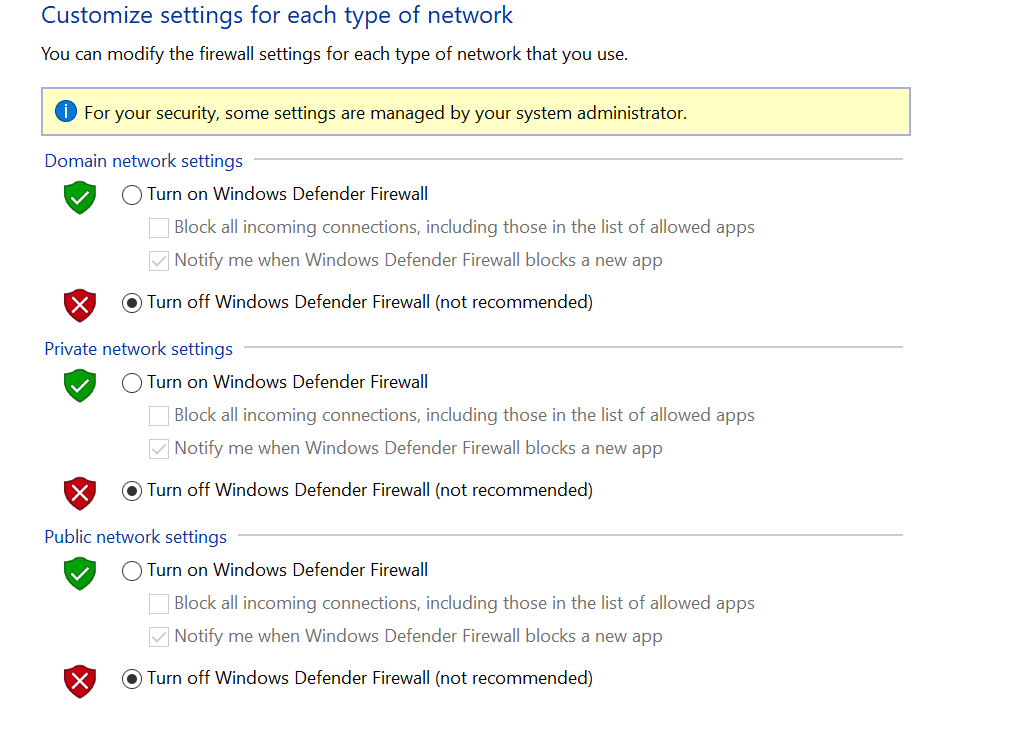
As a test, if you disable Windows Defender (or any other AV \ Malware apps), do you still see the issue?


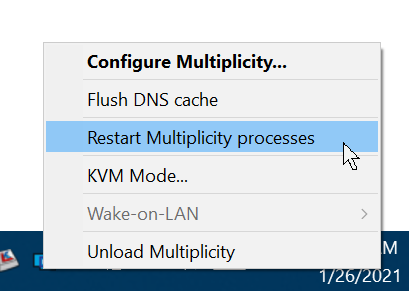
The current version of MP has an option to restart the service (Primary):

If you use it, does it resolve your issue \ frequency of?

If not, and you try a clean boot, does that change anything?

https://forums.stardock.com/486104/multiplicity-support-faq#cleanboot

Sean Drohan
Stardock Support Manager

Reply #34 Top

I'm a new user with the same issue. audio just randomly cuts out and I just click receive audio and then back to send audio and it fixes. Seems like it gets stuck and clicking those resets it.

Reply #35 Top

Yeah I just bought the whole suite of desktop apps from Stardock, and Multiplicity does this CONSTANTLY!!! It's extremely aggravating, and the fact support here is just like "I dunno we can't replicate the issue" is a really poor and sad excuse. There are DOZENS of ppl reporting the same problem you can find just by doing a simple google query for "Multiplicity Audio Issues// Cutting Out" You could at least admit your product is inferior to other products that offer the same solution on the market. I'm sick of dealing with this issue only to find dead end threads where you blame the users, not your faulty product. FIX THIS PROGRAM I WANT MY MONEY BACK

Reply #36 Top

Quoting j5smith23, reply 35

I WANT MY MONEY BACK

Hello,
Sorry to hear you are having issues. If you wish for refund please raise a support ticket using the link below : https://stardock.atlassian.net/servicedesk/customer/portal/4

Thanks
Basj,
Stardock Community Assistant.

Reply #37 Top

Quoting j5smith23, reply 35

It's extremely aggravating, and the fact support here is just like "I dunno we can't replicate the issue" is a really poor and sad excuse.

It is indeed frustrating, for us especially (our name is on it).  As anyone who has done any level of support knows, replicating an issue helps solve it immensely. 

That said, I too have had the issue in the past (so I have 'repro'd' it but cant at will).  The one thing that solved it for me was to ensure that the sender was unmuted; do you have it as such:


Quoting j5smith23, reply 35

There are DOZENS of ppl reporting the same problem you can find just by doing a simple google query for "Multiplicity Audio Issues// Cutting Out"

Perhaps 'a dozen' but not many more.  This is in contrast to the hundreds of thousands that use MP without issue daily.  That is not to say we are not looking at it (we are), it's just not as widespread as your frustration would have you believe.

Quoting j5smith23, reply 35

I'm sick of dealing with this issue only to find dead end threads where you blame the users

The length of this tread, and the participation from support and the lead dev, illustrate we do indeed care, follow up,  and never have 'blamed the user'.

Please let me know if the suggestion above helps (unmute).

Sean Drohan
Stardock Support Manager


Reply #38 Top

Just thought I would chime in and say I've also had the same issue.


All computers are on a wired connection. Some times it happens when I'm using both machines. Sometimes when I unlock my machines in the morning, audio isn't working. Unchecking and checking, "Send audio when receiver is online." brings audio back.


On a side note the service for "multiplicity audio" on the primary hasn't been running when I unlock in the morning. it's happened twice now. Clicking "Restart Multiplicity processes" starts it up again.


For reference I'm using the Multiplicity KVM version.

Reply #40 Top

It’s been a known issue for about an year now, with no fixes. You can try the troubleshooting steps in reply #1 and #3 but there isn’t much help beyond that. 

Reply #41 Top

Quoting sdRohan, reply 37


That said, I too have had the issue in the past (so I have 'repro'd' it but cant at will).  The one thing that solved it for me was to ensure that the sender was unmuted; do you have it as such:


Oh thank god this worked! Finally it seems to have fixed my sound issue :P


Edit:

Still having issues, but rather than having them every 5s, they're every few minutes

Reply #42 Top

I have this issue, too, but more frequently than audio failing altogether is a sync issue.

I mostly use the audio feature to watch videos or play games on a secondary PC and my games and videos start off in sync but then over time, they will gradually fall out of sync.  For single player RPG style games, it's not as much of a problem and I'll usually finish a quest and then restart Multiplicity Services on the primary or toggle ctrl+F12 on the secondary.  For games with voice acting, you can notice easily as the lip sync animation will start and then the audio follows 1-2 seconds thereafter.


Reply #43 Top

Quoting kevikev, reply 42

I have this issue, too, but more frequently than audio failing altogether is a sync issue.

I mostly use the audio feature to watch videos or play games on a secondary PC and my games and videos start off in sync but then over time, they will gradually fall out of sync.  For single player RPG style games, it's not as much of a problem and I'll usually finish a quest and then restart Multiplicity Services on the primary or toggle ctrl+F12 on the secondary.  For games with voice acting, you can notice easily as the lip sync animation will start and then the audio follows 1-2 seconds thereafter.


Hello,

I have forwarded your report to the Stardock support team for their review and recommendations.

Please keep an eye on this thread for any updates.

We really do appreciate your feedback, thanks.

Reply #44 Top

Quoting kevikev, reply 42

I have this issue, too, but more frequently than audio failing altogether is a sync issue.

I mostly use the audio feature to watch videos or play games on a secondary PC and my games and videos start off in sync but then over time, they will gradually fall out of sync.  For single player RPG style games, it's not as much of a problem and I'll usually finish a quest and then restart Multiplicity Services on the primary or toggle ctrl+F12 on the secondary.  For games with voice acting, you can notice easily as the lip sync animation will start and then the audio follows 1-2 seconds thereafter.
 

There will be some buffering but I am curious if this is done over a wired or wireless connection.  If the latter, have you tried with all ends wired?

Sean Drohan
Stardock Support Manager

Reply #45 Top

Quoting sdRohan, reply 44


Quoting kevikev,

I have this issue, too, but more frequently than audio failing altogether is a sync issue.

I mostly use the audio feature to watch videos or play games on a secondary PC and my games and videos start off in sync but then over time, they will gradually fall out of sync.  For single player RPG style games, it's not as much of a problem and I'll usually finish a quest and then restart Multiplicity Services on the primary or toggle ctrl+F12 on the secondary.  For games with voice acting, you can notice easily as the lip sync animation will start and then the audio follows 1-2 seconds thereafter.
 
There will be some buffering but I am curious if this is done over a wired or wireless connection.  If the latter, have you tried with all ends wired?


Sean Drohan
Stardock Support Manager

It's all wired.  I do notice the buffering delay when doing the ctrl+F12 toggle fix.  The sync issue usually happens at least an hour later but I've gotten used to using the toggle fix.

Reply #46 Top

Quoting kevikev, reply 45

It's all wired.  I do notice the buffering delay when doing the ctrl+F12 toggle fix.  The sync issue usually happens at least an hour later but I've gotten used to using the toggle fix.

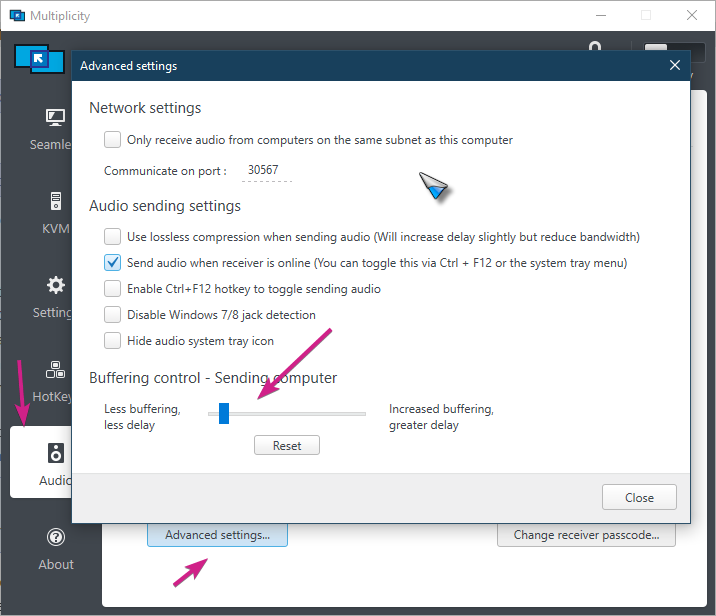
Something you may also want to check  \ experiment with:

Sean Drohan
Stardock Support Manager

Reply #47 Top

Hello to all,

can you test this powershell command? Create a file called "restart audio.ps1" on the client desktop. Enter this command (working for me):

restart-service -Name Audiosrv


I have the SAME sound problem with Multiplicity *and* the Microsoft RDP client. I don't think it is a Stardock problem but a Windows problem !! The other solution is to use another application to transfer the sound via TCP/IP.

I hope I helped everyone. And sorry for the bad English


Reply #48 Top

Yup I have it set to the least delay / least buffering but no change in the eventual audio desync.

Reply #49 Top

Is the reverse true, if you reverse the sender and receiver, does the same thing happen?

Sean Drohan
Stardock Support Manager

Reply #50 Top
I am also experiencing the same issue. Both computers wired. I have a hunch it's some device getting turned off to save power due to inactivity, or something similar to that. I've turned off that feature on all the USB controllers, and it SEEMS to have fixed the problem. It's been a couple hours and the audio is still working. But I could be wrong. I'll report back if it starts acting up again. Edit: Nope, still doing it. Trying the same thing on some network controllers. Edit: Still happening. Worth a shot. I've also tried the ideas mentioned here. Any new ideas?