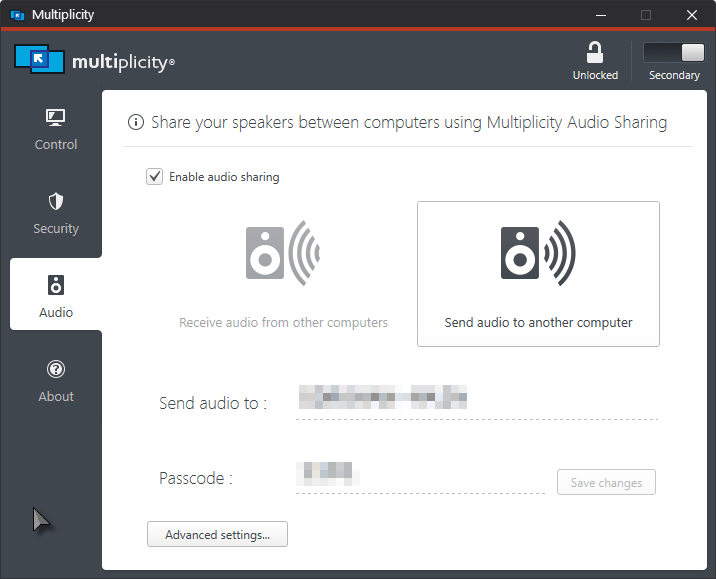
Multiplicity Audio occasionally stops

Multiplicity audio occasionally stops working, where the sender's audio is not outputted from the receiver any more.

Unticking and ticking "Send audio when receiver is online" or "Use lossless compression when sending audio" immediately fixes this.

I'm not sure what the cause is, this issue happens rarely, and I haven't found a pattern that it breaks on.

If this is not a known issue or if there needs to be extensive troubleshooting for this issue, could I have a batch file that disables and enables Multiplicity audio as a temporary fix? 

Thank you!

98,120 views 59 replies
Reply #2 Top

Thank you for the link. I personally think those steps won't be very relevant because my problem is that audio is working most of the time, with rare random disconnects. 

However, I've followed all the instructions there and I'll post a followup if I experience a disconnection again.

Reply #4 Top

Hi, I'm still experiencing random audio disconnections. I've followed the following instructions:

  • Used the IP address of the receiver
  • Disabled jack detection
  • Disabled all firewalls

Unticking and ticking "send audio when receiver is online" fixed this immediately.

Is there a way I can troubleshoot this? It's jarring when the disconnection happens during conference calls.

Reply #5 Top

Hello,

I have forwarded your report to the Stardock support team for their review and recommendations.

Please keep an eye on this thread for any updates.

We really do appreciate your feedback, thanks.


AzDude
Stardock Community Assistant

Reply #6 Top

Hello,

Sorry to hear you are having trouble.

I'm not sure what the cause is, this issue happens rarely

How rare is rare? Is this over wireless or ethernet?

Have you installed the most recent 3.5 version (About tab on Primary)? If not, please do so on each PC.

Sean Drohan
Stardock Support Manager

Reply #7 Top

Quoting sdRohan, reply 6

How rare is rare? Is this over wireless or ethernet?

Have you installed the most recent 3.5 version (About tab on Primary)? If not, please do so on each PC.

It happens about once or twice a week.

It originally happened when I was on a wireless connection so I switched over to a wired connection, but the issue is still there.

I'm running Version 3.5 Build 00096 on both sender and receiver.

Reply #8 Top

Same here. It's constant though with it cutting off randomly. I just gave up in the end and used a mixing desk to route the sound instead. Wired connection here, the latest version of Windows and using Vrs 3.5.

Reply #9 Top

Same here.  Experience this quite a lot when play game on the second computer.  I think this is related to the high CPU usage which is always an issue!!

Reply #10 Top

I would like to see if any of you are using Malwarebytes and to review this if so:

https://forums.stardock.com/498116/get;3788612

Sean Drohan
Stardock Support Manager


Reply #11 Top

Thanks for the reply. The only anti-virus/anti-malware I have installed is Windows Defender, with the firewall disabled. 

I see you mentioned MPPortFox.zip on the other thread, I'll try that and update if I still get disconnections. I presume that it's fine to run this with the firewall disabled?

Reply #12 Top

Quoting ktkwon00, reply 11

I see you mentioned MPPortFox.zip on the other thread, I'll try that and update if I still get disconnections. I presume that it's fine to run this with the firewall disabled?

No, run it with it enabled or it cant work on re-writing the rules.

Sean Drohan
Stardock Support Manager

Reply #13 Top

Thanks for the reply. I'm not expecting a fix to be available for this issue at this point but I wanted to update anyone watching this thread that MPPortFix.zip didn't fix the issue.

Reply #14 Top

I am also having this issue. It started after the recent update. I have tried the fixes suggested in the audio section of the support FAQ linked previously in this thread. 

It happens randomly but I'd say on average a few times an hour. My workaround for the time being is enabling the Ctrl + F12 hotkey to "Send audio when receiver is online."

Reply #15 Top

Hello,

Sorry to hear you are having trouble.

When you reestablish audio, do you uncheck \ check the sender's audio box or the receivers?

If it's the sender (something we suspect), what needs to be determined is if it stops capturing or stops sending. The tests will be challenging but informative:

  • When audio stops, does network traffic dip (task manager)? That will take some effort to have 'before' data and a consistent stream of data.
  • When audio stops, is the sender unmuted, does sound then play from its own attached output (speakers, headset, etc)?

Thanks for the help and patience.

Sean Drohan
Stardock Support Manager


Reply #16 Top

>When you reestablish audio, do you uncheck \ check the sender's audio box or the receivers?

I press Ctrl+F12 twice on the sender to fix the issue. I cant remember if doing it on the receiver fixed it, but I'll try the next time this happens and update.

For the other stuff (network usage/sender unmuted) I've never really checked, but I'll update after checking that too.

Reply #17 Top

Quoting ktkwon00, reply 16

>When you reestablish audio, do you uncheck \ check the sender's audio box or the receivers?

I press Ctrl+F12 twice on the sender to fix the issue. I cant remember if doing it on the receiver fixed it, but I'll try the next time this happens and update.

For the other stuff (network usage/sender unmuted) I've never really checked, but I'll update after checking that too.

Thank you for your help.

Sean Drohan
Stardock Support Manager

Reply #18 Top

I also press Ctrl+F12 twice on the sender to fix it. When the audio stops, the sender is unmuted. The audio starts playing through the sender's own attached speakers. I will attempt the monitor the network traffic and report back.

Reply #19 Top

I was able to monitor network traffic when the audio stopped and there is no dip in traffic when the audio stops. 

Reply #20 Top

Quoting MdoubleP, reply 19

I was able to monitor network traffic when the audio stopped and there is no dip in traffic when the audio stops. 

But the audio ends up being played on the sending machines speakers at the audio stop time?

Reply #22 Top

I did a purge and reinstalled version 3.44 but the issue was still happening, so it's not specific to version 3.5. The timing seemed to line up. I've used Multiplicity for a long time and never had an issue until very recently. I don't know what has changed. It's a bummer as this is the main reason I use Multiplicity and my setup hinges on this functionality. I upgraded back to 3.5. It's now happening every couple minutes. 

Reply #23 Top

Quoting MdoubleP, reply 22

I did a purge and reinstalled version 3.44 but the issue was still happening, so it's not specific to version 3.5. The timing seemed to line up. I've used Multiplicity for a long time and never had an issue until very recently. I don't know what has changed. It's a bummer as this is the main reason I use Multiplicity and my setup hinges on this functionality. I upgraded back to 3.5. It's now happening every couple minutes. 

If you set up a continuous ping from the sender to the receiver, does it ever fail to respond at the moment you lose audio?

  • cmd
  • ping <ip of receiver> -t
  • Ctrl+C to stop

Example:

https://cdn.stardock.us/support/uploads/2020-10-05_12-21-28.mp4

Also, is this over wireless or Ethernet? If not Ethernet, is that possible for testing?

Sean Drohan
Stardock Support Manager


Reply #24 Top

Quoting sdRohan, reply 23
If you set up a continuous ping from the sender to the receiver, does it ever fail to respond at the moment you lose audio?

    • cmd
    • ping <ip of receiver> -t
    • Ctrl+C to stop


Example:

https://cdn.stardock.us/support/uploads/2020-10-05_12-21-28.mp4

Also, is this over wireless or Ethernet? If not Ethernet, is that possible for testing?

Sean Drohan
Stardock Support Manager


I performed this test. No failure in ping response when the audio is lost. This is over Ethernet.

Reply #25 Top

Quoting MdoubleP, reply 24


Quoting sdRohan,
If you set up a continuous ping from the sender to the receiver, does it ever fail to respond at the moment you lose audio?


      • cmd

      • ping <ip of receiver> -t

      • Ctrl+C to stop


Example:

https://cdn.stardock.us/support/uploads/2020-10-05_12-21-28.mp4

Also, is this over wireless or Ethernet? If not Ethernet, is that possible for testing?

Sean Drohan
Stardock Support Manager


I performed this test. No failure in ping response when the audio is lost. This is over Ethernet.

Are you at any time using any specialist audio software which might use a low latency mode on either end?