

Tatiora Tatiora

ANNOUNCING: Curtains v1.1 - try the beta today!

ANNOUNCING: Curtains v1.1 - try the beta today!

v1.1 is coming soon, but you can get the beta right now

Stardock announces v1.1 for Curtains, the popular Windows customization app
The v1.1 beta for all Curtains and Object Desktop users is available now

Stardock released a v1.1 beta for Curtains today, its popular customization tool that allows users to apply new styles along the lines of Dark and Light Modes to Windows® 10. 
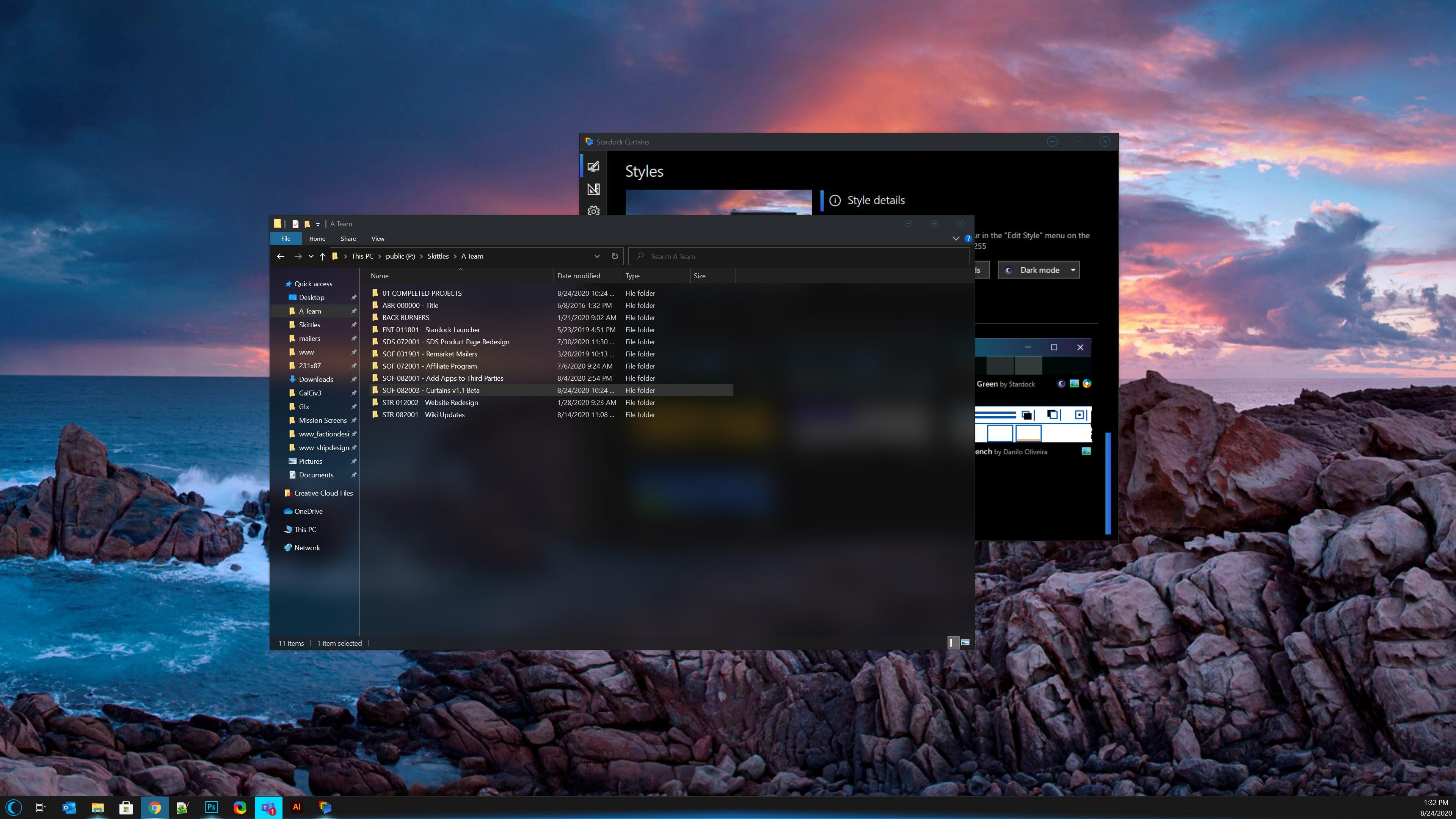
Curtains

Taking advantage of the groundwork built to support light and dark mode, Curtains includes several new styles including Crystal, Sky, and Midnight mode that enhance the look and feel of the Windows UI along with apps that already support light and dark mode. 

Curtains v1.1 Beta Features:

  • New options for explorer background transparency and blur effects (see screenshot above!)
  • New option to extend title bar into top of ribbon in explorer windows
  • Increased style application speed
  • Quality of life adjustments

To see a complete beta change log and to participate in our feedback thread, go here. The full release of v1.1 is coming soon. Enjoy the beta!

Don't have Curtains yet? Get it now through Stardock or Steam.
Curtains owners can get directions on how to access the beta below.

Curtains
Curtains
Curtains
Curtains


How to Get the Beta:
Object Desktop members can get the beta from within Object Desktop Manager with 'show beta downloads' enabled:

Individual purchases (as well as Object Desktop Members) can also be obtained from your an account page: https://store.stardock.com/myaccount/products

For guest check-out purchase (no account), from this link: http://www.stardock.com/support/productkeyretrieval

63,695 views 42 replies
Reply #26 Top

Tried the Explorer transparency option with Play style.  Works, but only after 1-4 seconds of delay post-launch of Explorer.  Sometimes trans effect won't appear at all until clicking in another window or the taskbar.  Win10 Pro v2004.

Reply #27 Top

Quoting Daiwa, reply 26

Tried the Explorer transparency option with Play style.  Works, but only after 1-4 seconds of delay post-launch of Explorer.  Sometimes trans effect won't appear at all until clicking in another window or the taskbar.  Win10 Pro v2004.

Can't reproduce the issue. The effect appear as soon I set that option to enable and click the "apply changes" button.

Need to know more specific on your system so we can try to recreate it.

1) Wallpaper manager running in the background? ie Deskscape or WallpaperEngine?

2) Blur setting?

3) Restart Explorer.exe helps?

Thank you,

Basj,
Stardock Community Assistant

Reply #28 Top

Thanks, basj.  Latency issue remains after explorer restart and with standard blur, acrylic blur and basic transparency.  No wallpaper manager, Deskscapes  or WallpaperEngine.  Only other SD app running at the time is Start10.  It's a Dell Optiplex 3060 desktop with OEM Intel video.

Reply #29 Top

Quoting Daiwa, reply 28

Thanks, basj.  Latency issue remains after explorer restart and with standard blur, acrylic blur and basic transparency.  No wallpaper manager, Deskscapes  or WallpaperEngine.  Only other SD app running at the time is Start10.  It's a Dell Optiplex 3060 desktop with OEM Intel video.

Please try purge and reinstall steps as mentioned here : https://forums.stardock.com/500728/curtains-support-faq#CurtainsPurge . Try to re-download the latest version available from your account. Reboot after the purge and reboot again after the re-installation. Retest and report back.

Thank you,

Basj,
Stardock Community Assistant

Reply #30 Top

Quoting Daiwa, reply 28

Thanks, basj.  Latency issue remains after explorer restart and with standard blur, acrylic blur and basic transparency.  No wallpaper manager, Deskscapes  or WallpaperEngine.  Only other SD app running at the time is Start10.  It's a Dell Optiplex 3060 desktop with OEM Intel video.

Is your computer automatically opening up some explorer windows on login, or are you manually opening these windows?

Reply #31 Top

Manually, Neil.  Thx.  I haven't done the purge & reinstall yet, however.

Reply #32 Top

PLEASE make the "Transparency with Blur" available in Next WB Update just like for Curtains ! ! PLEASE !     

(-Hoping someone will actually answer me)

Reply #33 Top

Quoting neone6, reply 32

PLEASE make the "Transparency with Blur" available in Next WB Update just like for Curtains ! ! PLEASE !     

(-Hoping someone will actually answer me)

I think that rather depends on how well Curtains does.

The better it does the more time we can justify in putting things like that into a future WB11.

Reply #34 Top

Quoting Neil, reply 33


Quoting neone6,

PLEASE make the "Transparency with Blur" available in Next WB Update just like for Curtains ! ! PLEASE !     

(-Hoping someone will actually answer me)


I think that rather depends on how well Curtains does.

The better it does the more time we can justify in putting things like that into a future WB11.

Just you wait n see when Mine and Vampys Curtain-Masterskins come up *_*  *_*  *_*  

Reply #35 Top

Quoting Daiwa, reply 31

Manually, Neil.  Thx.  I haven't done the purge & reinstall yet, however.

So is this every time you open a new explorer window, or just the first one?

Also is your computer set to run folders as a separate process?

Reply #36 Top

Current situation, still having not run purge/reinstall:

Over time, the latency of transparency on initial opening of an explorer window has shortened to a few milliseconds with an initial flash of white in each frame.  It seems that if a sufficient period of time has passed since last launch the initial launch trans works.

If I close the initially-opened explorer window and immediately launch Explorer again, transparency will not appear until a click event, on Explorer itself, another window or taskbar for example.

If I launch additional instances of Explorer after transparency is active (either with initial launch or a click event), transparency only appears in the additional instances with a click event.

Tried to do a SS of 2 Explorer windows side by side showing this, but just pressing the CTRL key triggers trans to appear in the second Explorer window so add keystrokes to clicks as triggers for the trans appearing.

I'm not knowingly running folders as a separate process; not sure where that setting resides.

Thanks again, Neil.  Hope this is of some help.

Reply #37 Top

Just installed the beta on my Dell Inspiron 13-7378 laptop running Win10 Pro 1909 and Explorer trans doesn't work at all.  Also have to exclude Universal Apps.  Just FYI.

Reply #38 Top

Quoting Daiwa, reply 37

Just installed the beta on my Dell Inspiron 13-7378 laptop running Win10 Pro 1909 and Explorer trans doesn't work at all.  Also have to exclude Universal Apps.  Just FYI.

Is that the same machine you had to exclude universal apps on before?  I assume your other computer doesn't have such an issue?

Regarding the transparency, I wonder if the files were not replaced correctly.

Uninstall Curtains, reboot and then install the beta.

Reply #39 Top

The first machine is a Dell Optiplex 3060 Desktop running Win10 Pro 2004.  Universal apps have to be excluded on both machines.

On the Dell Inspiron laptop, after uninstalling, rebooting and re-installing the beta, there was an Explorer window open beneath the config dialog & transparency was immediately applied to it when I clicked Apply in the Advanced Settings dialog.  Transparency has failed with all subsequent launches of Explorer, however.

Reply #40 Top

Quoting Daiwa, reply 39

The first machine is a Dell Optiplex 3060 Desktop running Win10 Pro 2004.  Universal apps have to be excluded on both machines.

On the Dell Inspiron laptop, after uninstalling, rebooting and re-installing the beta, there was an Explorer window open beneath the config dialog & transparency was immediately applied to it when I clicked Apply in the Advanced Settings dialog.  Transparency has failed with all subsequent launches of Explorer, however.

That is very strange as nobody else seems to be experiencing those issues with universal apps.

What other apps do you have on both, AV apps, other security apps, other third party software etc?

Reply #41 Top

Common to both machines are Windows Defender, Start10, Bins, VPN Unlimited, Office 2010, PaintShop Pro 8, iTunes, iCloud, Glary Utilities, Citrix Workspace, iOBit Uninstaller, SyncBack Free and Acrobat Reader DC.  Brave browser is default on both.  WB & CFX are installed but not running currently.  Don't spot any other third party apps in Task Manager that are common to both.

The laptop has Acronis 2020 and Malwarebytes installed and running.

There must be something common to my rigs that might be the culprit, so I appreciate your attention to this.

Reply #42 Top

Is the Chicago theme false advertising? It clearly doesn't exist and doesn't have a fingerprint left behind anywhere on these or other forums.