ANNOUNCING: Curtains v1.1 - try the beta today!

v1.1 is coming soon, but you can get the beta right now

Stardock announces v1.1 for Curtains, the popular Windows customization app
The v1.1 beta for all Curtains and Object Desktop users is available now

Stardock released a v1.1 beta for Curtains today, its popular customization tool that allows users to apply new styles along the lines of Dark and Light Modes to Windows® 10. 
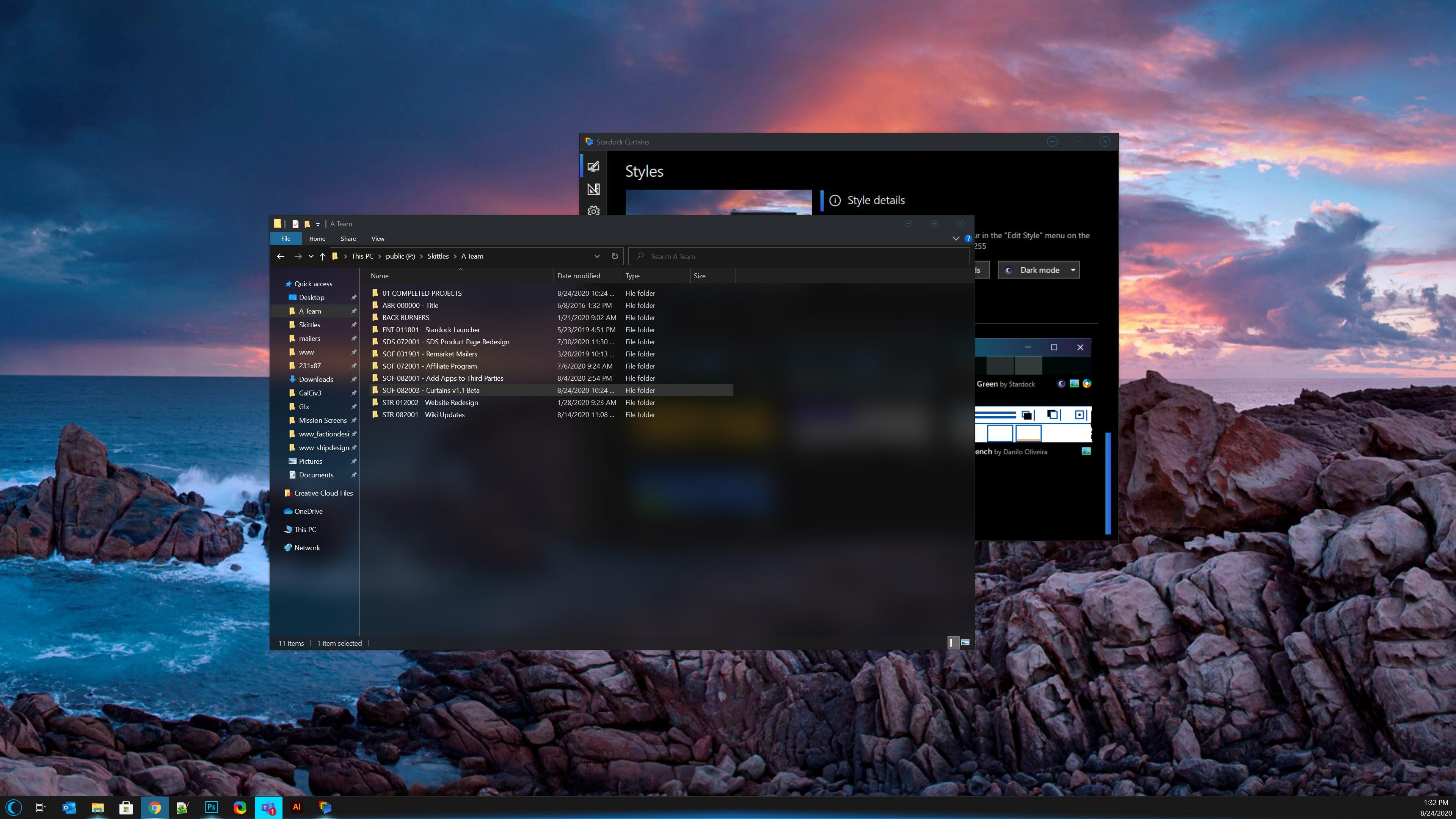
Curtains

Taking advantage of the groundwork built to support light and dark mode, Curtains includes several new styles including Crystal, Sky, and Midnight mode that enhance the look and feel of the Windows UI along with apps that already support light and dark mode. 

Curtains v1.1 Beta Features:

  • New options for explorer background transparency and blur effects (see screenshot above!)
  • New option to extend title bar into top of ribbon in explorer windows
  • Increased style application speed
  • Quality of life adjustments

To see a complete beta change log and to participate in our feedback thread, go here. The full release of v1.1 is coming soon. Enjoy the beta!

Don't have Curtains yet? Get it now through Stardock or Steam.
Curtains owners can get directions on how to access the beta below.

Curtains
Curtains
Curtains
Curtains


How to Get the Beta:
Object Desktop members can get the beta from within Object Desktop Manager with 'show beta downloads' enabled:

Individual purchases (as well as Object Desktop Members) can also be obtained from your an account page: https://store.stardock.com/myaccount/products

For guest check-out purchase (no account), from this link: http://www.stardock.com/support/productkeyretrieval

63,687 views 42 replies
Reply #1 Top

I like the controls you put in there for the Explorer window opacity and blur.  I'm normally not a fan of transparency behind text windows, but I can come up with a combination there I can work with and like.  B)   :thumbsup:  

Reply #2 Top

Where can I get that Chicago theme that is shown listed in the first screenshot?!


I just installed latest beta... and it's not there..... /sad

Reply #3 Top

After I installed this latest beta when the update completed Curtains automatically applied a skin.  Is that normal behavior?  Can that be configured?

Reply #4 Top

Love the transparent background. It's buried pretty deep.

Reply #5 Top

Quoting ALMonty, reply 4

Love the transparent background. It's buried pretty deep.

Mind showing me where it at. Been spending sometime looking for it. :borg: But I fail to find it.

Thank you,

Basj,
Stardock Community Assistant

Reply #6 Top

Quoting basj, reply 5

Mind showing me where it at.

It would be my honor, good sir. :)   [Windows] tab / [Advanced Properties] Button  about 2/3rds of the way down the Advanced properties window - "Explorer background blur mode".  It's a per-skin setting.

Reply #7 Top

Thanks Dave

Reply #8 Top

Thank you Dave and Al.. :thumbsup:  :thumbsup:  

Reply #9 Top

Would love to see the Explorer BG blur feature added to windowblinds10 :p  Curtains is an ok program, just dont like how limited it is.

Reply #10 Top

Quoting SimplexDesigns, reply 9

Would love to see the Explorer BG blur feature added to windowblinds10
:cylon:  :cylon:  :cylon:  

-Talked about this A LONG time... -If you can do it for Curtains, surely you can do it for WindowBlinds.

Reply #11 Top

That Explorer Blur looks really nice, but the setting shouldn't be buried so deep in my opinion.

Anyway, looking very much forward to Curtains 1.1 Final. :)

Reply #12 Top

Does anyone have a copy of that Chicago theme?

I can't find it anywhere. Not here, and also not on Danilo Oliveira personal site, and also not on his deviantart page either.

Reply #13 Top

Well, according to the Object Desktop Manager app I installed the beta for version 1.1 last night but Curtain's info screen tells me I have version 1.01. The Explorer blur option is not shown in the Advanced Properties area. I have rebooted the rig. 

Reply #14 Top

Mine says Version 1.1Beta 1. Try downloading it from your StarDock account. 

Reply #15 Top

thanks for the reply, ALMonty. I tried to do just that but it isn't listed on my Stardock account page for some reason. Neither is the Oranda Cursor Suite.

Reply #16 Top

For anyone who still looking for the Explorer background transparency settings. Its under each individual style. You will need to edit it yourself to have it turn on and adjust it to your liking. Hope the screenshot below will help.

Thank you,

Basj,
Stardock Community Assistant

Reply #17 Top

Quoting SamEVO, reply 15

I tried to do just that but it isn't listed on my Stardock account page for some reason. Neither is the Oranda Cursor Suite.

Hello SamEVO,

Please raise a support ticket using the link below. Make sure to put in all the details on your purchased items and your issue with it. Support will help you through email from there. There might be a mixed up somewhere. We appreciate your feedback and patience.

http://esupport.stardock.com/index.php?/default_import/Tickets/Submit

Thank you,

Basj,
Stardock Community Assistant

Reply #19 Top

Hello SamEVO,

Just out of curiosity, what is Curtains version available for download showing in your account page? Below is what showing on mine.

Thank you,

Basj,
Stardock Community Assistant

Reply #20 Top

I stand corrected. The beta is listed. If Curtains was listed there before, I overlooked it. My apologies to everyone involved. 

Reply #21 Top

Quoting SimplexDesigns, reply 9

Would love to see the Explorer BG blur feature added to windowblinds10 :P   Curtains is an ok program, just dont like how limited it is.

Reply #22 Top

When I switch to light mode, the column title does not extend to the edge of window. But when in dark mode, it's fine and dandy.


Reply #23 Top

Quoting midkazen, reply 22

When I switch to light mode, the column title does not extend to the edge of window. But when in dark mode, it's fine and dandy.

Hello,
Sorry to hear you are having issues. Please post screenshots so we can understand it better.

Thanks
Basj,
Stardock Community Assistant.

Reply #25 Top

Great, thank you for the screenshot. We appreciate your feedback and patience.

Basj,
Stardock Community Assistant
