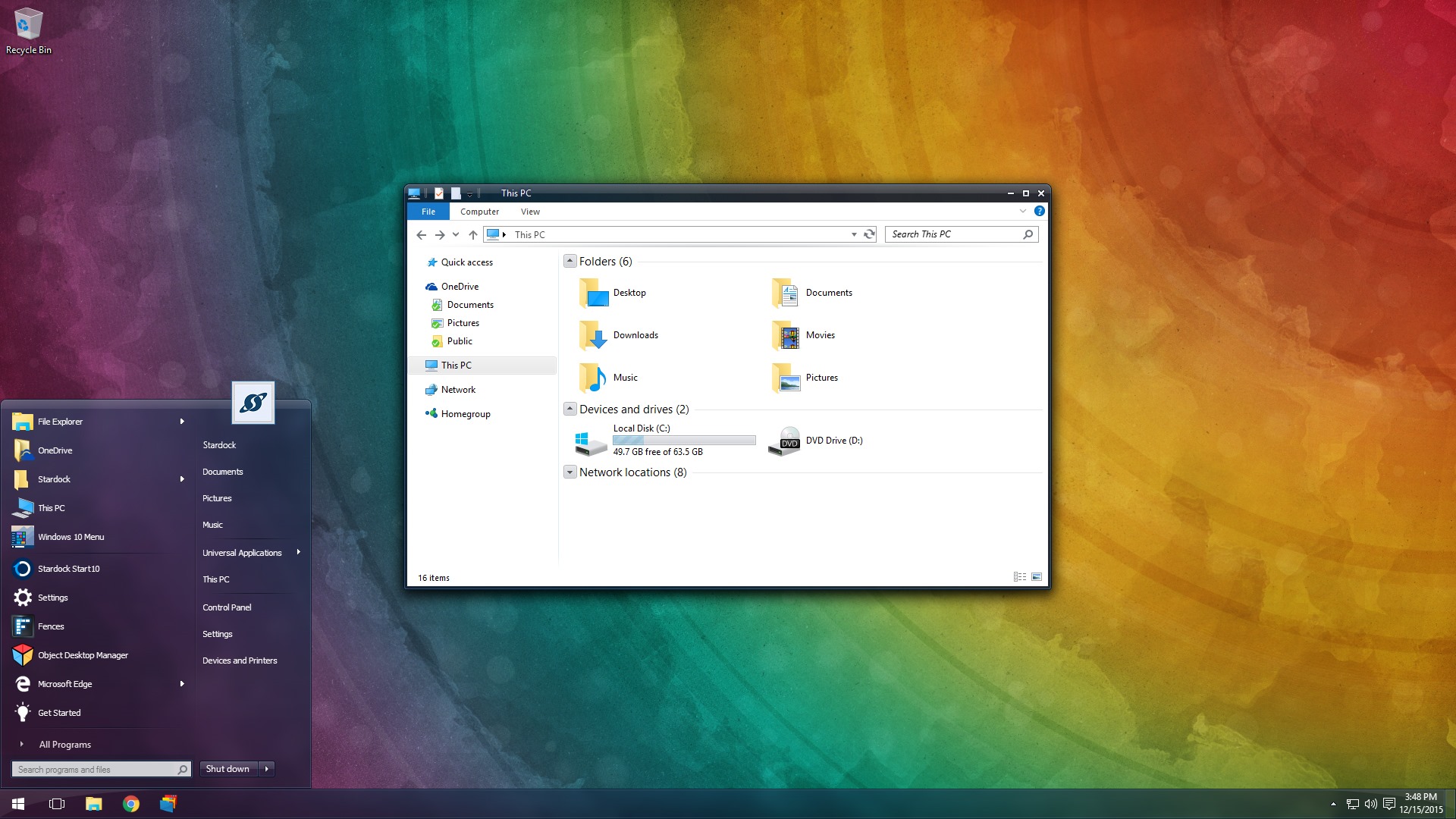
WindowBlinds 10 Beta with Windows 10 Support Available for Object Desktop Members

The first beta for WindowBlinds 10 is now available for active Object Desktop owners!
This beta includes support for Windows 10 and a new UI.

Active Object Desktop owners can now get the WindowBlinds 10 beta from your Stardock account hereIn future updates, we'll be including new skins and features.

WB v10.0.1 update:

  • Added skin rebuild list button
  • Fixed config screen resolution
WB10 14 WB10 21


If you're not an Object Desktop member, now is a great time to become one. You get over 10 Windows customization products such as WindowBlinds, DeskScapes, Fences, Start10, and many more. You will also get access to betas and updates first, like WindowBlinds 10 for one year. Get Object Desktop today!

414,464 views 91 replies
Reply #1 Top

I thought win10 had an expanded start menu. That look s like win7. Confused.

Reply #2 Top

That's Start10.


Reply #3 Top

Could I see a screenshot without Start10 running?  Thanks.

Reply #4 Top

Awesome 5*

Reply #5 Top

WB10 is working nice on 8.1 and no problems with Start8.

Reply #6 Top

Quoting DaveRI, reply 3

Could I see a screenshot without Start10 running?  Thanks.

Likely, like with Windows 8.1, without Start10, you'll get an unskinned Windows10 start menu.


Edit:  Yes, I checked. Non skinned Win10 menu, which is to be expected.

Reply #7 Top

Xp had a startmenu- It was being skinned.

Win 7 had a startmenu- It was being skinned.

Win 10 has a startmenu.....why do we need start 10 ??? <_< Hmmm...

Hopefully Sks 10 will have a Startmenu area for skinning the win 10 startmenu just like it used to be for XP & 7

Reply #8 Top

Quoting neone6, reply 7

Xp had a startmenu- It was being skinned.

Win 7 had a startmenu- It was being skinned.

Win 10 has a startmenu.....why do we need start 10 ??? <_< Hmmm...

Hopefully Sks 10 will have a Startmenu area for skinning the win 10 startmenu just like it used to be for XP & 7

The Win10 startmenu is not designed to be skinned and is not theme aware.

Reply #9 Top

Quoting RedneckDude, reply 6

Edit:  Yes, I checked. Non skinned Win10 menu, which is to be expected.


Quoting Neil, reply 8

The Win10 startmenu is not designed to be skinned and is not theme aware.

Thanks guys for checking and the info.  :)

Reply #10 Top

Quoting RedneckDude, reply 6


Quoting DaveRI,

Could I see a screenshot without Start10 running?  Thanks.


Likely, like with Windows 8.1, without Start10, you'll get an unskinned Windows10 start menu.


Edit:  Yes, I checked. Non skinned Win10 menu, which is to be expected.


My Windows 10 start menu is skinned just fine Jim, Using the new Start 10 1.08. I get the actual skin start menu. I have it set to Windows 7 menu in Start 10 though.

Reply #11 Top

Yes, Tom. Mine too, WITH Start10. DaveRI was wanting to see it WITHOUT Start10, in which case, it isn't skinned.

Reply #12 Top

Quoting RedneckDude, reply 11

DaveRI was wanting to see it WITHOUT Start10, in which case, it isn't skinned.

Yep, we're all good. I wasn't sure how all this was fitting together.  :beer:

I never had any reason to pay attention to the Start8/10 line until, well, today ;)

Reply #13 Top

Quoting Neil, reply 8

The Win10 startmenu is not designed to be skinned and is not theme aware.
Thanks Neil, then we know.  |-)

-Question 2 from me. Can you create an option/feature just like you can choose Win 7 style, for start 10 so it looks like the "native" Win 10 Start menu ?  :star:

Reply #14 Top

Quoting neone6, reply 13

the "native" Win 10 Start menu ? 


That feature is already there Andy, just select the Windows 10 menu in Start 10. I tested it in Windows 10 and it works.

Reply #15 Top

Quoting LightStar, reply 14

Quoting neone6,

the "native" Win 10 Start menu ? 


That feature is already there Andy, just select the Windows 10 menu in Start 10. I tested it in Windows 10 and it works.

Is it skinned with "Tiles" on the right hand side ?

Reply #16 Top

Quoting neone6, reply 15


Quoting LightStar,


Quoting neone6,


the "native" Win 10 Start menu ? 


That feature is already there Andy, just select the Windows 10 menu in Start 10. I tested it in Windows 10 and it works.

Is it skinned with "Tiles" on the right hand side ?


Yes, but not skinned, it is the normal Windows 10 start menu.

Reply #17 Top

Quoting LightStar, reply 16
Yes, but not skinned, it is the normal Windows 10 start menu.
So the Feature that we all want (??) is for Start 10 to have a feature with it skinned With Tiles on the right.

Reply #18 Top

Quoting neone6, reply 17


Quoting LightStar,
Yes, but not skinned, it is the normal Windows 10 start menu.

So the Feature that we all want (??) is for Start 10 to have a feature with it skinned With Tiles on the right.


According to Neil, that is not possible Andy. 

Reply #19 Top

Quoting neone6, reply 17

So the Feature that we all want (??) is for Start 10 to have a feature with it skinned With Tiles on the right.

EEwwww. I wouldn't want that anyway. Screw the tiles.

Reply #21 Top

That's ridiculous strategy,for me it's ok as long there is a  start 10 studio builder :grin:  but what about new users?New users will not buy windowblinds 10 if ever they found out that WB10 start menu will not skinned the menu of win 10.

Reply #22 Top

Me like my windows 10 tiles.  Skinning would be great.


Reply #23 Top

Quoting LightStar, reply 18

According to Neil, that is not possible Andy.

I think he's referring to what might be doable with updates to Start10, not the native Win10 start menu (the one Neil reports is not theme aware).

Reply #24 Top

Quoting Destrohelix, reply 21

That's ridiculous strategy

The ridiculous strategy is Microsoft's.

Since post Windows 7 Microsoft has dumbed-down the OS GUI so it looks 'OK' [their opinion] on a small form-factor Windows Phone [that no-one uses] to the detriment of [almost] ALL their Customer base who actually don't use Windows on anything other than a standard PC.

Their mistake...their heads rolled....

IN SPITE of Microsoft, Stardock has managed to enable skinning/sanity/recognizable-usable GUI for all...;)


+1 Loading…
Reply #25 Top

Quoting Daiwa, reply 23

Quoting LightStar,

According to Neil, that is not possible Andy.


I think he's referring to what might be doable with updates to Start10, not the native Win10 start menu (the one Neil reports is not theme aware).

Yup |-)