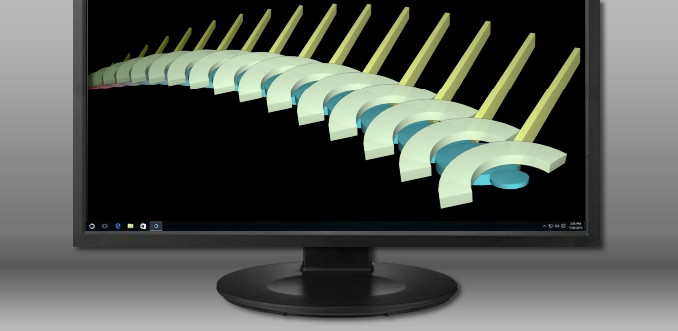
DeskScapes v8.50 - Now Windows 10 Compatible

Animated wallpapers, special effects and video screensavers.

Stardock is pleased to announce that DeskScapes, our program that allows you to animate and customize your desktop wallpapers, released an update today and is now fully compatible with Windows 10.

DeskScapes gives you the ability to animate and customize the wallpaper on your Windows desktop. You can choose one of the animated wallpapers already included with the program, or use your own WMV files to personalize your desktop. There are some additional features to DeskScapes as well:

Key Features:

  • Use your images and videos as the desktop wallpaper
  • Customize your wallpapers with animations
  • Apply over 40 special effects to your desktop
  • Apply any dream as your PC screensaver
  • Hundreds of Dreams on WinCustomize.com
  • And more!

Purchase DeskScapes or download a free trial here.


See the full changelog for v8.50 here.

Current Object Desktop owners and DeskScapes 8 owners can visit their My Downloads page and update to the latest version, 8.50, free of charge.

312,542 views 38 replies
Reply #1 Top


our program that allows you to animate and customize your desktop wallpapers, released today
First of all, DeskScapes has been around for years now.


now fully compatible with Windows 10
Secondly, it was allegedly already compatible with Windows10.

 Has something NEW been added??? If not........

This falls into the category of a Non-announcement. 

Reply #2 Top

Quoting Wizard1956, reply 1


our program that allows you to animate and customize your desktop wallpapers, released today

First of all, DeskScapes has been around for years now.


now fully compatible with Windows 10

Secondly, it was allegedly already compatible with Windows10.

 Has something NEW been added??? If not........

This falls into the category of a Non-announcement. 

It would appear the PR team have missed off the important information which is the release of Deskscapes 8.5!

This was out in beta but is now released in release form.

+1 Loading…
Reply #3 Top

Quoting Neil, reply 2

the release of Deskscapes 8.5!
This was out in beta but is now released in release form.
Now the announcement makes sense. Thank you Neil.

Reply #5 Top

Any word on what was fixed in this update from the beta?  Because none of the bugs I passed on have been addressed.

Reported here and numerous other places :)

https://www.wincustomize.com/article/471760/

Is this only a problem related to dynamic dreams like PhotoDream, because videos seem to work as expected (though with non-matching monitor ids)?

Reply #6 Top
 My product key cannot be registered, so the update could not be found in the "My Downloads"  , please solve this problem, I use Windows10. 
Reply #7 Top

Hi

Can't install deskcapes 8 try on windows 10, because  it's not the 8.5 try version but the 8.21 try version. Please correct this error !

Reply #9 Top

Quoting yhy001, reply 6

DeskScapes v8.50 - Now Windows 10 Compatible

Try here: https://www.stardock.com/accounts/register


Reply #10 Top

Quoting yhy001, reply 6

 My product key cannot be registered, so the update could not be found in the "My Downloads"  , please solve this problem, I use Windows10. 


I'm seeing you have registered on the 3rd of this month. You should see DeskScapes in your My Downloads and clicking Download will obtain the latest version.

+1 Loading…
Reply #12 Top

Hi

I also wanted to confirm what some of the users already said. The new release does not fix any of the bugs with windows 10 (at least not in my case). I use Home version of windows 10 and this newest DeskScapes version. Desktop freezes etc...

Reply #13 Top

Quoting netsurfernetsurfer, reply 13

Hi

I also wanted to confirm what some of the users already said. The new release does not fix any of the bugs with windows 10 (at least not in my case). I use Home version of windows 10 and this newest DeskScapes version. Desktop freezes etc...

Did you uninstall, reboot and reinstall the software?

We would need more specific information as that is not normal.

Be aware that if you have multiple computers using the same Microsoft account you will find the wallpaper gets synced which will disable DeskScapes.  This is a feature of your OS.

Reply #14 Top

Quoting Neil, reply 14


Quoting netsurfernetsurfer,

Hi

I also wanted to confirm what some of the users already said. The new release does not fix any of the bugs with windows 10 (at least not in my case). I use Home version of windows 10 and this newest DeskScapes version. Desktop freezes etc...


Did you uninstall, reboot and reinstall the software?

We would need more specific information as that is not normal.

Be aware that if you have multiple computers using the same Microsoft account you will find the wallpaper gets synced which will disable DeskScapes.  This is a feature of your OS.


Yes I did uninstall, reboot and reinstall. As I said, my desktop freezes when I'm using full screen app and doesn't refresh afterwards and for example when using Deskscapes, Windows 10 Action Center will not close until I click Taskbar. When I'm using regular background images, Action Center will close no matter where I click on desktop. Also I noticed just now that when I try to change from moving background to still image background, my desktop once  again freezes...


So, in my opinion Deskscapes isn't ready for Windows 10 yet...


Ps. Sometimes when I look active processes in Task Manager, I see DSHOST.exe there multiple times and if I'm not totally mistaken, that process somehow is linked to Deskscapes

Reply #15 Top

Quoting netsurfernetsurfer, reply 14


Quoting Neil Banfield,


Quoting netsurfernetsurfer,


Hi

I also wanted to confirm what some of the users already said. The new release does not fix any of the bugs with windows 10 (at least not in my case). I use Home version of windows 10 and this newest DeskScapes version. Desktop freezes etc...


Did you uninstall, reboot and reinstall the software?

We would need more specific information as that is not normal.

Be aware that if you have multiple computers using the same Microsoft account you will find the wallpaper gets synced which will disable DeskScapes.  This is a feature of your OS.


Yes I did uninstall, reboot and reinstall. As I said, my desktop freezes when I'm using full screen app and doesn't refresh afterwards and for example when using Deskscapes, Windows 10 Action Center will not close until I click Taskbar. When I'm using regular background images, Action Center will close no matter where I click on desktop. Also I noticed just now that when I try to change from moving background to still image background, my desktop once  again freezes...


So, in my opinion Deskscapes isn't ready for Windows 10 yet...


Ps. Sometimes when I look active processes in Task Manager, I see DSHOST.exe there multiple times and if I'm not totally mistaken, that process somehow is linked to Deskscapes

Can you download and run the tool below:

http://sd.stardock.com/Support/supportToolTest/SDSupportTool.exe 

Then attach the .zip that's created and send it in with a ticket to support:

https://esupport.stardock.com/index.php?/Tickets/Submit 

Reply #16 Top

So are we gonna get a patch soon? not being able to close cation center/clock just because deskscapes is running is stupid.

Reply #17 Top

I have deskstapes 8 but the videos don't work because it says I don't have a codec...

I do have other things like VLC that play the codecs and the media pack stuff.

I was hoping to upgrade to get that working correctly on windows 10, does the upgrade help any with this issue?


Reply #20 Top

Quoting Wizard1956, reply 19

Many of us use this: http://filehippo.com/download_klite_mega_codec/
It will run anything you throw at it.

No need to install codecs tbh, use a small software that it is from Klite called Codec Tweak Tool.


The software can enable Win10 codecs that come disabled by default. i did here and fixed the issue with some video format playback on deskscapes that make the video freeze for 10 seconds before start the loop again.


As for the updates, i do hope they fix the fullscreen freeze bug soon too, and if possible, optimize a bit more to at least make deskscapes use less than 10% of the processor.

Reply #21 Top

Well, I didn't experience any of the issues you have mentioned thus far.

However, it kinda totally messed up my Fences.  Icons seemingly disconnected from their fence and appearing on the desktop when the fences were hidden.. not that they worked.. they appeared to be a screenshot of my icons and were non-functional.  All I tried was applying snow effect to my existing static wallpaper.

*rolls eyes .. it's ok but, I think I will wait to reinstall it once there's been an upgrade/patch/fix/etc. released.

I'm still waiting for CursorFX to get fixed too.. so it doesn't prefer to slide under menus & things instead of staying on the top level so, maybe they're still thinking about fixes.. been a very long time to be without CursorFX already though.  I did convert a couple into windows format and that worked but, omg what a hassle that mess was.


Ok Stardock.  We love ya but, c'mon .. get w/those friends @Microsoft and figure out some solutions for these little glitches that keep us from being able to use the programs we keep licensing --please. ;-)


Sincerely, devoted fanboy for like ever, ~Myr

.end.trans.

Reply #22 Top

Is there a way to disable Deskscapes with a keyboard shortcut?

Reply #23 Top

Deskscapes 8 on windows 10 is constantly crashing just when browsing wallpapers on the application this just started this week last week I did not have any of these issues I think it has to be a windows update because I have not installed anything new to cause this issue software/hardware related. The error message I Receive is this application has stopped working and event 1000

Reply #24 Top

I had to go ahead and uninstall it (DeskScapes) for now.  I'm sure they must be trying to figure out what went wrong and how to fix it with an updated release.

That's the best advice I can offer you guys right now though.

Just remove it, reinstall any other things that may get messed up .. in my case, I had to reinstall Fences to get it to go back to behaving normally after removing DeskScapes .. and just get your favorite wallpaper back for the time-being.

They are bound to have noticed and while unresponsive here in the posts, I'm just gonna give 'em the benefit of the doubt and wait for an updated release to try again.

Happy New Year to you all in any event.!  Hope that you all have a Great year in spite of any evidence that could make us see something else on the horizon.

~Myrddin R Emrys

Reply #25 Top

Quoting Myrddin, reply 25

I had to go ahead and uninstall it (DeskScapes) for now.  I'm sure they must be trying to figure out what went wrong and how to fix it with an updated release.

That's the best advice I can offer you guys right now though.

Just remove it, reinstall any other things that may get messed up .. in my case, I had to reinstall Fences to get it to go back to behaving normally after removing DeskScapes .. and just get your favorite wallpaper back for the time-being.

They are bound to have noticed and while unresponsive here in the posts, I'm just gonna give 'em the benefit of the doubt and wait for an updated release to try again.

Happy New Year to you all in any event.!  Hope that you all have a Great year in spite of any evidence that could make us see something else on the horizon.

~Myrddin R Emrys


Deskscapes 8 seems to be working fine now I Did not change anything just restarted pc and everything seems to be fine browsing in windows 10 within the application.