Stardock’s Tiles reimagines the Windows task metaphor

Over the years, Stardock’s Object Desktop suite of utilities has been the source of many innovations on the PC.  It is where the concept of “widgets” and “gadgets” was born. It is where ZIP files being treated like folders came from, it’s where GUI skinning came from, it’s where animated desktop wallpaper came from.  And more recently, it’s where the popular icon organization program, Fences came from.

This year, Stardock is proud to add Tiles to the list of new Object Desktop programs. Tiles is to tasks what Fences is to desktop icons. It is designed to allow users to more effectively manage what they are working on.

“The current PC task management metaphor hasn’t really changed in over 18 years,” said Brad Wardell, President & CEO of Stardock. “In recent years, mobile devices have been able to introduce users to more modern metaphors of arranging their digital life.  Tiles has been designed to update that metaphor to the PC experience.”

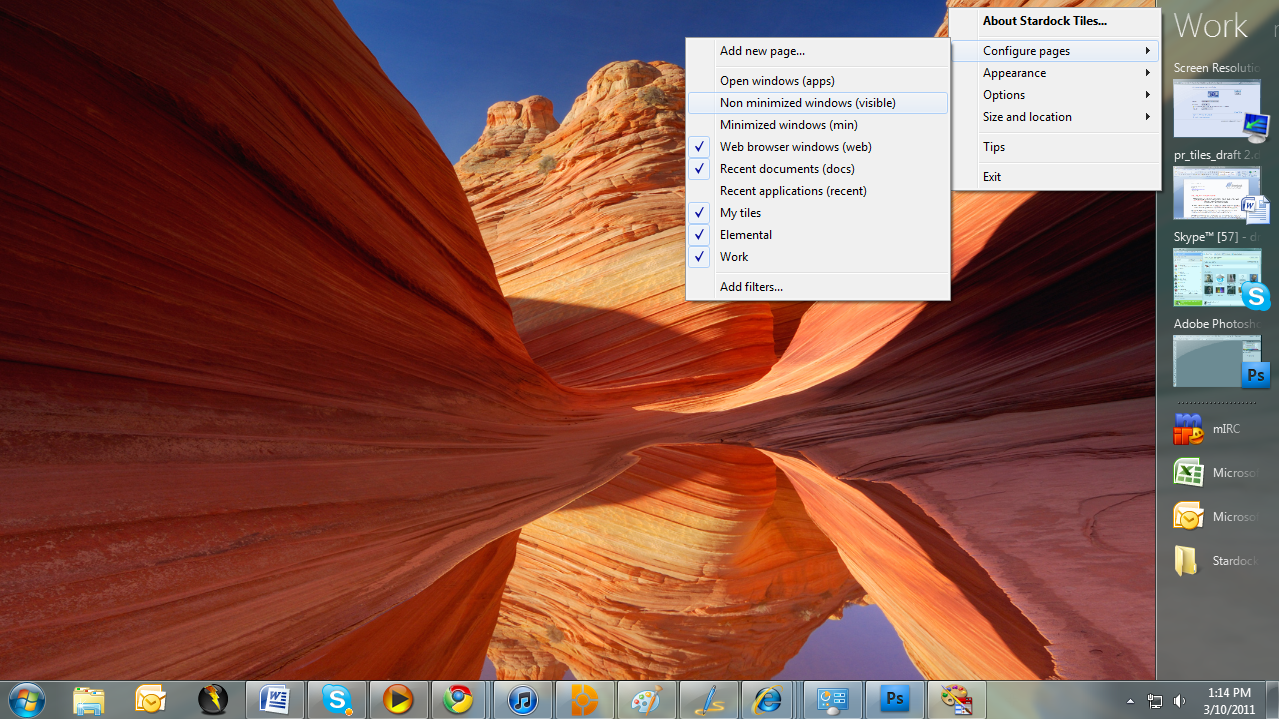
Tiles works by taking advantage of the wider aspect ratios of today’s desktops. On the right side of the screen, a page of tiles is displayed. Users may have multiple pages that they organize as they see fit or make use of several sample page filters such as displaying only active windows or only web pages. Users can then switch between pages either by clicking on the page title or on touch systems by sweeping their finger across the page to “turn the page”.

Users add tiles to a page through either holding the shift key down and dragging a window onto a page or by dragging an icon onto the page. When the tile is active, it is displayed as with a thumbnail of the window. When the tile is inactive, only the program’s icon is displayed. Users can configure Tiles to be different sizes, automatically maximize the windows selected tiles, automatically hide and show windows based on the tiles on a particular page as well as dozens of other options to enable users to customize Tiles to their work style.

Tiles is currently in beta exclusively on Stardock’s Object Desktop software network. Users can get Object Desktop at www.objectdesktop.com. It is expected to be generally released this Summer.

Download:

http://www.objectdesktop.com

Video:

http://www.screencast.com/t/u4oK0520uoK

Screenshots:
 

image

image

image

image

image

88,366 views 28 replies
Reply #1 Top

Nice to see new apps.. really nice.

Reply #2 Top

Quoting vStyler, reply 1
Nice to see new apps.. really nice.

Agreed 110 percent!!!

I have been Using a windows phone for about 4 yrs now the introduction of tiles has been a wonderful blessing .

I have found myself missing the tiles when I move from my phone back to my PC and I am very excited to hear this!

Skinnable too AWSOME!!! :)

Reply #4 Top

I dont understand what Tiles does, sorry.

I guess i am not Pro enough, to understand and therefor have use of it. *shrug*

Reply #5 Top

Quoting OsirisDawn, reply 4
I dont understand what Tiles does, sorry.

I guess i am not Pro enough, to understand and therefor have use of it. *shrug*

It allows you to easily manage running applications and windows.

Check here: https://forums.wincustomize.com/406242


Reply #6 Top

Quoting Island, reply 5


OsirisDawnreply 4I dont understand what Tiles does, sorry.I guess i am not Pro enough, to understand and therefor have use of it. *shrug*


It allows you to easily manage running applications and windows.
Check here: https://forums.wincustomize.com/406242
 

I was confused too...So it appears it is a taskbar replacement that allows you to organize the apps with less clutter, right?

Reply #7 Top

It organizes apps, work apps, web, no further need for quick launch...skins, hides....you name it. Unreal!

Reply #8 Top

Hey, this looks awesome.  Definitely going to try it out.   :thumbsup:

Reply #9 Top

This is such a cool app! Lots to play with! Thanks Stardock folk, love ya! <3

Reply #10 Top

I use the classic taskbar because I found the W7 one to be unintuitive. It looks neat but, and this is exactly what Tiles seems to address, you can't easily see what's running. Also, they ditched the quick-launcher which was dumb. The old taskbar doesn't scale very well but if I had that many things open at once my OCD would make my head explode.

Having just moved to a widescreen monitor a few weeks ago, I'm still getting used to the extra acreage either side of where I'm generally looking. I can't even run Libreoffice full screen any more or I get tennis neck when I'm writing.

Am I correct in saying the taskbar shown in the screenies is the W7 default and isn't affected by Tiles? Because I'd take a punt on OD if it is. I already owe you for the joy I get using Fences.


Reply #11 Top

Having just moved to a widescreen monitor a few weeks ago, I'm still getting used to the extra acreage either side of where I'm generally looking.

you mite want to try this. http://www.slickscreen.com/corporate.aspx

Reply #14 Top

I like it for many reasons but the biggest one is that I can finally hide the windows task bar.

With aero peek there was a glimmer of hope where the desktop was concerned but now with this app partnered with fences the task bar can finally be banished.

As with a lot of stardock apps there has always been an option to hide windows task bar and whilst this is something I have always wanted to do there has never been the functionality until now.

I can watch video, close unwanted pop under windows and keep an eye on running proccesses all at a glance.

Of course these functions have all been available before but never in a form that I have found to be usable for me

Reply #15 Top

Previously, I've shied away from many of Stardock's customization tools because the results look gaudy and require an immense investment of time to configure. Now, like Fences, I'm warming up to Tiles. It's got a straightforward and slick finish and more reasonably matches the way I do work, which is to work in different groups of apps.

Anyway, a few questions, since I can't figure out where to post them:

  1. Is there an appropriate technical forum where we can post feedback and get help? My Office apps aren't showing a preview, and I'd like to figure out what's causing that.
  2. Is there a way to adjust the width of the bar?
  3. Have you considered a simple, graphical way to encourage skin creation. Failing that, a video tutorial or two would be an immense help.

This is already proving to be quite useful, and that's without any tinkering and mucking about in confusion. That's a really great start.

Reply #16 Top

Tiles feedback thread is here: https://forums.wincustomize.com/406271


The size of Tiles can be adjusted by right-clicking inside Tiles, and going through the Size and location menu.


Tiles has an included skin editor which is pretty simple to use. There's no tutorials yet, but soon.

Reply #17 Top

Wow, I'm positively thick to have missed the size options. Thanks, Dog! It's nice to have that feedback thread too; I appreciate the quick response.

Reply #19 Top

No thanks. I like my Windows Superbar.

Reply #20 Top

First let me say that I have downloaded the "free" version of Tiles and I have to say that the concept is a good one, it's been quite a while since someone has come up with software that is actually usefull and not just a ripoff of someone elses idea, with that being said ..............

It really bothers me when a company advertises their software as free when it is really not, such as Stardocks software, your "free" version of Tiles just like most of the other "free" versions of your software and is VERY LIMITED on configuration or just not configurable at all, which is why there is absolutely no Stardock software on my system and after I finish writing this Tiles will be removed also, even though the concept is intriguing your "free" version is too limited for me to see what it ACTUALLY will do. If you want me to purchase something then give me something in return, don't just tell me something is free then give me the "bare bones" and expect me to come running with cash in my hands.

When you say free, in my mind that means 100%, no bs, no strings attached for the full blown version of the software, otherwise if I have to pay for it or any portion thereof then it's called "SHAREWARE", so lets call a spade a spade here and what Tiles is .......shareware, not freeware, shareware.

This is the reason why those of us in the skinning and Windows customization community would never recommend anything Stardock to anyone because there are always strings attached to your downloads.

Reply #21 Top

Quoting edee2, reply 20
This is the reason why those of us in the skinning and Windows customization community would never recommend anything Stardock to anyone because there are always strings attached to your downloads.

And your source for this information is...?

Reply #22 Top

What a concept....Stardock giving away free, full versions of all it's software. Man, that would be so cool!!!  Only drawback....Stardock makes no money, goes belly up, then we're all screwed as far as customization is concerned. I say this because OS Customization and Stardock go hand in hand.


Quoting edee2, reply 20
This is the reason why those of us in the skinning and Windows customization community would never recommend anything Stardock to anyone because there are always strings attached to your downloads.


Now that IS laughable. WinCustomize/Stardock represents the lion's share of Windows Customization community and software.

Reply #23 Top

Quoting edee2, reply 20
If you want me to purchase something then give me something in return, don't just tell me something is free then give me the "bare bones" and expect me to come running with cash in my hands.
Would you have been happier with everything enabled for a certain length and the have some features stop working?  

Or, were you surprised that some features were not part of the base product?  Do you think that there was a mis-communication on what was being offered?

There is a large population of people that think the free version of products like Fences is good enough and there is a population that wants to upgrade for the extra features.  Why not market to both, right?

Reply #24 Top

Well, if Microsoft was like Stardock, we will have the OS home edition for free and only pay if we wish the professional version...

I am a open source guy who use Linux... basic linux is free but professional version cost thousand of $$$...

In fact a lot of software use similar method... the free avast antivirus software have not all the option of the professional version... same for Teamviewver, winrar, winzip.... take a look at http://www.adobe.com/products/acrobat/matrix.html ... seem that the free Acrobat reader is very limited when compare to the X version... hmmm, maybe you need to remove the acrobat reader  from your computer too... same with the Adobe flash player...


Reply #25 Top

Quoting Zubaz, reply 23
Quoting edee2, reply 20 If you want me to purchase something then give me something in return, don't just tell me something is free then give me the "bare bones" and expect me to come running with cash in my hands.Would you have been happier with everything enabled for a certain length and the have some features stop working?  

Or, were you surprised that some features were not part of the base product?  Do you think that there was a mis-communication on what was being offered?

There is a large population of people that think the free version of products like Fences is good enough and there is a population that wants to upgrade for the extra features.  Why not market to both, right?

Why don't you read this post here at the Windows Club : http://www.thewindowsclub.com/download-tiles-stardock-free?utm_source=feedburner&utm_medium=feed&utm_campaign=Feed%3A+TheWindowsClub+%28The+Windows+Club%29

Tiles is advertised as being fully skinnable and customizable with no mention of any price at the Windows club whatsoever, no price is mentioned until I arrive at the Stardock site, to me THAT is false advertisment.

To me I would have been happy if for instance the skinning part was enabled or at least a few other skins were included, there are a few other skins in the programs folder in Windows Explorer bu there is no way to enable them through Tiles, I am sure if I hacked the program I could get the other skins to work but as far as changing skins through the right click menu under "configure stardock tiles" there is no option, in the free version at least.

Don't get me wrong, I like the idea and it is very useful. I just hate when companies use the old bait and switch to get people to buy their stuff and heaven forbid Stardock loose any money and offer anything full blown for free what with all the other software they have out and such.

I would at the very least make it so that users can change colors to match their own desktop, meaning those that do not use Window Blinds or Object Desktop.