ObjectDock Plus 2 (v1.99) Beta Released

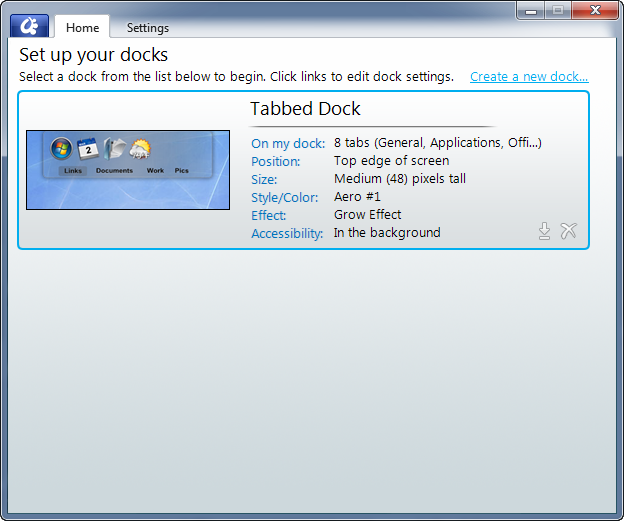
Stardock has released today a new beta (v1.99) for the highly anticipated ObjectDock Plus 2.  ObjectDock Plus 2 is the follow-up to the hugely popular ObjectDock Plus which gives you the ability to organize shortcuts, apps, etc. into a functional dock.  OD+ also features tabbed docks which makes organizing even cleaner as you can make tabs for specific applications, games, etc.

The v1.99 update includes:

  • Added Explorer-view "Folder" tabs for use on tabbed docks! (Windows 7 only)
  • Added new default layout items based on what's pinned to your taskbar (Windows 7) or in QuickLaunch (Vista/XP)
  • Added changing the running-program indicator from within the new Settings dialog
  • Added ability to adjust the edge-offset of the running indicator
  • Added new "Choose Icon" dialog (Windows 7 or .NET 3.5 updated Vista only)
  • Brought back "Quit" menu item
  • Improvements to tabbed dock resizing ability (where you can grab it to resize)
  • Improvements to weather-docklet accuracy. Fixed issue where it could get stuck with cached results.
  • Running-indicator graphic and its edge-offset is now specifiable in skin
  • Fixed issue where activating Skype from the system tray would cause Skype to hang
  • Tweaked draggable-tabs (use right mouse button to rearrange)
  • Various other fixes

Current users who have upgraded to ObjectDock Plus 2 can update via Impulse.  You can also still upgrade to the OD+2 beta or by the current version which includes beta access by visiting the ObjectDock website.

https://www.stardock.com/products/objectdock/
9-23-2010 3-02-19 PM9-23-2010 3-01-49 PM

124,628 views 33 replies
Reply #1 Top

Awesome!!!!!   News to be happy about!!  I'm giddy with excitement!!!  Ok, that last part was a bit much....:blush:


Thanks ID, and thanks to the Devs!!!

Reply #3 Top

ok, how does one show icons and png's in other locations when wanting to edit an icon? i've added locations to the index but those locations are not shown in the display.

Reply #4 Top

Em...i get an error or rather an warning from my Anti-Virus software(ESET Smart Security 4)about ObjectDock Plus Beta v1.99 update i got the same thing with v1.98 :annoyed: So...is ESET right or wrong?

This is what i got:
ESET Warning

Also...i got an warning when i was going to the wincustomize forums with Firefox(v4 Beta 6)

Reply #5 Top

The WinCustomize issue is something with ads we're trying to sort out with Google since yesterday. The crash report dll is fine, it's been in there for years. I don't know why it's suddenly yelling now, I use ESET as well. :(

Reply #6 Top
Please re-add 'Run as Administrator' option on the right click menu!
Reply #7 Top

Nice to see an update!  THANKS!


Two remaining bugs so far...


1)  Under Windows 7 64-bit, only 32-bit applications show up with proper window thumbnails in the running tasks dock I have.  64 bit applications have the same old low-res non-skinned (via iconpackager) default icon whether they are open or minimized now.  32 bit applications behave as expected.

2)  Using two adapters and three monitors (1|2,3), if I select monitor 2 for the zoomer dock, it always pops to monitor 3.  There is no way short of text editing the .ini file to get a zoomer dock to move to monitor 2.  Once there, it works fabulously, so there's no performance or other issue involved.

That's all so far!!!

Reply #8 Top

when i attempt to browse to another folder for icons and png files in order to change the dock icon, nothing happens. what am i doing wrong?

Reply #9 Top

Nice list of updates.  Thanks! :thumbsup:  

 I haven't tried them all yet but it is still only showing half of the start menu when launched from OD. ( Win7/64)

Quoting MadDeez, reply 8
when i attempt to browse to another folder for icons and png files in order to change the dock icon, nothing happens. what am i doing wrong?

I get the same thing. It opens up every image I have in C:\Program Files (x86)\Stardock\ObjectDockPlus2 but won't let me browse to a folder of my choice by selecting browse from the drop down.

Reply #10 Top

Quoting Wizard1956, reply 9
Nice list of updates.  Thanks!  

 I haven't tried them all yet but it is still only showing half of the start menu when launched from OD. ( Win7/64)


Quoting MadDeez, reply 8when i attempt to browse to another folder for icons and png files in order to change the dock icon, nothing happens. what am i doing wrong?

I get the same thing. It opens up every image I have in C:\Program Files (x86)\Stardock\ObjectDockPlus2 but won't let me browse to a folder of my choice by selecting browse from the drop down.

I had to manually type in the directory I wanted to get it to work. Clicking on "Browse" apparently does nothing.

Still no option to change the tab font, but at least I don't really change that ever. Now if we could get the coloring feature updated like WB's, that would be fantastic (and an option to make the color change global to all tabs).

Reply #11 Top

Yup, they didn't make this easy.  Instead of hitting browse hit options then show navigation.  Then just go to where your icons are and select a package.  It wasn't easy to find but once you do remember how you got there.  :sun:

+1 Loading…
Reply #12 Top

About to DL it now. Very excited to see this!

Reply #13 Top

"Added Explorer-view "Folder" tabs for use on tabbed docks! (Windows 7 only)"

How do those work exactly? Not sure what to do with it or what it does.

Reply #14 Top

Added changing the running-program indicator from within the new Settings dialog -


Has anyone found this?

Reply #15 Top
No Plus/Minus images? Just the default ones? :(
Reply #16 Top

There was a problem browsing to this folder. Please try again.

(Browsing to object failed)


^^^^^^^^^^
The above message is now displayed when I attempt to change a dock icon.

Reply #18 Top

There was a problem browsing to this folder. Please try again.

(Browsing to object failed)


^^^^^^^^^^
The above message is now displayed when I attempt to change a dock icon. If it makes a difference, I'm using Windows 7 64-bit.

Reply #19 Top

wow. that was nice. i tried to edit post #16 and a new post was created. glen beck will soon declare it a progressive plot to take over WC.

Reply #20 Top

Hi guys. Sorry but the Start Menu glitch is another one that is just not going to be fixed :( This is a glitch in Windows itself that makes that right area of the panel not draw when its location is anywhere but where it expects to be. (Well technically this isn't a glitch in windows, just an odd inflexibility!) Will keep looking for hacks to work around in, but otherwise, sorry :(

Keep sending feedback on the other areas though that is helpful. So far I've been reading people have been having issues with the new Icon Browser? Seeing several instances of "Browsing to object failed"...

I also read of (but haven't tried reproducing locally yet, hopefully i'll be able to) a problem whereby you can't move a zoomer dock to monitor #2 in a 3-monitor system. Will have to give that a try.


Some tips:

-FolderView-tabs are available from anywhere you can add a tab to a tabbed dock. Just right click a tabbed dock and go "Add"->"Tab"->"Folder tab", or from the UI "On My Dock"->"Add a tab"->"Add a folder tab". It'll then ask you what folder you want to view and you'll be off to the races. (You'll probably need to make your dock a little bigger to be able to see more of the view! And from there you can change to large icons, smaller icons, details view, etc by right clicking the inner area of the view.)

-Running-indicator choosing is hidden..er I mean available..from within the "Style" area of the options for zooming docks. Check out the links on the right, its the 4th/last one. You can now pick your indicator and move it up/down as you wish ; some skins have a default now built in to them.

-+/- images for tabbed docks are not editable via the UI at this point... you'll still have to swap them out by hand. Changing the +/- images is available though the skin settings however. By creating a "[Extras]" section in your tabbed dock skin, with lines such as "PlusImage=plus.png" and "MinusImage=minus.png" (and then putting the appropriate images in your skin folder) you can customize the +/- images on a per-skin basis

Reply #21 Top

Sorry, but can we please have the old IconBrowser back ? It was perfect, why change it at all ???

Reply #22 Top

ObjectDock Plus 2 bug thread

https://forums.wincustomize.com/397693


Reply #23 Top

I also read of (but haven't tried reproducing locally yet, hopefully i'll be able to) a problem whereby you can't move a zoomer dock to monitor #2 in a 3-monitor system. Will have to give that a try.

THANKS!  Note that I believe this only in a two graphics card system, such that (running left to right):

#1 (primary, card 1)

#2 (secondary, card 1)

#3 (primary, card 2)


Since #2 is the main central monitor, this glitch is a bit of a pain.  :D

I believe that OD is reading 3 monitors correctly in it's menu, it just must be getting confused internally when selected.

Reply #24 Top

-+/- images for tabbed docks are not editable via the UI at this point... you'll still have to swap them out by hand. Changing the +/- images is available though the skin settings however. By creating a "[Extras]" section in your tabbed dock skin, with lines such as "PlusImage=plus.png" and "MinusImage=minus.png" (and then putting the appropriate images in your skin folder) you can customize the +/- images on a per-skin basis

Jim...as far as I know they've never been editable through the UI. Been using the method below for years now. I'm pretty sure that most of my skins all have that line as well as the images in the skin folders. So your saying we have to do each skin by hand now whenever we change them? Or is your example above the new line method?

Before it was....

[Extras]
PlusImage = Backgrounds\TabName\Plus.png
MinusImage = Backgrounds\TabName\Minus.png

So is this still suppose to work?

Reply #25 Top


Sorry but the Start Menu glitch is another one that is just not going to be fixed

Oh well. you can't win 'em all, but thanks for all of the other improvements. :thumbsup: