
Island Dog Island Dog

ObjectDock Plus 2 (v1.99) Beta Released

ObjectDock Plus 2 (v1.99) Beta Released

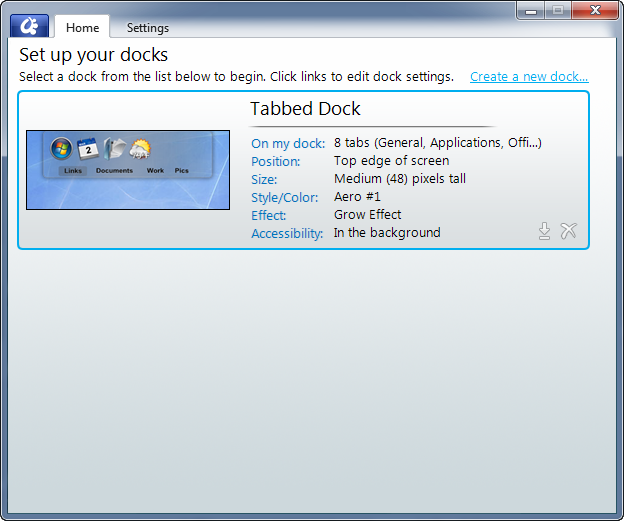
Stardock has released today a new beta (v1.99) for the highly anticipated ObjectDock Plus 2.  ObjectDock Plus 2 is the follow-up to the hugely popular ObjectDock Plus which gives you the ability to organize shortcuts, apps, etc. into a functional dock.  OD+ also features tabbed docks which makes organizing even cleaner as you can make tabs for specific applications, games, etc.

The v1.99 update includes:

  • Added Explorer-view "Folder" tabs for use on tabbed docks! (Windows 7 only)
  • Added new default layout items based on what's pinned to your taskbar (Windows 7) or in QuickLaunch (Vista/XP)
  • Added changing the running-program indicator from within the new Settings dialog
  • Added ability to adjust the edge-offset of the running indicator
  • Added new "Choose Icon" dialog (Windows 7 or .NET 3.5 updated Vista only)
  • Brought back "Quit" menu item
  • Improvements to tabbed dock resizing ability (where you can grab it to resize)
  • Improvements to weather-docklet accuracy. Fixed issue where it could get stuck with cached results.
  • Running-indicator graphic and its edge-offset is now specifiable in skin
  • Fixed issue where activating Skype from the system tray would cause Skype to hang
  • Tweaked draggable-tabs (use right mouse button to rearrange)
  • Various other fixes

Current users who have upgraded to ObjectDock Plus 2 can update via Impulse.  You can also still upgrade to the OD+2 beta or by the current version which includes beta access by visiting the ObjectDock website.

https://www.stardock.com/products/objectdock/
9-23-2010 3-02-19 PM9-23-2010 3-01-49 PM

124,650 views 33 replies
Reply #26 Top

Quoting c242, reply 21
Sorry, but can we please have the old IconBrowser back ? It was perfect, why change it at all ???

Omg that thing was far from perfect. It was only perfect if you kept all your icons in the OD library, and who actually did that? OD creates so many folders all over the damn place, it's near impossible to figure out which one is the right one, let alone trying to make backups.

Quoting WebGizmos, reply 24

-+/- images for tabbed docks are not editable via the UI at this point... you'll still have to swap them out by hand. Changing the +/- images is available though the skin settings however. By creating a "[Extras]" section in your tabbed dock skin, with lines such as "PlusImage=plus.png" and "MinusImage=minus.png" (and then putting the appropriate images in your skin folder) you can customize the +/- images on a per-skin basis
Jim...as far as I know they've never been editable through the UI. Been using the method below for years now. I'm pretty sure that most of my skins all have that line as well as the images in the skin folders. So your saying we have to do each skin by hand now whenever we change them? Or is your example above the new line method?

Before it was....

[Extras]
PlusImage = Backgrounds\TabName\Plus.png
MinusImage = Backgrounds\TabName\Minus.png

So is this still suppose to work?

Just plus.png and minus.png, using the relative path won't work anymore.

+1 Loading…
Reply #27 Top

It was only perfect if you kept all your icons in the OD library, and who actually did that? OD creates so many folders all over the damn place, it's near impossible to figure out which one is the right one, let alone trying to make backups.

k1  I never did like the library being in My Documents, either.

Reply #28 Top

Well, I did because well I like to keep files in the documents folder. ;) But okay, let's see what the fix brings.

Reply #29 Top

Just plus.png and minus.png, using the relative path won't work anymore.

Bummer...Oh well...back to OD Plus for me then. I don't want to have to keep going to folders to keep changes the images...the old way made more sense.

Reply #30 Top

Quoting JMBdev, reply 20
Hi guys. Sorry but the Start Menu glitch is another one that is just not going to be fixed This is a glitch in Windows itself that makes that right area of the panel not draw when its location is anywhere but where it expects to be. (Well technically this isn't a glitch in windows, just an odd inflexibility!) Will keep looking for hacks to work around in, but otherwise, sorry

I can confirm the same thing under Windows 7 with Winstep apps. I ended chosing to make the Start Menu popup at the original location under Windows 7 instead of near the place you click, as users thought this was a bug with Nexus and not a 'glitch' in Windows, which made the application (not Windows) look bad. Sometimes I can't help but wonder if MS programmers are making our life difficult on purpose!

Reply #31 Top

A refresh was put out today, be sure to check it out!


New (major!) feature:
-New "Show Applications" mode for Quicklaunch docks (Windows7-taskbar-like functionality...running applications not already on dock have links automatically/temporarily created for them... allow pinning/unpinning/etc)

Tweaks/fixes:
-Reorganized right-click menu when right clicking shortcuts on quicklaunch docks, to emphasize interacting with the application
-Fixed "Browsing to object failed" messages and other such failures when interacting with the new Choose Icon dialog. (Search command in explorer-browser was too complex)
-"Browse..." menu item in new Choose Icon dialog hooked up again
-Fixed glitch with tabbed dock mouse-activation (dock wouldn't activate via click, only after delay)
-Fixed right-mouse button drags to zoomer docks not working


@JcRabbit: Indeed, thank you for confirming :( Yeah it's really having to choose between the lesser of two evils. Based on all the feedback I'm getting the preference seems to be like you have it, leave it where it was when on Win7. Doesn't make it much better than just hitting the windows key and we'll surely get reports of *that* being a bug still anyhow...but oh well. Since I already have a DLL loaded into explorer I've consiiiiiiidered trying to tap into there to see if i can figure out what it's doing wrong / put in some sort of workaround (i.e. lie to it during that specific theme-part draw operation), but if I even think about hooking any UXTheme APIs I'm sure Neil (WindowBlinds dev) will have my head :) Why did they do this!!!

+1 Loading…
Reply #32 Top

-New "Show Applications" mode

This is nice, but would be better if it fully took advantage of W7's jump lists.

I do like how many of the settings are accessable upon right-click.

Reply #33 Top

-Fixed "Browsing to object failed" messages and other such failures when interacting with the new Choose Icon dialog. (Search command in explorer-browser was too complex)
-"Browse..." menu item in new Choose Icon dialog hooked up again

It is extremely slow when opening my icons folder (to the point that I thought it had stopped responding and would crash). I would much prefer it just use the basic default 7 dialog, utilizing my Favorites links. Probably faster too.