Put some XP back in 7 and Vista

Classic shell can do what MS didnt.

http://sourceforge.net/projects/classicshell/

What many pc users didnt like most about Vista was the way MS changed some of the functionality in the UI.(seemingly just to make sure you knew it was different)

Most annoyingly the UP and DELETE buttons were gone and we were left with a non-configurable command bar with a bunch of near useless commands.

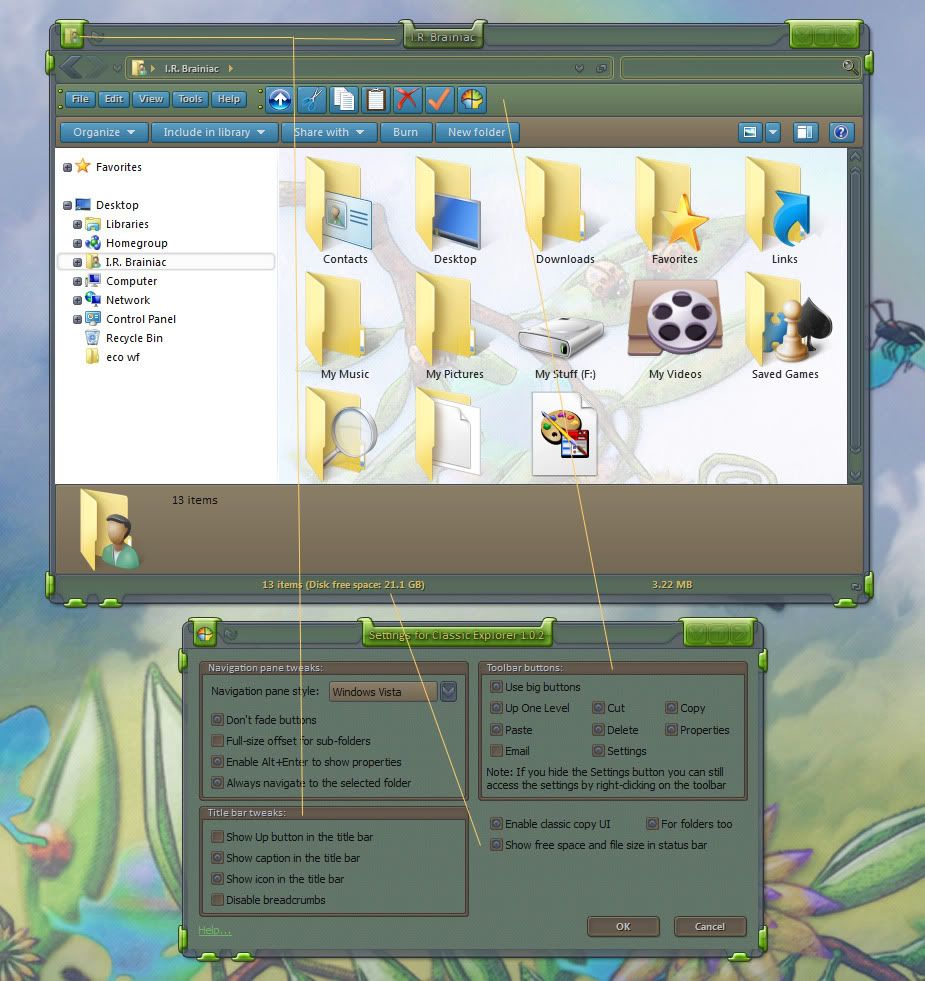
A developer at source forge,Ibeltchev,has made a FANTASTIC toolbar addon that fixes a lot of what I hated about the changes.

You can even add the icon and titlebar text back.The status bar sometimes shows more info than the MS info pane.HAH!


TIP:...dont put the up button next to the back/forward buttons...it looks like doodoo...just use the one on the toolbar.


I'm using it on 7 and its made me a happier user. :smitten: http://sourceforge.net/projects/classicshell/
 

146,421 views 47 replies
Reply #1 Top

I.R. Thanks for this! Great find, man! :thumbsup: :star:

Reply #2 Top

I was truly thrilled when I found this DR. :D MS should have done this for us. :annoyed:

I'd like to see Stardock throw some of their muscle at things like this...force windows to behave the way WE want...not the way MS wants.

Reply #3 Top

COOOOL.... Thanks IR..... B[]

Reply #4 Top

So, are my eyes seeing correctly, does this piece of software allow all of explorer to be skinned?

Have you found any conflicts yet with Stardock software?

Reply #5 Top

Have you found any conflicts yet with Stardock software?

No conflicts (except the UP button next to the back forward buttons looked like poo...dont need it tho,you can have it on the toolbar like in the picture)

this isnt a skinning prog...it just adds back stuff MS took away...without asking me. ^_^

Reply #6 Top

awesome little app.. someone is losing money on this.. by not making money...on it. :thumbsup:

Reply #7 Top

What a great find. Thanks.

Reply #8 Top

I.R. what version of IE are you using?  IE8 doesn't seem to skin that way with Win 7.  That is IE, right?

Reply #10 Top

Still on XP & I D/L'd it.  Gonna  end up with 7 sometime & can't take anything for granted these days.:thumbsup:

Thanks for posting the link.

Reply #11 Top

That is IE, right?

Dont make me hit you...thats an explorer window. :grin:

Reply #12 Top

The fixed file copy window is great :D

Reply #13 Top

Quoting I.R., reply 11

That is IE, right?


Dont make me hit you...thats an explorer window.

Every once in awhile a gentle slap on the back of the head is required, for some of us, especially me. :rofl:

Reply #14 Top

Thanks for turning us on to this man. I've only been away from XP since November and I got used to the 7 explorer window. I forgot about the great features in XP explorer but now I've got them back! Seems to work like a charm! :grin:

Reply #15 Top

a gentle slap on the back of the head

hehe...I said hit...I wasnt considering anything gentle. :banhammer: :(O XD

+1 Loading…
Reply #16 Top

It even does (almost) a proper start menu.

Reply #17 Top

I forgot about the great features in XP explorer but now I've got them back! Seems to work like a charm!

Ahhh...come on back to XP...ya know ya want to! XD Think of all the great skins you could still use!  :grin:

Reply #18 Top

It even does (almost) a proper start menu.

I was afraid to try that one...but then I actually like the 7 start menu ^_^

Reply #19 Top

Neat!  Thanks I.R.!

Reply #21 Top

Thank you sir very nice!!!|-)

Reply #22 Top

i'm OK with just using the back button within explorer. No big deal.

Reply #23 Top

I never really used Win 7's Explorer window.....just as I never really used XP's Explorer window....just as I never really used Win 2000's Explorer window....just as I never....

Powerdesk Pro....then Explorer Plus....now Directory Opus....;)

Reply #24 Top

i'm OK with just using the back button within explorer. No big deal.
:moo: X|

Reply #25 Top

i'm OK with just using the back button within explorer. No big deal.


 some of us actually use our PC's :rofl: