
I.R. Brainiac I.R. Brainiac

Put some XP back in 7 and Vista

Put some XP back in 7 and Vista

Classic shell can do what MS didnt.

http://sourceforge.net/projects/classicshell/

What many pc users didnt like most about Vista was the way MS changed some of the functionality in the UI.(seemingly just to make sure you knew it was different)

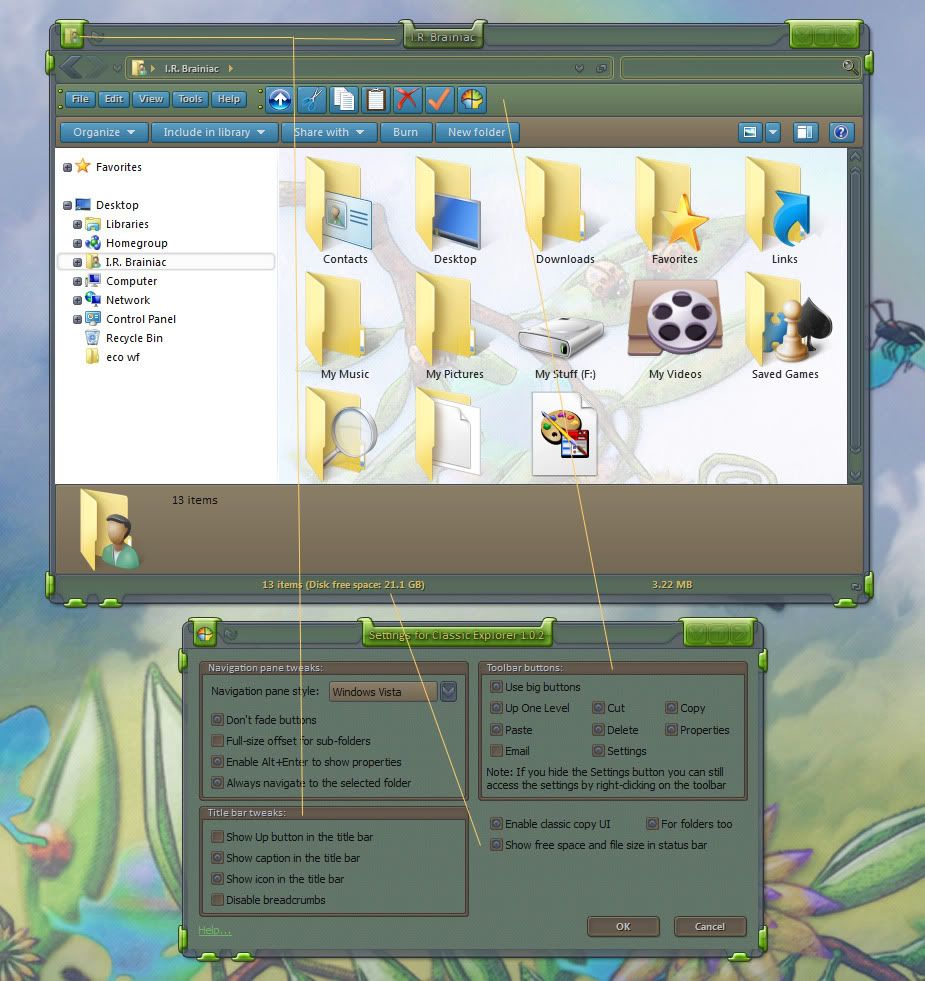
Most annoyingly the UP and DELETE buttons were gone and we were left with a non-configurable command bar with a bunch of near useless commands.

A developer at source forge,Ibeltchev,has made a FANTASTIC toolbar addon that fixes a lot of what I hated about the changes.

You can even add the icon and titlebar text back.The status bar sometimes shows more info than the MS info pane.HAH!


TIP:...dont put the up button next to the back/forward buttons...it looks like doodoo...just use the one on the toolbar.


I'm using it on 7 and its made me a happier user. :smitten: http://sourceforge.net/projects/classicshell/
 

146,436 views 47 replies
Reply #26 Top

Quoting Jafo, reply 23
I never really used Win 7's Explorer window.....just as I never really used XP's Explorer window....just as I never really used Win 2000's Explorer window....just as I never....

Powerdesk Pro....then Explorer Plus....now Directory Opus....

'Windows Explorer'?! Whassat? (I've used Norton Commander and later Total Commander since 1996)

Back button? Wtf is that?! (Hint: use backspace and/or alt+left arrowkey.....)

Eks-pee?????? That ancient POS?
No thanks......

Reply #27 Top

Back button? Wtf is that?! (Hint: use backspace and/or alt+left arrowkey.....)


It adds an up button, not a back one :snowman: :sun:

Reply #28 Top

(Hint: use backspace and/or alt+left arrowkey.....)
yes of course keyboard shortcuts are great...but I'm lying sick in bed...typing with onscreen keys...


this post isnt about how to nav without gui buttons...its about getting back UI functionality. ;P

Reply #29 Top

wow nice now only to bookmark that link for later :grin:

Reply #30 Top

:frogboy:

Reply #32 Top

no need for apalogies Kona...I aint mad at nobody B)

Reply #33 Top

a bump for the come latelys... ^_^

Reply #34 Top

The side buttons on my Mouse work just fine for forward and back in browser pages and folders in Windows Explorer. :P

Reply #35 Top

Yes,but will they go up a level,delete a file,add the text back to the titlebar,give you properties,cut,copy,paste,more info in the statusbar or put the icon back in the left upper corner?

Didnt think so.................. :P

Reply #36 Top

Marked for later....thankee sai 5*

Reply #37 Top

but will they go up a level

Default setting on my Logitech G15 does.

delete a file

Um... I do believe I have a button on my keyboard for that ;-)

add the text back to the titlebar

Um... never been missing that, unless it's removed by a WB.

give you properties

Alt+enter

cut,copy,paste

Even more standard Windows shortcut keys

etc etc etc...

hehe ;-) ;-P

Reply #38 Top

What's the big need for an 'Up' button?  Just click the parent directory in the address bar and it goes there.

Reply #39 Top

Some of us dont use keyboard shortcuts, some of our keyboards are under our glass desks, so some of us are not benefitting whatsoever from some.. of the posts. ;)


Purball, when you have been using toolbar buttons for as long as some.. of us have..year in year out.. things get engrained, one of those things, for some.. of us.. is an up bupponi :thumbsup:


secondly, the breadcrumb bar in vista\7 is a complete bastard imo. :sun:

Reply #40 Top

You need to learn keyboard shortcuts if you don't use them. They will save you weeks of your life.

Reply #41 Top

Even more standard Windows shortcut keys

1 more time...this post wasnt about how to do these things with your KEYBOARD...not about programmed mouse buttons...its about UI functionality put back into the GUI where I(ME) want it...not the way MS wants it.

If you dont get that then this post wasnt for YOU.

I use...buttons,breadcrumbs,keys...the stars and constellations...whatever gets me where I want the easiest at that moment.

An up button just goes up and up and up without moving the mouse...but more important to me ...the delete button...I would have installed the whole thing just for that. :thumbsup:

The titlebar text was a bonus...actual use of empty space.

This thing saves me a lot of right-clicking...something I just dont like to do...I need to save the strength in my middle finger for flippin' off smartasses. :grin:

Reply #42 Top

What's the big need for an 'Up' button?

Not a huge deal I admit...but...I dont have to pick it out of the breadcrumbs and I dont have to READ an up arrow. :thumbsup:

Reply #43 Top

Also...I love keyed shortcuts in something like photoshop...makes life easier...but I am not a touch typer so I have to usually take my eyes off the screen to use a keyboard.

I have several mental and physical limitations that make a mouse easier,if less efficient.My brain,big as it is,has Kelley Bundyitis.It will only hold so much before something falls out.

Changing focal depths from screen to keyboard with 50 year old eyes is a bitch.

So now does everybody see why I liked this? (cause I can splain more if ya dont get it) :drool:

Reply #44 Top

be warned...my middle finger is well rested...^_^

Reply #45 Top

Thanks for update I was using an earlier version.

Reply #46 Top

You need to learn keyboard shortcuts if you don't use them. They will save you weeks of your life.


I could learn them all I want, but if my keyboard in not accessible, whats the point, My Keyboard is under a glass desk with a musical keyboard on top of it, always has been, always will be..

I sit with one hand on my mouse and the other (in my pocket) ..no :w00t: , under my chin with that elbow firmly planted on my desk.


The thinking man's position one might say.. :| Only time the KB gets pulled out is when I type.


Keyboard shortcuts are moot to me, and I can almost guarantee I can click my way to doing everything I need just as quick as u can keystroke it.


:sun:   Peace and love

Reply #47 Top

Had to get it again Thanks IR!!! :)