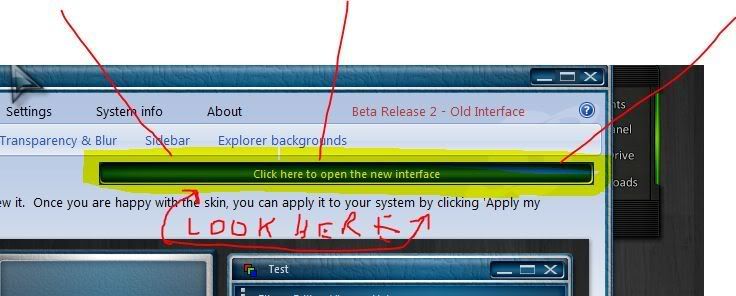
WindowBlinds 7 Beta Update (6.80.060) Released

http://www.windowblinds.net

Today we are happy to announce an update to the WindowBlinds 7 Beta.  The WindowBlinds 7 beta is currently available for active subscribers to Object Desktop, and can be downloaded via Stardock’s Impulse. 

New in this update:

  1. XP toolbar & animations settings are back in the UI. They are under Settings now
  2. On Vista the sidebar skin settings are back in the UI. Also under Settings.
  3. Explorer backgrounds tab has been added to the UI. This will show on XP, Vista AND Windows 7.
  4. New Textures tab added to the UI.
  5. Support for enlarged menus on Vista / 7
  6. Some additional skin sections added for Vista / 7 including new shadow sections.
  7. The fixes for the start button clipping on multiple monitor Win7 boxes are in this build. 
  8. The old WB UI has a bigger button for the new UI and says Beta 2 rather than Beta 1. 
  9. You can drag wallpapers to the large preview area and it will copy them into the wallpapers folder off WB skins as it used to in WB6. Note that its the large preview area and NOT the list itself.
9-21-2009 3-52-32 PM 9-21-2009 3-54-56 PM
48,539 views 76 replies
Reply #1 Top

  :thumbsup:   @#2,#3 and #9     :D   5* B)

Reply #2 Top

Life is beautiful, and all is calm once again across the community. :sun:   

Reply #3 Top
wow! the textures feature os pretty cool. i'm not getting the explorer backgrounds to work on windows 7, tho. are the walls for Corporate included in this update? if they are, where? great update, neil!!
Reply #4 Top

are the walls for Corporate included in this update? if they are, where?
Looking into that now.


And yes, textures are amazing!

Reply #5 Top
WoW! this feature will just get better in the future. thanks guys :CONGRAT:
Reply #6 Top

I have just recently purchased object desktop and I can't seem to figure out how to download this through Impulse. If someone could point me in the right direction, I would really appreciate it. Thanks. :grin:  

Reply #7 Top

G3mpi3 once you have Object Desktop registered through Impulse you should then see the individual programs that came with your version under the My Software tab.  You then download the each individual programs that is compatible for your OS.

Hope that helps.

Reply #8 Top
I have installed Windowblinds7 and ONLY that version. Why does impulse say that I have WB6 installed also? It was this way before installing this update.
Reply #9 Top

Okay, I guess i'm not quite sure how to register Object desktop through impulse.......I can see all of the individual programs that came with Object destop, but not any beta programs or anything. I can only see a way to register one program of object desktop, how do you register object desktop and not just one program?

Reply #10 Top

Go to preferences (the blue button ,top left)  All your apps should show in the My Software tab as available for download,including betas if you have selected Show pre-release versions in preferences.All of ODNT will use a single number to register.

Reply #11 Top

Ah thank you, I'm very sorry for the confusion. It turns out I just needed to select show pre-release versions in my preferences. Thanks again!

Reply #12 Top
Can't search walls by name....sux....sorting by color isn't working....sux.....
Reply #13 Top
How do you change the GUI to WB7? Mine is showing WB6. It was posted how to do this once, but even tried to search and can't find how. Can someone please tell me? Thank you. :)
Reply #14 Top
Under XP specific setings the animations seem to be working but not the toolbaricons. It keeps reverting to default in the settings.
Reply #15 Top
Hopefully user generated textures can be added.
Reply #16 Top
How do you change the GUI to WB7? Mine is showing WB6. It was posted how to do this once, but even tried to search and can't find how. Can someone please tell me? Thank you.


There should be a button in the upper right-hand side.

Hopefully user generated textures can be added.


They can.  :)
Reply #18 Top
No button in the upper right, I made a shortcut to SevenConfig so I can change it. :)
Reply #19 Top

Hopefully user generated textures can be added.


They can.

Tell me how, please....been trying.

Reply #20 Top
Were can i get windowsblinds 7 please tell me how. Thank you


You need to be an active Object Desktop subscriber to get access to the beta.

http://www.objectdesktop.com
Reply #21 Top

Quoting dwax, reply 18
No button in the upper right, I made a shortcut to SevenConfig so I can change it.


Reply #22 Top
Woops there is a button to change it. :d
Reply #23 Top
Wow.. Thank you.. Is it possible to add textures & backgrounds?? Thanks anyway.. Brilliant.... ;)
Reply #24 Top

It still doesn't make toast >:(

Reply #25 Top

On Vista:

  • Textures: C:\Users\Public\Documents\Stardock\WindowBlinds\Textures
  • Backgrounds: C:\Users\Public\Documents\Stardock\WindowBlinds\Vista Images\Textures

Have fun :)