
DriveScan

where can i get it?

hi there, there was a handy program called DriveScan in the Object Desktop, but it seems i can't fid itin the Stardock Central. any help on how can i get it since i can't see it in the Central? thanks in advanced
3,275 views 18 replies
Reply #1 Top
it shows in mine

check you settings to make sure you have marked to visible (maybe, not home can't check)
Reply #2 Top
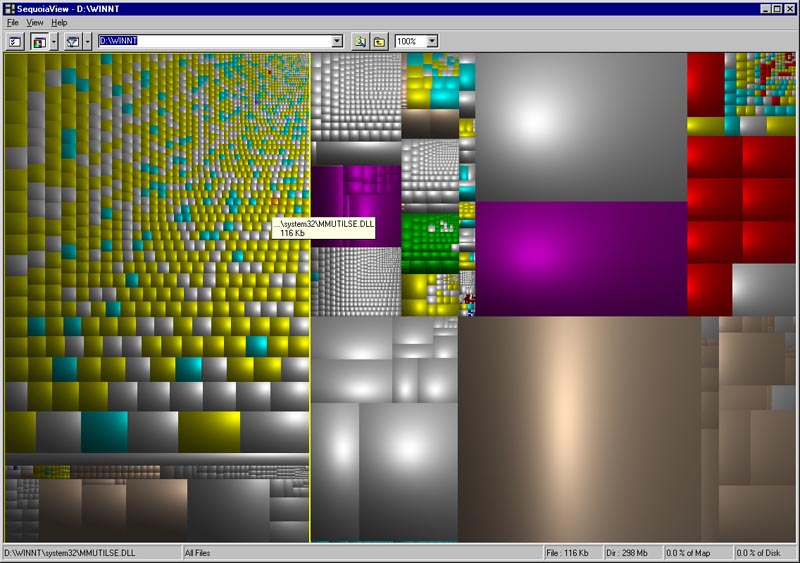
Stardock makes some great apps . . but I reccommend sequoiaview for drive mapping. Not only is it useful, it's art. http://www.win.tue.nl/sequoiaview/


Posted via WinCustomize Browser/Stardock Central
Reply #3 Top


you mentioned this a long time ago...had forgotten about it...still have no idea what the hell I'm looking at, but it's purty.
Reply #4 Top
i tried the sequoiaview and i didn't like it. Drivescan is much neat and simple. still waiting for an answer on where i can get it, i went through my Central option and settings but couldn't find away on how to make it reapear again. and i don't want to download the old objectdesktop again.

Posted via WinCustomize Browser/Stardock Central
Reply #5 Top
Wow. Too big. Didn't realize the image was resized in the img tag. Sorry.

Differetn file types have different colors. All my music files are green for example. Each file is a square. Size of the square = size of file.


Posted via WinCustomize Browser/Stardock Central
Reply #6 Top
Citizen Ebdowy Fe Alsooq  ...in SDC make sure you have 'show pre-release versions' clicked.  Drivescan is there...2.00c.026 ....
Reply #7 Top
I checked, and I don't see it either. Checked the settings and everything is fine, but still don't see DriveScan.
Reply #8 Top
Try going Tools | settings | Internet | Refresh XML data.

That might help. Can't hurt.


Posted via WinCustomize Browser/Stardock Central
Reply #9 Top
Admin Jafo.. i cheked all the opetions and settings including the "Show pre-release". restarted the PC sevral times. but there is no use..


Posted via WinCustomize Browser/Stardock Central
Reply #11 Top
Try going to View > Show/Hide Applications, and see if it's set to show, if it is, hide it, and set it back to show. Might have to close SDC and reopen.
Reply #12 Top
If all else fails, TreeSizeFree is like DriveScan's twin brother.... http://www.jam-software.com/freeware/index.shtml
Reply #13 Top
#2 I've gotta try it just to look at it
(secret confession-- before MS changed the Defrag GUI, I used to become mesmerized watching it, even tho it was boring & slow.)
Reply #14 Top
(secret confession-- before MS changed the Defrag GUI, I used to become mesmerized watching it, even tho it was boring & slow.)


Me too.


Posted via WinCustomize Browser/Stardock Central
Reply #15 Top
I had the same problem about DriveScan now showing. Not that I really care, but now that I know it's not working, I'm going to obsess over it until it's fixed.

I went to the show/hide application and DriveScan is checked but won't show. I hid and unhid it but still no luck. Weird.

By the way, what is DriveScan?
Reply #16 Top
By the way, what is DriveScan?


It's like sequoiaview but simpler.

I graphiclly shows a hard drives and how much space folders and files take up. It makes it real easy to clean up the crap.


Posted via WinCustomize Browser/Stardock Central
Reply #17 Top
Zubaz -- thanks for the link-- sequoiaview is trippy-- will try putting it to use tomorrow.
Reply #18 Top
Sounds cool. I want it now. Gotta figure out why it won't show in SDC.