Start11 v2 (2.82) Feedback


With the Start11 v2  (version 2.8.2.0), we are creating this thread so that users can report any observed issues.  

Thank you for your interest and any time you put into making Start11 v2 a better product.


1,071 views 27 replies | Pinned
Reply #1 Top

Start11 v2 (2.82) Changelog

Date

11/06/2026

Version

  • UI: 2.82

  • File version: 2.8.2.0

Changes

  • Addresses issues reported with taskbar thumbnails on upcoming OS updates.

  • Addresses missing clock and other unstable items reported from beta / dev / Window Insider builds.

  • Fix for System Properties icon display on enhanced taskbars.

  • Potential fix for crash on login report.

  • Potential fix for Dragon Naturally Speaking explorer crash.

Reply #2 Top

Known issues

While we appreciate all feedback, please remember that we offer no official support for beta \ preview \ developer channel versions of Windows. If you report issues while in any of those early release channels, you should not expect them to be addressed unless it still exists in a retail version of Windows.

Reply #3 Top

***Reserved***

Reply #4 Top

Confirming that the "Potential fix for Dragon NaturallySpeaking explorer crash" in 2.82 beta works.

Setup:
- Start11 v2 2.82 beta (file version 2.8.2.0)
- Windows 11 26H2
- Dragon NaturallySpeaking 15, running in the background

With 2.81 Explorer crashed reproducibly as soon as I customized the Start menu with Dragon active (original report: https://forums.stardock.com/542793/start11-2-81-reproducible-explorer-exe-crash-with-dragon-naturallyspeaking-15/page/1#4149327). With 2.82 I've been running for several days and have gone through all the Start menu customizations: no crashes at all.

Thanks to Neil and Adam for the quick turnaround.

+1 Loading…
Reply #5 Top

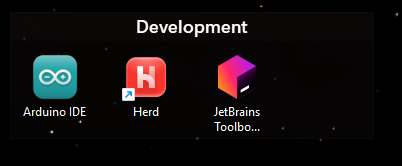
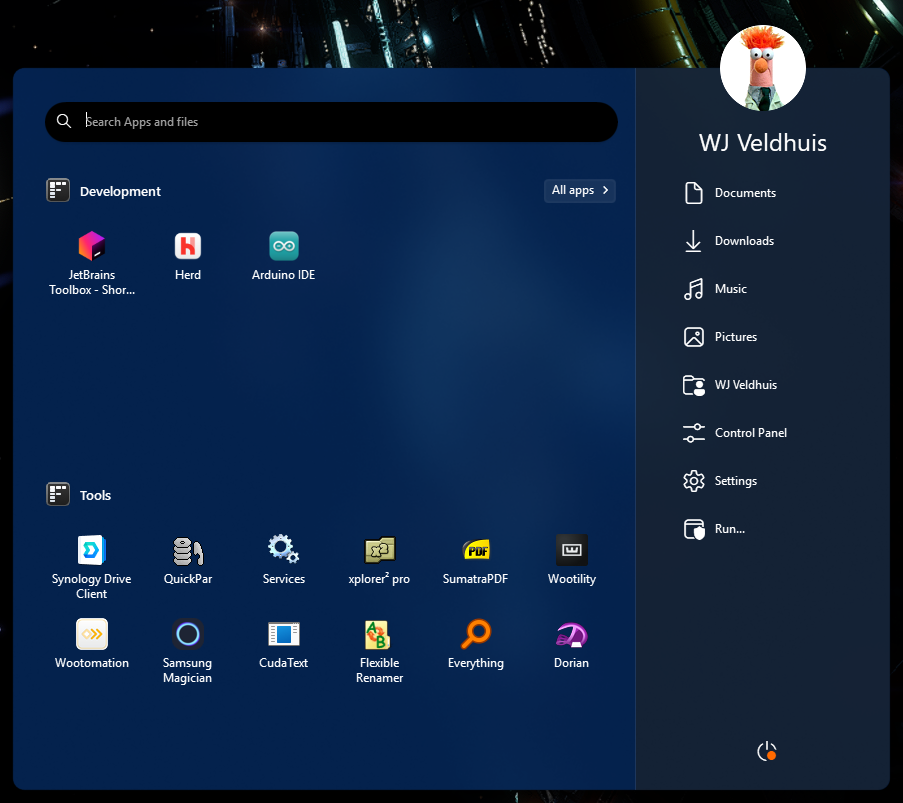
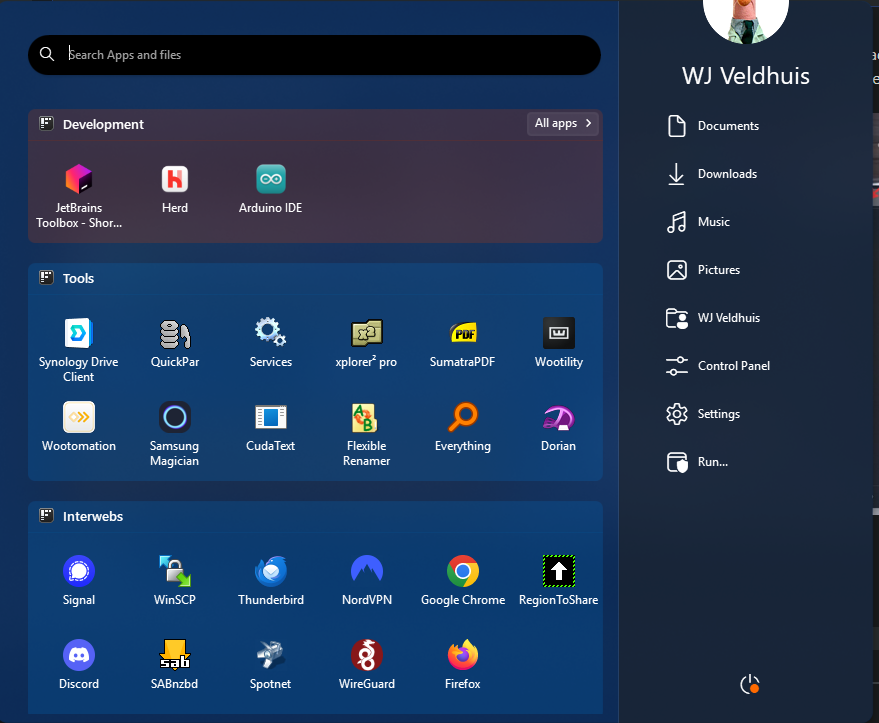
I do like the option of adding a fence as group in the start menu. There is a little visual glitch that needs adressing: a fence with only three items takes up a lot of space:

Original fence (note only 3 items):

How it looks in the Start Menu:

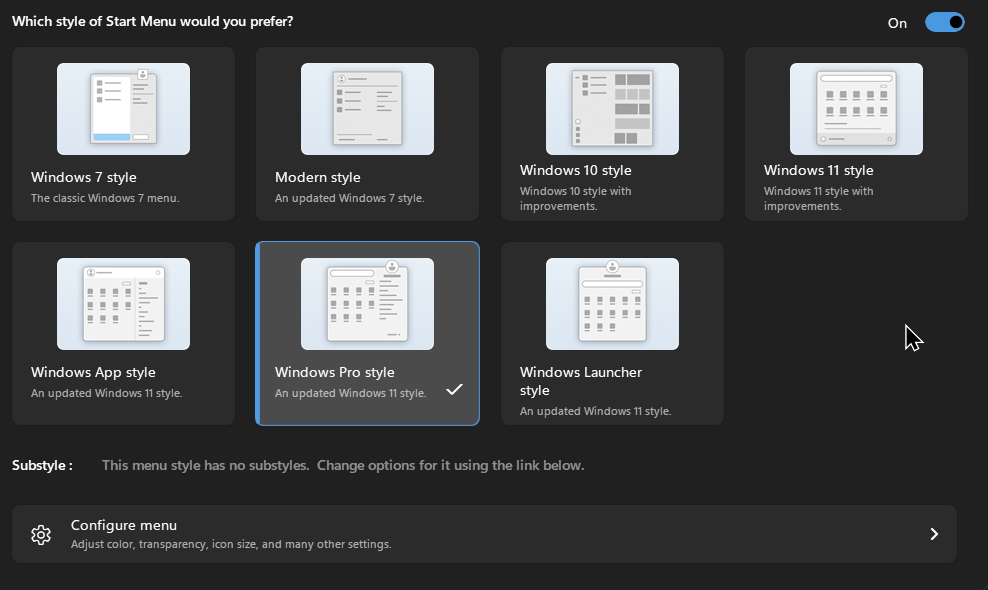
This is using the "Windows Pro Style"

Reply #6 Top
Quoting WJVeldhuis, reply 4149965

I do like the option of adding a fence as group in the start menu. There is a little visual glitch that needs adressing: a fence with only three items takes up a lot of space:

Original fence (note only 3 items):

How it looks in the Start Menu:

This is using the "Windows Pro Style"

End of WJVeldhuis's quote

Hello,
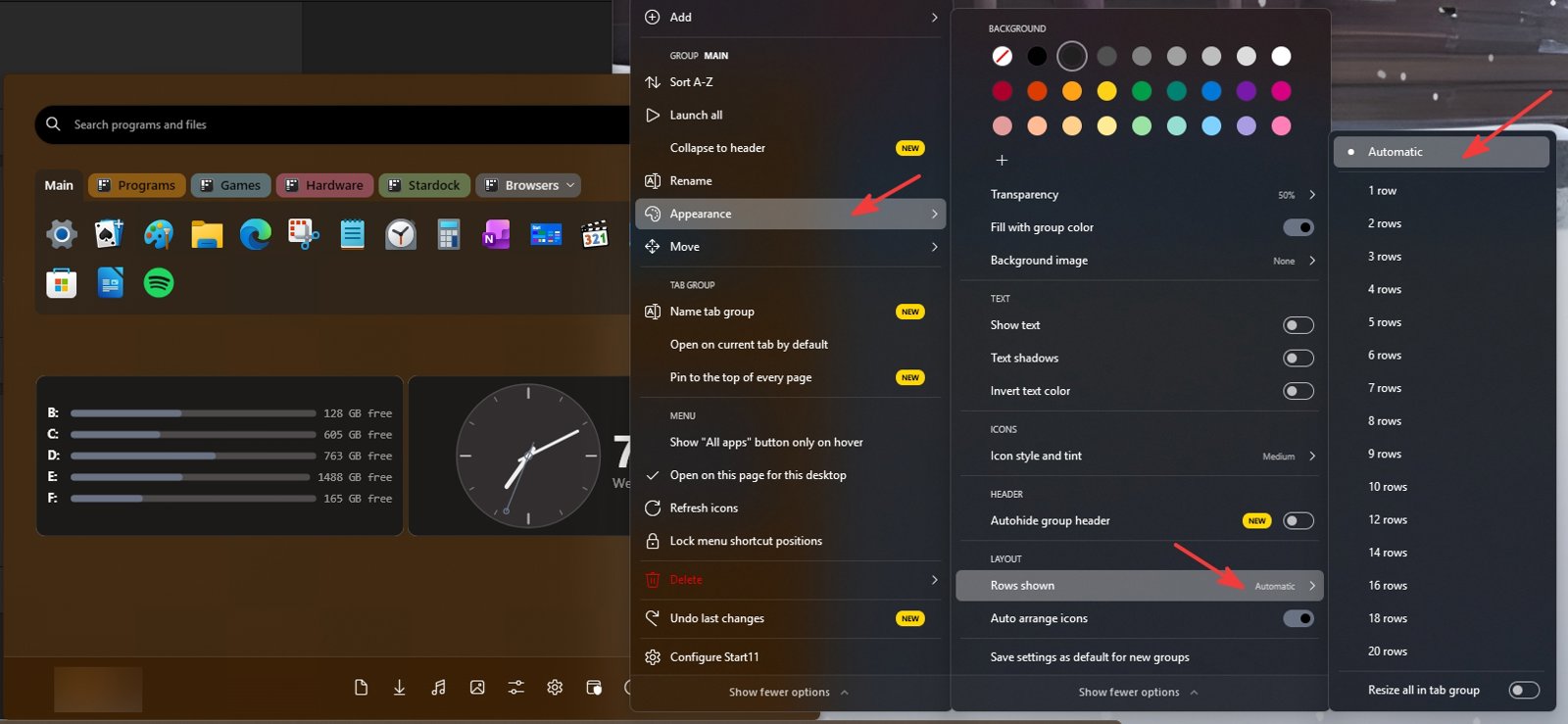
Sorry to hear you are having issues. Have you tried this setting? Row count is set to Automatic. Then the row will be add or remove as more or less icons in that group. Refer to my screenshot below. Note that this is from Start11v3, but, I believe Start11v2 should have something similar.


Thank you,
Basj,
Stardock Community Assistant.

Reply #7 Top

You, my friend, are a hero! I've set all fences to "rows auto" and this is the result. I also found the colouring settings 🤣:

This looks gorgeous now! Thanks 😁.

The setting "Save as default for new groups", is there so that's also sorted.

+1 Loading…
Reply #8 Top

I’m not sure if this is the right place for this...

I downloaded and installed Start11 2.81 on 22 October 2026, which was recently updated to 2.82.
As my activation period was due to expire soon, I purchased a licence on 9 November 2026 (https://www.stardock.com/products/start11/#purchase).

Start11™ v3, permanent licence (5 activations)
Total including VAT: €17.42

I activated the software using this licence number, but I am still getting messages asking me to activate the software, so I am not sure whether the activation was successful or not.

I have version 2.82 and the activation key is for version 3.
Could this be a problem?
Should I install version 3, bearing in mind that it is still in beta?

Reply #9 Top
Quoting Axolotl-13, reply 4149985

I’m not sure if this is the right place for this...

I downloaded and installed Start11 2.81 on 22 October 2026, which was recently updated to 2.82.

As my activation period was due to expire soon, I purchased a licence on 9 November 2026 (https://www.stardock.com/products/start11/#purchase).


Start11™ v3, permanent licence (5 activations)

Total including VAT: €17.42

I activated the software using this licence number, but I am still getting messages asking me to activate the software, so I am not sure whether the activation was successful or not.


I have version 2.82 and the activation key is for version 3.

Could this be a problem?

Should I install version 3, bearing in mind that it is still in beta?

End of Axolotl-13's quote

Yes, the different licenses are not interchangeable.  To clarify: Your V3 key will only activate an installation of V3 and not V2, unless it's an active "Start Annual Subscription" key, in which case that key would activate both.  The guide below can help to get the correct key and installer for your purchase.

Getting purchased products and keys - Documentation - Stardock Help Center

Best regards,

Adam McGuinness
Stardock Support Specialist

Reply #10 Top

I’m sorry, but I didn’t request a licence for Start11 v3...
I downloaded Start11 v2.81 (which has since been updated to v2.82).
I tried it out, configured it to my liking and, as it suited me, I went on to purchase a perpetual licence for 5 activations on https://www.stardock.com/products/start11/#purchase

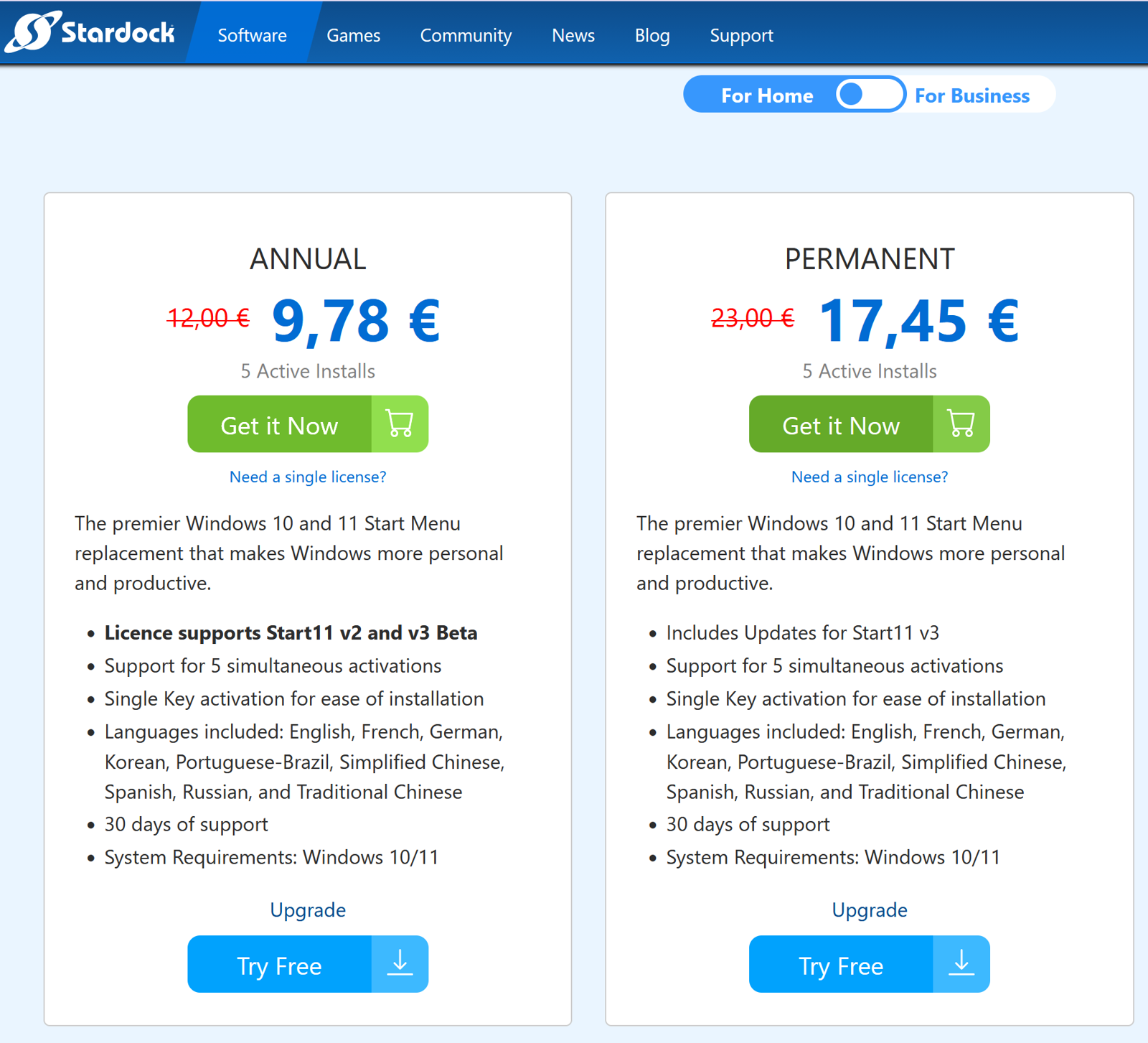
On this page, I can read:

_______________________________________________________________________________

PERMANENT

5 Active Installs
The premier Windows 10 and 11 Start Menu replacement that makes Windows more personal and productive.

  • Includes Updates for Start11 v3
  • Support for 5 simultaneous activations
  • Single Key activation for ease of installation
  • Languages included: English, French, German, Korean, Portuguese-Brazil, Simplified Chinese, Spanish, Russian, and Traditional Chinese
  • 30 days of support
  • System Requirements: Windows 10/11

_______________________________________________________________________________ 

I didn’t realise at all that this was a licence for Start11 v3!
I’m not entirely familiar with all the nuances of the English language, but to me, the phrase ‘Includes Updates for Start11 v3’ actually clearly suggested the opposite: that it also covered updates to v3...
So, what should I do with my licence?
Should I install v3?
Will my settings be preserved?
Is this version stable enough?
Thank you for your help.
 

Reply #11 Top
Quoting Axolotl-13, reply 4149995

I’m sorry, but I didn’t request a licence for Start11 v3...

End of Axolotl-13's quote

You must have caught the release of the newer Start11 v3 version in the middle of trying out Start11 v2.  As such, you can update to Start11 v3 and your settings should be preserved.  Or you can now check your account for a Start11 v2 license / key to use instead. 

Best regards,

Adam McGuinness
Stardock Support Specialist

Reply #14 Top
Quoting AngelEar, reply 4150149

A question: have all the fixes from version 2.82 also been included in V3?

End of AngelEar's quote

With the exception of a fix for the System properties taskbar icon yes.

Reply #15 Top

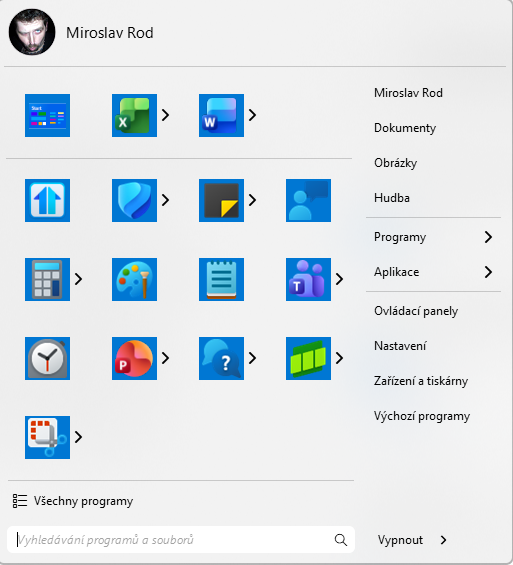
I'm using the Modern style (updated Windows 7 style).

 Why isn't the icon background transparent, but instead has this ugly background color?

(in this case, blue—see the picture)

Reply #16 Top
Quoting mirod7174, reply 4150191

I'm using the Modern style (updated Windows 7 style).

 Why isn't the icon background transparent, but instead has this ugly background color?

(in this case, blue—see the picture)


End of mirod7174's quote

Hello,
Sorry to hear you are having issues. I can't reproduce your issue on my system. Perhaps something went wrong while installing. Please try, uninstall Start11v3, reboot immediately (important), download latest version available in your account product download page: https://store.stardock.com/myaccount/products. Install it, reboot immediately again. Retest it and report back. 

If the issue still there, we need to know your Windows 11 full version and OS Build number. Use Winver.exe.

Thank you,
Basj,
Stardock Community Assistant.

Reply #17 Top

It goes away after I reinstall it. But if I start messing with the Start menu settings or customization, it suddenly reappears. I haven't been able to figure out exactly when that happens yet.


I have version 2.8.2. I don't know if version 2.7.2 had the same issue—I can check.

Upgrading from 2.8.2 to 3.0.4 didn’t fix this bug; it still persists.
Maybe if I install version 3.0.4 on a PC that doesn’t have any version of Start11, it’ll work fine for a while before it breaks too...

My OS is Windows 11 26H2, build 26300.9974.

Reply #18 Top

It looks like you have enabled the setting to paint a solid background colour on icons.

If you are using v3 open the Start11 settings.  On the Start Menu page pick Apps and layout and then find Pinned and most used apps.  Expand it and untick "Show a solid colour behind icons"


+1 Loading…
Reply #19 Top

I'm not sure if I am adding this correctly. I have been trying to add a tab to a group in version 2.82, and when I attempt to rename it, the Start menu either closes or doesn't give me enough time to enter the new name.  My Windows version is Windows 11 Pro 23H2.  I appreciate any help given.

Reply #20 Top
Quoting mickerick, reply 4150649

I'm not sure if I am adding this correctly. I have been trying to add a tab to a group in version 2.82, and when I attempt to rename it, the Start menu either closes or doesn't give me enough time to enter the new name.  My Windows version is Windows 11 Pro 23H2.  I appreciate any help given.

End of mickerick's quote

Hello,
Sorry to hear you are having issues. Perhaps something went wrong while installing. Please try, uninstall Start11, reboot immediately (important), download latest version available in your account product download page: https://store.stardock.com/myaccount/products. Install it, reboot immediately again. Retest it and report back.

Thank you,
Basj,
Stardock Community Assistant.

Reply #21 Top

Thanks, Basj. I did as you directed, but it still wouldn't work, so I switched my theme from Windows App style to Windows Pro style as a test, and it worked okay in that. Then I switched back to the Windows App style, and the change was there, so it all turned out okay in the end.  Not sure why, but thanks again for your help.

Reply #22 Top
Quoting mickerick, reply 4150660

Thanks, Basj. I did as you directed, but it still wouldn't work, so I switched my theme from Windows App style to Windows Pro style as a test, and it worked okay in that. Then I switched back to the Windows App style, and the change was there, so it all turned out okay in the end.  Not sure why, but thanks again for your help.

End of mickerick's quote

Great, glad to hear that.

Thank you,

Basj,
Stardock Community Assistant

Reply #23 Top

Hi,

Since a recent update, explorer.exe uses 60 to 70% of one CPU core constantly, even with almost all other programs closed.
Restarting explorer does not help; the load is back within a minute.

System:
- Start11 v2 2.8.2.0 (installed 2026-11-06)
- Windows 11 Pro, build 26300.9974

What I found:
- All the CPU time is in one thread of explorer.exe: the taskbar thread (it owns Shell_TrayWnd and the tray overflow window). Every other thread is idle.
- I took the call stack of that thread several times with cdb and Microsoft symbols. In most samples it is in this loop:

win32u!NtGdiStretchDIBitsInternal
gdi32full!StretchDIBitsImpl
GDI32!StretchDIBits
user32!SmartStretchDIBits
user32!BitmapFromDIB
user32!ConvertDIBBitmap
user32!CopyBmp
user32!CopyIcoCur
user32!InternalCopyImage
comctl32!CImageList::_ReplaceIcon
comctl32!CImageList::ReplaceIcon
comctl32!ImageList_ReplaceIcon
Start10_64!RepaintTask (5 frames) <----------
user32!UserCallWinProcCheckWow
user32!DispatchClientMessage
user32!_fnDWORD
ntdll!KiUserCallbackDispatcherContinue
win32u!NtUserDispatchMessage
user32!DispatchMessageWorker
explorer!CTray::_MessageLoop

So RepaintTask in Start10_64.dll seems to replace a taskbar icon in the image list over and over, instead of once per change.

Is this a known issue, and is there a fix? I am happy to test a build or collect more data.

Thanks,
Susanne

Reply #24 Top

It sounds like the taskbar is being told over and over to repaint.

How many monitors do you have and what positions do you use for the taskbar?

Also do you have anything else running which reserves desktop space?

Reply #25 Top

Setup:
- OS: Windows 11 26H2, Build 26300.10075
- Start11: v2 2.8.2.0
- Taskbar: Left vertical taskbar, Enhanced Taskbar enabled, combined buttons (single 3440x1440 monitor)

Issue:
After updating to Start11 2.8.2.0, hovering over taskbar buttons on the left vertical taskbar no longer shows thumbnail previews—making it impossible to switch between multiple open windows of the same app without Ctrl+Click.

Repro / findings:
1. Restart explorer.exe.
2. Hover over a taskbar button: the thumbnail preview appears normally on the very first hover.
3. Move away and hover again (on the same or any other button): no preview appears on any subsequent hover until explorer.exe is restarted again.

Workaround / root cause clue:
- Turning OFF Windows global "Animation effects" (Settings -> Accessibility -> Visual effects) + explorer restart immediately fixes consecutive hovers.
- Disabling only legacy "Animations in the taskbar" (TaskbarAnimations = 0) or Start11's own taskbar animations does not fix it—it only resolves when global Animation effects are disabled, which points to the new 26300.x taskbar preview animation getting stuck on dismissal with a vertical taskbar.