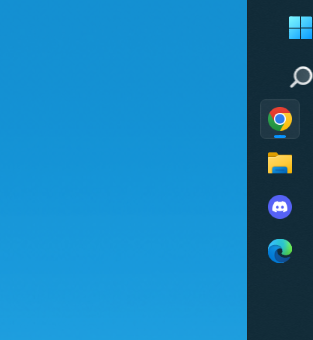
Is Start11 ever going to work reliably?

Windows Version Number: Windows 11 Home 25H2 26200.9457

I've been running it for over a year now, and it fails to work incredibly frequently.  I have to restart my computer to fix it (restarting Explorer does not work), and even then it sometimes doesn't resolve the issues. I've updated to latest Start11 every time one becomes available.

- Task bar on second monitor regularly doesn't show any icons.

- Start Menu button regularly disappears.  I can click the empty space where it's at to open the start menu, but the start button just not there.

- Clicking an icon switches to the wrong app.  If I hover over, and then select the individual window from the pop-up, it works fine.  That's if the pop-up preview is even working, which it isn't always.

I'm at my wits end.  Please fix your software.  To think I bought the 5-pack thinking I'd use this on more than one machine...

122 views 7 replies
Reply #1 Top

Hello,
Sorry to hear you are having issues. Don't see similar report from other on this one. Perhaps there is something in your system causing the issue. Would like to suggest few things to try.

  1. Please try, uninstall Start11, reboot immediately (important), download latest version available in your account product download page: https://store.stardock.com/myaccount/products. Install it, reboot immediately again. Retest it.
  2. Do the System check such as Sfc /scannow and DISM check. Refer here for more. https://support.microsoft.com/en-us/windows/experience/backup-recovery/use-the-system-file-checker-tool-to-repair-missing-or-corrupted-system-files
  3. Please try purge and reinstall steps as mention here : [Link]. Just make sure to redownload the latest version from your account page. Reboot after the purge. Reinstall and reboot again after the installation. Retest and report back here.
  4. If you have any other 3rd party application running in the background that change your taskbar or your Windows shell try disabling them, reboot the system and redo the system, just make sure those disabled apps do not restart again after boot. Application such as DisplayFusion, OpenShell, StartAllBack etc.

Report back.

Thank you,
Basj,
Stardock Community Assistant.

Reply #2 Top

This is definitely not normal behaviour for the software so I am sorry you are experiencing those issues.

The first question is exactly what version of the software does it say in the config UI?

Reply #3 Top

I'm seeing the same problems.  I also have issues where the taskbar on a 2nd monitor become transparent.  As mentioned, I don't see any icons.  The taskbar is transparent and not the color it should be.  I only see the start button.  I can click on the taskbar and it still function, you just can't see what you're clicking on in the taskbar.

Reply #4 Top
Quoting dkump, reply 4146995

I'm seeing the same problems.  I also have issues where the taskbar on a 2nd monitor become transparent.  As mentioned, I don't see any icons.  The taskbar is transparent and not the color it should be.  I only see the start button.  I can click on the taskbar and it still function, you just can't see what you're clicking on in the taskbar.

End of dkump's quote

Hello,
Sorry to hear you are having issues. Have you tried any of my suggestion steps in reply#1? 

Thank you,
Basj,
Stardock Community Assistant.

Reply #5 Top

I was debating if I should roll back to prior version. I'll try your steps first. Just to clarify, are the steps:
1. Save current settings
2. Uninstall
3. Run system checks (Sfc, DISM check)
4. Purge
5. Download and reinstall version 2.8 (or latest)
6. Add license key
7. Import settings

Reply #6 Top

Run the uninstall and reinstall first. Retest. If the issue still there continue to Step 2 system check. If there is error and the error get fixed. reboot and retest the issue. If the issue still there continue to step 3. Retest and report back.

Thank you,


Basj,
Stardock Community Assistant

Reply #7 Top

Reinstalled.  System check had found no issues.  Ran purge and reinstalled.  It seems ok but I have this funky issue on my main monitor where the start button and search button aren't aligned and are partially off the screen.