
Start11 all apps list bug when navigating by aplhabet

App Version: 2.8

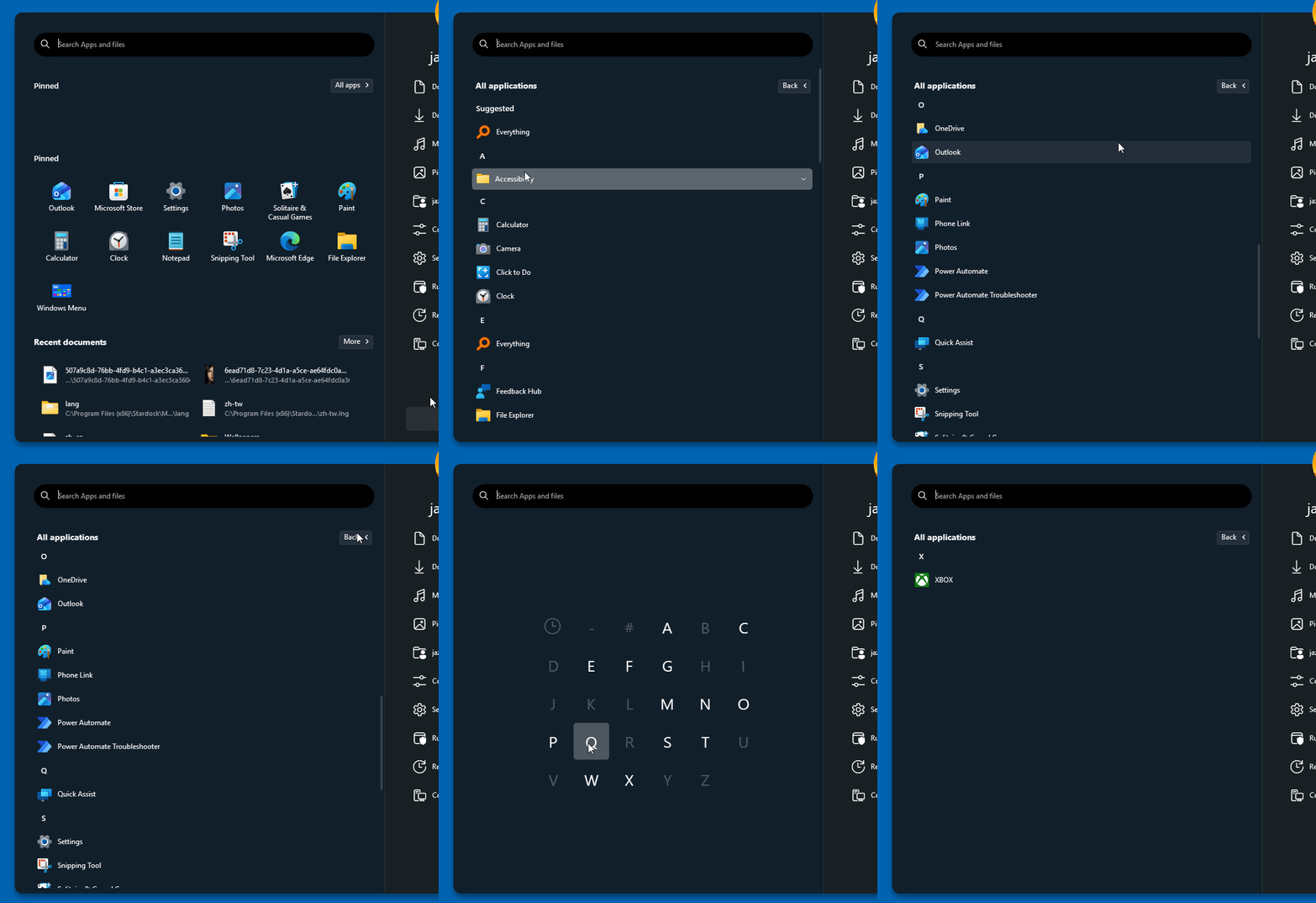
I am using the windows pro style launcher using version 2.8 of Start11. When I hit "all apps" and then click on a letter to navigate through the list to a specific letter of the alphabet, it drops me into the list of apps at the incorrect location. For example, when I try to navigate to the "O" apps, but it drops me around "S" instead.
164 views 1 replies
Reply #1 Top

Hello,
Sorry to hear you are having issues. I can't reproduce this issue. Refer to my short video below. Moving forward, please try, uninstall Start11, reboot immediately (important), download latest version available in your account product download page: https://store.stardock.com/myaccount/products. Install it, reboot immediately again. Retest it and report back.

If the issue still appear we need more details. We need to know your Windows 11 full version and OS Build number. Use Winver.exe to get these numbers.

Added Note: I am running Windows 11 v25h2 (OS Build 26200.8875) and Start11 v2.81 Beta.


Thank you,
Basj,
Stardock Community Assistant.