
No System Tray Icon
No "unload" function available
from  Stardock Forums
Stardock Forums
Windows Version Number: Windows 11 Core 25H2 (26100.ge_release.240331-1435)
App Version: WindowBlinds 11.07 (024 x64 - Windows 11 Edition
Windows 11 Core 25H2 (26100.ge_release.240331-1435)
WindowBlinds 11.07 (024 x64 - Windows 11 Edition) - 64 bit OS
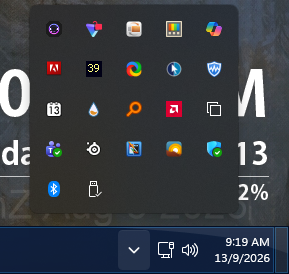
a) there is NO "hidden system tray" icon shown even though the setting was repeatedly ON / OFF several times with no change
 since NO sys tray icon, NO way to UNLOAD windowblinds (that I can find).
WindowBlinds is "up to date".
Thank you.

 WinCustomize Forums