Icons not visible

I have 3 fences on my screen..Programs, Files and Documents and Folders.  Icons are shown in Programs but Files and Documents and Folders are empty.  How do I get icons to show in all the fences?

171 views 3 replies
Reply #1 Top

Hello,

Sorry to hear you are having issues. But, need to know few more details,

  1. You on Windows 10 or 11? Also need its full version and OS Build numbers. Use Winver.exe.
  2. Fences full version number installed.
  3. Do you have some files and documents inside your Desktop folder? If you do, does those documents, files and folders, still show up in your general desktop area? If they do, if you click and drag them into those respected Fences does it move into it and stay there?

Thank you,

Basj,

Stardock Community  Assistant.

Reply #2 Top

Hello.  

1.  I use Windows 11

2. Stardock Fences 6  6.4.6.1

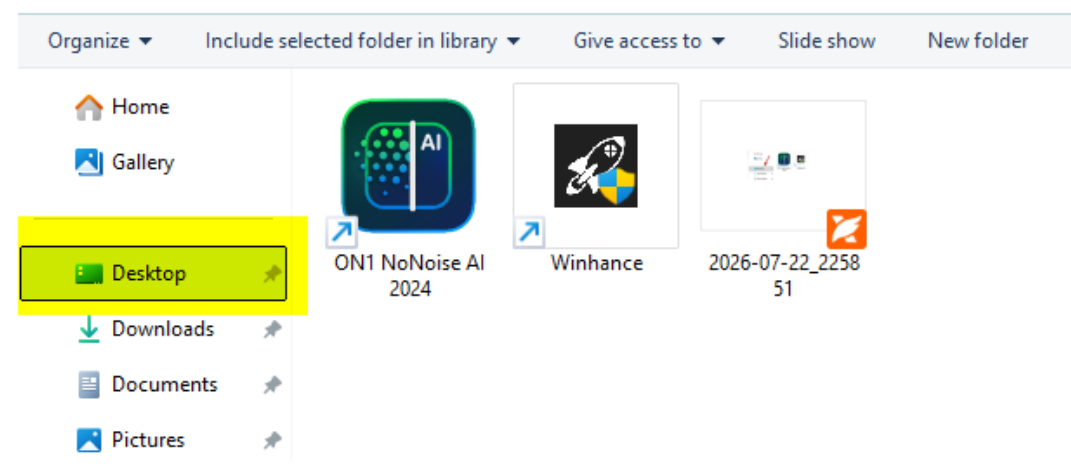
3.  Desktop folder is now empty except for a screenshot I just made.  All the icons that used to be on my desktop are missing.

Reply #3 Top
Quoting sailfree, reply 3995891

3.  Desktop folder is now empty except for a screenshot I just made.  All the icons that used to be on my desktop are missing.

End of sailfree's quote

That screenshot show that all those missing files were removed from the desktop directory, this is not something can be done by Fences itself. Perhaps, those files was deleted or move to some other folders. If it were move to other directory, try searching for it using your Windows File explorer. If it no longer seachable, perhaps it were deleted, you could try recover it with various file recovery application or for shortcuts you can recreate those shortcuts.

Thank you,

Basj,

Stardock Community  Assistant