Start11 v1 Release (1.56) Feedback

With the Start11 v1.56 release today, we are creating this thread so that users can report any observed issues.  

Obtaining the product

Object Desktop members can get the release from within Object Desktop Manager 

Individual purchases (as well as Object Desktop Members) can also be obtained from your account page: https://store.stardock.com/myaccount/products

For guest check-out purchase (no account), from this link: http://www.stardock.com/support/productkeyretrieval

Reporting an issue

Please include the following for anything found:

  • Exact Windows version \ build (winver.exe)

  • Detailed steps to recreate the issue seen

  • Screenshots and videos are very helpful.  Videos can be uploaded to a cloud drive service (GoogleDrive, DropBox, OneDrive, YouTube), with a shared link included in your post.  Images can be copied and pasted directly into a post.

  • If there are specific apps that the app does not work (well) with, please note what apps and their exact versions.  If any app is not common, a link to a trial version would be appreciated.

Thank you for your interest and any time you put into making Start11 a better product.

450 views 16 replies | Pinned
Reply #1 Top

Platforms

  • Stardock release (Steam version 1.56 currently available in beta)

Date

07/10/2026

Version

  • UI: 1.56

  • Start11Config.exe: 1.5.6.1

Changes

  • Addresses hover-over preview issue with some monitor and taskbar combinations

Date

07/07/2026

Version

  • UI: 1.56

  • Start11Config.exe: 1.5.6.0

Changes

  • Stability improvements for Windows 11 26 H2

  • Improvements for tool-tip position on the taskbar

  • Enhanced taskbar compatibility improvements

  • Installer updates to improve reliability and durability

  • Misc updates to back-end support mechanism

Reply #2 Top

Known issues

  • While we appreciate all feedback, please remember that we offer no official support for beta \ preview \ developer channel versions of Windows. If you report issues while in any of those early release channels, you should not expect them to be addressed unless it still exists in a retail version of Windows.
Reply #3 Top

***Reserved***

Reply #4 Top

Today, 7/21/2026, when I booted my Win11 PC a popup appeared saying there was an update for Start11 to version 2.73.  I clicked the button to update, the program ran and ended.  When I then checked the app version under Settings, it shows my Start11 version as 1.5.6.1 (I believe it was on ver. 1.5.5.0 before this update).  At first I wondered if I had been hacked. but all seems well and I've learned on the forum that this ver. 1.5.6.1 is the latest for my version 1 of the program.

I'm assuming that this update for 2.73 did this update, and then stopped since it was the latest for my version of Start11.  Strange that there was no warning or explanation as to what had happened.

Can I assume that all is well with this?

Reply #5 Top
Quoting n2trainz, reply 3995835

Today, 7/21/2026, when I booted my Win11 PC a popup appeared saying there was an update for Start11 to version 2.73.  I clicked the button to update, the program ran and ended.  When I then checked the app version under Settings, it shows my Start11 version as 1.5.6.1 (I believe it was on ver. 1.5.5.0 before this update).  At first I wondered if I had been hacked. but all seems well and I've learned on the forum that this ver. 1.5.6.1 is the latest for my version 1 of the program.

I'm assuming that this update for 2.73 did this update, and then stopped since it was the latest for my version of Start11.  Strange that there was no warning or explanation as to what had happened.

Can I assume that all is well with this?

End of n2trainz's quote

Hello,

Sorry to hear you are having issues. That is a strange one. Do you still see the popup message for upgrading to Start11v2.73? From what I know, that should not appear, unless you have Start11v2 running.

Thank you,

Basj,

Stardock Community  Assistant.

Reply #6 Top

Basj, no, the popup showed right after boot up, and I clicked it to install the update.  It ran for a short while, then disappeared.  I then looked to see what version my Start11 was at and it showed as version 1.5.6.1 and the installation date was 7/21/2026.  So obviously the version 2.73 update that appeared actually did an update, but not to ver. 2.73 (which I wouldn't expect).

My last update prior to this was to version 1.5.5.0 on 2/24/2025.

A bit more, I just booted up my Win11 laptop PC which also has Start11 on it.  As soon as it booted, that same popup appeared.  I cancelled it without updating until I felt confident that all was well.

What is strange is that the pop-up said it would update to 2.73.  I now realize that should have only appeared on a PC with version 2 of Start11.  There is nothing in the popup that says anything about version 1 or an update to it.

My original concern was whether I had been hacked.  Apparently not though.

Reply #7 Top

Odd behaviour after installing this update. 

Intermittently but frequently, when moving or clicking the mouse, an (unclickable) duplicate of part my taskbar (everything but the system tray and start button) appears at the top left of my leftmost monitor. This isn't my primary monitor -- usually the taskbar is on monitor 2 on the bottom. 

It seems to reliably trigger every time I change focus to a new window (either by clicking on it, or clicking on the taskbar) or even switching tabs in Firefox. If I click on a new window, it flashes; sometimes but less reliably it comes up and stays until I mouseover it at which point it disappears by parts depending on what's rendering.

Not sure what further information you'd need to troubleshoot.

It's very irritating to have things constantly flash on my monitors. Is there any way to revert to previous version?

Reply #8 Top
Quoting mdsan, reply 3995840

Odd behaviour after installing this update. 

Intermittently but frequently, when moving or clicking the mouse, an (unclickable) duplicate of part my taskbar (everything but the system tray and start button) appears at the top left of my leftmost monitor. This isn't my primary monitor -- usually the taskbar is on monitor 2 on the bottom. 

It seems to reliably trigger every time I change focus to a new window (either by clicking on it, or clicking on the taskbar) or even switching tabs in Firefox. If I click on a new window, it flashes; sometimes but less reliably it comes up and stays until I mouseover it at which point it disappears by parts depending on what's rendering.


Not sure what further information you'd need to troubleshoot.

It's very irritating to have things constantly flash on my monitors. Is there any way to revert to previous version?

End of mdsan's quote

Hello,

Sorry to hear you are having issues. Please try, uninstall Start11, reboot immediately (important), download latest version available in your account product download page: https://store.stardock.com/myaccount/products. Install it, reboot immediately again. Retest it and report back.

If the same issue still appear, we need to know your Windows 10/11 full version and OS Build number. Please use Winver.exe to get this information.

Quoting n2trainz, reply 3995839

Basj, no, the popup showed right after boot up, and I clicked it to install the update.  It ran for a short while, then disappeared.  I then looked to see what version my Start11 was at and it showed as version 1.5.6.1 and the installation date was 7/21/2026.  So obviously the version 2.73 update that appeared actually did an update, but not to ver. 2.73 (which I wouldn't expect).

My last update prior to this was to version 1.5.5.0 on 2/24/2025.

A bit more, I just booted up my Win11 laptop PC which also has Start11 on it.  As soon as it booted, that same popup appeared.  I cancelled it without updating until I felt confident that all was well.

What is strange is that the pop-up said it would update to 2.73.  I now realize that should have only appeared on a PC with version 2 of Start11.  There is nothing in the popup that says anything about version 1 or an update to it.

My original concern was whether I had been hacked.  Apparently not though.

End of n2trainz's quote

Understood, if the popup does appear, please take a screenshot and post it here.

Thank you,

Basj,

Stardock Community  Assistant.

Reply #9 Top

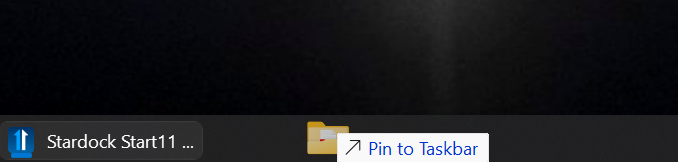
Previous Versions of Start 11 Enabled folders to be pinned to the taskbar,    with the latest version 1.56 this still shows as an option but does not execute.


Reply #10 Top

Hi ExpatPom,

Quoting ExpatPom, reply 3995866

Previous Versions of Start 11 Enabled folders to be pinned to the taskbar,    with the latest version 1.56 this still shows as an option but does not execute.

End of ExpatPom's quote

This seemed to work just fine for me in a fresh install.  I expect when you enabled the enhanced taskbar (making folder pinning possible) it didn't automatically prompt the restart of explorer.  

If you restart explorer manually (button in the Start11 v1 UI), does that help?


Best regards,

Adam McGuinness
Stardock Support Specialist

Reply #11 Top

Actually, I do need to make a correction on my last post.  To clarify:

I was able to get one folder to pin to my taskbar, but the conditions were unique.  Something odd about creating a New Folder on the desktop, and then immediately dragging it to the taskbar- allowed that one singular folder to be pinned.  

I'm not sure why it let me do this, as all other attempts to pin a folder or folder shortcut to the taskbar failed.

I can see how this can be confusing; I will make note of the behavior. (Internal reference: ODNT-12505) 

Also noteworthy to add, I dug a little deeper and found the same inability to pin folders occurs in testing the prior Start11v1 version.  Meaning this doesn't seem to be new or specific to the updated build.

And so ExpatPom, as it stands, for folder taskbar pinning, you could use a workaround in Windows to edit a folder shortcut and pin that to your taskbar (internet search for "windows 11 how to pin folder to taskbar").  

Alternatively, you might try out Start 11v2, which has a "Taskbar pins" tab in the app itself, with the folder pinning feature built into the UI.

Thank you and best regards,

Adam McGuinness
Stardock Support Specialist

+1 Loading…
Reply #12 Top

Basj,

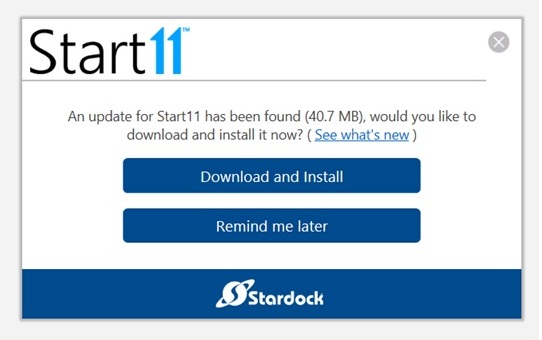
Today when I booted the laptop PC the popup didn't appear as it did earlier.  What I did though was went to the Start11 menu and clicked About, then to Check Now  (for Updates).  The window below came up, looking very similar to the earlier popup that appeared during the previous boot up.  Noted that this box doesn't have anything about version 2.73 on it.  I also noted that the update file is over 40mb (the same as the 2.73 update file that I had downloaded earlier for my desktop PC). 

Perhaps someone has fixed the original dialog box for the version 1 users.

I don't think there is much else to say about it . . . the update to ver. 1.5.6 seems to work OK.

Reply #13 Top
Quoting n2trainz, reply 3995879

Basj,

Today when I booted the laptop PC the popup didn't appear as it did earlier.  What I did though was went to the Start11 menu and clicked About, then to Check Now  (for Updates).  The window below came up, looking very similar to the earlier popup that appeared during the previous boot up.  Noted that this box doesn't have anything about version 2.73 on it.  I also noted that the update file is over 40mb (the same as the 2.73 update file that I had downloaded earlier for my desktop PC). 

Perhaps someone has fixed the original dialog box for the version 1 users.

I don't think there is much else to say about it . . . the update to ver. 1.5.6 seems to work OK.

End of n2trainz's quote

Great, maybe it's a glitch somewhere. Do know that Start11v2.73 is around 55 MB

Thank you,

Basj,

Stardock Community  Assistant


Reply #15 Top

Basj, I can confirm that the reinstall appears to have been successful and the flashing taskbar is no longer occurring.

Reply #16 Top
Quoting mdsan, reply 3995978

Basj, I can confirm that the reinstall appears to have been successful and the flashing taskbar is no longer occurring.

End of mdsan's quote

Great, glad to hear that.

Thank you,

Basj,

Stardock Community  Assistant