Start11 v2.72 Release Feedback

With the Start11 v2.72 release today, we are creating this thread so that users can report any observed issues.  

Obtaining the product

Object Desktop members can get the release from within Object Desktop Manager 

Individual purchases (as well as Object Desktop Members) can also be obtained from your account page: https://store.stardock.com/myaccount/products

For guest check-out purchase (no account), from this link: http://www.stardock.com/support/productkeyretrieval

Reporting an issue

Please include the following for anything found:

  • Exact Windows version \ build (winver.exe)

  • Detailed steps to recreate the issue seen

  • Screenshots and videos are very helpful.  Videos can be uploaded to a cloud drive service (GoogleDrive, DropBox, OneDrive, YouTube), with a shared link included in your post.  Images can be copied and pasted directly into a post.

  • If there are specific apps that the app does not work (well) with, please note what apps and their exact versions.  If any app is not common, a link to a trial version would be appreciated.


342 views 5 replies | Pinned
Reply #1 Top

Start11 v2.72 Changelog (Released 06/01/2026)

Date

06/01/2026

Version

UI: 2.72
File Version: 2.7.2.0

Changes

  • Addresses the issue with icons on secondary displays when to the left of the primary monitor and autohide is enabled (or taskbar on left/right/top is in use)

  • Fix for desktop icons appearing under the taskbar when in ‘Only hide when a window is maximized or overlapping the taskbar’ mode, and the taskbar is at the top or left of the monitor

Reply #2 Top

Known issues

While we appreciate all feedback, please remember that we offer no official support for beta \ preview \ developer channel versions of Windows. If you report issues while in any of those early release channels, you should not expect them to be addressed unless it still exists in a retail version of Windows.

  •  tbd
Reply #3 Top

***Reserved***

Reply #4 Top

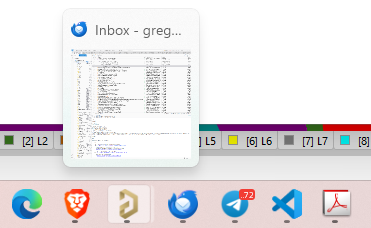
Since installing this update on a multi-display setup my icons move to a different location every time I boot the machine.  I also get random results when I try to order the icons.  Sometimes they all just jump to spots of their own choosing.

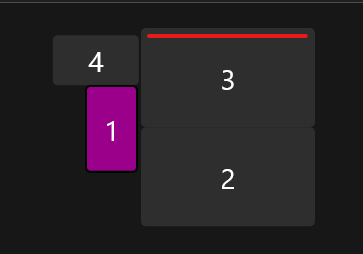
The taskbar is at the top of display 3 as shown here.   

Hardware specs are: 

Processor	Intel(R) Core(TM) i9-10900 CPU @ 2.80GHz (2.80 GHz)
Installed RAM 64.0 GB (63.9 GB usable)
Graphics card NVIDIA Quadro P4000 (8 GB)
Intel(R) UHD Graphics 630 (128 MB)
Storage 715 GB of 3.18 TB used


Reply #5 Top
Quoting dr.gerg, reply 3994177

Since installing this update on a multi-display setup my icons move to a different location every time I boot the machine.  I also get random results when I try to order the icons.  Sometimes they all just jump to spots of their own choosing.

The taskbar is at the top of display 3 as shown here.

End of dr.gerg's quote

Hello,

Sorry to hear you are having issues. First, Please try, uninstall Start11, reboot immediately (important), download latest version available in your account product download page: https://store.stardock.com/myaccount/products. Install it, reboot immediately again. Retest it and report back.

If the issue still appear. Need few more details.

  1. Windows 10 or 11? Also need its full version and OS Build number.
  2. When you said "My icons move" its your desktop icons or your Start11 Start menu tiles? 
  3. Post a video or a screenshot might help us understand your issue.

Thank you,

Basj,

Stardock Community  Assistant.