Reply #1 Top

Hello,
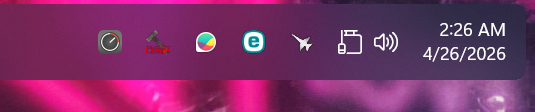
Sorry to hear you are having issues. There is another report from another user about this one. But, so far, I can not reproduce this issue on my system. Perhaps there is something conflicting in your system that causing this issue. Do you have any other 3rd party application that also add or change something in your taskbar?

Would like to suggest trying Clean boot steps. Refer here for Steps: https://support.stardock.com/space/SHC/1334935592/Start11+Clean+Boot. Do note that Clean Boot need to be done with Care. Please try it and report back. 

Added note: We need to know your Windows 11 full version and OS Build number. Use Winver.exe to get these numbers.

Thank you,
Basj,
Stardock Community Assistant.

Reply #2 Top

Okay I have the Windows 11 IoT Enterprise LTSC Version 24H2 (OS Build 26100.8246)


Instead of this clean boot, can't I just back up settings and uninstall  Start11?

Reply #3 Top

Sure, you can do that, but I don't think that could resolved it.

Any reason you're not upgrading to latest 25H2?

Thank you,

Basj,
Stardock Community Assistant

Reply #4 Top

Hi papahuge (and anyone else seeing the upside-down network icon on top aligned taskbar),

Thank you for your posts.

Quoting aket3, reply 11

No. I'm not doing sandboxing or clean boot stuff. 

Quoting papahuge, reply 2

Okay I have the Windows 11 IoT Enterprise LTSC Version 24H2 (OS Build 26100.8246)

Instead of this clean boot, can't I just back up settings and uninstall  Start11?

This is of course entirely your choice, but it does limit our ability to help.  

If anyone experiencing the network icon appearing upside-down can test the behavior with a Windows Sandbox or from a Clean Boot, that would be our most efficient way to help us isolate why some users are experiencing this, and others are not.

Quoting selesn777, reply 14

I have the same situation on Windows 11! :(  

Quoting aket3, reply 9

I removed S11, told it to delete settings & reinstalled it, then the only change I made was put the taskbar on top. The icon was right-side-up..... until I rebooted it. Now it is upside-down again.

Two questions:

1. Do you have anything else installed on your PC that could be effecting the behavior of your taskbar?

2. After you see the icon appear upside-down, try to Restart the process of Windows Explorer from Task Manager (as in the image below).  Does this make it appear normal again?
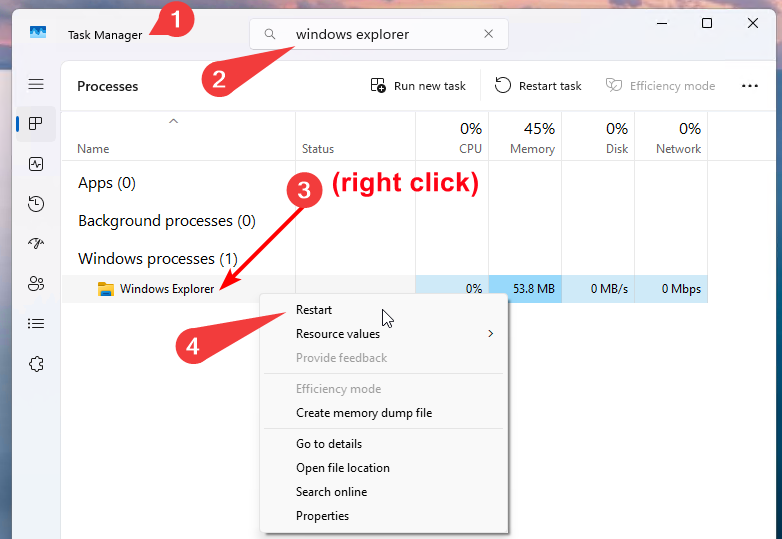
Thanks again and best regards,

Adam McGuinness
Stardock Support Specialist

Reply #5 Top

I can reproduce this. When I change the taskbar position from the bottom to the top: 

When I revert to the position on the bottom, it works as it should:

Win11 Pro 25H2 (KB5083769) (26200.8246)

+1 Loading…
Reply #6 Top

Hello again,

Quick follow up on my last post.  We've now identified what seems to be the issue, and have it logged.

Internal Ref: ODNT-12279

Best regards,

Adam McGuinness
Stardock Support Specialist

+2 Loading…
Reply #7 Top

Quoting Abisnabidam, reply 6

Привет ещё раз!

Краткое дополнение к моему предыдущему сообщению. Мы определили, в чем, по всей видимости, проблема, и зафиксировали ее.

Внутренний номер: ODNT-12279

С наилучшими пожеланиями,

Адам МакГиннесс
Специалист службы поддержки Stardock

Thank you. We'll be looking forward to a fix. All the best.

Reply #8 Top

Quoting Abisnabidam, reply 4

Two questions:

1. Do you have anything else installed on your PC that could be effecting the behavior of your taskbar?

2. After you see the icon appear upside-down, try to Restart the process of Windows Explorer from Task Manager (as in the image below).  Does this make it appear normal again?

1 - nothing but S11

2 - that worked, until I rebooted it...

Reply #9 Top

This will be addressed in the next beta and I will make sure someone posts here to let you know when it is available.  It should be this week.

Thanks for letting us know.

Reply #10 Top

Thank you for your support. S11 is really awesome. It makes w11 bearable for many of us. Keep up the great work! 😎🙏