Feedback & Feature Requests for Stardock Fences

1. Adjustable Delay for "Roll Up" Fences

I would like to see an option to set a custom delay for when a folder (Fence) rolls back up after the mouse leaves the area. Currently, if the cursor accidentally slips past the edge of an expanded Fence, it collapses instantly. Adding a "Retraction Delay" (e.g., 500ms or 1s) would prevent the frustration of having to hover over the title bar repeatedly to reopen it.

2. Improved Access to Hidden Fences

I’d love a more intuitive way to interact with Fences that are buried behind open windows.

  • Edge Integration: Perhaps a thin, interactive strip could remain visible at the edge of the screen (or even tucked under the Taskbar) to trigger the Fence.

  • Shortcut Access: Alternatively, adding a "Bring Fences to Front" command via a Middle-Mouse Click on the desktop or a specific hotkey would greatly improve workflow efficiency.

3. Single-Click Execution & Modified Selection

I would like an option to enable Single-Click to launch applications within a Fence. To avoid accidental selections, the logic could be adjusted so that:

  • A Long Press of the Left Mouse Button selects the file.

  • Or, selection requires holding Ctrl + Left Click, while a standard single click remains dedicated to opening the file/app.

4. Compact Title Bars (Adjustable Thickness)

I would like an option to reduce the height of the Fence title bars. Currently, they can feel a bit bulky. Having a "Thin Mode" or a slider to adjust the vertical padding would allow for a much cleaner, more compact look, especially for users who want to maximize their desktop space.
140 views 2 replies
Reply #1 Top

These are all very good suggestions! Added them to dev team notes. I’m sure they’ll get some of these in. Very much appreciate.

Btw if any mockups of this compact titlebar style you’re looking for, please feel free to post.

+1 Loading…
Reply #2 Top

Quoting Dr, reply 1

Btw if any mockups of this compact titlebar style you’re looking for, please feel free to post.

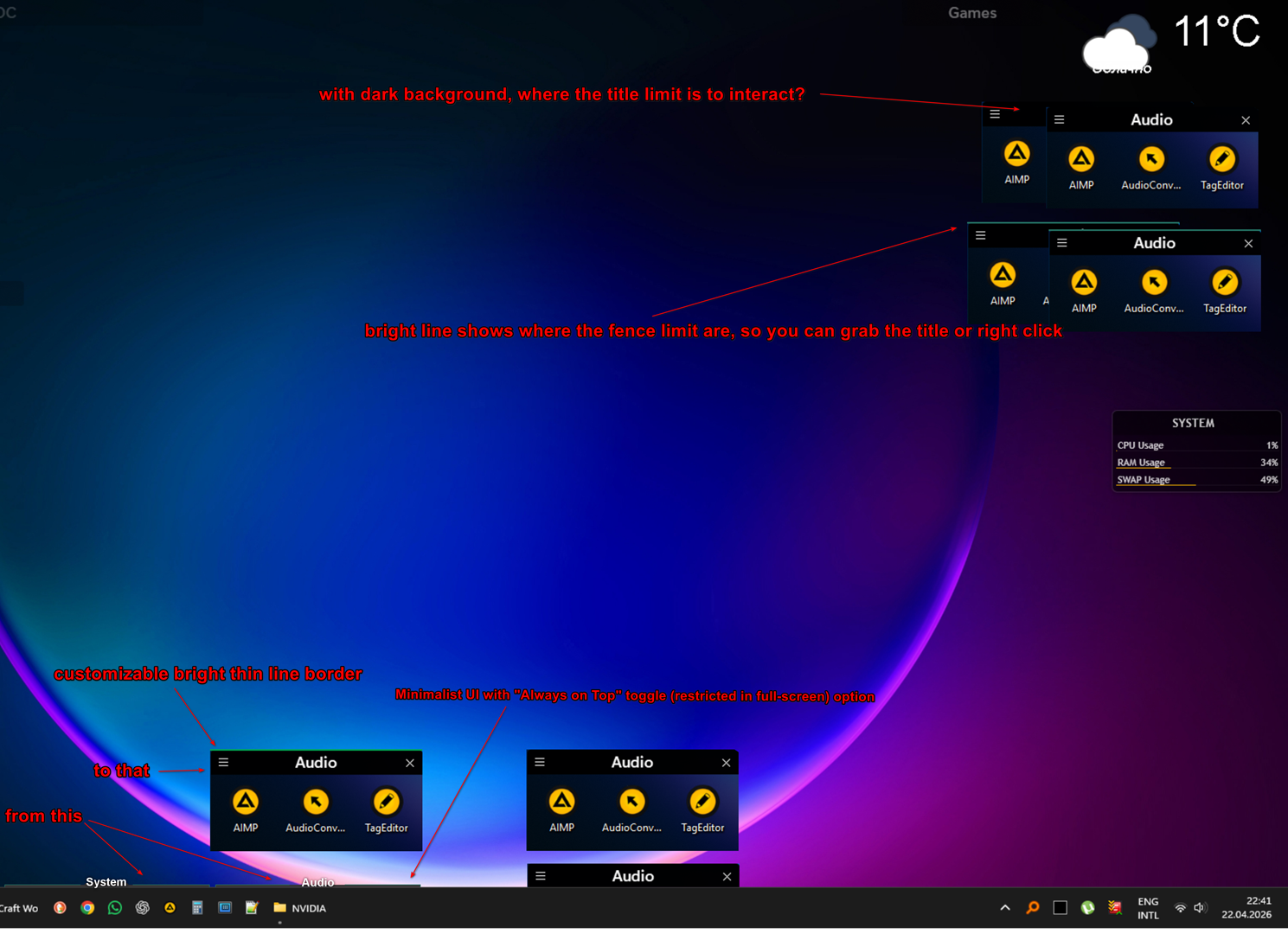
Hi again! As requested, I’ve prepared a mockup to illustrate the Minimalist UI and how the thin line borders would work.

[Attached]

In addition to the visual style, I would like to propose a specific logic for the 'Always on Top' mode to ensure it doesn't interfere with daily workflow:

  1. Activation Delay (Hover-to-Show): When a Fence is in 'Always on Top' mode, there should be a short delay before it activates/expands upon hovering. This prevents the Fence from popping up accidentally when the mouse is simply passing through its area to reach another UI element.

  2. Retraction Logic:

    • Keep-Open Delay: Once expanded, the Fence should stay open for a couple of seconds even if the mouse leaves the area (to prevent accidental collapsing).

    • Instant Collapse on Action: However, the Fence should collapse immediately as soon as an application is launched (via single or double click). This ensures the workspace stays clean once the user has made their choice.

I believe these refinements, combined with the adjustable title bar thickness and the bright border visibility, would make Fences much more powerful for power users. Looking forward to your thoughts!

One more important detail for the Minimalist UI from my example: I would like to see an option to change the font or, at the very least, reduce the font size for Fence titles.

Crucially, the Title Bar height should scale dynamically based on the chosen font size. If a user selects a smaller font, the title bar should automatically become thinner to match, allowing for a truly compact and sleek look.