Start11 2.7 Release Feedback Thread

With the Start11 2.7 release today, we are creating this thread so that users can report any observed issues.  

Obtaining the product

Object Desktop members can get the release from within Object Desktop Manager 

Individual purchases (as well as Object Desktop Members) can also be obtained from your account page: https://store.stardock.com/myaccount/products

For guest check-out purchase (no account), from this link: http://www.stardock.com/support/productkeyretrieval

Reporting an issue

Please include the following for anything found:

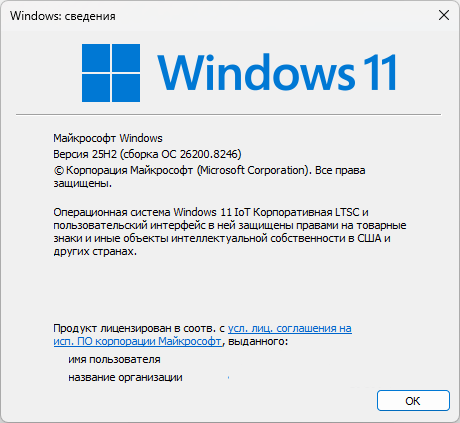
  • Exact Windows version \ build (winver.exe)

  • Detailed steps to recreate the issue seen

  • Screenshots and videos are very helpful.  Videos can be uploaded to a cloud drive service (GoogleDrive, DropBox, OneDrive, YouTube), with a shared link included in your post.  Images can be copied and pasted directly into a post.

  • If there are specific apps that the app does not work (well) with, please note what apps and their exact versions.  If any app is not common, a link to a trial version would be appreciated.

472 views 13 replies | Pinned
Reply #1 Top

Start11 v2.7 Changelog (Released 04/22/2026)

Date

04/22/2026

Version

UI: 2.7
File Version: 2.7.0.3

Changes

  1. Resolved issue with Show recently installed apps not saving the setting for Windows 7/Modern styles when using Win10 style all apps list

  2. Extended edit fields in Start11 to support Ctrl + backspace to delete the last word.

  3. Custom icons are now used in groups, which are opened as a menu as well

  4. Dark custom colours will make Win7-style menus use dark mode instead of light mode as before. This can be controlled by creating a value S11_ForceDarkMode in HKEY_CURRENT_USER\Software\Stardock\Start8\Start8.ini\Start8 of type String and giving it a 1 to force dark always, or 2 to force it to be light always (0 means auto)

  5. Dark mode Win7 menus now respect the colour the user picked for the taskbar when in auto mode rather than defaulting to black

  6. Everything search now respects the search filters built into S11 search

  7. Fixed the recent docs list to filter out folders when the option to hide folders is enabled

  8. Resolved an issue with some incorrectly saved pinned items with shell:appsFolder at the front of them in error

  9. Added an option to hide shadows on the Start11 menu. This can be controlled by creating a value S11_HideShadows in HKEY_CURRENT_USER\Software\Stardock\Start8\Start8.ini\Start8 of type String and giving it a 1 to hide shadows or delete (or set to 0) for show shadows

  10. Fixed issue with search window appearing too high on the screen when using a left/right taskbar on Win11 25H2

  11. Resolved issue with combined taskbar buttons in enhanced mode not clicking on the right item when clicked sometimes on some machines.

  12. Resolved issue with having enhanced taskbar autohide enabled and then switching back to non enhanced taskbar causing issues.

  13. Resolved issue with thumbnails overlapping wider right-aligned vertical taskbars.

  14. Resolved search on 25H2 with a right-aligned taskbar overlapping the taskbar slightly.

  15. Resolved some desktop icon placement and dragging behaviours when the taskbar is at the top of the screen on Windows 11.

  16. Resolved issue with right click menu on taskbar on the top when in autohide mode juddering a bit sometimes

  17. Resolved taskbar not hiding in autohide mode on first run sometimes.

  18. Resolved some tooltips on on top taskbars not showing correctly when used with an autohide taskbar.

  19. Resolved some clipping of thumbnails on the taskbar in certain situations

  20. Added Ctrl override for resizing Win11 etc style menus to allow menus to be a little smaller. So hold ctrl when resizing and it will be allowed to be a bit smaller than before.

  21. On top taskbars now have the tray icon expansion arrow pointing down correctly instead of up

  22. Resolves an issue with the brand new preview KB5086672 update where on top taskbars have the icons sitting under the taskbar sometimes.

  23. Enables MS Edge pinned weblinks to use the icon from the webpage (note that these are low res so on large sizes they will not look perfect)

  24. Resolved issue with Copilot not having the right pinned taskbar icon

  25. Added a registry key S11_BLOCKMOSTTASK which when created as a string with value "1" will stop S11 doing much with the taskbar.  This is for compatibility with some third party tools.  This WILL disable enhanced taskbar, taskbar colour control, custom start button etc.  The location is HKEY_CURRENT_USER\Software\Stardock\Start8\Start8.ini\Start8 and you have to restart explorer after changing.

  26. A /s (silent) uninstall will not pop the uninstall survey.

  27. Some fixes to allow rounded corners to work better on vertical taskbars including a fix to stop the taskbar going onto a screen to the left of it in error

  28. A fix for some flicker issues on the desktop icons when using a left aligned taskbar 

  29. A fix for toggling taskbar autohide status on the taskbar not always resetting the work area correctly

  30. A fix for swapping between virtual desktops with an autohide taskbar and rounded taskbar on causing the taskbar to still be partially visible sometimes

  31. Resolved an issue with vertical secondary taskbars not repositioning correctly when rounded and offset from the screen border

  32. Worked around an issue on latest Win11 builds with the search box on vertical taskbars sometimes painting without an icon

  33. Added in UI option to disable all taskbar functionality in S11

  34. Fixed issue with vertical taskbar and some rounding options stopping the menu opening at all

  35. Desktop icons did not always shift over correctly when you had vertical taskbars on the secondary display

  36. German string edits, credit: https://github.com/Naxterra

  37. Four new strings added

  38. Fixes an issue with two search buttons showing on the taskbar on Windows 11 when one taskbar is vertical and one is not introduced in the last build

  39. Resolves the click and thumbnails move issue

Reply #2 Top

Known issues

While we appreciate all feedback, please remember that we offer no official support for beta \ preview \ developer channel versions of Windows. If you report issues while in any of those early release channels, you should not expect them to be addressed unless it still exists in a retail version of Windows.

  • tbd
Reply #3 Top

***Reserved***

Reply #4 Top

Changelog #4

Dark custom colours will make Win7-style menus use dark mode instead of light mode as before. This can be controlled by creating a value S11_ForceDarkMode in HKEY_CURRENT_USER\Software\Stardock\Start8\Start8.ini\Start8 of type String and giving it a 1 to force dark always, or 2 to force it to be light always (0 means auto)

Here is a vote for making this change a configurable menu item. I spent a lot of time trying to figure out how to get my start menu back to how it was JUST before the update and after giving up, and accepting a color combination I did not prefer, I noticed this changelog item #4. Making this adjustment in regedit and changing it to "2 to force it to be light always" did fix it for me. But, it would be MUCH easier for all to make this an option in "Configure Start11".

I'm not just thinking of the fact I have a few more computers to adjust, but also that any backup restoration (from before this update) or re-install would require remembering to make these adjustments to regedit in the future. Not to mention, this may not be an easy adjustment for all users.

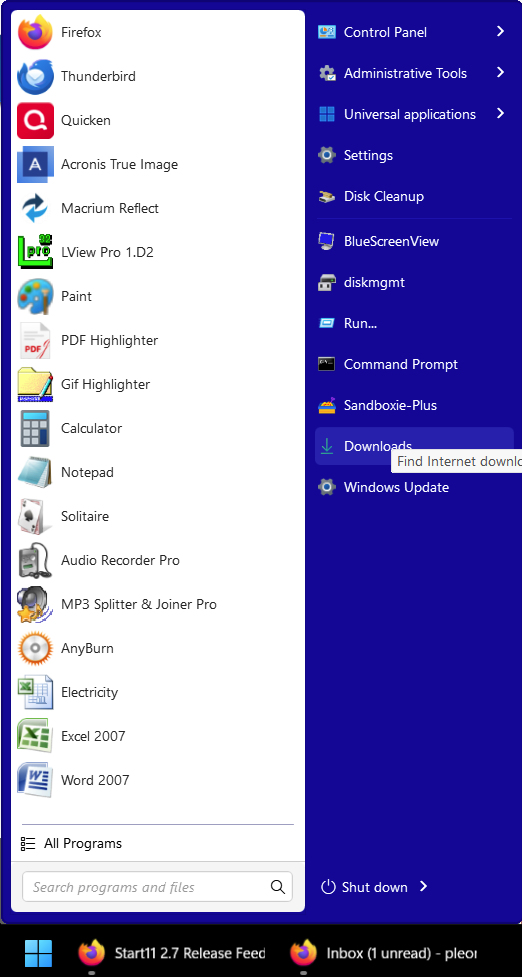
This is pretty much how I like to see my Start Menu. (What I was seeing after the update was both sides of the start menu being the same dark black color.)


Reply #5 Top

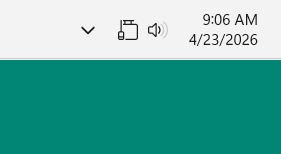
Loaded 2.7 today, immediately noticed an appearance bug. The wired network icon is upside-down. If Wi-Fi is turned on, the Wi-Fi icon does not show up in its place.

Windows 7 menu/Win 7 submenu. Taskbar on top.

Windows 11 25h2.

And on another computer that connects only via Wi-Fi, that icon is upside-down too. (Same settings & Windows version as above)

Reply #6 Top

Hi aket3,

Thanks for posting. 

Quoting aket3, reply 5

Loaded 2.7 today, immediately noticed an appearance bug. The wired network icon is upside-down. If Wi-Fi is turned on, the Wi-Fi icon does not show up in its place.

Windows 7 menu/Win 7 submenu. Taskbar on top.

Windows 11 25h2.

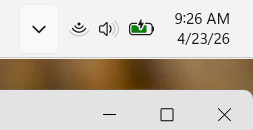
I'm not seeing this issue reproduce on my Win11 25H2, tested with a fresh install and also on a Windows Sandbox:
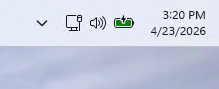
Have you tried rebooting the PC and/or restarting Explorer?

There are some more guides included below you can try using to help isolate what may be different on your end:

1. Save your Start11 settings to a file, reset them to the default, and restart explorer to see if the issue persists (can also try a restart of the PC to be more thorough):

2. If you are on Windows version that supports it, testing a fresh install of Start11 in a Windows Sandbox is the best way to isolate differences.  This also helps to test in a more default state of Windows itself, incase anything has changed there on your PC:

If you're able to try the above guides and see a fresh install of Start11 working normally, please let us know what (if anything) seems to make the issue reappear.

Best regards,

Adam McGuinness
Stardock Support Specialist

Reply #7 Top

Quoting Abisnabidam, reply 6

1. Save your Start11 settings to a file, reset them to the default, and restart explorer to see if the issue persists (can also try a restart of the PC to be more thorough):

That worked; when I defaulted it, the taskbar was set to Windows 7/Windows 7, was on the bottom and the icon was right-side up. Then the only thing I changed was to put the taskbar on top. The icon was right-side-up until I rebooted - the taskbar is still on top, but the network icon is upside-down.

That's about as much testing as I feel like doing. The desktop computer is always on a wired connection (but has wi-fi capability) and the laptop is the same, but it is sometimes on wifi when I'm out and about with it.  Now, when I unplug the laptop from the wired connection, it switches automatically to Wi-Fi and displays the Wi-Fi icon, but upside-down.

Like I said, it's an appearance bug, not a performance issue.

Reply #8 Top

Quoting aket3, reply 7

That worked; when I defaulted it, the taskbar was set to Windows 7/Windows 7, was on the bottom and the icon was right-side up. Then the only thing I changed was to put the taskbar on top. The icon was right-side-up until I rebooted - the taskbar is still on top, but the network icon is upside-down.

That's about as much testing as I feel like doing. The desktop computer is always on a wired connection (but has wi-fi capability) and the laptop is the same, but it is sometimes on wifi when I'm out and about with it. Now, when I unplug the laptop from the wired connection, it switches automatically to Wi-Fi and displays the Wi-Fi icon, but upside-down.

Like I said, it's an appearance bug, not a performance issue.

Hello,
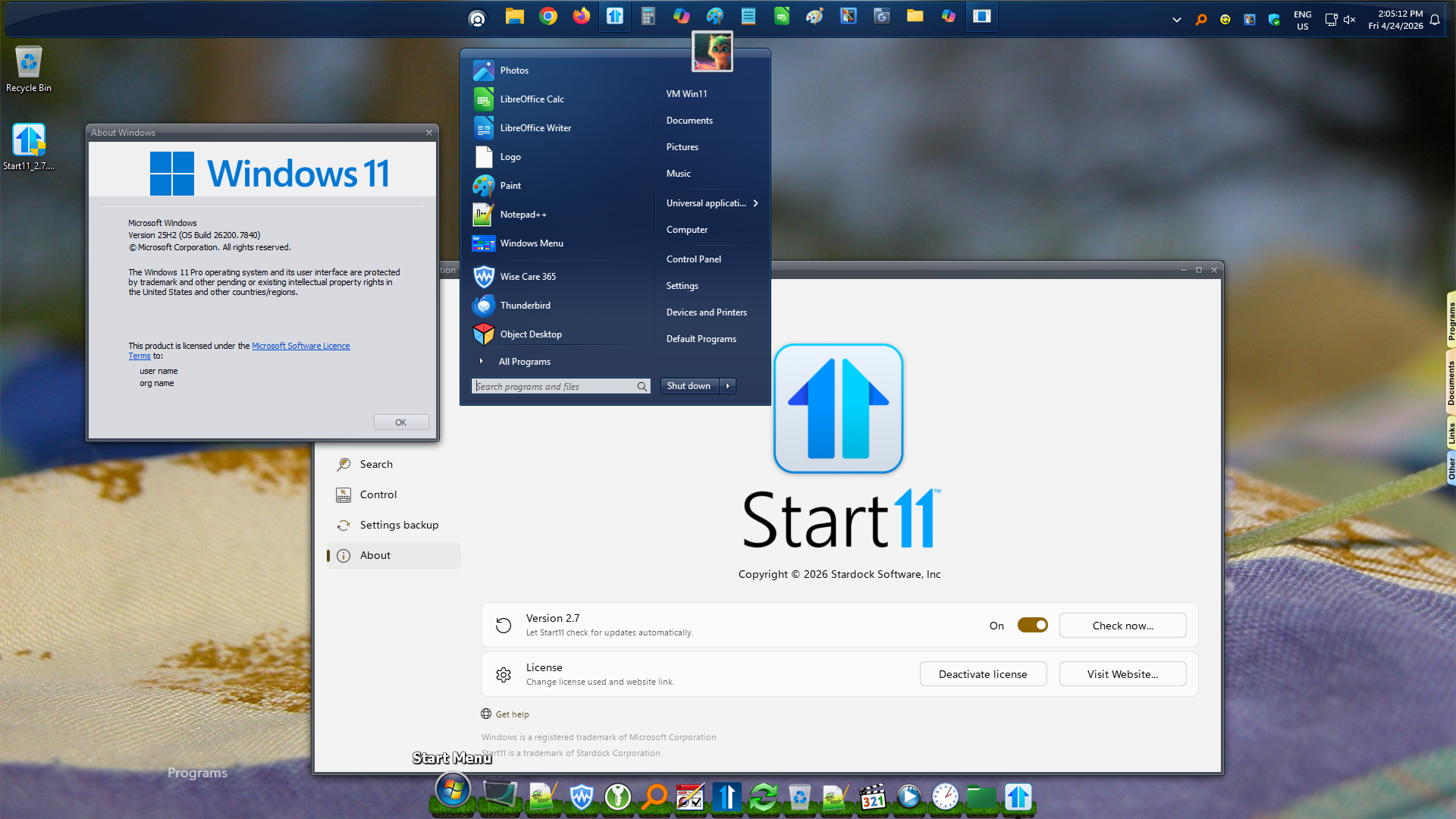
Sorry to hear you are having issues. I cannot reproduce your issue on my system too. Refer to my screenshot below. 

Perhaps something not get installed properly, please try, uninstall Start11, reboot immediately (important), download latest version available in your account product download page: https://store.stardock.com/myaccount/products. Install it, reboot immediately again. Retest it and report back.

If the issue still appear, perhaps there is a conflicting application, please try Clean boot. Refer here for steps: https://support.stardock.com/space/SHC/1334935592/Start11+Clean+Boot. Do note that Clean boot need to be done with care. Try it and report back. 

Thank you,
Basj,
Stardock Community Assistant.


Reply #9 Top

I removed S11, told it to delete settings & reinstalled it, then the only change I made was put the taskbar on top. The icon was right-side-up..... until I rebooted it. Now it is upside-down again.

Reply #10 Top

Quoting aket3, reply 9

I removed S11, told it to delete settings & reinstalled it, then the only change I made was put the taskbar on top. The icon was right-side-up..... until I rebooted it. Now it is upside-down again.

Have you tried clean boot steps I mentioned above?

Thank you,

Basj,
Stardock Community Assistant

Reply #12 Top

Quoting aket3, reply 11

No. I'm not doing sandboxing or clean boot stuff. 

Please do, the is high probability something is interfering with Start11 in your system. If it is from Start11 alone, more report from other user would already show up by now.

Thank you,

Basj,
Stardock Community Assistant

Reply #13 Top

Hello, Great product, by the way.

I would like to add a vote to part of reply #4: Absolutely agree that the config options should be a button toggle. I would like to see that just to ease visual experimentation. 


Thanks 

+1 Loading…