Fences v6.20 Freezing & File Explorer Right-Click Issue on Multi-Monitor Setup (Windows 11 25H2)

I am experiencing a recurring issue with Stardock Fences (v6.20) on my system, where both Fences and File Explorer become partially unresponsive.

System Configuration:

  • Device: Samsung Galaxy Book 6 Ultra
  • External Display: Samsung ViewFinity S8
  • OS: Windows 11 Home (25H2)
  • Multi-monitor setup (laptop + external display via dock)

Issue Details:

  • Several times per day, Fences freezes when interacting with fences on the laptop display.
  • At the same time, File Explorer loses the ability to show the right-click context menu on the laptop desktop.
  • Interestingly, right-click continues to work normally on the external monitor.
  • The issue appears localized to the laptop display environment.

Trigger / Pattern Observed:

  • The issue seems to occur when:
    • Moving from the external monitor to the laptop screen
    • Then attempting to interact with Fences (e.g., opening folders inside a fence)
  • It does not happen every time, but frequently enough (multiple times daily) to disrupt workflow.

Troubleshooting Performed:

  • Restarting File Explorer → Does NOT resolve the issue
  • Signing out of Windows and signing back in → Resolves the issue temporarily
  • Full system restart → Resolves the issue temporarily
  • Removing Fences entirely → Issue disappears completely
  • Adjusted display scaling:
    • Previously: 150% (external), 200% (laptop)
    • Currently: 175% on both displays (testing; too early to confirm impact)

Additional Notes:

  • Fences are primarily located on the laptop display.
  • The issue appears tied specifically to Fences interaction rather than general system instability.

Request:


  • Are there known issues with Fences v6.20 related to:
    • Multi-monitor setups?
    • Mixed DPI/scaling environments?
    • Context menu integration with File Explorer?
  • Are there recommended settings, patches, or diagnostics I should apply to isolate or resolve this?

1,061 views 4 replies
Reply #1 Top

Hello,
Sorry to hear you are having issues. First, you like to suggest trying these steps, uninstall Fences, reboot immediately (important), download latest version available (v6.44) in your account product download page: https://store.stardock.com/myaccount/products.  Install it, reboot immediately again. Retest it and report back.

If the issue still appear. We need more information.

  1. Windows 11 25H2 OS build number. Please use Winver.exe to get these numbers.
  2. Moving from the external monitor to the laptop screen
    What is actually moving? A Fence? or a File? please elaborate.
  3. If possible post a video showing this issue.

Thank you,
Basj,
Stardock Community Assistant.

Reply #2 Top

Hi,

I followed your recommended procedure: I uninstalled Fences, restarted my computer, downloaded and installed the latest version, and restarted again. I am now running version 6.4.4.1.

However, I am still experiencing an issue on startup. Each time I boot my computer, Fences does not initialize properly. All desktop icons appear ungrouped, and I receive the following message:

"Fences has detected that Explorer was not closed properly. As a precaution, Fences has been temporarily disabled. To re-enable Fences, open Fences' Settings and choose 'Enable Fences'."

When I click OK, my fences are restored. However, this issue occurs again after every restart.

A few additional observations:

  • I am not shutting down my computer improperly.

  • I cannot locate the “Enable Fences” option referenced in the message.

  • When I right-click on the desktop and select “Configure Fences,” I am taken to a “Welcome to Fences” window, but I do not see any clear Settings section or option to enable Fences.

  • After Fences reappear, if I right-click on the desktop again, all fences suddenly disappear and my icons are scattered across the desktop.

  • I also attempted restoring from a backup. The same “Explorer was not closed properly” message appeared, and while icons were somewhat grouped, the fences themselves were not restored properly.

At this point, the behavior is inconsistent and disruptive, and my desktop layout is no longer stable.

Could you please advise on how to:

  1. Prevent Fences from disabling itself at every startup

  2. Restore a stable configuration

  3. Locate or access the “Enable Fences” setting referenced in the error message

Thank you for your assistance.

Best regards,
Andre

Reply #3 Top

I uninstalled Fences including settings then reinstalled it.  I recreated all my fences from scratch (about 20 of them) and redragged all apps, files, folders.  After finishing, I did a backup of the layout.  Everything looked fine.  I restarted the computer and I got the exact same error that file explorer was not shtudown properly and Fences did not restart.  I can't find a way to restart it as I don't see any such option when I right-click and select Configure Fences.  

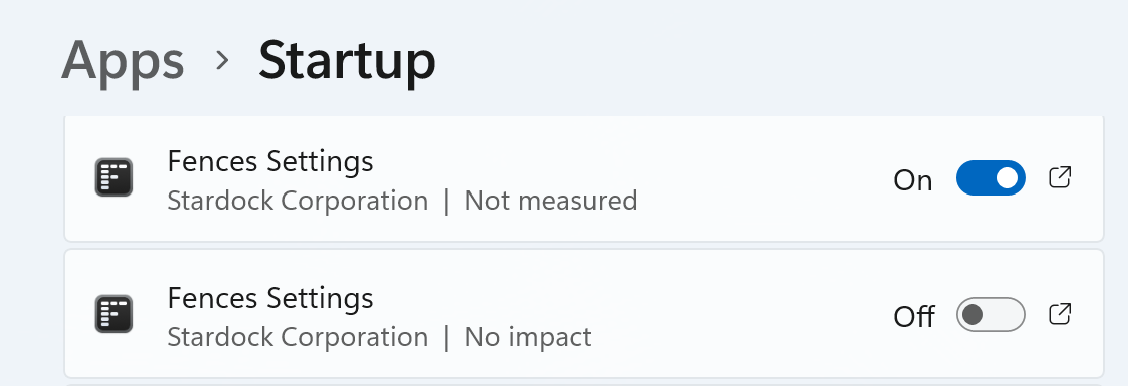
Additionally, I noticed that in Apps> Startup, there are two Fences appearing. This doesn't look right, the uninsall should have removed everything and a reinstall should only have resulted in one app in Startup to toggle on and off. 

Please adivse on what to do, my Fences is completely non-operational at this point.  

It seems that Fences also causes an issue with OneDrive as it doesn't launch when I have this situation with Fences and an error at startup. 

Reply #4 Top

Hello again,
First, do know that Fences need to start up twice to work properly. So please turn on that second startup setting.

As for version 6.44. It appear there are some issues with this version on some system as reported in this thread: https://forums.stardock.com/541311. For now if you have Fences 6.2 please roll back to that version. Uninstall, reboot and reinstall v6.2 and reboot again. Try that first and report back. 

Thank you,
Basj,
Stardock Community Assistant.