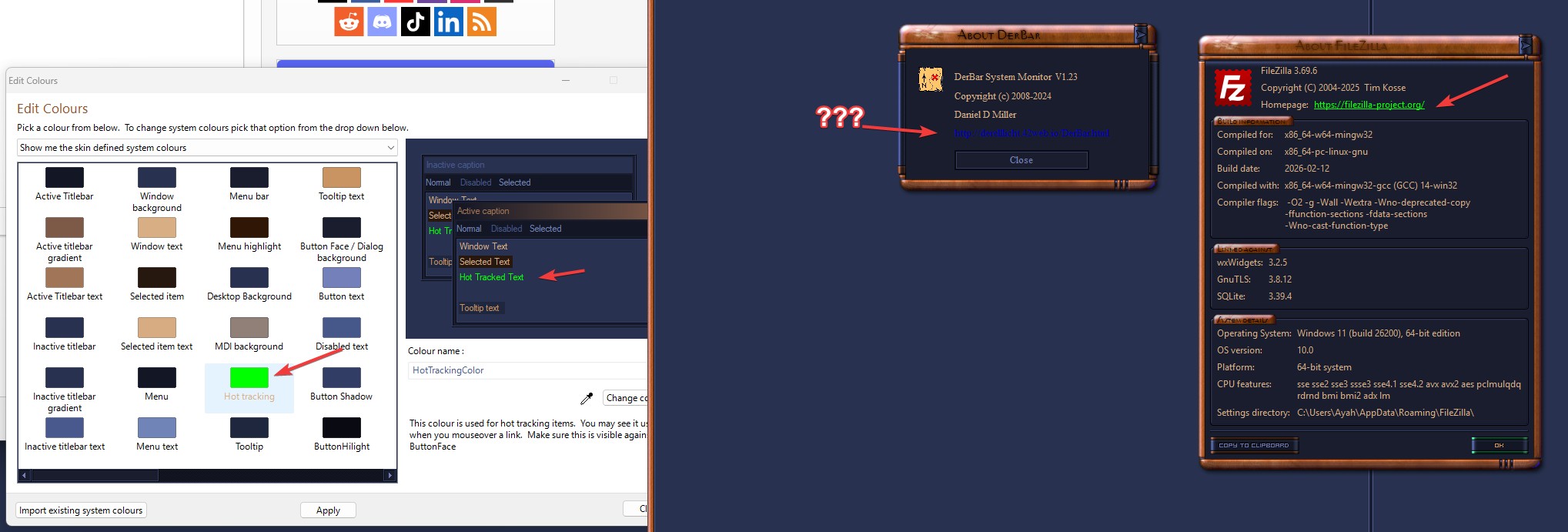
SkinStudio 10 - where is hyperlink color set ???

I'm using a theme called Knot Aero, dating back to 2010...
https://www.wincustomize.com/explore/windowblinds/6211/

I'm using the dark green preset; it is a lovely theme, except that the hyperlinks are in dark blue against dark green background, thus almost unreadable:
https://www.flickr.com/photos/derelllicht/55206067045/

I tried modifying it in WB Modify style interface, but can't find the appropriate field.
So, I switched to Skin Studio, but I have two issues there:

1. I don't see how to select a preset in SS10

2. I don't see where to edit hyperlink colors

Could someone give me a pointer on this??


329 views 4 replies
Reply #1 Top

Later note: 

I went in with a color picker, and found that the hyperlink color is 0,0,192 ...
There are *no* fields in the WB "Modify style" interface, that are anywhere near that color.

I wonder if the hyperlink color isn't controlled by WB at all?? (at least in WB10, which is what I'm using)

Reply #2 Top

Hello,
Sorry to hear you are having issues. It look like Derbar is using some other color for its links. Here is what I get when I change the hotlink color. The filezilla link change to hotlink.

Perhaps someone else can help with some pointers.

Thank you.
Basj,
Stardock Community Assistant.

Reply #3 Top

Interesting... I get the same thing as you get, in Filezilla's About dialog...

I'll have to go back and look at that dialog in DerBar again - though afaik it is using standard WinAPI calls...


HAH!!!

perhaps it is *this* line ?!?!?!

<pre>SetTextColor(hdc, RGB(0, 0, 192)); </pre>

<sigh>
Okay, I know what to do now...

case closed...


Reply #4 Top

Quoting Derell, reply 3

Interesting... I get the same thing as you get, in Filezilla's About dialog...

I'll have to go back and look at that dialog in DerBar again - though afaik it is using standard WinAPI calls...


HAH!!!

perhaps it is *this* line ?!?!?!

Code: c++
  1. SetTextColor(hdc, RGB(0, 0, 192));


<sigh>
Okay, I know what to do now...
case closed...

If there are any other WinAPI programmers who are curious about this issue, I fixed it with this:

Code: c++
  1.    // SetTextColor(hdc, RGB(0, 0, 192));
  2.    COLORREF fgnd = GetSysColor(COLOR_HOTLIGHT) ;
  3.    SetTextColor(hdc, fgnd);