Groupy 2.3.1 does not work

Dear Support,

until recently, Groupy 2 was fine.


After installing 2.3.1 there are no tabs avove the respective app window. Either the software is ineffective or it crashes repeatedly.

I alreadly uninstalled using control panel and purge and then installed cleanly. It then worked once yesterday. Todayther are no tabs.

Kindly advise how to resolve.


Thx, Steffen


Edit: After reboot tabs work as long as the app (e. g. Powerpoint) is open. When I close and reopen e. g. Powerpoint, there are no tabs anymore.

1,074 views 16 replies
Reply #1 Top

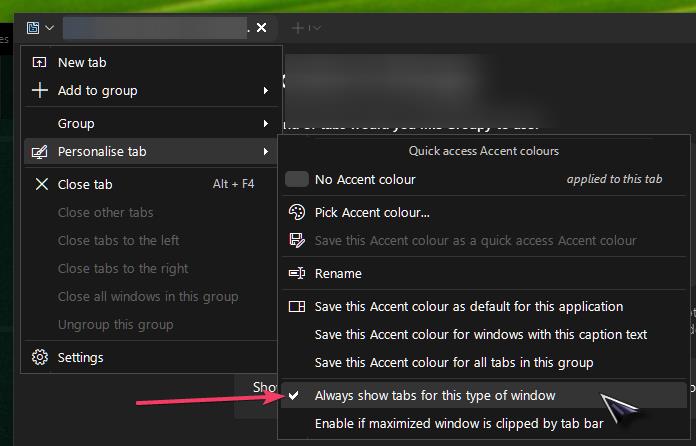
Do you have the tabs to auto-hide?

Reply #2 Top

Hello,
Sorry to hear you are having issues. Also, perhaps, you need to turn on this option.

Thank you,
Basj,
Stardock Community Assistant.

Reply #3 Top

Dear bdsams, thanks for caring,

you have a good point here: If I set tabs to "always visible", they do show up. With "show for active windows", they do not pop up. That used to be different. Any idea what to try next?

Regards

Steffen

Reply #4 Top

Dear Basj,

thanks for your reply.

this option is activated. But still, the option "show (tabs) for active windows" does not work. User bdsams put me on the right track.

Any more ideas? Thx, Steffen

Reply #5 Top

Quoting klaer_it, reply 3

Dear bdsams, thanks for caring,

you have a good point here: If I set tabs to "always visible", they do show up. With "show for active windows", they do not pop up. That used to be different. Any idea what to try next?

Regards

Steffen

Show for active window, if you hover your mouse near the top of the window, do they show then?

Reply #6 Top

No, unfortunately not. One more idea. Isthere such ting as a settings folder that could be deleted. I hope it would then be created freshly.

BR Steffen

Reply #7 Top

If I run the purge.bat file is tis done as local admin or as the user who has the throble or both?

Thx, Steffen

Reply #8 Top

Just to be clear, when you group two applications together, the tabs do show up, yes? Only, when you move out/ungroup one out, both of the windows don't have tabs, yes?

Quoting klaer_it, reply 7

If I run the purge.bat file is tis done as local admin or as the user who has the throble or both?

From what I know, the purge will removed everything related to Groupy from your system.

Thank you,

Basj,
Stardock Community Assistant

Reply #9 Top

Dear Basj,

not quite: Until malfunction I had the setting General: inegrate tabs and Appearance; show only with active window. With the new version, I can open two docs e, g. with Powerpoint but then no tabs appear at all. If I switch to  Appearance: show all it seems to work.

But inbetween trials I also had the situation that there are no tabs at. all. It must be a more severe  problem than just a user error because this behavior is new and I did not have trouble for many years. 

Is there anything I can do to narrow down the problem, eg. check any services not running, delete any settings etc?

BR

Steffen

Reply #10 Top

Please try, uninstall Groupy, reboot immediately (important), download latest version available in your account product download page: https://store.stardock.com/myaccount/products. Install it, reboot immediately again. Retest it and report back.

Thank you,

Basj,
Stardock Community Assistant

Reply #11 Top

Dear Basj, it works ok now, but the option:


>Settings >Appearance >Visibility of tabs >always works. The 2nd options options > only for active windows does mot work. With this there are no tabs at all.

Any good idea?

Steffen

Reply #12 Top

Hi Steffen,

Thank you for posting. 

Quoting klaer_it, reply 11

Dear Basj, it works ok now, but the option:

>Settings >Appearance >Visibility of tabs >always works. The 2nd options options > only for active windows does mot work. With this there are no tabs at all.

Any good idea?

Steffen

I believe I've reproduced something worth looking at with this, and have it logged.

  • Internal reference: ODNT-12192

Some applications (Microsoft Word in my particular test) can have the top bar set to be always visible with Groupy, and that 'Groupy bar' will appear, regardless of mouseover or not (when Tab appearance -> Always visible is selected). 

However, if "Show on active windows" from tab appearance is selected instead, I now have to mouseover the top of MS Word to make that same Groupy title bar appear. 

A few questions to help clarify your experience here:

1. Does my description above sound like what you're experiencing now? (If there's anything else, a screenshot image or video upload in your reply may help to clarify what you're seeing, with a complete description of what you're expecting to happen).

2. Does the ("no tabs at all") issue only occur for some applications, or all of them? Which ones?  Are they Grouped, or on their own? 

3. When you say, "there are no tabs at all" does a mouseover on the top of them make the Groupy tab appear at the top? 

Please let us know, and we'll have your answers added to our log for review.

Best regards,

Adam McGuinness
Stardock Support Specialist

 

Reply #13 Top

Dear Adam,

thanks for taking this seriously.

To clarify: I have G2 installed as Admin and use it with user priviledges only. Does this have an effect on de-installation remains causing this problem? Purge does not seem to do anything at alll after the prompt and pressing any key. My feeling is I could get this all resolved but there are some corrupted items in the registry or elsewhere.


BTW how can I add screenshots etc to the post? I do not see any icon.


"Always visible" is fine.


Q1. However, if "Show on active windows" from tab appearance is selected instead, I now have to mouseover the top of MS Word to make that same Groupy title bar appear.

A1. If I hover above, there are still no bars that will appear.


Q2. Does the ("no tabs at all") issue only occur for some applications, or all of them? Which ones?  Are they Grouped, or on their own?

A2. The problem occurs in particular with Excel, Word and Powerpoint. I have not done any testing with others because these are my main concern. The grouping is limited to opening more than one document at the same time.


Q3. When you say, "there are no tabs at all" does a mouseover on the top of them make the Groupy tab appear at the top? 

A3. No, there are no tabs at all with or without hover.


BR

Steffen


Reply #14 Top

Quoting klaer_it, reply 13

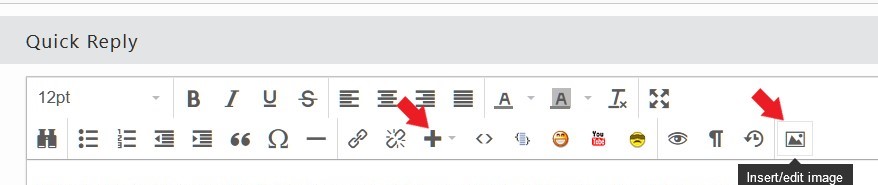
BTW how can I add screenshots etc to the post? I do not see any icon.

You can use one of these icons to add image/picture: 

Thank you,

Basj,
Stardock Community Assistant

Reply #15 Top

Dear Basj,


thanks. But there is really nothing from my side to upload. Does it make sense to send a screenshot with not tabs? I can reproduce that the setting o"Show on active windows" from tab appearance is selected. I then do no see any tabs even if I hover aboe Word, PPT or XLS.


I even purged, uninstalled once more, an reinstalled. Then for first opening of PPT, the option Show on active windows" worked. When I opened PPT for the second time, it  did not work.


Any ideas?

BR Steffen


Reply #16 Top

For now, please wait, since Adam mentioned above, the issue has been reproduced and it was logged internally, hopefully the issue is resolved on the new version release.

Thank you,

Basj,
Stardock Community Assistant