Disable system icons from tray
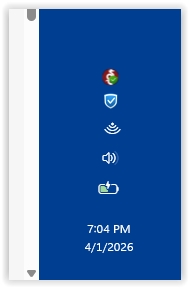
How can I disable the network and battery icons from my system tray? They're wasting a big chunk of space.
Hello,
From what I know, unfortunately, there is no such option within Start11 for it.
Thank you,
Basj,
Stardock Community Assistant.
If you can forward this to the support/development teams, that would be greatly appreciated.
Also if the tray icons can arranged perpendicular to the taskbar like they were in Windows 10, that would be a really good space saver.
To illustrate, below is the bottom right corner of my screen. I have the taskbar on the right side of the screen. Because the tray icons are arranged vertically, they are taking up 20% of the taskbar. If they were arranged horizontally, they would take up far less space. And if the network and battery icons were gone, even better.
Hello,
I have forwarded your request to the Stardock Support Team for their review and recommendations. Please keep an eye on this thread for any updates. We really do appreciate your feedback, Thanks
Basj,
Stardock Community Assistant.
Welcome Guest! Please take the time to register with us.