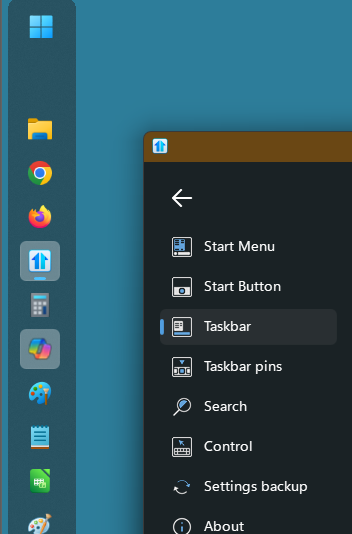
Start 11 left taskbar icon not centered

Hi, as you can see, the icons on my left-aligned taskbar aren't in the center of the taskbar itself (except for the search icon and the third one, whose name I don't know in English).

Is this because left alignment is an experimental feature, or did I miss a setting?

Thanks in advance for your help!



397 views 8 replies
Reply #1 Top

Hello,
Sorry to hear you are having issues. Please take another screenshot, but, this time take one with a bright colored wallpaper. So we can see where the taskbar area actually are and see if those taskbar buttons not centered.

Thank you,
Basj,
Stardock Community Assistant.

Reply #2 Top

Hello,

I took a video screenshot so you can see it better thanks to the hover :

https://i.imgur.com/msgwHHK.mp4

As you can see, the only centered icons are the ones that have open windows (and the search bar, for some reason...). But the icons of the menu and the other apps are a bit too close to the left.

Also it seems that the wifi, sound, battery and date icons are a bit misaligned too 


Reply #6 Top

Please try, uninstall Start11, reboot immediately (important), download latest version available in your account product download page: https://store.stardock.com/myaccount/products . Install it, reboot immediately again. Retest it and report back.

If the issue still appear, we need few more details.

  1. Windows 11 full version and OS Build number. Please use Winver.exe to get these numbers.
  2. Start11 full version number.
  3. Start11 enhance taskbar turn on or off?

Here is what I get on my system.

Thank you,

Basj,
Stardock Community Assistant

Reply #7 Top

I found the source of this issue!

since it wasn't present on my other PC, I compared all of the settings and the only difference was on the "Taskbar button combining"


So, if you choose "Never combine taskbar buttons", the icons are not aligned (probably a consequence of the display of the text, text that you can't see if your taskbar is too small)

Then, if you chose "Walsays combine taskbar buttons", everything is centered (except for the sound button, but since there isn't any problem with the hover or the Internet icon, which is in the same "space", I guess it's more an icon issue than a setting issue, there is pribably some void on the right of the icon)

Anyway, thanks for the help!

Reply #8 Top

Great, glad you figured it out.

Thank you,

Basj,
Stardock Community Assistant