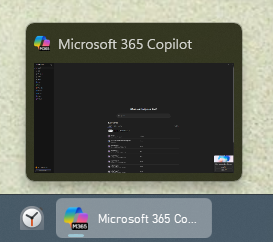
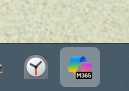
Start11 V2 Taskbar Rendering Bug — Copilot Icon Becomes Black Square When App Is Closed
 Stardock Forums
Hi, I’m seeing a reproducible issue with Start11 V2’s enhanced taskbar. When the enhanced taskbar is enabled, the pinned icon for the Microsoft Copilot app displays correctly while the app is open, but becomes a solid black square when the app is closed.
Important details:
-
The desktop shortcut icon is correct
-
The Start menu icon is correct
-
The taskbar icon is correct only while Copilot is running
-
The issue occurs only when Start11’s taskbar enhancements are enabled
-
If I disable Start11’s taskbar enhancements and revert to the standard Windows taskbar, the icon displays normally
This suggests Start11’s taskbar renderer is failing to load the inactive icon asset for the Copilot MSIX package and falling back to a blank square.
Could you confirm whether this is a known issue with UWP/MSIX icons in Start11 V2, and whether a fix or workaround is available?
I am on Windows 11, 25H2 with all the latest patches, and on Start11 V2 2.6
Thanks!