Saving a group does not preserve the 'Pin Groupy Tabs' setting of the Saved group

Hi,
 Just acquired groupy2 and loving all the options.
But after few weeks, now found few issues.
(I'll create separate Topics per issue)

Saving a group does not preserve the 'Pin Groupy Tabs' setting of the Saved group.

(Observer in all OneNote groups and all Chrome groups)

After the  'Pin Groupy Tabs' setting  is activated and then the group setup is saved.
When restarting the saved group,  the  'Pin Groupy Tabs' setting is lost
  

Regards, Martin
1,071 views 9 replies
Reply #1 Top

Hello,
Sorry to hear you are having issues. Need more details on your issue.

  1. Windows 10 or 11? Also need its full version and OS Build number. Please use Winver.exe to get this information.
  2. Groupy full version number.
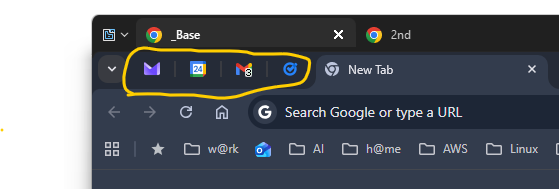
  3. Post a screenshot showing the saved pin tabs setting and what appear after restarting.
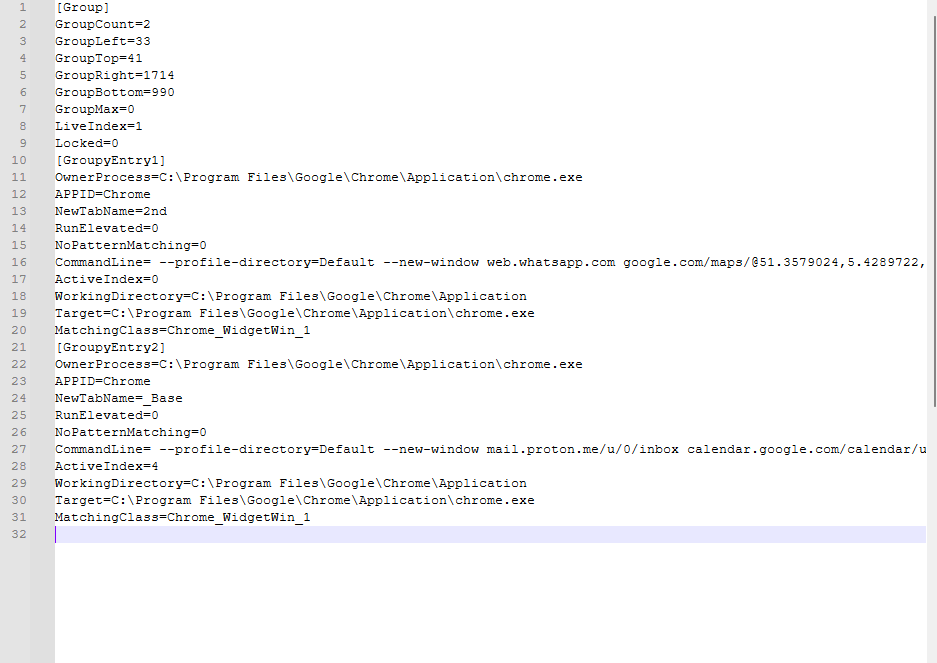
  4. Copy and paste your saved Groupy group.

Thank you,
Basj,
Stardock Community Assistant.

Reply #2 Top

Hi Basj,

Groupy2: Version 2.3 

Windows Edition:
Windows 11 Enterprise
Version: 24H2
OS Build: 26100.8037
 
original tab setup with saved pins

origional setup

Reply #4 Top

Copy and paste your saved Groupy group.

fails,  either i get an error the psot os not accepted  or it just does  Nothing  at  Submit  ???

Reply #6 Top

From what I know, and if I understand your situation properly, those pinned tabs are chrome tabs, yes? I don't think Groupy saved those tabs. HOwever, to be sure, I have forwarded your problem/question to Stardock Support Team for their assistance. Please keep an eye on this thread for any updates. We appreciate your feedback and patience. Thank you.

Basj,
Stardock Community Assistant

Reply #7 Top

Thanks for the info.
Indeed, as indicated, this is about  Chrome  Pinned tabs

Elsewhere in Chrome Pin info i found: 
    Note: Pinned tabs can be lost if multiple Chrome windows are open and the window containing the pinned tabs is not the last one closed. 

So it may be difficult for   groupy  to handle this ...

Reply #8 Top

Hi Martin,

Thank you for posting.


Saving a group does not preserve the 'Pin Groupy Tabs' setting of the Saved group.

After the  'Pin Groupy Tabs' setting  is activated and then the group setup is saved.
When restarting the saved group,  the  'Pin Groupy Tabs' setting is lost

I've reproduced and logged this for review.

Internal Reference:  ODNT-12157

Thanks again and best regards,

Adam McGuinness
Stardock Support Specialist

Reply #9 Top

It would require Chrome to provide a mechanism for us to a) detect a tab is pinned and b ) be able to flag that something should be considered pinned when opened from the command line.  Neither of these things exist currently.