Disabling Start 11 for ARM Based Hosts

Start 11 Running on Mac OS Parallels

Hello Start Team, 


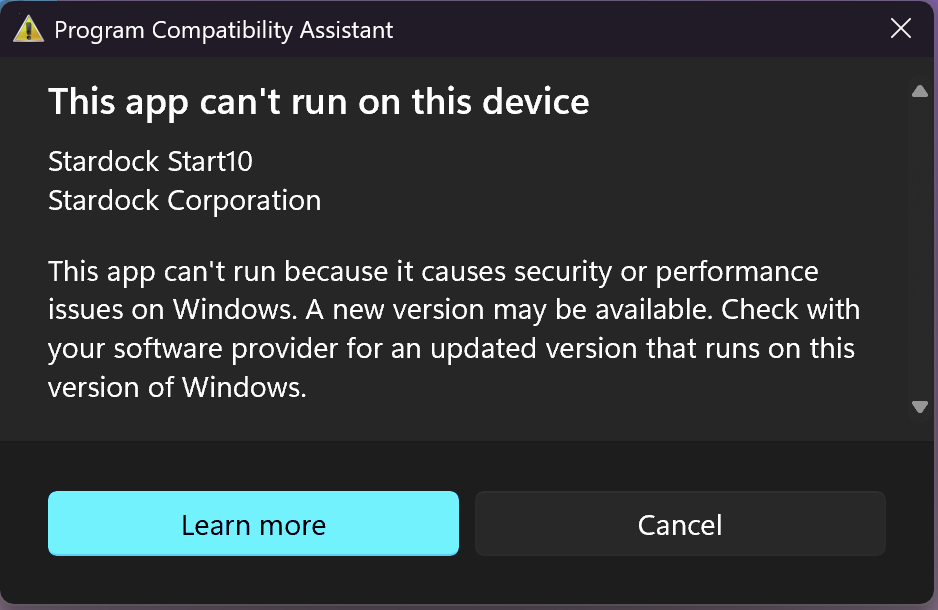
I'm having a recent issue with what looks like Start 11 is interfering with Parallels running in coherence mode.  In regular mode Start 11 is working great but in coherence mode the Start menu is just flashing.  So simple question for your team. How to I temporarily disable start11 from booting up/running with Windows so I can test coherence mode?    I have tried going into C:\Program Files(x86)\Stardock\Start11 Start10tweak.exe, but I receive an error message stating this program cannot run?  Also, there is no program pointing to start11tweak.exe.  I would just like to completely disable Start11 while I test coherence mode.. 


Thanks, 


Kevin
244 views 4 replies
Reply #1 Top

Start10Tweak.exe should run just fine.  What exactly does the error message say?

Reply #3 Top

When I click on Start10tweak this comes up? I tried disabling program compatibility, but same message appears when clicking on Start10tweak.  

Reply #4 Top

Quoting kjulius, reply 3

When I click on Start10tweak this comes up? I tried disabling program compatibility, but same message appears when clicking on Start10tweak.  

Thats because someone at Microsoft decided to block older versions of Start11/10 on ARM machines (before it had support) and for reasons best known to them they blocked that exe too.

Your best bet here is to open services and set the Stardock Start11 service to disabled and sign out and in again.  That will stop Start11 for now without uninstalling.  To undo just set it back to automatic.