Single click to launch app shortcuts?

Hi

I'm using Fences 5 ...

Is there seriously no option for Single click to launch app shortcuts?

I looked everywhere in options, how is this possible?

Why must a user have to double click to open an app, when a shortcut on taskbar is single click?

Please tell me there's a way to single click and that I have this wrong!
 

331 views 6 replies
Reply #1 Top

Hello,
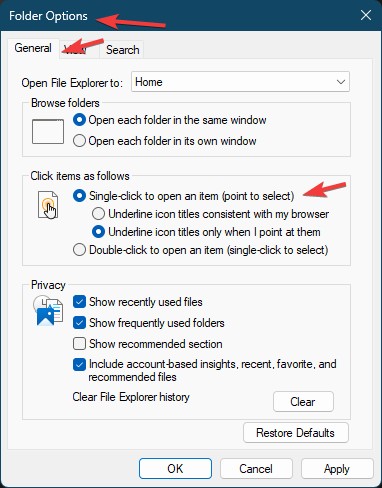
Sorry to hear you are having issues. The action on "click to open" is control by Windows. You should be able to single click open by setting this one.

Thank you,
Basj,
Stardock Community Assistant.

Reply #2 Top

Hi, are you requesting this for Folder Portals, or all desktop icons etc etc. Any specifics?


As pointed out, this is already possible, but we are looking at adding it to the program itself

Reply #3 Top

Hi


No I'm talking about for the Fences obviously, nothing do with desktop icons or Windows folders ..

So it's not possible to single click an application icon used within Fences?

Why would anyone even use fences then for applications then, when the taskbar is single-click?

This is so frustrating and disappointing.

Reply #4 Top

I'm aware of "folder options" but I'm not asking about windows explorer or desktop, I'm asking about application shortcuts within Fences!

Reply #5 Top

As you should know, Fences is basically "Desktop Organizer" hence it, shortcuts in it, act as what is normally do while it outside the Fences. Do not confuse Fences with Application launcher such as Stardock ObjectDock or any Dock application.

As you notice, Dr W is asking for more feedback, he might consider adding such features in future release.

Thank you,

Basj,
Stardock Community Assistant


Reply #6 Top

Again — would this be a setting for ALL desktop icons, or only ones within Fence groups, etc?


ie should loose desktop icons not moved into a Fences group still be double click.


 Should this be a global setting in Fences or a group by group setting