Empty Win7 menu?

I've been using a Win7 menu setup on a new Win11 laptop .... and suddenly it's EMPTY (see the attached screenshot).   Previously it has looked like a normal menu with installed apps and the folders at the bottom.   I did find one item in the FAQ regarding privacy setting and made sure that was set correctly.  If I set one of the Win 10 or Win 11` menu styles, I do see all the apps and folders.

Next steps?

Thanks!

Dan
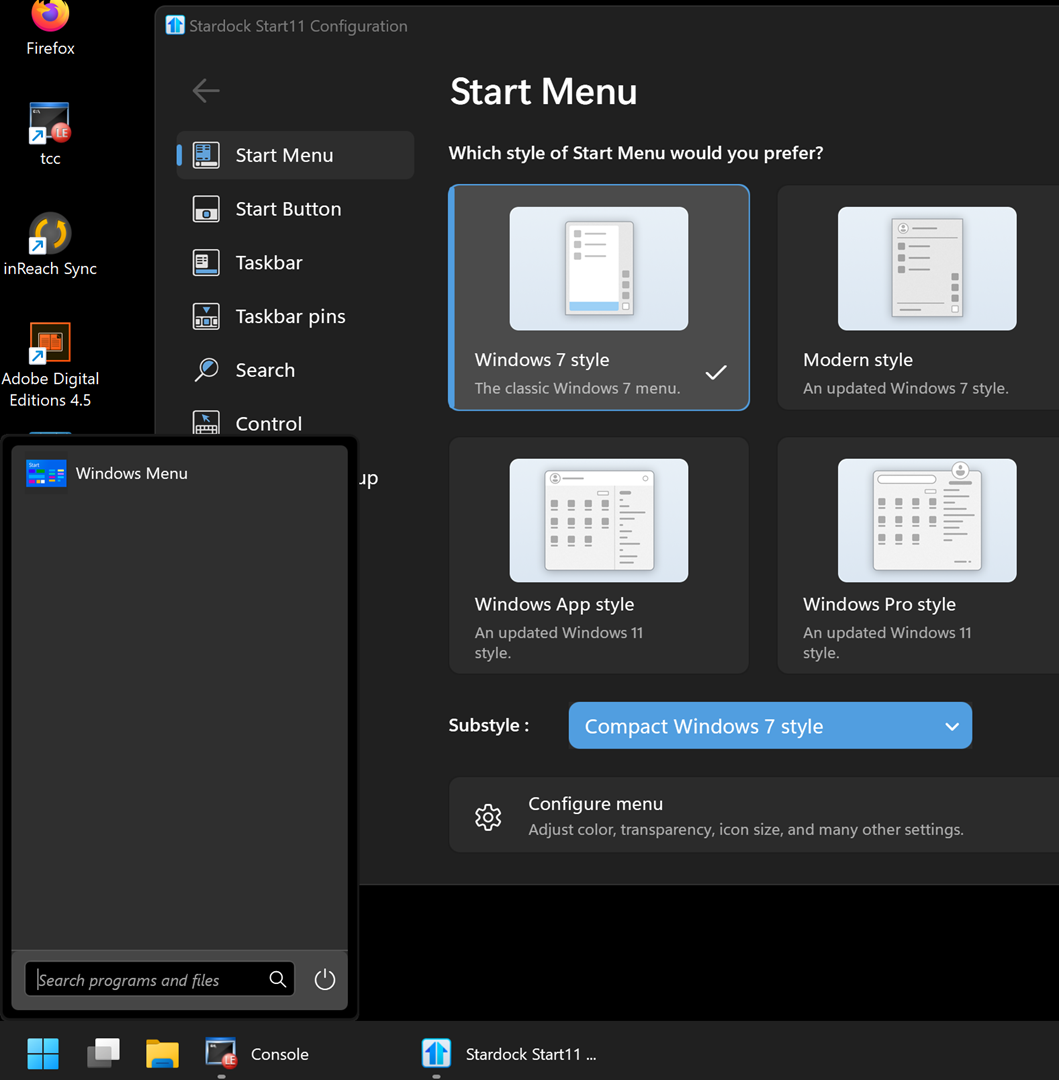
Empty menu

285 views 3 replies
Reply #1 Top

Hello,
Sorry to hear you are having issues. Please try, uninstall Start11, reboot immediately (important), download latest version available in your account product download page: https://store.stardock.com/myaccount/products.  Install it, reboot immediately again. Retest it and report back.

If the issue still appear, need more information.

  1. Windows 10 or 11 full version and OS Build number. Use Winver.exe.
  2. Start11 full version number installed.
  3. What changed since it was working before? New software installed, new software updates etc.

Thank you,
Basj,
Stardock Community Assistant.

Reply #2 Top

And .... it's fixed.  Remove / reinstall did the trick.  I HAD been through changing back and forth to other menu styles with no success.

Thanks!  Dan

Reply #3 Top

Great, glad to hear that.

Thank you,

Basj,
Stardock Community Assistant