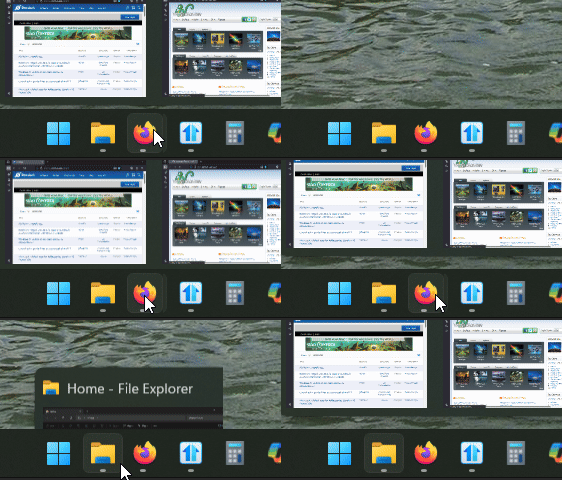
Start11v2 - Significant delay in taskbar thumbnail preview when Enhanced Taskbar is enabled

Hello! There is an inconsistent behavior in the taskbar thumbnail/window picker popup depending on whether the Enhanced Taskbar option is enabled or not.

Steps to Reproduce:
1. Disable Enhanced Taskbar in Start11 settings -> click on any taskbar icon with multiple open windows -> the thumbnail picker appears instantly, as expected
2. Enable Enhanced Taskbar in Start11 settings -> click on the same taskbar icon -> the thumbnail picker appears only after a noticeable  delay*

I've attached a screen recording demonstrating both behaviors side by side (around 0:07 - default Windows behavior and around 0:35 - Start11 delayed behavior). Sorry for the music, I didn't realize it was being caught in the video!!


I'm using the latest version (2.6) at the moment.

Thanks and any help is greatly appreciated!

1,308 views 6 replies
Reply #1 Top

If you haven't done so yet, we have a new build (in your account at the top of this page, click downloads) and there is a new beta that targets thumbnail inconsistency. 

Reply #2 Top

Hello,
Sorry to hear you are having issues. But, I can't visually see the delay on my system. Perhaps there is a delay in milliseconds, but visually I don't see the delay on my system.

Thank you,
Basj,
Stardock Community Assistant.

Reply #3 Top

Quoting bdsams, reply 1

If you haven't done so yet, we have a new build (in your account at the top of this page, click downloads) and there is a new beta that targets thumbnail inconsistency. 


Hi, I will test it later today.


Quoting basj, reply 2

Hello,
Sorry to hear you are having issues. But, I can't visually see the delay on my system. Perhaps there is a delay in milliseconds, but visually I don't see the delay on my system.


Hi, the problem appears when you “click” the icon in the taskbar (if you look closely in my video, I press the icon and you can see the delay, check 0:07-0:10 and 0:35-00:42), hovering the mouse is not producing the bug 


Reply #4 Top

This is what I get when click on the button. The popup preview appear as soon as I mouse over the taskbar button. And if I click on it, it will close and reopen the reviews.

Thank you,

Basj,
Stardock Community Assistant

Reply #5 Top

Quoting basj, reply 4

This is what I get when click on the button. The popup preview appear as soon as I mouse over the taskbar button. And if I click on it, it will close and reopen the reviews.


Thank you,

Basj,
Stardock Community Assistant


Quoting bdsams, reply 1

If you haven't done so yet, we have a new build (in your account at the top of this page, click downloads) and there is a new beta that targets thumbnail inconsistency. 


Hi, installing the latest beta fixed the problem. Thanks for your support!

Reply #6 Top

Quoting GaT23, reply 5

Hi, installing the latest beta fixed the problem. Thanks for your support!

Great, glad to hear that.

Thank you,

Basj,
Stardock Community Assistant